
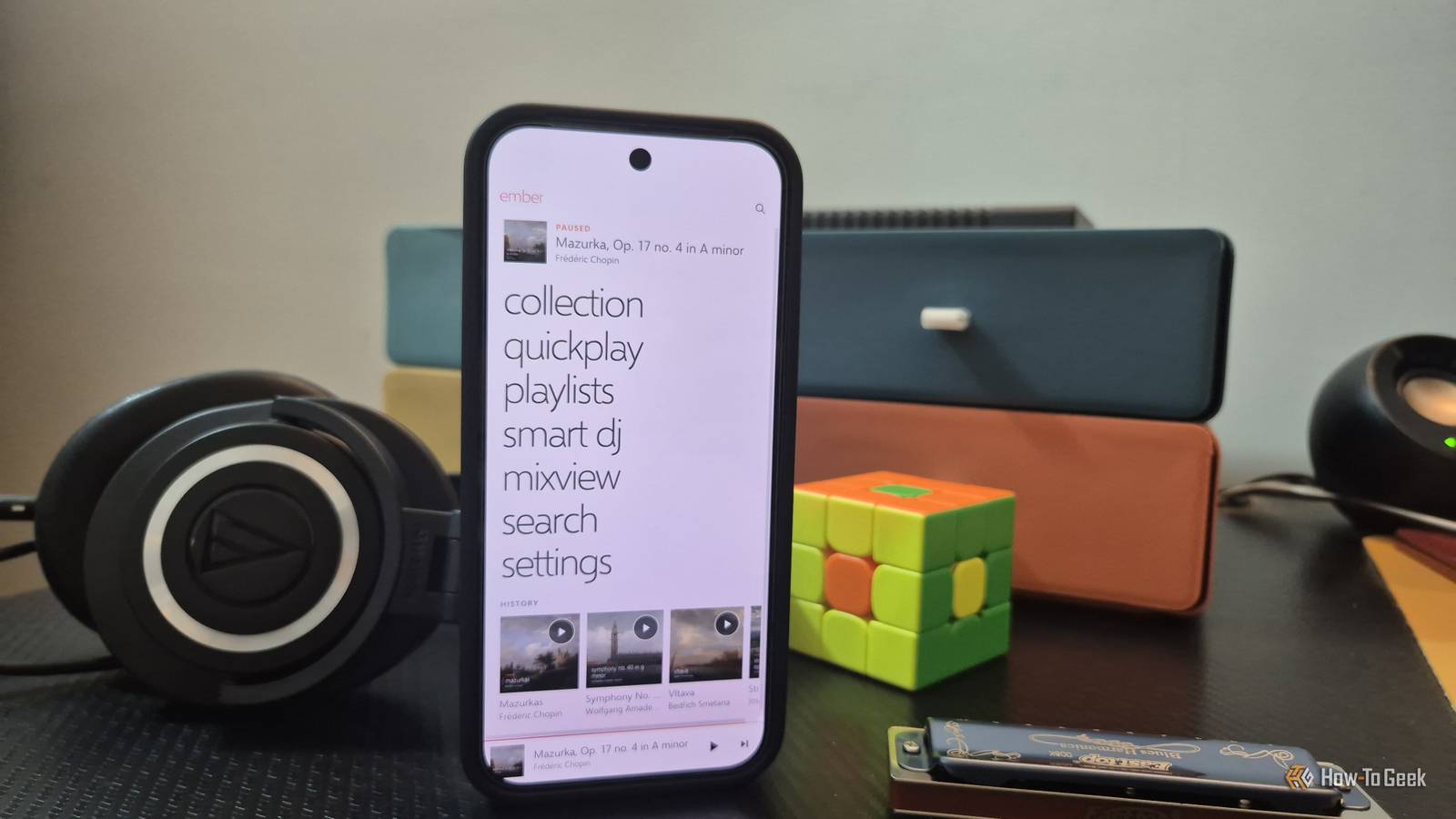
Published Nov 11, 2026, 5:00 PM EST Dibakar Ghosh is a tech journalist at How-To Geek with over a decade of experience using and writing about open-source software, Linux, Android, AI, and personal productivity. He writes about software, operating systems, and tools that help people get more from the technology they already use. Sure, Zune was a commercial flop, and it never had a large enough user base to justify Microsoft keeping it around. But if you used it, you'll probably agree with me that nothing else felt, feels, or will ever feel quite like it. Yes, at the end of the day, it was a music player you used to play your music. But it did so with a design language so distinctive and iconic that it still looks modern today. And so, with Zune turning 20 this month, I decided to bring the software back with a little help from Claude. I’ve been feeling nostalgic for Zune for the past week Zune is 20 years old now — can you believe it The first Zune came out on November 14, 2006, which means it's celebrating its 20th anniversary this month. Now, Google seems to know just how much I adore Zune because, over the past couple of weeks, my YouTube recommendations and Discover feed have been filled with articles and retrospectives about it. And all of this has put me in a seriously nostalgic mood. Zune was the Nokia of music players. It was much sturdier and more durable than the flimsy, scratch-prone iPods of that era. You also got a high-end Wolfson DAC for amazing audio quality. However, what I miss most about Zune is its software experience, especially the design. It felt like a genuine breath of fresh air, like something straight out of the future. While most music player apps took a utilitarian approach and didn't worry much about their interfaces, Zune's interface was the big eye-catcher. It was extravagant and minimal at the same time. The typography, the buttonless layout, the scrollable interface — everything just felt so avant-garde. The software was so well designed that you'd want to hang out in the interface most of the time. Microsoft later turned these ideas into the Metro design language, which became the foundation of Windows Phone. And yes, even those products failed, but people who still remember them fondly do so largely because of the design. In fact, there are dedicated Windows Phone launchers on Android with millions of downloads. That's how good the design was. Even today, the software looks incredibly modern, not like something from the mid-2000s. And so I decided to bring it back to life. I decided to recreate Zune as a Jellyfin client A modern version of Zune, where I own the server Technically, you can still use Zune on your Windows PC. There's a community-run preservation project called Zune Update. You can visit the site, grab the final version of Zune from the Resources tab, and run it on your system. I tried it, and it runs just fine on my Windows 11 system. All the online features are dead, so there's no Zune Marketplace, Zune Social, or even Smart DJ. But you can still use it as a local music player. Now, you'd think that would be enough to satisfy my nostalgia, but it wasn't. Running software that's more than 15 years old at this point just didn't feel like a wise decision from a security standpoint. So I went looking for other options and found Rune Player. It's designed to answer the question — what if Microsoft had continued developing Zune? Now, the developers have done a great job, and it absolutely nails the Metro aesthetic. However, it's still a local music player and will only play music stored on the device where it's installed. Plus, it doesn't work on Android. It's 2026, and I want to be able to stream my music from any device I own, including my smartphone. Rune Player is available as a paid app on Steam, the Microsoft Store, and the Apple App Store. However, you can get it without paying a dime if you're willing to go through the hassle of compiling the code yourself, which is available on GitHub. So I decided to take matters into my own hands and rebuilt Zune as a Jellyfin client. This means I can simply enter a URL on any device I own and access a web-based music player that looks like Zune, while streaming my entire local music collection to that device. And with an app like Hermit on Android, I can turn that website into something that looks and feels like a native mobile app. Now, if you're not familiar with it, Jellyfin is a free, open-source media server (similar to Plex) that lets you host your music collection and access it fromother devices. This way, I own the music server, and no one can come in and take that away. I have Jellyfin installed on a home server, but you can also install it on a Raspberry Pi, hook it up to a hard drive containing your music collection, and make that collection available across all your devices connected to the same Wi-Fi network. And if that feels limiting, you can add something like Tailscale, a mesh VPN that lets your devices connect securely to your home server, even when you're away from home. Claude Code one-shot the Zune-Jellyfin client It took less than an hour and barely scratched my quotas I'm not a developer, and much like every other non-developer with a sparkling idea, I quickly opened Claude Code and gave it a brief description of what I wanted. I've used Claude to help me vibe-code quite a few apps before, so I knew this waspossible. That said, the scope of this project was bigger than anything I'd attempted before. It needed to nail the design, function as a working web app that I could self-host using Docker, and tap into my Jellyfin server. I was expecting some trouble, but Claude absolutely nailed it with barely any issues. I thought this would be a complicated project, but Claude got it done in one shot. For reference, I used Claude Code in the desktop app with Opus 5.5 set to Medium effort. The entire process took somewhere around an hour and used roughly 40% of my five-hour quota on my $20 Pro plan. Here's the prompt I used, in case you want to build something similar: I want you to build a web-based music client for Jellyfin that recreates the look and feel of Microsoft's Zune desktop software (version 4.x). I'm not a developer, so I can't give you specific instructions. Please make the best decision possible. Make it legal and don't infringe on Microsoft's assets. Use legal, open-source equivalents to nail the look. First, install Jellyfin as a Docker container on this computer. My music library is here: {enter localation of music library that will be hosted by Jellyfin} Help me set up the Jellyfin server. Then create a Jellyfin client that is also hosted on Docker, so I can access the Jellyfin library using that client. This client needs to be like Zune in looks, appearance, and aesthetics, and in functionality where possible. Use Jellyfin's features as a base to recreate the Zune features. For example, I believe Smart DJ was a popular Zune feature that can be recreated using Jellyfin's Instant Mix. Like that. First, plan it out. Give me an overview of what this app will be and where it will fall short, so that I know you understand the scope. After that, go ahead. Claude basically one-shotted a working web app that nailed all the basics. There were a few issues with metadata not loading properly and the mobile design not looking right, but I fixed them with a bit of back-and-forth. The resulting app is called Ember (Claude named it). It runs in a Docker container alongside Jellyfin. Design-wise, it's absolutely flawless — I have zero complaints. It uses the Selawik font, an open-source alternative to Segoe UI. This way, you get a similar visual feel without using Microsoft's proprietary font assets. On the functionality front, I could have Claude build new features from scratch, but I found it more resourceful to repurpose Jellyfin's existing features instead. After all, that's what's powering the app. Claude configured Quickplay as the start screen, showing my pins, newly added tracks, and listening history. Jellyfin's Instant Mix feature has been repurposed to power the Smart DJ functionality I loved when using Zune. You've also got Mixview, which arranges related artists and albums around whatever's playing, and the full-screen Now Playing collage. Hearts are wired to Jellyfin's favorites, while the Broken Hearts mark songs that Smart DJ and shuffle will skip. No app shall stay dead when Claude is around Zune isn't the only awesome app to have been abandoned over the past few decades. Countless apps were loved by hundreds of people, but their companies (or developers) eventually had to abandon them because they no longer made commercial sense. Well, now, thanks to Claude, you can revive them with a modern tech stack and keep using them. And it’ll probably only take you an afternoon to vibe code — unless you’re looking at something very ambitious.
I rebuilt Zune as a Jellyfin client, and Microsoft can't kill this one
Full Article
Original Source
Read the full article at Howtogeek →KhanList aggregates and links to publicly available news content. We do not host full articles from third-party sources. Always verify important information with original sources.