
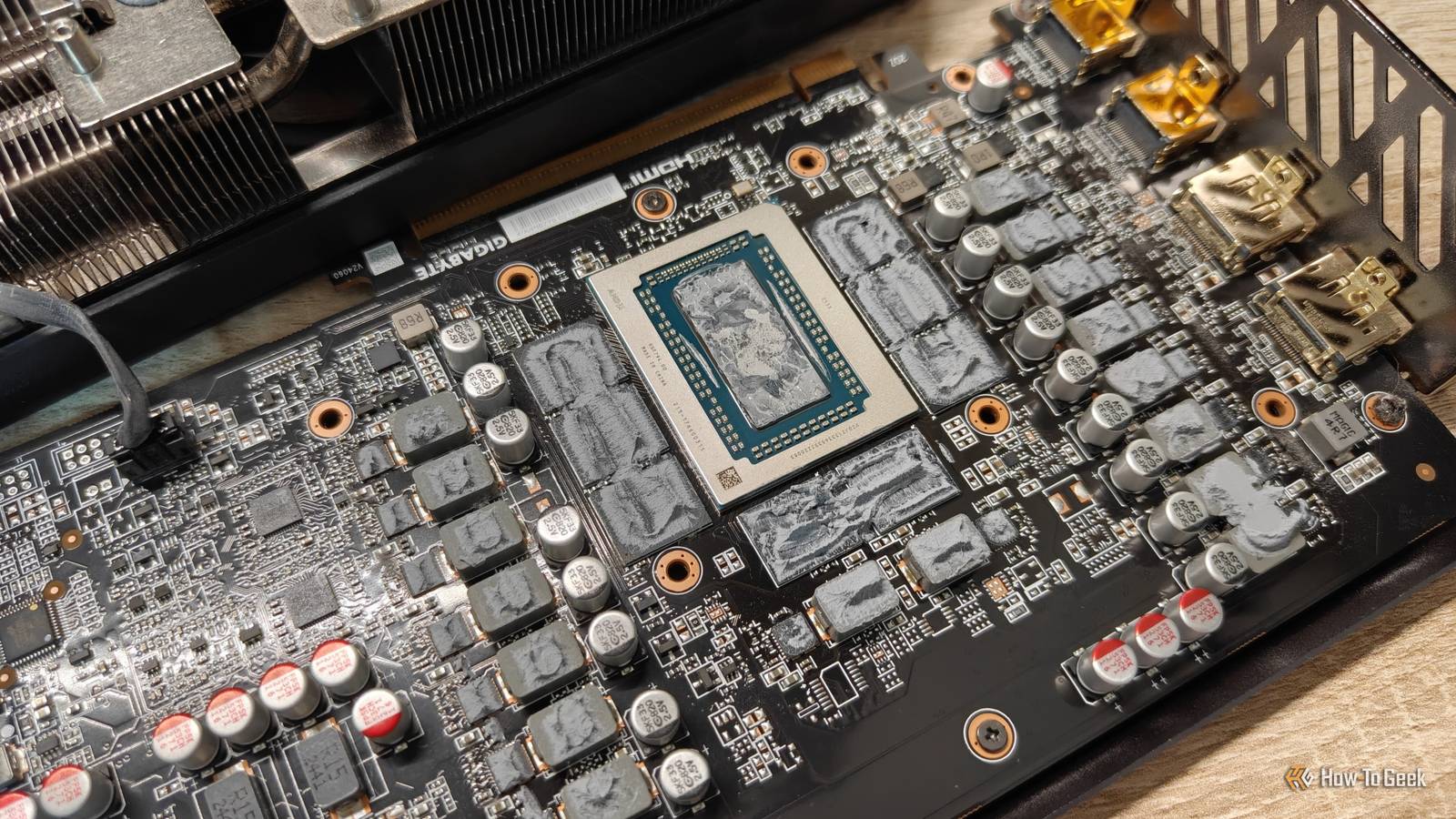
Published Nov 21, 2026, 11:30 AM EST Sydney Butler is a technology writer with over 20 years of experience as a freelance PC technician and system builder and over a decade as a professional writer. He's worked for more than a decade in user education. On How-To Geek, he writes commerce content, guides, opinions, and specializes in editing hardware and cutting edge technology articles. Sydney started working as a freelance computer technician around the age of 13, before which he was in charge of running the computer center for his school. (He also ran LAN gaming tournaments when the teachers weren't looking!) His interests include VR, PC, Mac, gaming, 3D printing, consumer electronics, the web, and privacy. He holds a Master of Arts degree in Research Psychology with a minor in media and technology studies. His masters dissertation examined the potential for social media to spread misinformation. Outside of How-To Geek, he hosted the Online Tech Tips YouTube Channel, and wrote for Online Tech Tips, Switching to Mac, and Helpdesk Geek. Sydney also wrote for Expert Reviews UK. He also has bylines at 9to5Mac, 9to5Google, 9to5Toys, Tom's Hardware, MakeTechEasier, and Laptop Mag. Between your heatsinks and your processors, there's an intermediate substance that's usually referred to as "thermal paste," though it's not always a paste, and the actual material it's made from can vary quite a bit. It fills the gaps between the surfaces on either side, increasing the efficiency with which heat moves from the processor to the cooling system. Over time, this paste tends to dry up and become less conductive, at which point you'll have to replace it. Possibly a more premium variety (but perhaps not liquid metal) which can make your computer run even cooler than before. But there's a phenomenon known as "pumpout" that can deplete your thermal paste much sooner than that, and it might even be a problem that keeps coming back. Your thermal paste can move after you install it Pump up the jam If you remember your high school science lessons, you may recall that when things get hot they tend to expand, and when they get cold they contract. This means that heat has a mechanical effect. A Stirling engine, for example, uses gas expansion and contraction to power mechanical movement. This is what happens during pumpout. The repeating heating and cooling of the two surfaces the paste sits between can create a pumping force, as each surface flexes differently under temperature. The grease doesn't pump out into the rest of your computer, or anything as dramatic as that. Instead, it displaces and moves around. Because it's not evenly distributed, you get hot spots and overall worse thermal performance. Different paste formulations have different viscosities and properties, so they aren't all vulnerable to pumpout to the same degree. The tube that works on your desktop can disappoint in your laptop There are fundamental design differences at work here Credit: Pawarun Chitchirachan/Shutterstock.com Why are we only really hearing about pumpout complaints now? Well, for one thing, high-end GPUs and CPUs are pushing out far more heat than in previous generations. When you have desktop CPUs that can suck down anything up to 400W and GPUs that almost hit 600W, that thin layer of paste is doing way more today than it did in the past. Still, pumpout is relatively rare on desktop CPUs, because these chips have an IHS or Integrated Heat Spreader between the CPU die and heat sink. Under the die there's a factory-installed TIM, or Thermal Interface Material. This is why some modders and overclockers "delid" CPUs to replace that TIM with something better. Effectively changing the thermal paste inside and outside the CPU package. Credit: Joshua Sanderson Media/Shutterstock.com Things are different for laptop CPUs and GPUs in both laptops and desktops. Here, there typically is no IHS. The paste and heat sink go directly onto the CPU die you can see above. However, unlike an IHS, that surface is small and doesn't present the same profile or receive the same clamping force as a desktop CPU with an IHS. This makes it more sensitive to displacement. If the problem keeps coming back, change what goes between the chip and cooler It's just a phase Credit: R. Rizvanov/Shutterstock.com Pumpout produces pretty much the same symptoms as old and dry thermal paste. Your processor's temperature is higher than it should be at a given load compared to when it had a fresh application of paste. The basic remedy is also the same — replace the paste. However, when you open up the system and take off the heat sink, pumpout presents differently. The paste is not dry and cracked; it's still "wet" as it should be. However, you should clearly see how it's been moved around, leaving open spots on the processor. Replacing the paste with the same stuff that was already on there will likely result in the same short-term problem. So the first thing you can try is changing to a paste that's more resistant to pumpout, or at least rated for the temperatures your system is hitting. Putting cheap paste on a high-end CPU pulling hundreds of watts isn't perhaps the best idea. If you bought a prebuilt, or we're looking at a laptop, then whoever did the initial build might have been cutting costs. However, if a better paste doesn't solve the pumpout issue (i.e., your paste should dry out before you have issues), then using a phase-change thermal pad might be the right move. This is in fact something certain GPU and laptop makers are already doing. The pad, a solid material when cold and more fluid when hot, is designed to resist pumpout, though it may not be quite as effective as paste. Take a baseline while your PC is still working properly If your computer is running just fine at the moment, it's a great idea to put it under load and then make a note of its baseline temperature numbers for both the CPU and GPU. This will help you figure out if temperatures are really going up or if it's just your imagination.
Your PC could be pumping out its crucial thermal paste, but here's what you can do about it
Full Article
Original Source
Read the full article at Howtogeek →KhanList aggregates and links to publicly available news content. We do not host full articles from third-party sources. Always verify important information with original sources.