
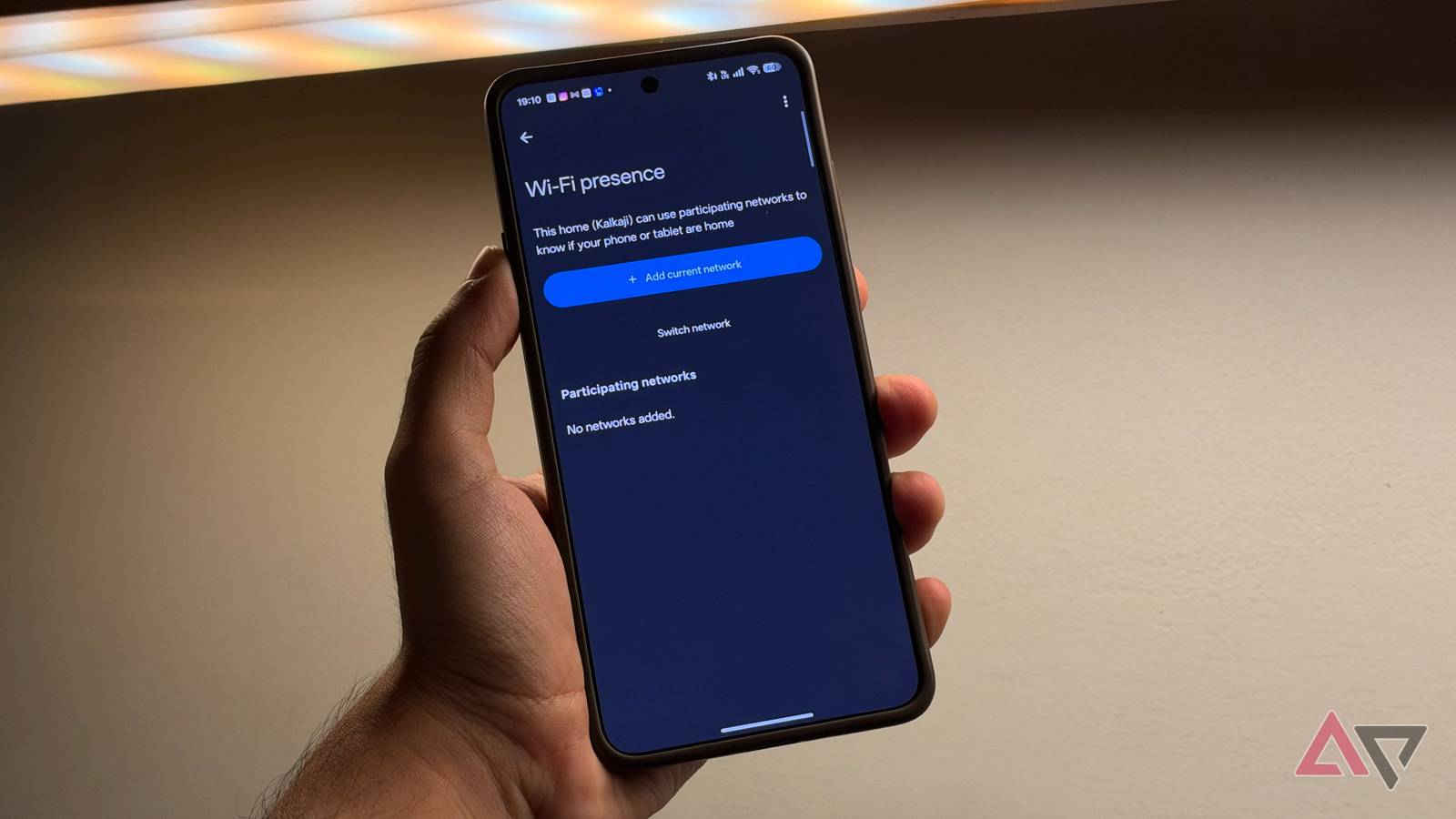
Published Nov 8, 2026, 7:00 AM EST Dhruv Bhutani has covered the Android ecosystem since 2010, with a focus on smartphones, connected devices, and home networking. His reporting is informed by hands-on experience reviewing hundreds of smartphones and testing a wide range of smart home and audio products over more than a decade. He has attended Mobile World Congress eight times since 2011 and IFA Berlin five times, alongside regular coverage of launch events and industry briefings from companies including Google, Xiaomi, Oppo, and Qualcomm. This on-ground access and long-term exposure to product cycles inform how he evaluates hardware, software direction, and ecosystem shifts. First-Hand Experience Reviewed and tested hundreds of smartphones since 2009 Tested smart home, audio, and connected devices across multiple categories Attended Mobile World Congress (8 times, first in 2011) Attended IFA Berlin (5 times) Covered industry events including Qualcomm Summit and launch events from Google, Xiaomi, Oppo, and Vivo Career History CNET — Freelance Editor May 2024 – Present Android Police — Freelance Editor July 2023 – Present Android Authority — Contributor November 2022 – Present Android Authority — Editor January 2019 – October 2022 FoneArena — Editor February 2010 – January 2018 PhoneReport.info — International Correspondent February 2010 – May 2011 Nokia Mobile Talk — Writer June 2009 – October 2009 I love my smart home, but while smart switches and lights are cool, they are far from the sci-fi fully automated future we were promised. A true smart home is about automations that trigger based on where you are. Unfortunately, presence-based automations are rarely as accurate as I need them to be. I've had situations where my home thinks I'm still there even though I'm sweating it out at the gym. I've also had occasions when my welcome-home automations refused to kick off even though I was back and settled in. It's hard to trust a system that won't manage lights, switches, and more as expected. So, I made a change in Google Home that transformed my presence-based automations. I added my Wi-Fi network to the presence sensing settings. Instead of relying on my phone's location, Google Home can check if my phone is connected to my home network as another way to know if I'm at home or not. This tiny little addition is all it took to address the biggest weakness in my location-based automations. Why Google Home's location-based presence detection isn't always perfect Wi-Fi presence adds a second layer of accuracy Presence sensing isn't new in Google Home, and it's a straightforward idea. The app uses your phone's location and relevant smart home hardware to decide whether you are home or if everyone has left. This information can trigger automations, like switching off the lights and turning down the thermostat when you leave home, or turning on a porch light when you're heading home. The problem is that conventional location-based detection isn't always precise. Your phone uses a combination of GPS, cellular networks, and Wi-Fi signals to establish location. This can work quite well, or it may not trigger at all. Similarly, if you are in the immediate vicinity of, let's say, an apartment building, your automations can trigger even before you mean them to. I don't want my home to unlock or start blaring my favorite playlist because I'm down the street. Wi-Fi-based presence offers another, and in my opinion, a more precise way to establish my presence at home. Instead of relying solely on location, Google Home can now check whether the phone is connected to a designated Wi-Fi network. For me, that means my home Wi-Fi network. When my phone connects to my home Wi-Fi network, it's irrefutable proof that my phone is actually at home. How to set up Wi-Fi presence detection Home and Away automations become more accurate Setting up Wi-Fi-based presence settings is straightforward. Open the Google Home app, tap your profile picture, and go to Home settings. Under Presence settings, you'll find a new Home Wi-Fi networks option. Add your current network to register the Wi-Fi network that your phone is connected to. When configured, this becomes part of the inputs Google Home uses to determine whether you're actually at home. The feature works alongside the previous location-based Home or Away detection and doesn't replace it, so you can't switch off location sharing. So what do you get out of it? If you're already using automations, presence detection unlocks a new dimension to them. I use it to switch off the fan and the air purifier when I get home without having to toggle them on or off. Another automation turns off the lights in my study as soon as I leave the house and shuts down the monitor. The feature works both ways, while you're stepping in and out. Similarly, if you use presence-based automations, adding Wi-Fi to the mix increases accuracy. Your location might be nearby, but your Wi-Fi network will rarely extend beyond your home. When you build automations around your presence at home, the latter matters more. In my experience, lighting benefits most from this. I have a bunch of smart lights in the stairwell going up to my apartment. Alongside the in-home automation I mentioned earlier, connecting to my Wi-Fi network also enables these lights, so I don't have to fumble around looking for light switches. Other settings are worth checking before relying on this feature. First, Google Home needs permission to access your phone's location at all times. You also need to enable phone location sharing under Presence sensing and make sure the home is allowed to use your phone's location. That's it. Presence detection is what makes a smart home feel truly smart Presence detection is one of the biggest quality-of-life upgrades to any smart home. The point of a smart home is to reduce friction, and if you're still looking for digital light switches or using your voice, it's not much of a smart home, is it? Adding Wi-Fi presence goes a long way towards removing that friction. It's not entirely foolproof. If your phone is dead, it won't work. But that's an edge-case scenario. If you're using Google Home for Home and Away automations, I highly recommend checking this setting to upgrade your smart home setup.
This one Wi-Fi setting fixed all my problems with Google Home's presence automations
Full Article
Original Source
Read the full article at Androidpolice →KhanList aggregates and links to publicly available news content. We do not host full articles from third-party sources. Always verify important information with original sources.