
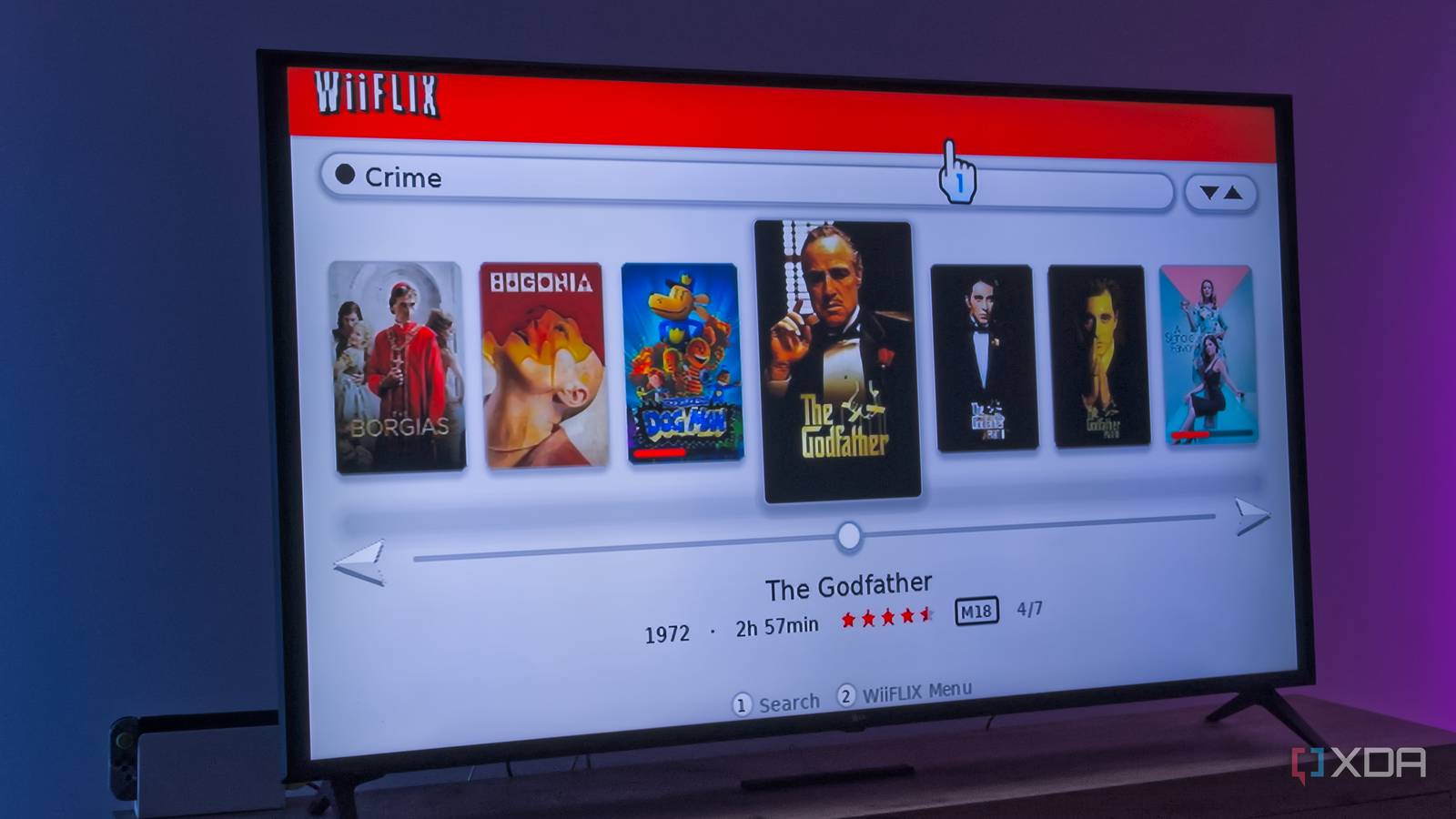
Published Nov 14, 2026, 6:00 PM EST João has been covering the tech world for over 7 years, with a heavy focus on laptops and the Windows ecosystem. I also love all things tech and videogames, especially Nintendo, which he's always happy to talk about. Prior to joining XDA in 2021, he worked at Neowin: https://www.neowin.net/news/poster/jo%C3%A3o-carrasqueira/ I'm usually not a fan of vibe-coded projects, but there is something kind of appealing about the idea that everyone can bring their vision to life relatively easily now. It's especially cool when someone has nostalgia for something relatively niche and they're able to bring it to life for the people who may feel the same way. That's how I feel about WiiFlix, a recent project that aims to recreate the Netflix experience on the Wii — but this time, it's used for Jellyfin instead. It's an awesome project that works surprisingly well in its initial release. Does 480p media make sense in 2026? Probably not, but that doesn't stop this from being super cool. Netflix on the Wii was a big deal All consoles were, really Credit: Dolphin Emulator Wiki These days, there are far too many streaming services, and they're available pretty much anywhere, but when Netflix started breaking ground in the streaming space, it was a huge deal. Almost any content you could want was available on the service for a low monthly price, and to get into people's homes, Netflix made its service available on the main consoles at the time, being the Xbox 360, PlayStation 3, and Wii. Xbox initially had an exclusivity deal on the digital version of the app — Netflix actually distributed the app via discs for PlayStation and Nintendo owners for a bit before the exclusivity lifted, and the apps became available on the respective digital stores. But once all three consoles were treated equally, with the Wii being the best-selling system and also the one most geared towards a mainstream audience, Netflix became a very popular service on the platform. So much so that Nintendo tried to make Netflix a big selling point for the Nintendo 3DS in 2011. Being that I live in Portugal, I actually wasn't able to use Netflix at all at that time, but the discourse around that time is enough on its own to instill a sense of nostalgia in me. I've heard so much about Netflix on the Wii that it almost feels like I did get to use it, and so WiiFlix immediately got my interest. You need a modded Wii But it shouldn't be too hard As you might expect, in order to use WiiFlix, you need to have modded your Wii and installed the Homebrew Channel. I've had my Wii since around 2010, and I do remember modding it at some point, so for me, this was actually a very easy process. Simply download the wiiflix-hbc archive from the project's GitHub page, copy the apps folder to an SD card — or copy the WiiFlix folder within it into an existing apps folder, if you already have an SD card ready — and insert the card into my Wii. I did have to buy a new card for this, but since the Wii itself was already modded, it was still a simple process. The only thing I had to worry about was buying a compatible microSD card, because the Wii only officially supports the SDHC standard, which goes up to 32GB of storage. Finding those cards in stores was a bit of a challenge now that SDXC is everywhere, but I lucked out and got one for around $15. That said, you should be able to get SDXC to work as well, but you'll need a third-party tool to force the card to format using the FAT32 file system instead of exFAT. If you haven't modded your Wii before, there are plenty of guides online on how to get started with the Homebrew Channel, and these days you can do it easily without needing many tools. You can do a lot more with it than just use WiiFlix, too. It just works And it feels just as it should I wasn't sure what to expect in this initial release, but to my surprise, WiiFlix basically just worked when I booted it up. I could enter my server manually, use a Quick Connect code, or scan for servers on my local network, and that also worked perfectly. After entering my credentials, I was in and ready to browse my collection. The UI for WiiFlix looks exactly like the old Netflix app for Wii did, and it organizes my content into similar categories, which is nice for nostalgia, though not ideal for organization. Jellyfin usually lets me choose between TV shows and movies right off the bat, but here, I don't have that option. I can continue watching something I already started or browse the content by genre. Again, good for nostalgia, but I would like that additional level of control. Most of the content on my Jellyfin server is in HD, but thankfully, WiiFlix also supports server-side transcoding, so media is played in standard definition just fine on the Wii. I was able to skip back and forth in a movie, and it worked pretty well, with the expected delays that come from real-time transcoding. Is this an ideal way to watch this content? Absolutely not, but it is usable, and if you have a pre-HDMI TV, this is a pretty cool way to use Jellyfin on it. Otherwise, it's fascinating to just see it work at all. Each media entry gets its own dedicated page with a synopsis and cast information, which is nice to see as well. It's not the most detailed Jellyfin app, but again, it stays true to the original Netflix app. It is interesting to see everything at such a low resolution on a 65-inch 4K TV, but back in the day, this would have looked great on my tiny curved LCD TV. That said, if you want the best way to use Jellyfin on the Wii, there's another app called WiiFin, which WiiFlix is actually a fork of. That's more focused on the core experience, even adding support for photos and music on your server. WiiFlix is all about the nostalgia, and I love it for that. Like a trip down memory lane Nostalgia is a powerful emotion, so getting to experience my Jellyfin library in a way so reminiscent of the original Netflix app is great, and I can see myself doing it again just for the novelty. I would like to see more active support from the developer though, seeing as the WiiFin base has been updated a few times since the original WiiFlix release. Still, if you're as curious as I was, you can check it out below. WiiFlix Platform(s) Wii (homebrew) Price model Free
This Jellyfin app resurrects Netflix on the Wii, and the nostalgia hits hard
Full Article
Original Source
Read the full article at Xda-developers →KhanList aggregates and links to publicly available news content. We do not host full articles from third-party sources. Always verify important information with original sources.