
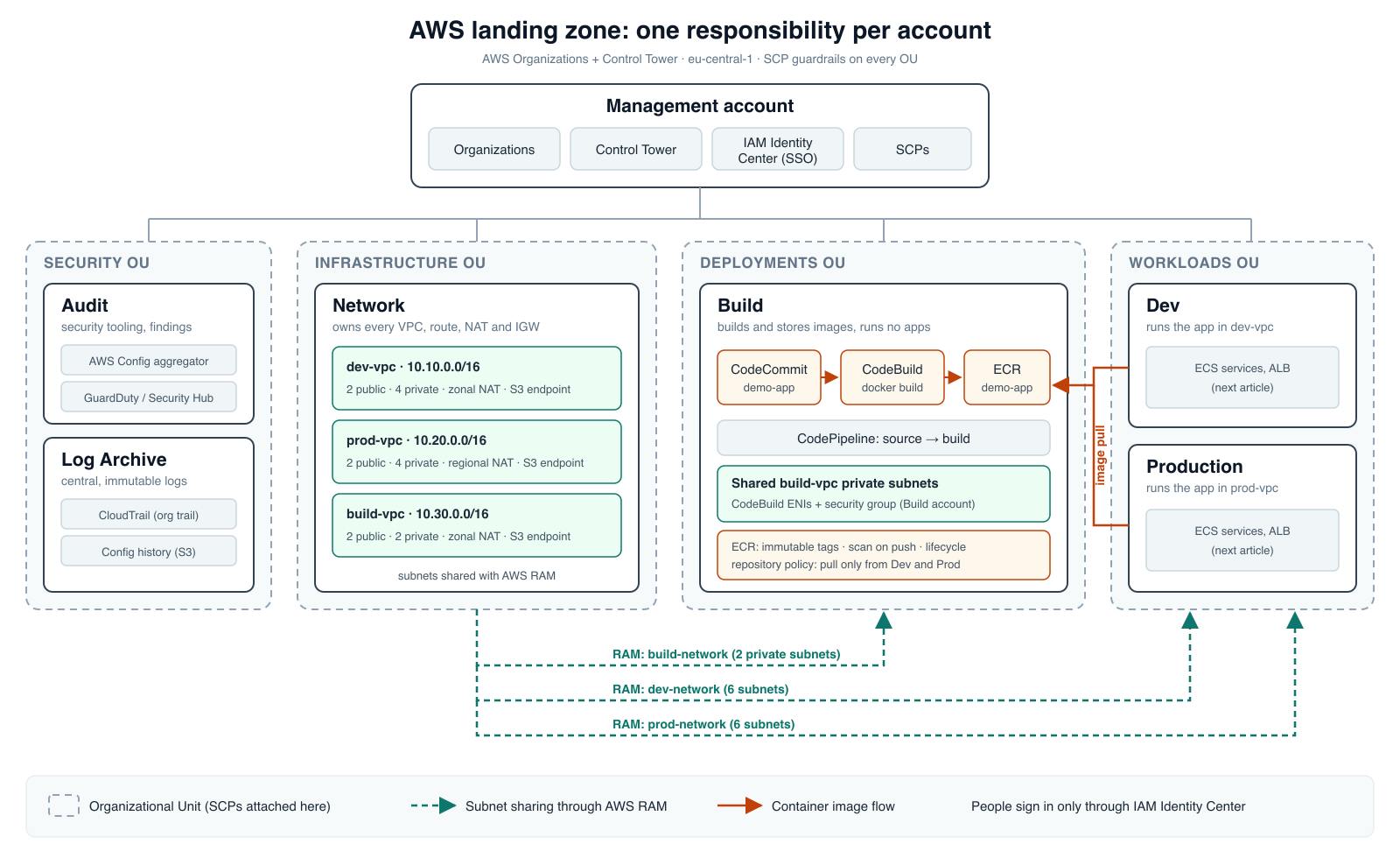
Most landing-zone guides stop after "click Set up landing zone". This one keeps going. By the end, you will have a working multi-account AWS environment where every account has one job, the rules are enforced by Service Control Policies, and the network is owned by one account and shared with the others. Each rule is tested from the command line, so you can prove it holds.Everything here was built in a real organization, including the parts that went wrong: an SCP that broke DNS, an "allow list" SCP that allowed everything, and a RAM share that failed for 40 minutes. The fixes are part of the steps and are collected in the Troubleshooting section.This is part 1 of a series. Part 2 sets up the Build account (CodeCommit, ECR with cross-account pull, and CodeBuild inside the shared VPC), and part 3 runs the application on ECS in Dev and Production.1. What we are buildingLanding zone architecture: seven accounts in Security, Infrastructure, Deployments and Workloads OUs, with VPCs owned by the Network account and shared through RAMSeven accounts, grouped into Organizational Units (OUs), each with one responsibility:Management (Root OU) owns AWS Organizations, Control Tower, IAM Identity Center, SCPs. Must not: run workloads.Audit (Security OU) owns security tooling and findings (Config aggregator, GuardDuty, Security Hub).Log Archive (Security OU) owns central CloudTrail and Config logs.Network (Infrastructure OU) owns all VPCs, subnets, routes, NAT and internet gateways. Must not: run applications or CI/CD.Build (Deployments OU) owns source repository, CodeBuild, CodePipeline, ECR. Must not: own networking, run applications.Dev (Workloads OU) owns the application in the dev environment. Must not: own networking, build or push images.Production (Workloads OU) owns the application in production. Must not: own networking, build or push images.The "must not" rules matter as much as ownership: each one becomes a Deny statement in an SCP, so it holds even for an administrator inside that account.What you will have at the end:An organization with five OUs and seven accounts, governed by Control Tower (section 4).Single sign-on to every account through IAM Identity Center, with no IAM users or access keys anywhere (section 4).Four deny-based SCPs that enforce each account's job (section 5).Three VPCs owned by the Network account, each shared only with its own environment (section 6).A script that proves all of the above in one run (section 7).The diagram already shows the Build pipeline and the workloads. They are built on this foundation in parts 2 and 3.2. Why one account per responsibility?An AWS account is a hard boundary for IAM permissions, billing, service quotas, and the blast radius of mistakes. When dev, prod, networking, and CI/CD share one account, a developer who needs the dev cluster easily ends up with access to production, and costs can only be split with careful tagging. Separate accounts give you these boundaries for free, and OUs let you apply the same rules to a group of accounts at once: every account you add to the Workloads OU later inherits its guardrails.The design follows one principle, ownership: for any resource, it should be obvious which account owns it and who is allowed to change it. The network belongs to the Network account, images belong to the Build account, and the running application belongs to the workload account. Images are built once and only pulled by Dev and Production, so Production runs exactly what was tested in Dev.This article builds only Dev and Production. A Staging account can be added later in exactly the same way.3. Prerequisites and costYou need:An AWS account that is not yet part of an organization. It becomes the management account. Don't use an account that runs workloads.A separate email address for each new account. With Gmail, you can use +aliases such as you+network@gmail.com.AWS CLI v2. All access in this article goes through IAM Identity Center (SSO). We don't create a single IAM user or access key, and the SCPs will even forbid it.About two hours of hands-on time, plus about 35 minutes of waiting while Control Tower sets up.Region: everything runs in eu-central-1 (Frankfurt). Control Tower governs only this Region, and an SCP denies the others. Replace it with your own Region throughout.What it costsControl Tower itself is free, but the services it enables are not. Approximate monthly costs in eu-central-1 for this setup:ItemApprox. cost per month3 NAT gateways~$150 + $0.052/GBConfig, CloudTrail, S3 logsA few dollars at this scaleThe NAT gateways are almost all of the bill. If you build this only to learn, follow the Cleanup section when you are done, or delete the NAT gateways between sessions.4. Control Tower setupControl Tower creates the organization structure, the two shared accounts in the Security OU, an organization-wide CloudTrail trail, and AWS Config in every enrolled account. Everything later in this article builds on it.Before you start: if IAM Identity Center is already enabled in the management account, Control Tower must be set up in the same Region. Choose the home Region carefully. Changing it later means decommissioning the landing zone.Step 1: Set up the landing zoneSign in to the management account and open AWS Control Tower → Set up landing zone.On the first page, choose your home Region and Automatic account enrollment. With automatic enrollment, accounts that join the organization later (and accounts you move between OUs) get the Control Tower baseline and controls without manual enrollment.Control Tower landing zone setup, first page: Regions and automatic account enrollmentOn the second page, keep the recommended Sandbox OU. It is a place for experiments with fewer restrictions, and we will also use it to test new SCPs before they reach other OUs.Control Tower setup: the Security OU and the recommended Sandbox OUNext, Control Tower asks for the two shared accounts in the Security OU:Log Archive: stores the CloudTrail and AWS Config logs of every account. I named it "CloudTrail administrator".Audit: aggregates AWS Config data and becomes the delegated administrator for security services. I named it "Aggregator account".You will see these names in the screenshots. Each account needs its own email address. With Gmail, a +alias such as you+audit@gmail.com is enough: mail to it arrives in your normal inbox.Control Tower setup: email addresses for the Log Archive and Audit accountsReview the settings and confirm:Control Tower setup review page before confirmingThe setup takes about 35 minutes. You can follow each step on the landing zone page:Landing zone setup in progress on the Control Tower pageControl Tower landing zone page after the setupStep 2: Create the OUsControl Tower created the Security and Sandbox OUs. Create the other three under Root in Control Tower → Organization → Create resources → Create organizational unit: Infrastructure, Deployments, and Workloads. Create them through Control Tower, not the Organizations console, so that they are registered and get the Control Tower controls.Creating the Infrastructure OU through Control TowerIf you expect many workloads, you can nest OUs later, for example Workloads/web and Workloads/ai, and attach different policies to each.Creating a nested OU under Workloads in Control TowerStep 3: Create the accountsUse Control Tower → Account Factory → Create account for each workload account:AccountOUEmail exampleNetworkInfrastructureyou+network@gmail.comBuildDeploymentsyou+build@gmail.comDevWorkloadsyou+dev@gmail.comProductionWorkloadsyou+prod@gmail.comAccount Factory: creating an account with its email address and OUAccount Factory: account details and the target OUAccount Factory provisions accounts one at a time, so creating all four takes a while. When it's done, Control Tower → Organization should show every OU as Registered and every account as Enrolled:Control Tower organization view with every OU Registered and every account EnrolledStep 4: Access through IAM Identity CenterControl Tower configures IAM Identity Center. It creates groups such as AWSControlTowerAdmins, AWSSecurityAuditors, and AWSLogArchiveViewers, and permission sets such as AWSAdministratorAccess, AWSPowerUserAccess, and AWSReadOnlyAccess. In every enrolled account, your user gets AWSAdministratorAccess directly, while the AWSControlTowerAdmins group only gets AWSOrganizationsFullAccess. That direct assignment is how I sign in everywhere in this article:Identity Center assignments in the Dev accountFor a team, don't give everyone administrator access. Create groups by role and assign each group only to the accounts it needs:platform-admins: AWSAdministratorAccess in all accountsnetwork-team: AWSAdministratorAccess in Networkdevelopers: AWSPowerUserAccess in Devdevelopers: AWSReadOnlyAccess in ProductionIn the console: IAM Identity Center → Groups → Create group, then AWS accounts → select the accounts → Assign users or groups → choose the group and the permission set. The same assignment from the CLI:aws sso-admin create-account-assignment --profile mgmt \ --instance-arn \ --target-type AWS_ACCOUNT --target-id \ --permission-set-arn \ --principal-type GROUP --principal-id For the command line, add one profile per account to ~/.aws/config, then sign in once with aws sso login --sso-session lz. One sign-in covers all profiles:[sso-session lz] sso_start_url = https://.awsapps.com/start sso_region = eu-central-1 sso_registration_scopes = sso:account:access [profile mgmt] sso_session = lz sso_account_id = sso_role_name = AWSAdministratorAccess region = eu-central-1 [profile network] sso_session = lz sso_account_id = sso_role_name = AWSAdministratorAccess region = eu-central-1 # ...same for audit, logarchive, build, dev, prod Tip: use the role name that you actually see in the access portal. In my organization the management account has AdministratorAccess while member accounts have AWSAdministratorAccess. A wrong role name fails with "ForbiddenException: No access".Also check that no AWS_ACCESS_KEY_ID or AWS_SESSION_TOKEN environment variables are set in your shell. The CLI uses them whenever a command has no --profile, so a single forgotten flag silently runs that command against a completely different account. I had exactly this situation, with keys for an unrelated organization in my shell.5. Service Control PoliciesService Control Policies (SCPs) are guardrails in AWS Organizations. They define the maximum permissions available to IAM users and roles in the accounts of an OU, regardless of what their IAM policies allow.We use them to enforce the Region, to block dangerous actions (leaving the organization, disabling security services), to enforce ownership (only the Network account builds connectivity), and to remove risky shortcuts (root user, long-lived access keys). SCPs say "what's possible", IAM policies say "who can do it".Two rules worth remembering:SCPs never grant permissions. They only limit them.SCPs do not affect the management account, and they do not affect service-linked roles. This is one more reason not to run workloads in the management account.Allow lists vs. deny listsThere are two ways to write SCPs:Allow list: remove FullAWSAccess from the OU and attach an SCP that allows only specific services.Deny list: keep FullAWSAccess and attach SCPs that explicitly deny what you don't want. A common mistake is an allow-list SCP attached next to FullAWSAccess. SCPs on the same OU are combined, so FullAWSAccess already allows everything and only the "Deny" statements have any effect. I made exactly this mistake in my first version. The Workloads OU policy "allowed only ECS, ECR, ELB and logs", but a user in the Dev account could still create SQS queues and work in us-east-1. Worse, a "deny outside Frankfurt" rule that included route53:* broke DNS completely in the Network account. Route 53 is a global service whose API calls are made through us-east-1, so the request never matched eu-central-1:An error occurred (AccessDenied) when calling the ListHostedZones operation: ... is not authorized to perform: route53:ListHostedZones with an explicit deny in a service control policy - Allow lists are also hard to maintain: every new service your team needs requires an SCP change. We use deny lists.Our SCP structureWe will use four custom policies:BaselineGuardrails → Infrastructure, Deployments, Workloads, Sandbox OUs: Rules every member account must followInfrastructureNetworkManagement → Infrastructure OU: Network account owns connectivity, runs no applications or CI/CDDeploymentCICDPolicy → Deployments OU: Build account owns CI/CD, does not own networking or run applicationsWorkloadsECSPolicy → Workloads OU: Workload accounts run applications, do not own networking or build imagesWe don't attach our policies to the Security OU. Control Tower manages the Audit and Log Archive accounts and already protects them with its own guardrails (the aws-guardrails-* policies you can see in the list).Every Deny statement below has an exception for the AWSControlTowerExecution role and the stacksets-exec-* roles. Control Tower uses these roles to manage the accounts, and blocking them would break enrollment and drift repair.Policy 1: BaselineGuardrailsGo to AWS Organizations → Policies → Service control policies → Create policy, and name it BaselineGuardrails :{ "Version": "2012-10-17", "Statement": [ { "Sid": "DenyLeavingOrganization", "Effect": "Deny", "Action": "organizations:LeaveOrganization", "Resource": "*" }, { "Sid": "DenyRootUser", "Effect": "Deny", "Action": "*", "Resource": "*", "Condition": {"ArnLike": {"aws:PrincipalArn": "arn:aws:iam::*:root"}} }, { "Sid": "DenyLongLivedIamCredentials", "Effect": "Deny", "Action": ["iam:CreateUser", "iam:CreateAccessKey", "iam:CreateLoginProfile"], "Resource": "*", "Condition": { "ArnNotLike": { "aws:PrincipalArn": ["arn:aws:iam::*:role/AWSControlTowerExecution", "arn:aws:iam::*:role/stacksets-exec-*"] } } }, { "Sid": "DenyDisablingSecurityServices", "Effect": "Deny", "Action": [ "guardduty:DeleteDetector", "guardduty:DisassociateFromAdministratorAccount", "guardduty:DisassociateFromMasterAccount", "securityhub:DisableSecurityHub", "securityhub:DisassociateFromAdministratorAccount", "securityhub:DisassociateFromMasterAccount", "access-analyzer:DeleteAnalyzer" ], "Resource": "*", "Condition": { "ArnNotLike": { "aws:PrincipalArn": ["arn:aws:iam::*:role/AWSControlTowerExecution", "arn:aws:iam::*:role/stacksets-exec-*"] } } }, { "Sid": "DenyOutsideFrankfurt", "Effect": "Deny", "NotAction": [ "account:*", "acm:*", "aws-marketplace:*", "aws-portal:*", "billing:*", "budgets:*", "ce:*", "cloudfront:*", "cur:*", "directconnect:*", "ec2:DescribeRegions", "ec2:DescribeTransitGateways", "ec2:DescribeVpnGateways", "ecr-public:*", "globalaccelerator:*", "health:*", "iam:*", "kms:*", "networkmanager:*", "organizations:*", "pricing:*", "route53:*", "route53domains:*", "s3:GetAccountPublic*", "s3:ListAllMyBuckets", "s3:PutAccountPublic*", "shield:*", "sts:*", "support:*", "trustedadvisor:*", "waf:*", "wafv2:*" ], "Resource": "*", "Condition": { "StringNotEquals": {"aws:RequestedRegion": "eu-central-1"}, "ArnNotLike": { "aws:PrincipalArn": ["arn:aws:iam::*:role/AWSControlTowerExecution", "arn:aws:iam::*:role/stacksets-exec-*"] } } } ] } The BaselineGuardrails SCP in the Organizations consoleWhat it does:DenyLeavingOrganization — an account cannot remove itself from governance.DenyRootUser — the root user of a member account cannot do anything. Everyday access goes through IAM Identity Center.DenyLongLivedIamCredentials — no IAM users, passwords, or access keys. People use Identity Center, and automation uses IAM roles with temporary credentials (for example, GitHub Actions OIDC).DenyDisablingSecurityServices — once GuardDuty, Security Hub, and IAM Access Analyzer are enabled, nobody in a member account can turn them off or detach from the Audit account.DenyOutsideFrankfurt — everything outside eu-central-1 is denied. Note that this uses NotAction: global services such as IAM, STS, Route 53, CloudFront, Organizations, and billing make their API calls through us-east-1, so they must be excluded or they stop working.Policy 2: InfrastructureNetworkManagement (Infrastructure OU)The Network account owns connectivity. FullAWSAccess already allows that, so we only add what it must not do: run applications or CI/CD.{ "Version": "2012-10-17", "Statement": [ { "Sid": "DenyApplicationWorkloads", "Effect": "Deny", "Action": [ "ecs:CreateCluster", "ecs:CreateService", "ecs:RunTask", "eks:CreateCluster", "rds:CreateDBInstance", "rds:CreateDBCluster", "apprunner:CreateService", "elasticbeanstalk:CreateEnvironment", "lightsail:*" ], "Resource": "*", "Condition": { "ArnNotLike": { "aws:PrincipalArn": ["arn:aws:iam::*:role/AWSControlTowerExecution", "arn:aws:iam::*:role/stacksets-exec-*"] } } }, { "Sid": "DenyBuildResources", "Effect": "Deny", "Action": ["ecr:CreateRepository", "codebuild:CreateProject", "codepipeline:CreatePipeline"], "Resource": "*", "Condition": { "ArnNotLike": { "aws:PrincipalArn": ["arn:aws:iam::*:role/AWSControlTowerExecution", "arn:aws:iam::*:role/stacksets-exec-*"] } } } ] } Policy 3: DeploymentCICDPolicy (Deployments OU)The Build account owns pipelines and container images. It must not create its own network connectivity (Transit Gateway, peering, VPN, Direct Connect) and must not run application services or databases.{ "Version": "2012-10-17", "Statement": [ { "Sid": "DenyNetworkConnectivityOwnership", "Effect": "Deny", "Action": [ "ec2:CreateTransitGateway", "ec2:CreateVpcPeeringConnection", "ec2:AcceptVpcPeeringConnection", "ec2:CreateVpnGateway", "ec2:CreateCustomerGateway", "ec2:CreateVpnConnection", "directconnect:*" ], "Resource": "*", "Condition": { "ArnNotLike": { "aws:PrincipalArn": ["arn:aws:iam::*:role/AWSControlTowerExecution", "arn:aws:iam::*:role/stacksets-exec-*"] } } }, { "Sid": "DenyApplicationRuntime", "Effect": "Deny", "Action": [ "ecs:CreateService", "eks:CreateCluster", "rds:CreateDBInstance", "rds:CreateDBCluster", "elasticloadbalancing:CreateLoadBalancer", "apprunner:CreateService", "elasticbeanstalk:CreateEnvironment", "lightsail:*" ], "Resource": "*", "Condition": { "ArnNotLike": { "aws:PrincipalArn": ["arn:aws:iam::*:role/AWSControlTowerExecution", "arn:aws:iam::*:role/stacksets-exec-*"] } } } ] } Policy 4: WorkloadsECSPolicy (Workloads OU)Dev and Production run the application. They may attach their VPC to a Transit Gateway shared by the Network account, but cannot build their own connectivity, create ECR repositories, push images, or create pipelines. Images are built once in the Build account and only pulled here.{ "Version": "2012-10-17", "Statement": [ { "Sid": "DenyNetworkConnectivityOwnership", "Effect": "Deny", "Action": [ "ec2:CreateTransitGateway", "ec2:CreateVpcPeeringConnection", "ec2:AcceptVpcPeeringConnection", "ec2:CreateVpnGateway", "ec2:CreateCustomerGateway", "ec2:CreateVpnConnection", "directconnect:*" ], "Resource": "*", "Condition": { "ArnNotLike": { "aws:PrincipalArn": ["arn:aws:iam::*:role/AWSControlTowerExecution", "arn:aws:iam::*:role/stacksets-exec-*"] } } }, { "Sid": "DenyBuildResources", "Effect": "Deny", "Action": [ "ecr:CreateRepository", "ecr:PutImage", "ecr:InitiateLayerUpload", "codebuild:CreateProject", "codepipeline:CreatePipeline" ], "Resource": "*", "Condition": { "ArnNotLike": { "aws:PrincipalArn": ["arn:aws:iam::*:role/AWSControlTowerExecution", "arn:aws:iam::*:role/stacksets-exec-*"] } } } ] } Attaching the policiesSelect the policy → Actions → Attach policy, and choose the OU:Organizations: attaching the SCP with Actions, Attach policyChoosing the Infrastructure OU as the SCP targetBaselineGuardrails → Infrastructure, Deployments, Workloads, SandboxInfrastructureNetworkManagement → InfrastructureDeploymentCICDPolicy → DeploymentsWorkloadsECSPolicy → WorkloadsLeave FullAWSAccess attached. Our policies only take permissions away from it.The final picture for the Workloads OU should be: FullAWSAccess, the Control Tower aws-guardrails-* policy, BaselineGuardrails, and WorkloadsECSPolicy:Policies attached to the Workloads OUTesting the guardrailsAlways test SCPs right after attaching them. EC2 supports --dry-run, which checks permissions without creating anything:aws ec2 create-transit-gateway --dry-run --profile dev # UnauthorizedOperation: explicit deny in a service control policy aws ec2 create-transit-gateway --dry-run --profile network # DryRunOperation: would have succeeded The error message names the exact SCP that denied the request, which makes troubleshooting much easier. Section 7 has a script that tests all guardrails at once.Tip: before attaching a new SCP to a production OU, attach it to the Sandbox OU or a test account first. A wrong Deny statement affects every account in the OU immediately.With the guardrails in place, we can build the network. The Network account owns all VPCs, subnets, route tables, NAT gateways, and internet gateways. Dev, Production, and Build don't create VPCs. They receive subnets from the Network account through AWS Resource Access Manager (RAM).This model is called VPC sharing:The Network account (owner) creates the VPC and controls routing, NAT, and internet access.The workload account (participant) launches its own resources (ECS tasks, load balancers, databases) into the shared subnets and manages its own security groups.The participant cannot modify or delete the VPC, subnets, route tables, or gateways, even with administrator access in its own account.Why one VPC per environment?One shared VPC for everyone would put Dev and Production on the same network. Instead, each environment gets its own VPC, shared only with its own account, and we don't need a Transit Gateway yet.IP address planBefore creating anything, plan the IP ranges. VPCs that may need to be connected later (with Transit Gateway or peering) must not overlap. Control Tower created a VPC in every account with the same 172.31.0.0/16 range, and these VPCs can never be connected to each other.We reserve a /16 range for each environment:VPCCIDRShared withreserved: egress10.0.0.0/16–dev10.10.0.0/16Dev accountprod10.20.0.0/16Production accountbuild10.30.0.0/16Build accountreserved: staging10.40.0.0/16–Each environment VPC uses two Availability Zones and three subnet tiers:SubnetAZCIDR (dev)Purposepublic1eu-central-1a10.10.0.0/24Load balancers, NAT gatewaypublic2eu-central-1b10.10.1.0/24Load balancersprivate1 (app)eu-central-1a10.10.16.0/20ECS tasksprivate2 (app)eu-central-1b10.10.32.0/20ECS tasksprivate3 (data)eu-central-1a10.10.48.0/24Databases, cacheprivate4 (data)eu-central-1b10.10.49.0/24Databases, cacheThe app subnets are larger (/20, about 4,000 addresses) because every ECS task on Fargate gets its own IP address. Production uses the same layout with 10.20.x.x. The build VPC needs only two public and two private subnets (10.30.0.0/24, 10.30.1.0/24, 10.30.16.0/20, 10.30.32.0/20).Cleaning up the Control Tower VPCsControl Tower's Account Factory created an empty VPC named aws-controltower-VPC in every new account. We don't need them, so delete them in the Network, Build, Dev, and Production accounts (VPC → Your VPCs → select aws-controltower-VPC → Actions → Delete VPC).Deleting the aws-controltower-VPCTo prevent Control Tower from creating these VPCs in future accounts, go to Control Tower → Account Factory → Network configuration → Edit, and set the maximum number of private subnets to 0.Account Factory network configuration with 0 private subnetsCreating the dev VPCSign in to the Network account, open VPC → Create VPC, and choose VPC and more. This wizard creates the VPC, subnets, route tables, internet gateway, NAT gateway, and VPC endpoints in one step.Use the following settings:Name tag auto-generation: devIPv4 CIDR block: 10.10.0.0/16, no IPv6Number of Availability Zones: 2 (eu-central-1a and eu-central-1b)Number of public subnets: 2Number of private subnets: 4dev VPC settings in the VPC wizardExpand Customize subnets CIDR blocks and enter the CIDRs from the table above. The wizard's defaults would give the public subnets /20 ranges, which wastes addresses we want to keep for ECS tasks.Custom subnet CIDRs in the VPC wizardNAT gatewayECS tasks in private subnets need outbound access to pull container images, send logs, and call external APIs. This is the job of the NAT gateway. The wizard offers three options:None — no outbound internet access from private subnetsZonal — a NAT gateway in a specific AZ, either "In 1 AZ" or "1 per AZ"Regional — a single NAT gateway that AWS automatically makes available across your AZs, without managing a NAT gateway and route per AZWe make a different choice per environment:dev: Zonal, in 1 AZ. Cheapest. If one AZ fails, dev loses outbound access temporarily, which is acceptable.prod: Regional. Highly available across AZs without managing one NAT gateway per AZbuild: Zonal, in 1 AZ. CI/CD can tolerate a short outageNAT gateway, S3 endpoint and DNS optionsFor prod, choose Regional instead of Zonal. There is no AZ selection for a regional NAT gateway, because AWS manages its availability across zones:Regional NAT gateway for prodVPC endpointsChoose S3 Gateway. Gateway endpoints are free. Amazon ECR stores image layers in S3, so most of the traffic when ECS pulls an image goes through the endpoint instead of the NAT gateway, which reduces NAT data processing costs.We don't create interface endpoints (ECR, CloudWatch Logs, STS) yet. At about $0.01 per hour per AZ each, five of them in two AZs cost more than the NAT gateway they would replace.Keep DNS hostnames and DNS resolution enabled.Before creating the VPC, check the Preview panel on the right. It shows every resource the wizard will create. You should see six subnets, one internet gateway, one NAT gateway, and private route tables with a 0.0.0.0/0 route to the NAT gateway.Click Create VPC. Creating the NAT gateway takes a minute or two.dev VPC createdOpen the VPC and look at the Resource map tab. It shows the whole design on one screen: six subnets in two AZs, the public route table pointing to the internet gateway, and the private route tables pointing to the NAT gateway and the S3 endpoint.dev VPC resource mapRepeat the same steps for prod (10.20.0.0/16, Regional NAT gateway) and build (10.30.0.0/16, 2 public and 2 private subnets, Zonal NAT gateway in 1 AZ).The three VPCs in the Network accountSharing subnets with RAMFirst, allow RAM to share resources within the organization. In the management account, open Resource Access Manager → Settings and enable Enable sharing with AWS Organizations. Without this setting, resources can only be shared through invitations.Enable RAM sharing with AWS OrganizationsNow, in the Network account, open Resource Access Manager → Resource shares → Create resource share:Name: dev-networkResource type: Subnets. Select the six dev subnetsPrincipals: leave "Allow sharing with principals outside your organization" disabled, choose AWS account, and enter the Dev account IDSelecting the dev subnets in RAMDev account as the share principalCreate two more shares the same way:prod-network — the six prod subnets, shared with the Production accountbuild-network — only the two build private subnets, shared with the Build account. The Build account doesn't need public subnets, because the SCP denies it from creating load balancers anyway.The three RAM resource sharesTroubleshooting: "can only be shared within your AWS Organization"When I created the first share, it failed with this error, even though organization sharing was enabled a few minutes earlier:RAM onboarding error: can only be shared within your AWS OrganizationThe message suggests waiting for onboarding to finish, but mine still failed after 40 minutes, from every account. The real hint came from the CLI: sharing with the organization as principal returned UnknownResourceException: Organization o-xxxxxxxx. RAM had never imported the organization, even though the Organizations console listed RAM as a trusted service.The fix was to reset RAM trusted access from the management account:aws organizations disable-aws-service-access --service-principal ram.amazonaws.com aws ram enable-sharing-with-aws-organization Run this only before you have any resource shares. Disabling trusted access affects existing organization-based shares. After the reset, sharing worked within a minute.Before that, I ruled out our own SCP by detaching BaselineGuardrails from the Infrastructure OU for a minute. A good habit in a governed account: rule out your own SCPs first. The error message names the denying SCP, as in this example where the region lock blocks CloudTrail in us-east-1:User: arn:aws:sts::111122223333:assumed-role/AWSReservedSSO_AWSAdministratorAccess_0123456789abcdef/admin is not authorized to perform: cloudtrail:LookupEvents with an explicit deny in a service control policy: arn:aws:organizations::444455556666:policy/o-exampleorgid/service_control_policy/p-examplepolicy Verifying from the Dev accountSign in to the Dev account and open VPC → Subnets. The shared subnets appear with the Network account as the owner.Shared subnets in the Dev account, owned by the Network accountTwo things may look surprising here:The subnets have no names. Tags are not shared with participant accounts, but you can add your own Name tags in the Dev account.AZ names can differ between accounts: "eu-central-1a" may be a different physical AZ elsewhere. Compare AZ IDs (for example, euc1-az2), not names.The Dev account can now launch ECS services and load balancers into these subnets, but it cannot change routing or create its own internet path.7. Verify your landing zoneGuardrails are easy to get subtly wrong, so I keep a script that checks the important rules in one run. It only uses read-only calls and EC2 --dry-run, so it never creates anything:#!/usr/bin/env bash check() { # name, expected (allow|deny), command... local name=$1 expect=$2; shift 2 out=$("$@" 2>&1); rc=$? if echo "$out" | grep -qE 'explicit deny|UnauthorizedOperation|AccessDenied'; then got=deny elif echo "$out" | grep -q 'DryRunOperation' || [ $rc -eq 0 ]; then got=allow else got="error: $(echo "$out" | tail -1)"; fi [ "$got" = "$expect" ] && s=OK || s=FAIL printf '%-4s %-48s expected=%-5s got=%s\n' "$s" "$name" "$expect" "$got" } check "network: Route 53 works" allow aws route53 list-hosted-zones --profile network check "dev: eu-central-1 allowed" allow aws ec2 describe-vpcs --profile dev check "dev: us-east-1 denied (region lock)" deny aws ec2 describe-vpcs --region us-east-1 --profile dev check "dev: IAM (global) still works" allow aws iam list-roles --max-items 1 --profile dev check "dev: cannot create Transit Gateway" deny aws ec2 create-transit-gateway --dry-run --profile dev check "build: cannot create Transit Gateway" deny aws ec2 create-transit-gateway --dry-run --profile build check "network: can create Transit Gateway" allow aws ec2 create-transit-gateway --dry-run --profile network check "prod: us-west-2 denied (region lock)" deny aws ec2 describe-vpcs --region us-west-2 --profile prod Output from my organization:OK network: Route 53 works expected=allow got=allow OK dev: eu-central-1 allowed expected=allow got=allow OK dev: us-east-1 denied (region lock) expected=deny got=deny OK dev: IAM (global) still works expected=allow got=allow OK dev: cannot create Transit Gateway expected=deny got=deny OK build: cannot create Transit Gateway expected=deny got=deny OK network: can create Transit Gateway expected=allow got=allow OK prod: us-west-2 denied (region lock) expected=deny got=deny The "allow" checks matter too: a guardrail that blocks too much is also a bug, like my first region lock that broke Route 53. Run the script after every SCP change.8. Troubleshooting summaryEvery problem I hit while building this part, in one place:Route 53 returns AccessDenied with "explicit deny in a service control policy": A region-lock SCP denied route53:*. Route 53 calls go through us-east-1. Fix: Use NotAction and exclude global services (section 5).An "allow only ECS, ECR, ..." SCP doesn't restrict anything: FullAWSAccess is still attached, and SCPs on the same target are combined. Fix: Keep FullAWSAccess and write Deny statements (section 5).RAM: "can only be shared within your AWS Organization", still failing after 40 minutes: RAM never imported the organization (UnknownResourceException for the org ID). Fix: Disable and re-enable RAM trusted access before creating shares (section 6).Shared subnets have no names in the participant account: Tags aren't shared. Fix: Identify subnets by CIDR or AZ ID, and tag them locally if needed.9. CleanupIf you built this only to learn, delete it in this order. Participants must remove their resources from shared subnets before the owner can delete them.Dev, Production, and Build accounts: delete anything you launched into the shared subnets, including security groups.Network account: delete the three RAM shares. Then delete the NAT gateways and release their Elastic IP addresses (this stops most of the cost), and delete the three VPCs.Management account: detach and delete the four custom SCPs. To remove everything, decommission the landing zone in Control Tower, then close the member accounts. Closed accounts stay suspended for 90 days.10. Conclusion and what's nextWe now have a landing zone where every account has one clear job, and the boundaries are enforced rather than just documented:SCPs make each account's "must not" rules hold, even for administrators. We tested every rule from the CLI.The Network account owns all routing and egress. Each workload account receives only the subnets of its own environment, and it cannot change them.No IAM users and no long-lived keys exist anywhere. All access goes through IAM Identity Center.In part 2, we will set up the Build account on this foundation: CodeCommit without IAM users, an ECR repository that only Dev and Production can pull from, and CodeBuild inside the shared VPC, with its own set of surprises.
Setting Up AWS Control Tower? These SCP and Networking Mistakes Can Cost You Hours
Full Article
Original Source
Read the full article at Hackernoon →KhanList aggregates and links to publicly available news content. We do not host full articles from third-party sources. Always verify important information with original sources.