
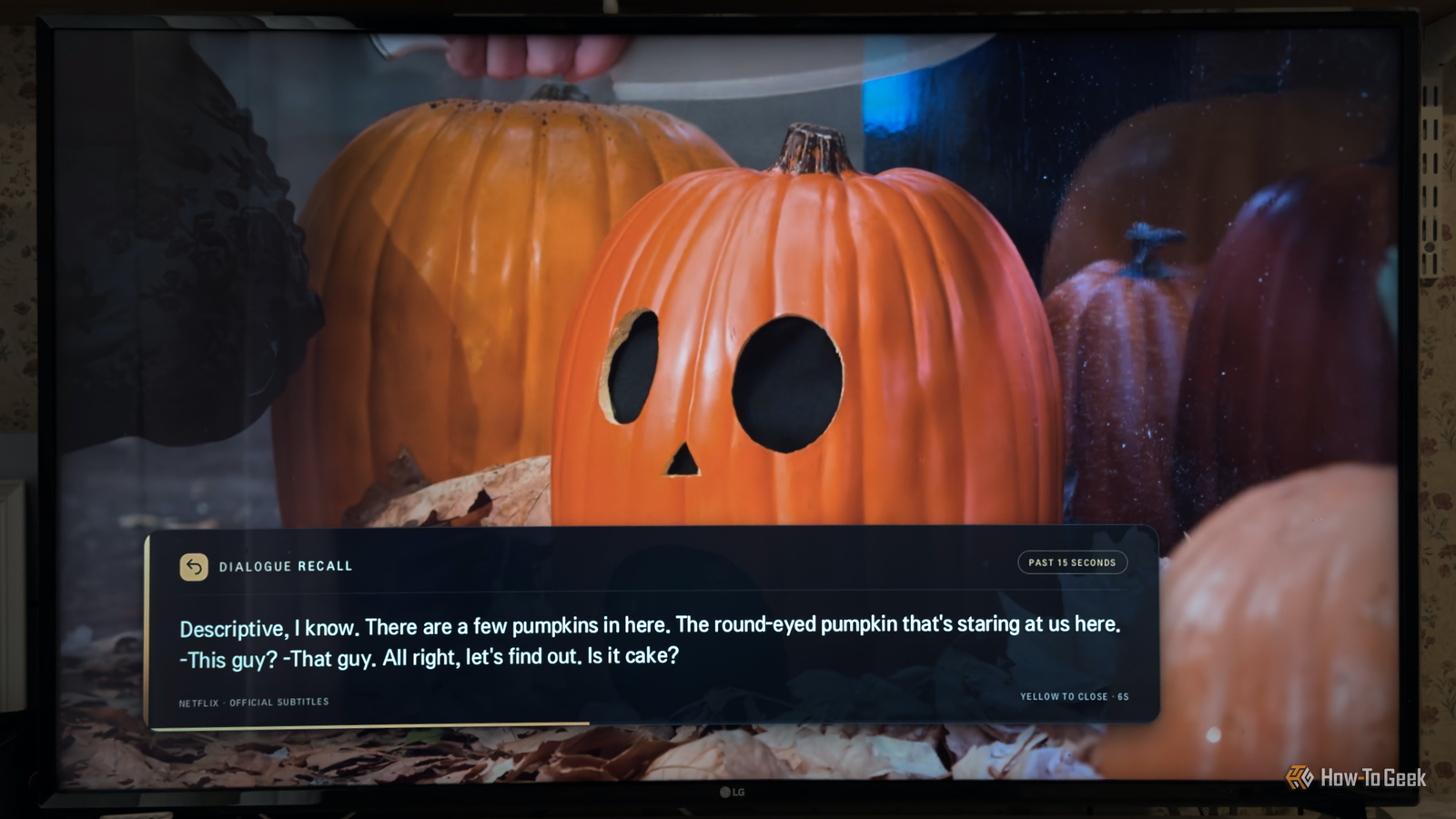
Published Nov 21, 2026, 11:00 AM EST Adam has a degree in Engineering and has a life-long interest in technology. He has been writing for over a decade for various print and online publications, with a focus on consumer tech. He joined How-To Geek in 2024 while working at Pocket-lint. As well as being a long-term fan of Apple products, he also has a strong interest in smart home tech, running a Home Assistant server at home to automate all his smart home devices. He believes that the ideal smart home should work with minimal interaction from the user, with automations running as if by magic rather than requiring you to push buttons on a control panel. You can find more of his work on Muck Rack. I loved my Apple TV, right up until it died. With my smart TV offering all the streaming apps I need, I couldn't justify buying another one. There's one feature of my Apple TV that I still miss on an almost daily basis. I decided to try to get ChatGPT's Codex to add it to my rooted TV, and I ended up with something even better than Apple's feature. I miss a feature from my Apple TV I even added it to Jellyfin Is it just me, or do actors in TV shows and movies always start to mumble the moment you get to the crucial piece of plot information? "The whole key to this mystery is mmmgh-fnngh-mmm-nnnng!" It's not just me; my wife regularly misses the crucial pieces of dialogue on which the entire plot rests. With an Apple TV, there's a feature that you can use in these circumstances. If you miss a crucial line of dialogue, you can use the Siri button on your remote to ask, "What did they say?" The Apple TV will then rewind for 10 seconds and temporarily turn on subtitles, so you can find out what they mumbled. You can also enable Show on Skip Back in the subtitles settings, which will do the same thing if you press Left once on the Siri remote. The Apple TV isn't the only streamer with a similar feature; it's available on some Roku devices, and I loved it so much that I even added it to my Jellyfin setup. Rooting my TV made almost anything possible Codex can write directly to the TV Since my Apple TV has died, I've really missed having the ability to quickly see what an actor mumbled. I've lived without it for some time, but it's always been something I've yearned for. I recently rooted my LG TV after watching the excellent Gamers Nexus video about how much data these TVs can send back to LG. Having done so, I realized that I could let AI coding tools such as Claude Code and Codex both read and write to the TV, allowing them to modify existing software or create new apps of their own. A lot of people have been using these tools to build custom launchers to replace the stock LG home screen, but I wondered if I could do something even better. I told Codex about the feature that I was missing and asked whether it would be possible to build something similar for my smart TV, but with a twist. My idea was that instead of rewinding the show and turning on the subtitles, the software would save the subtitle text in the background and display the last 15 seconds of dialogue at the touch of a button. That way I could find out what I'd missed without having to rewind the show. I decided to start with Netflix, since that's the streaming app we use the most. The subtitles keep working behind the scenes Subtitles are on, they're just not displayed Credit: Netflix The first hurdle that Codex came to was that in order to record the subtitles, they needed to be turned on. If the subtitles were off, there was no way to save them to memory. I didn't want the subtitles to be on all the time, however. Codex came up with a clever solution. The subtitles would always be on, so that the last few seconds of dialogue could be continually saved to memory. Although the subtitles are enabled, the app Codex built blocks them from appearing on the screen. If you do want to watch with subtitles, pressing a button on the remote can tell the app to stop hiding them. The subtitles will then appear as normal. One button shows the recent dialogue without pausing the show I can see exactly what I missed without ruining the flow Once Codex had got past that hurdle, it didn't take long for it to achieve its goal. With a bit of tweaking, I ended up with the app that I'm now using on a regular basis. When I'm watching TV and someone mumbles something, all I need to do is press the yellow button on my TV remote. The content keeps playing, but a box appears on the screen, displaying the subtitles from the last 15 seconds of the show. The box stays on the screen for a few seconds, so you have enough time to find the dialogue that you missed. It then disappears again, or you can dismiss it sooner by pressing the yellow button again. The whole thing works like a dream. It's already second nature to grab the remote and press the button when I've missed something, and it's not nearly as disruptive as having the whole show rewind by 10 seconds. It's an even better version of the feature that I'd missed for so long. Vibe-coding makes it possible to build the features you wish you had Whatever your opinion of vibe-coding, it's hard to deny that it can help you build some truly awesome things. I now have a feature I'd missed for a long time, and if I'd tried to build it myself, it would have either taken me forever, or I would have failed dismally. By asking Codex, I had the exact feature I wanted in under an hour.
I stole my favorite Apple TV feature and made it better on my rooted TV
Full Article
Original Source
Read the full article at Howtogeek →KhanList aggregates and links to publicly available news content. We do not host full articles from third-party sources. Always verify important information with original sources.