
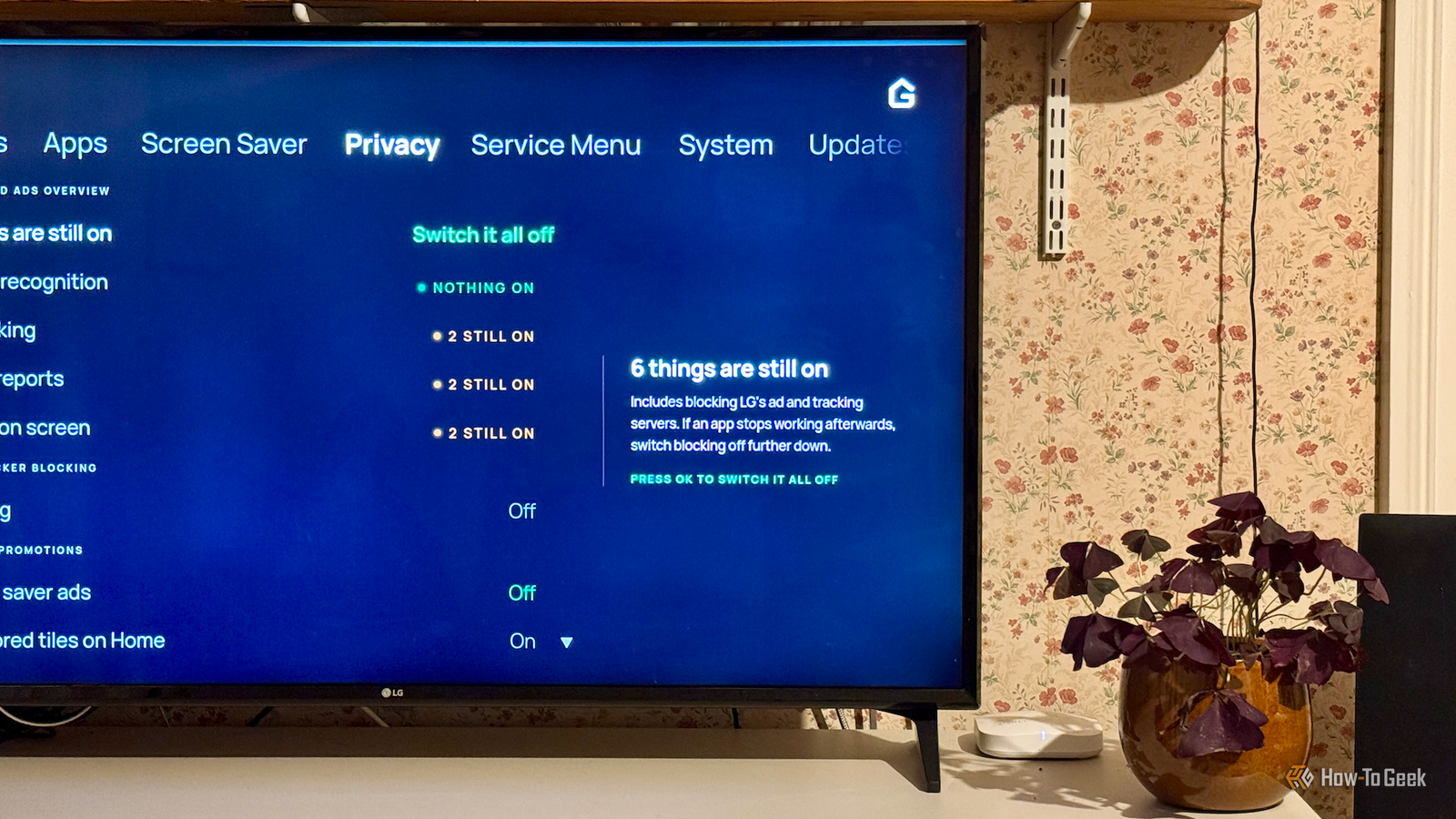
Published Nov 7, 2026, 2:00 PM EST Adam has a degree in Engineering and has a life-long interest in technology. He has been writing for over a decade for various print and online publications, with a focus on consumer tech. He joined How-To Geek in 2024 while working at Pocket-lint. As well as being a long-term fan of Apple products, he also has a strong interest in smart home tech, running a Home Assistant server at home to automate all his smart home devices. He believes that the ideal smart home should work with minimal interaction from the user, with automations running as if by magic rather than requiring you to push buttons on a control panel. You can find more of his work on Muck Rack. A recent YouTube video by Gamers Nexus exposed the fact that LG TVs are sending huge amounts of data from your home to LG's servers. This can include information about what you're watching, even if you're watching a DVD or Blu-ray through a connected device. A lot of people have started rooting their TVs to try to stop this from happening, so I decided to give it a try. Rooting my TV let me install a privacy dashboard I installed Glasshouse via the Homebrew Channel My LG TV has a lot of privacy settings that you can change. I'd already disabled all of the options I could find, including disabling Automatic Content Recognition (ACR) that sends information to LG about what you're watching based on the images on your screen. I'd blocked everything that the LG settings allowed me to block, so I was interested to see whether rooting my TV would allow me to block more, or whether my TV really was private now. There are multiple methods for rooting a TV depending on the model and the firmware. I used the DejaVuln USB rooting method, which involves installing some files on a USB stick, connecting it to the TV, and opening one of the files through the TV's media player app. It was quick and easy to do. Rooting the TV doesn't automatically stop it from phoning home to LG. It does allow you to install apps through the Homebrew Channel app that's added to the TV when you root it. You can use this to enable features such as SSH access and block system updates. You can also install homebrew apps. I installed the Glasshouse privacy app, which had been designed specifically to block some of the LG features that send your data to external servers. Rooting your TV is a risk, and you could end up bricking your device. I was happy trying it out on my old and relatively cheap model, but you might want to think carefully before rooting a device you may have paid thousands of dollars for. Disabling every native privacy option I could find still hadn't blocked everything Glasshouse discovered six things that were still enabled When I first opened Glasshouse, I saw a large message confirming what I had suspected all along. Despite disabling every privacy option that I could, Glasshouse informed me that "six things are still on." The privacy settings confirmed that screen recognition was disabled, but three other sections still had two features enabled each. These were ad tracking, usage reports, and LG ads on screen. This meant that even though I had turned off everything I could find in the TV's own settings, six advertising and tracking services were still running. The enabled features included sponsored tiles that can appear on the home screen, smart tips, and LG data services that collect and send usage data to LG. In other words, my TV was still trying to contact LG despite me doing everything I could do through the standard settings to turn it all off. Glasshouse offered two additional tiers of blocking I tried the default option first, then disabled everything Glasshouse offered two options at this point: a simple option and a more extreme option that had the potential to stop some services from working. I decided to try both and see how each impacted what LG sent home. The first was a simple option to "Switch it all off." This would disable the six services that were still enabled, and block ads and telemetry. I'd been using Pi-hole to log the DNS requests from my TV before I installed Glasshouse, so I turned on this option and then used my TV as normal for 24 hours. After the 24 hours were up, I enabled the more nuclear option. By setting the Blocking feature in Glasshouse to "Everything," Glasshouse blocks other LG endpoints. This can potentially affect things such as the ability to remotely control the TV using ThinQ, as well as the Content Store and LG Channels. I enabled this option and then tracked the DNS requests for another 24 hours. At the end of that time, I then compared the DNS requests from before Glasshouse was installed, after the six services had been disabled, and after everything had been disabled. The DNS logs showed some significant changes Fewer lookups don't prove total silence The results were significant. In the 24 hours before I rooted the TV and installed Glasshouse, my TV made 704 DNS requests to LG-related services. After I chose the "Switch it all off" option, this dropped to 476, a reduction of over 30%. After choosing to block everything, the DNS requests dropped by a further 11%. Many requests disappeared completely, with requests to gb.ad.lgsmartad.com dropping from 31 to 0, and requests to gb.rdx2.lgtvsdp.com dropping from 18 to 0. DNS requests alone aren't evidence that LG is doing anything bad or that Glasshouse is blocking what it says it is, but it does give a useful indication that my TV may be trying to call home less than it was before. My TV may still not be fully private Disabling all the options I could in the LG TV settings still left some services enabled. Rooting my TV and running Glasshouse seems to have blocked much more. I can't be certain that it's blocking everything, but it does appear to have given me more control over what my TV does.
I rooted my LG TV to stop it spying on me, and it blocked things that the TV's settings didn't
Full Article
Original Source
Read the full article at Howtogeek →KhanList aggregates and links to publicly available news content. We do not host full articles from third-party sources. Always verify important information with original sources.