
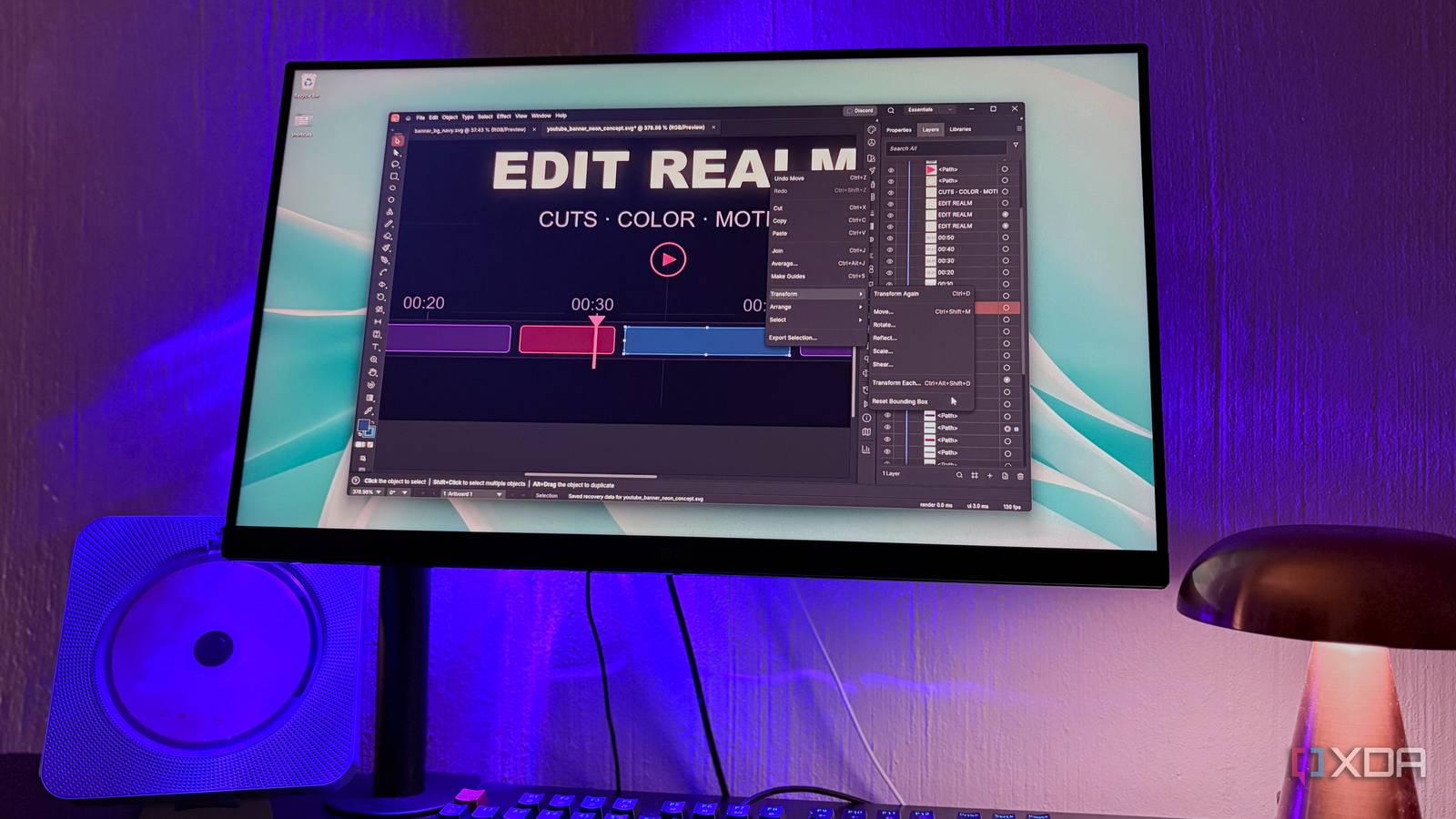
Published Nov 8, 2026, 5:30 PM EST Nolen began their writing career in 2019, with three years dedicated to editing the Creative section at MakeUseOf. Their expertise lies at the crossroads of technology and creativity, covering areas like photography, video editing, and graphic design. Outside of work, you'll often find Nolen diving into a good book, writing their own stories, or playing video games. Ask anyone in the creative space for a free Adobe Illustrator and Inkscape is almost always the name you'll hear first. It's been the open-source vector design pick for years. The catch for anyone who learned vector work in Illustrator is that Inkscape has its own logic. Tools are in different places and panels don't have the same names, so that muscle memory from Illustrator doesn't always carry over cleanly. That's probably why so many people try Inkscape once or twice then hop over back to an Illustrator subscription. Then ArtCraft happened. It's a completely free, open-source suite consisting predominantly of Adobe alternatives, and it's mainly built with AI. Illustrator was never the Adobe app I'd reach for most, so it was pretty easy for me to switch to Inkscape, though it is probably not my top pick for cohesive user flows or being user-friendly. This is why I was pretty excited to see an Illustrator clone in the ArtCraft lineup, called VectorCraft. Meet the Illustrator clone, VectorCraft It copies Illustrator's look without any of Adobe's code VectorCraft is part of ArtCraft's Crafting Apps, a set of free, open-source programs that each recreate a well-known paid app, and VectorCraft is the one taking on Illustrator. ArtCraft is run by Brandon Thomas, an Atlanta-based software engineer, and it started as a desktop app for generating AI images and video, where you set up characters and props in a scene before the AI renders it. Then the Crafting apps came later as a full suite of Adobe replacements, though it's been venturing into Microsoft Office and Figma's territory too. Thomas says he built the apps with Anthropic's Claude Opus 5.5, and Claude is credited as co-author on most of the commits. This is a clean-room rebuild, meaning it was recreated based on how Illustrator looks and functions without actually using any of Adobe's code. This is why any ArtCraft app you try will pretty much look like a mirror of the app it's meant to replace. The whole collection of apps is completely free and open-source, you don't even need to make an account to use any of them, and it runs on Windows, Mac, and Linux. It's still alpha, though. The team puts it at about 65% ready for real work for a typical illustrator, and they're upfront that the number is their own estimate, measured against Adobe's public documentation. The Illustrator features and habits that carried over cleanly If you're used to Illustrator, then you'll feel right at home in VectorCraft The welcome screen has the presets for the common canvas sizes - in these screenshots I went with the 1920x1080 web one to rough out a YouTube banner with a design of an editing timeline. The Properties and Layers panels are also where Illustrator puts them, you really don't have to dig for anything around here because the layout is identical. One of my most-used tools in vector software is the shape tools, and this one comes with the usual flyout that gives you options for a spiral tool, arc, and grid. Smart Guides, the little "align" labels and distance readouts that pop up while you draw, are here too, and this is a little life-saver if you want your design elements to line up. For the curvier bits I used the Pen and Curvature tools, which give you proper anchor points and handles to drag around. Combining overlapping shapes runs through Pathfinder and Shape Builder like it does in Illustrator, and the team says its shape maths never throws Illustrator's old "cannot perform operation" error. Recoloring every clip took one trip to Select > Same > Fill Color, which grabs every object sharing a color so you can change them all at once. Effects stay live, so a glow or drop shadow can be tweaked after you've applied it instead of undoing back through everything, and Warp shows a live preview while you drag its bend slider. Raster filters, the Photoshop-style ones that treat your art like pixels, are a little rougher. The 57 are there as approximations, but the Effect Gallery doesn't show thumbnails or a preview yet, and a couple of Color Effects options were greyed out for me. It opens SVG and PDF files, and it'll take less common ones like EPS and DXF and even Affinity documents, but PSDs will drop in as single flattened images. Illustrator's own .ai files only open properly if they're PDF-compatible or very old, and the team does say that the real-world .ai files probably won't keep their structure reliably, which means VectorCraft isn't exactly an option yet if you have a serious workflow where you trade files with others who use Adobe. Exporting brings up the proper options dialog where you can minify the code or make the file responsive for use on a website. The AI is built for agents, not for you Don't expect a prompt box You won't find a generate button anywhere here. The team says generative AI is still missing, so Illustrator pulls far ahead here. Adobe's app has Firefly features like Text to Vector Graphic, where you type a prompt and get back editable vector art. Generative Shape Fill works off a shape you've already drawn and fills it in with generated detail. Inkscape has nothing like this built in, so anything AI comes from community extensions, like the one that connects to ComfyUI for image generation. VectorCraft's AI is more so aimed at agents. It ships with an MCP server, a standard way for AI assistants like Claude to plug into other apps, and almost everything in VectorCraft down to individual dialogs can be driven through it, so Claude can draw and export on your behalf, basically. But you have to register the server with Claude Code through a terminal command. How VectorCraft is already taking Inkscape's spot The new open-source vector tool in town Inkscape does have a fix for the muscle memory problem, sort of. You can swap its keyboard shortcuts to an Illustrator preset in the preferences, and a newer version based on Illustrator CC is still waiting on testers before it'll be merged. But those are just the shortcuts and they don't move panels or rename the tools. VectorCraft skips this setup entirely and literally just gives you a copy of the Illustrator layout you're already familiar with. This is a great start because navigation and user flow are the first things that get people in the door with any new app they try. Speed is another major difference. VectorCraft's team says it renders 20,000 shapes in about 27 milliseconds while the interface holds 120fps, and the frame counter in the corner never dropped below 115fps while I was editing, even zoomed in past 11,000%. Inkscape has a tendency to feel sluggish when you work with as many layers as in my screenshots here, and I'm not the only one with that complaint. The pace is different too. Inkscape's latest release is 1.4.4, a maintenance update from May, and 1.5 still has no release date. VectorCraft has over 7,000 commits after about five weeks - now, this might be something to be nervous about in the other direction because there's a chance that things switch up a lot. But I don't think it will, since the intention from the start was to stick to the Illustrator vibe, so that's probably what we can expect to keep getting. Not ready for client work, but ready for everything else It's a little strange that the vector app I'd pick over Inkscape right now is about five weeks old and written mostly with an AI model. I think the alpha label is still something to keep in mind though - there's no AI and you can't trust it with a client's .ai files yet. However, I haven't touched Inkscape since VectorCraft dropped, and if the MCP setup ever turns into a button instead of a terminal command, I'd probably let Claude have a go at my designs too. VectorCraft
I ditched Inkscape for an open-source Illustrator rival built with AI
Full Article
Original Source
Read the full article at Xda-developers →KhanList aggregates and links to publicly available news content. We do not host full articles from third-party sources. Always verify important information with original sources.