
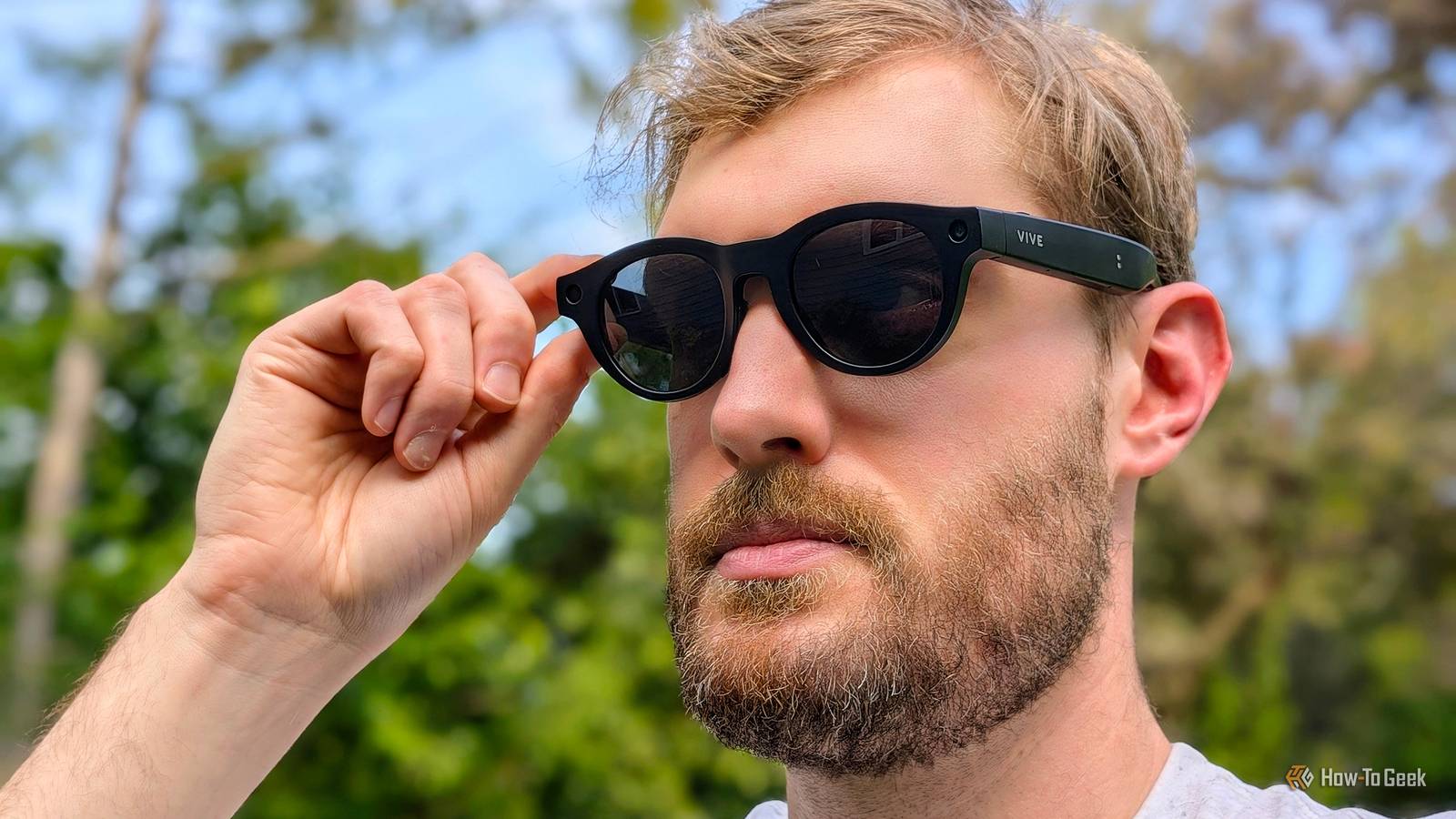
HTC's Vive Eagle smart glasses fix Meta's biggest flaw, but it comes at a price Credit: Joe Fedewa / How-To Geek Published Sep 3, 2026, 9:00 AM EDT Joe Fedewa has been writing about technology for over a decade. Android and the rest of the Google ecosystem have been a focus for years, as well as reviewing devices, hosting podcasts, filming videos, and writing tutorials. Joe loves all things technology and is also an avid DIYer and food blogger. He has written thousands of articles, hundreds of tutorials, and dozens of reviews. Before joining How-To Geek, Joe worked at XDA-Developers as Managing Editor and covered news from the Google ecosystem. He got his start in the industry covering Windows Phone on a small blog, and later moved to Phandroid where he covered Android news, reviewed devices, wrote tutorials, created YouTube videos, and hosted a podcast. From smartphones to Bluetooth earbuds to Z-Wave switches, Joe is interested in all kinds of technology. After several years of jailbreaking and heavily modifying an iPod Touch, he moved on to his first smartphone, the HTC DROID Eris. He's been hooked ever since. Sign in to your How-To Geek account I’ve never been very interested in smart glasses. The idea of having a hands-free camera on my face sounds great, but there’s always so much extra stuff that goes along with it. However, my Android brain perked up when I heard HTC was releasing a pair of smart glasses. I’ve been using the Vive Eagle for several weeks, and I have a lot of thoughts. If you’re a long-time Android fan like me, the HTC name brings back fond memories of iconic phones. However, for the better part of the last decade, it’s mainly been hidden behind Vive VR branding. Now, similar to how it took on smartphone giants like Samsung, the company is entering the ring against the Ray-Ban Meta glasses. HTC VIVE Eagle 7/10 Speakers Two stereo, bass-enhanced, open-ear speakers Weight 49g HTC's privacy-first AI smart glasses. VIVE Eagle offers hands-free photo and video capture, Total Memory Recall, live translation, and smartphone integration, while striving to protect the privacy of the wearer and of the people around them. Pros & Cons Beautiful, lightweight design feels like normal glasses Surprisingly great dual, open-ear speakers Respectful privacy policies, and choose your own AI assistant Cameras on par with the competition Expensive compared to the competition Small color selection in the U.S. Price & availability The Vive Eagle is available now for $499. Here in the U.S., there are three models to choose from. “Square” is a wayfarer-inspired design that comes in glossy black with sunglass lenses. “Pantos” has a smaller, rounded shape, and it’s available in matte black with sunglass or clear lenses. The ZEISS lenses are user-replaceable with support for prescriptions. There’s also an optional “PowerBoost” magnetic battery pack for $49. Specifications Speakers Two stereo, bass-enhanced, open-ear speakers Weight 49g Connectivity Wi-Fi 6E, Bluetooth 5.3 Storage space 32GB, 4GB RAM Microphone 4-mic array: 1 directional (nose bridge) and 3 omnidirectional Camera 12 MP ultra-wide Image Resolution 3024 x 4032, HDR Video Resolution 1512 x 2016 at 30 fps, 2176 x 2944 at 30 fps Smart glasses that look like regular glasses Passing the first test Every company making smart glasses has one primary assignment: fit all the tech into a package that looks like a regular pair of glasses. Most people won’t wear something on their face if it draws attention to themselves. Thankfully, smart glasses have come a long way since Google Glass. The Vive Eagle comes in the two styles mentioned above—the glasses you see on my face in this review are the black Pantos model with sunglass lenses. They happen to fit perfectly on my head, but it comes with ear grips and nose pads so you can make adjustments. In other parts of the world, the glasses are available in super cool translucent navy, “coffee,” and “berry” colors. Personally, I prefer the look of the Square model, and I’m extremely jealous of those who get the transparent color options. But the Pantos design didn’t feel too far out of my personal style comfort zone. Most importantly, they don’t immediately look like smart glasses. The only real noticeable giveaway is the thickness of the temple arms, but even that is subtle. Speaking of arms, that’s where the 235 mAh battery lives. HTC rates it for 4.5 hours of music playback, 3+ hours of calls, or 36 hours on standby. Charging is through a magnetic cable, and there’s an optional magnetic “Power Boost” battery pack for $50. Battery life was not a concern for me, though I never had a need to wear the glasses for longer than a couple of hours at a time. As a first-time smart glasses wearer, I didn’t know how to expect the Vive Eagle to feel. The good news is they’re very light—only 49g. I can easily wear them for several hours with no comfort issues at all. In general, the overall size and feel are not far off from my regular sunglasses. I know this has become standard in smart glasses, but it’s impressive, nonetheless. Speaking of standard, HTC nailed the design of the Vive Eagle, but it’s not exactly reinventing the wheel here. The Ray-Ban Meta glasses—which are a direct competitor—have offered similar styles for several years already. This will be a common theme throughout this review (it’s not a bad thing). Cameras good enough to actually use But don’t expect to replace your phone camera Credit: Joe Fedewa / How-To Geek Alright, let’s get into the meat of it. The Vive Eagle has a 12MP ultra-wide camera capable of taking 3024 x 4032, HDR photos. It can record video up to 3K resolution (2176 x 2944) at 30 fps. Slow-motion video can be captured at 120 fps in 960 x 1280 resolution. Photos and videos are taken in a 3:4 portrait aspect ratio. Now, this was by far the part of the glasses I was most excited about. There have been many occasions over the years when I wished I could snap a quick photo without pulling out my phone. In fact, I wrote an editorial about this very subject a couple of years ago. I’m a cyclist, bikepacker, kayaker, hiker, and just generally an active guy. I’m also a proud parent who takes far too many photos and videos of my son. So, I had plenty of opportunity to test out the Vive Eagle’s camera. First, I recorded a few videos during a kickball game. I really enjoyed watching back my POV as I kicked a ball and ran to first base, but it was definitely a challenge for the camera. The dusk lighting was dim, and the wide-angle lens made everyone look far away. I’m not sharing the footage for privacy reasons, but you can’t make out anyone’s faces. My next adventure was a kayaking trip on a beautiful sunny day. This was the exact type of situation I envisioned for smart glasses. I usually have my phone stowed away for safe-keeping—pulling it out for a quick photo makes me nervous. The camera performed much better this time. I got some great photos of the scenery, and some cool videos of wildlife. Without the glasses, I may not have taken a single photo or video, but with the glasses, I ended up snapping nearly 20. It was genuinely super handy. As I said, the wide-angle camera makes everything look far away. This is standard in smart glasses, and it’s a blessing and a curse. It ensures you get your subject in frame, but it looks very different from what you saw through your eyes. The zoom lens on my phone gets a lot of work for this very reason. That being said, it’s best to think of the unedited media as a starting point. I was able to get respectable photos with minimal editing and cropping in Google Photos. I’ve included a couple of examples of that in the gallery below. On the technical side of things, taking a photo or video can be done in two ways: saying “Hey Vive, take a photo/video” or by pressing the button on the right temple arm once or long-pressing. A small white light blinks to indicate when you’re recording. The overall experience and specs are similar to the Ray-Ban Meta Gen 2, which is considered by many to have the best camera in a pair of smart glasses. The speakers are a dark horse feature I didn’t expect to care about speakers Credit: Joe Fedewa / How-To Geek One last hardware feature I want to mention is the dual stereo, bass-enhanced, open-ear speakers. I have to admit, when I heard the boot-up chime and voice for the first time, I was shocked. My wife was sitting next to me, and I asked, “Did you hear that?” She didn’t, but I was convinced it had come from somewhere in the room. Walking around while listening to music or a podcast ended up being one of my favorite ways to use the glasses. I’ve been a fan of open earbuds for years, but everything I love about them is even better with the Vive Eagle. The audio quality is great, and I can still hear my surroundings with perfect clarity. I honestly wished I had transition lenses so I could wear them inside. AI, privacy, and navigation The Vive Eagle’s big win It’s time to talk about AI. As with the Ray-Ban Meta glasses, AI is supposed to be a big part of the experience. However, HTC had taken a drastically different approach than the company we all know as Facebook. First of all, HTC is not pushing an in-house, proprietary digital assistant. Vive AI is essentially an audio skin on top of Gemini or ChatGPT, and you get to choose which one you’d like to use (I chose Gemini). In addition, you can access the default digital assistant on your phone from the glasses. This is obviously handy, but it’s also necessary for an important reason. Basic commands, like the ones for taking photos and videos, controlling media playback, and making calls, are handled offline, on the device. More complex questions are de-identified, encrypted, and sent to your chosen model. For personal questions, like “What’s on my calendar today?” or smart home commands, the phone assistant you already use gets called into action. I’ll be honest—I don’t find AI on glasses to be particularly useful, but I appreciate HTC’s approach. I didn’t feel like I was handing over buckets of personal data in order to use the Vive Eagle. Plus, everything that Vive AI does is neatly laid out in a timeline in the app. You can see exactly what you asked, when you said it, how Vive AI responded, and where it got the answer from. Let’s talk about the app. Software was what originally drew me to HTC, and I’m happy to report the Vive Connect app is well-designed. It also offers a surprising number of customization options. You can choose what the AI button on the left side does when pressed once or twice. Shortcuts include everything from activating your phone assistant to generating a recipe based on the ingredients you’re looking at. You can also choose exactly when the glasses shut down—after a set length of time under a battery level threshold. The app is where you can view photos and videos taken with the glasses. By default, they’re only imported to the app, but you can choose to have them automatically added to your phone’s media library as well. Unlike Meta’s app, there’s no weird AI slop tools to be found here. Occasionally, you’ll notice a sparkle icon on a photo, which means it was slightly enhanced. However, you can simply tap the icon to undo the change. Honestly, it’s hard to fit all of the AI and app features into this review. There’s “Memories” for saving things to recall later, voice recording, visual identification, and translation. Should you buy the HTC Vive Eagle AI Glasses? Credit: Joe Fedewa / How-To Geek The Vive Eagle is one of the most interesting devices I’ve reviewed. There are parts of it I really love, and usually that would mean I don’t like the other parts—this is different. I respect how HTC has gone about infusing AI into a pair of attractive glasses, but I struggle to find real-world uses for it. There’s no denying the Vive Eagle is a beautiful piece of hardware, and I will gladly continue to use them to take photos, record videos, and listen to music. But the elephant in the room is the $500 price tag. The Ray-Ban Meta Gen 2 glasses start at $380, and the technical specs are very similar. It all comes down to how much you value privacy and AI. Putting myself in the shoes of a frequent AI user, the Vive Eagle is the more compelling option, even if it is $120 more. Meta forces you to use its own AI assistant, which, let’s be honest, is no one’s first choice. Not to mention all the privacy concerns that come with using a Meta product. The Vive Eagle lets you use the AI tools you’re already familiar with, and that’s a big deal. So, if you’ve been looking for a pair of high-quality AI smart glasses that aren’t tied to one of the most controversial companies on the planet, the Vive Eagle is a pretty solid choice. HTC VIVE Eagle 7/10 Speakers Two stereo, bass-enhanced, open-ear speakers Weight 49g HTC's privacy-first AI smart glasses. VIVE Eagle offers hands-free photo and video capture, Total Memory Recall, live translation, and smartphone integration, while striving to protect the privacy of the wearer and of the people around them.
HTC Vive Eagle Review: Privacy-first smart glasses come at a price
Full Article
Original Source
Read the full article at Howtogeek →KhanList aggregates and links to publicly available news content. We do not host full articles from third-party sources. Always verify important information with original sources.