
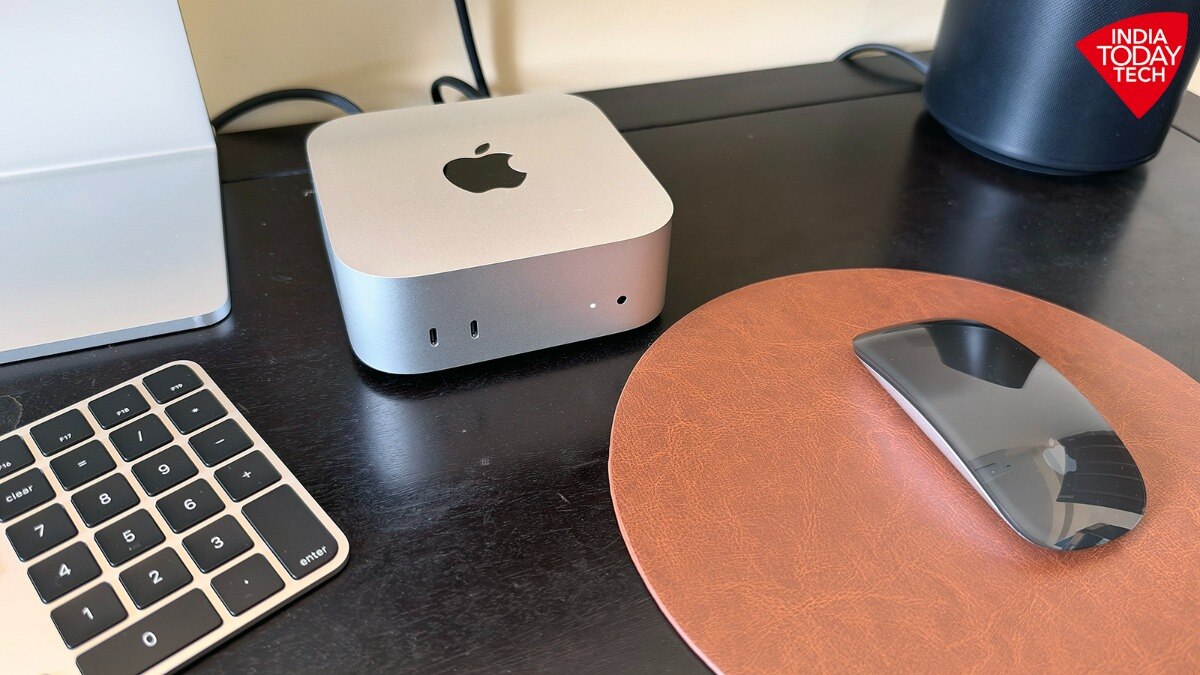
Since the early 2000 when I bought my first computer, I have always believed in the power of personal computers. They are transformative and enable us to do things we otherwise cannot. A good computer at home can spark many magics. Like books. In a house full of books chances of children growing up to have more successful and fulfilling lives are also higher. A home computer has the same effect. It was true 20 years ago. It is true in 2026 even though now we also have smartphones, tablets, laptops and all other sundry devices ranging from e-readers to smart speakers. Yet a good computer like the Apple Mac mini remains indispensable. After using the new Mac mini with M6 chipset for several weeks I feel this is the best home computer you can get for yourself, and more importantly, for your kids in 2026. I wish it had more storage in its base variant, and I wish it was slightly cheaper, but on the whole the Mac mini is great in many ways. With the powerful M6 chipset inside it, the Mac mini can serve as a hub for all your home computing needs. It even serves as a fantastic AI box if that is what you wish for, although conditions apply. A compact boxSince forever — and by that I mean 2005 and not 2020 — Apple has kept the design of the Mac mini similar. It has always been a small square, or squarish, box. The Mac mini 2026 follows the design that Apple introduced in 2024. It is made of milled aluminium, except the base that is a mix of plastic and rubber. On the front, there are still two USB-C ports, a port for the 3.5mm headphone jack, and a small LED light to show the status of the machine. On the back: a power port, three Thunderbolt ports, port for the ethernet cable, and an HDMI port. On the Mac mini M6, the Thunderbolt port is Type 4. The Type 5 is still limited to the Mac mini with the M5 Pro, Mac Studio, and MacBooks powered by Pro chipsets. Not that it matters much because you are essentially going to use the port to connect a monitor to it and Thunderbolt 4 is more than enough. The Mac mini M6 has an upgraded 2.5Gpbs ethernet port. The Thunderbolt ports, however, remain Type 4 with 40Gbps link. While externally the machine is the same as its predecessor, internally there are some changes. The biggest is the new chipset. The M6 is built using newer architecture and a newer 2nm process at TSMC. Compared to the M5 chip, and the ones before it, it is significantly faster although you will notice it most in gaming and while running local AI models such as Gemma and Qwen. About that in a while though. The M6 chipset in the Mac mini has a 12-core CPU, 12-core GPU and a 16-core NPU with two units for a total of 32 NPU cores. That is a lot of hardware for AI. According to Apple, the M6 gives you up to 13X faster performance in AI apps like LLM Studio, over 2X faster performance in something like Excel and up to 2X faster performance in games like Cyberpunk 2077. I am not sure of the theoretical numbers, but on the basis of my experience with the Mac mini M6 I can safely say this is one fast machine, arguably the fastest you can buy at this price point. And in benchmarks like Geekbench it rips, delivering the fastest single-core performance you can get in a consumer machine.The Mac mini M6 also comes with upgraded network hardware. It now supports WiFi 7, which is handy if you have a compatible router. If you don't, that's okay too because it makes the new Mac more future proof. Same is the case with the Bluetooth 6 that the new Mac mini supports. A more immediate and significant upgrade is in the ethernet port. It now supports 2.5Gbps link compared to 1Gbps in the M4 variant, with an upgrade option for 10Gbps available.Talking of upgrades, there are several options. In its base variant, which is what I tested, the Mac mini comes with the M6 and 16GB RAM paired with 256GB storage. This costs Rs 99,900. You can go up to 32GB RAM and up to 2TB storage. If you switch to the Mac mini powered by the M5 Pro, you can go for up to 64GB RAM and up to 8TB storage. Of course, as you add more, the price quickly starts going up. In my opinion the sweet spot with the Mac mini is in M6 configurations that stay below 24GB RAM and 1TB storage. I also feel that 256GB in the base variant is on the lower side. At this price, it would have been nice to get at least 512GB. But all Mac mini configurations, even the base one, are good enough for most people for most of their computing needs. If you have some special requirements around RAM — that is vibe coders using a lot of AI — or need more storage, options are available for you. Using the Mac mini M6 for stuff and AIThe beauty of home computers like the Mac mini is that they can be whatever you want them to be. They can be your home theatre device, your workstation, your gaming box, your home networking hub, your communication tool. Nowadays they can also be your AI powerhouse.While reviewing the Mac mini M6 I used the machine as a home computer that can also, because we live in 2026, serve as a box through which I can try some AI-specific workloads. I used the Mac mini with the Studio Display. With its 5K resolution, an embedded webcam, and superb compatibility with Apple devices, is the best monitor for all things Apple.Given the speedy M6 chipset, for regular workloads the new Mac mini is more than fast enough. And then some more. Irrespective of what you do on it, from web browsing to office work, you will not see it limp or even walk. It runs and runs and runs speedily. When you add somewhat more demanding tasks, like I did in Lightroom by rushing through 1000s of RAW 45-megapixel (think 30mb to 50mb per image) photos clicked with the Nikon Z8, even then you will not see the Mac mini break into sweat. It even sails through Adobe Premier Pro workloads smoothly, despite its 16GB RAM, although Aftereffects makes it huff and puff. The Mac mini has the power button placed on its underbelly. In an otherwise great design, this is one oddity. Although Apple designs Mac in a way where you don't need to turn it off or on again and again. You can put it in sleep mode when you are not using it. While the classic workloads are all great and barely tax the Mac mini M6, I wanted to explore how it does with the AI workloads. This I tried by running multiple local AI models. For general AI work, I used the LM Studio with Google Gemma 12B (12 billion parameters). And for generating local images I used Draw Things, paired with Z Image Turbo, an open source model from Alibaba. Both worked beautifully, although they were limited by their capabilities. You see, M6 is a great chipset but running an AI model locally also needs loads of RAM. So when you go for the Mac mini, if local AI is on your mind, you would need to go for more RAM. Something like Qwen 3.8 27B, a highly capable and still small open-source model, needs a minimum of around 24GB RAM, although it really works okay only with 32GB RAM or more. The question then is: what is possible with the Mac mini M6 16GB variant when it comes to local AI. Quite a lot I say. After installing LM Studio and Gemma 12B on the Mac mini M6, my experience with the local AI was pleasant. I could chat with the local AI and tokens were generated fast enough to give me an experience comparable to what we get with the likes of ChatGPT and Gemini. For example, I discussed Andrei Tarkovsky movies with Gemma. Of course Gemma — because it is just a 12B model — is not very smart compared to Claude, Gemini and ChatGPT but that is hardly a fault of the Mac mini. The chat with Gemma was near instantaneous if not instant. And this was all running locally, without any internet. To push it further, I gave Gemma a few PDFs so I could chat with it to understand them. Again, Gemma was good enough for the task and the performance, thanks to the M6 chipset, was good enough to be near instantaneous. I also wanted to try agentic AI work on the Mac mini M6. For this too I used the LM Studio — Bionic, to be specific. I asked Gemma to read a PDF report on anxiety and how to manage it. Then I asked it to create a 10-slide presentation on the topic. Gemma did it in around 7 minutes, which wasn’t shabby at all. Although visually the quality of presentation was poor because Gemma 12B doesn’t have the intelligence and taste of larger models. I then asked Gemma 12 to build an interactive website to showcase the presentation it just created. This was too heavy a burden for too light an AI model on a machine that is not specifically tuned for AI inference for this kind of workload. Gemma worked for over 5 hours before I got tired of waiting and asked it to stop. The Mac mini m6 as paired with the Studio Display which remains the best monitor for Apple devices. But then I gave it a lighter workload: create a website where I can input the name of a movie, year of its release, a summary, and then display it neatly so I can keep a track of everything I have watched. Gemma 12B worked for over 30 minutes and finished the job reasonably well. Similarly, the Mac mini M6 was quite fast in Draw Things, where I asked it to create images. Most of the time, the machine took between a couple of minutes to 5 minutes for creating 1024x1024 images. The quality wasn’t as good as what you get with Nano Banana or ChatGPT but it wasn’t shabby at all. Lots of words, but let me offer a quick summary of local AI work on the Mac mini M6. The local AI models, particularly the small ones like Gemma 12B, are not good enough to match what you get from a subscription of Claude, Gemini or ChatGPT. And on a machine with 16GB or even 24GB RAM you are limited by the amount of RAM you get. But the Mac mini M6 is still the best computer you can buy for local AI under Rs 2 lakh. And this matters because if you want to use AI without paying a steep subscription, a machine like Mac mini M6 offers you opportunities. What all can you do with the current models on such a machine with 16GB RAM: You can do a lot of drafting and writing work such as emails and sales reports. You can do basic image generation, lots of text-to-speech and speech-to-text work, such as transcribing recordings fast with a relevant AI model. You can do some coding, preferably code snippets — and not necessarily full projects — that can help you speed up your coding or IT work. You can do a lot with PDFs and office documents using local AI models. More importantly because of just how coherent and beautiful is macOS 27, the Mac mini M6 is also a wonderful computer to do AI work through agentic tools like OpenAI Dots. These don’t work locally, like Gemma inside LM Studio, but they do need a decent machine to do their agentic stuff.Get the Mac mini M6 for yourself or your kidsLet me go back to the point made in the beginning: every home, if it can afford one, needs a regular desktop computer. The Mac mini M6 is the finest general purpose home computer you can buy at the moment. It has its uses. And beyond those uses, it has some more specific uses. For example, if you are a junior developer who wants to up your game and needs a machine that will let you do that. The Mac mini is for you. Same in case you are starting as a content creator and need a computer that can help you as you grow. At the same time, I believe the Mac mini M6 is a great tool for school and college students because it lets people play around with local AI models. It is a great learning tool because it lets you build things, not professional and very polished, but nonetheless things using local AI in a way a phone or a tablet does not. It lets you explore new ideas, new ways of working, it lets you tinker using open-source AI models. The Mac mini M6, at least the ones with less than 32GB RAM, are not professional machines. For accomplished professionals, whether in IT or in audio-video industries, Apple sells beefier machines. But for the rest of us, the Mac mini M6 is the perfect blend of performance, design, utility and efficiency. Even at Rs 99,900 — more when you add a display and accessories — it is worth the price.- Ends
Apple Mac mini M6 review: You need one, and so do your kids
Full Article
Original Source
Read the full article at Indiatoday →KhanList aggregates and links to publicly available news content. We do not host full articles from third-party sources. Always verify important information with original sources.