
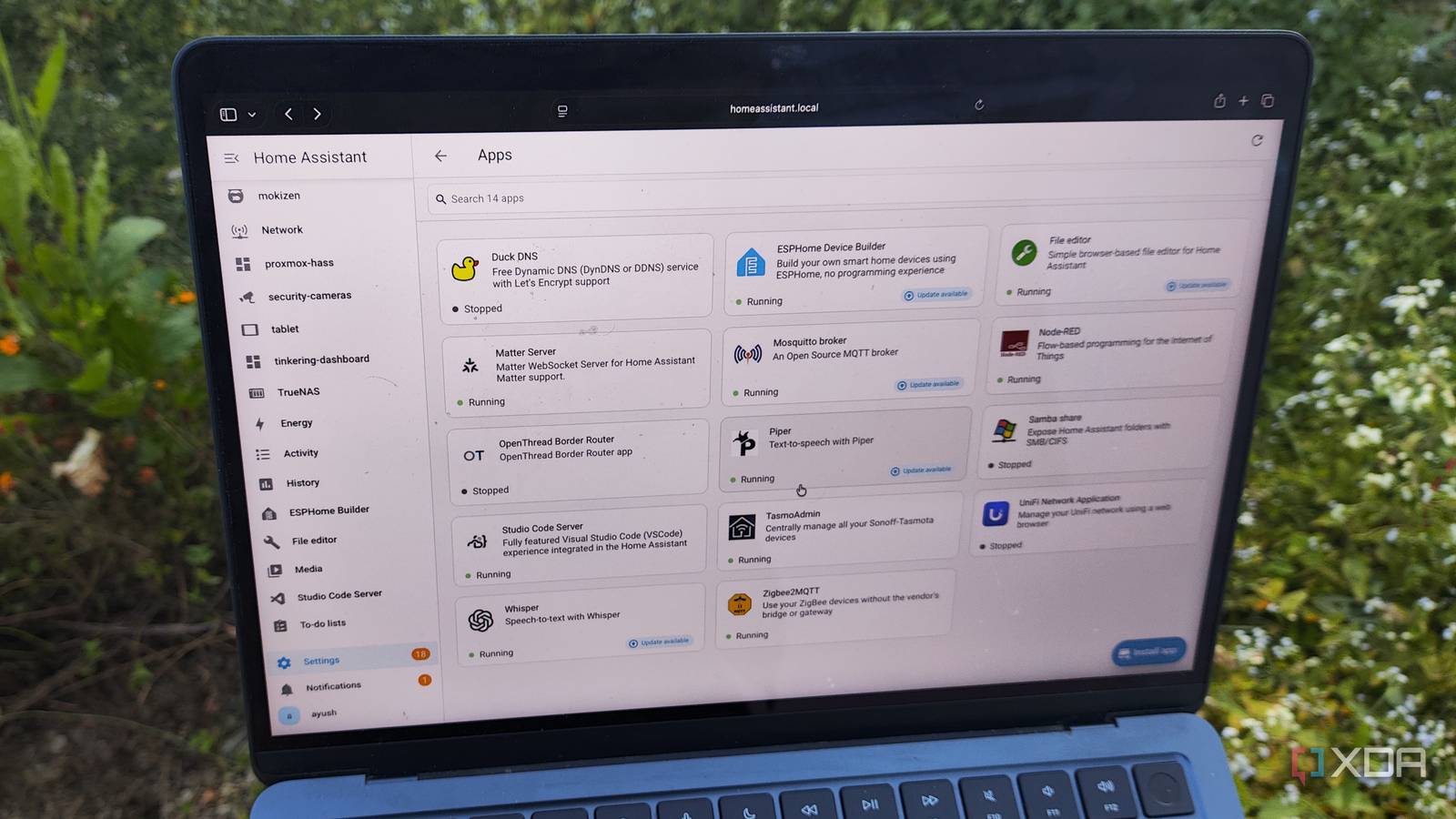
Published Nov 20, 2026, 1:00 PM EST Ayush Pande is a PC hardware and gaming writer. When he's not working on a new article, you can find him with his head stuck inside a PC or tinkering with a server operating system. Besides computing, his interests include spending hours in long RPGs, yelling at his friends in co-op games, and practicing guitar. Between cool blueprints, wacky integrations, and neat dashboard elements, you’ll find several community-created packages that can bolster Home Assistant’s capabilities. And this number has only gone up ever since the Open Home Foundation added typical Home Assistant Community Store integrations into a built-in Marketplace. But apart from integrations that are responsible for pairing Home Assistant with pre-existing services and devices, this smart home platform can also run standalone containers. The App Store includes dozens of these container images, and unlike simple integrations, they can deploy full-on self-hosted services directly on your Home Assistant. I’ve been using the Apps ever since they were called Add-ons back in the day, and I’ve got an entire lists’ worth of recommendations for tinkerers looking to arm their HASS server with QoL services. Studio Code Server But File Editor is fairly reliable for simple config tweaks, too Most of my smart home experiments involve sifting through waves of menus within HASS’ web UI, but there are a handful where I need to add extra code snippets to configuration files. Certain advanced entities and custom templates may require tweaks to the configuration.yaml file, while the secrets.yaml file lets me hide confidential passwords and keys for my HASS projects. Heck, I recently set up an automation workflow involving my 3D printer and Spoolman, and I had to add a bunch of entities to the configuration.yaml for the pipeline to run properly. On a barebones setup, I can’t access these files via the web UI. Instead, I’d have to SSH into my HASS hub and use a built-in text editor to tweak their parameters – and that can get somewhat cumbersome in a command-line interface. Fortunately, the Studio Code Server app lets me access the directories and config files on the underlying Home Assistant hub, all while providing similar UI elements, syntax highlighting, and add-ons that I’m accustomed to on VS Code forks. That said, the File Editor application is a simpler alternative for beginners who might get overwhelmed by Code Server’s interface. Mosquitto While Zigbee2MQTT lets my Zigbee coordinator talk to this MQTT broker Let’s go back to brass tacks for a second: My MQTT-powered setup has a couple of devices responsible for publishing messages (often sensor readings and microcontroller metrics), while other gizmos receive them and act according to the trigger-action rules I’ve set up for them. This publish-subscribe model used by MQTT requires a central server to route messages between my smart gizmos, as these devices can’t talk to each other on their own. That’s where my Mosquitto instance comes into the equation, as it serves as the broker when coordinating the messages between the publishers. Mosquitto is fairly lightweight, too, so I don’t have to worry about it siphoning too many resources on my Home Assistant hub. And since I’ve got a handful of Zigbee devices in my arsenal, I’ve also installed the Zigbee2MQTT app. What it does is accept the Zigbee signals from bulbs, sensors, and switches that use this protocol and pushes them to my Home Assistant hub via Mosquitto. This way, I can display the metrics reported by my smart gizmos on my dashboards and (more importantly) use them in my automation workflows. Node-RED Perfect for automation chains spanning multiple devices Since we’re already on the subject of automation, the trigger-action provisions built into Home Assistant are undoubtedly useful for controlling typical IoT paraphernalia. That said, they can be a bit lacking when you’re planning to work on complex experiments. Now, I’m aware that HASS lets me switch to YAML when I need to fine-tune my automation pipelines. But when it comes to branching workflows, the menu-based UI can be a little too inadequate, while the YAML editor can be a real pain to troubleshoot. Node-RED, however, makes long automations a lot easier to manage, as it offers a flow-based canvas where I can wire together all the entities I want to use on my pipeline. Likewise, the live debugging sidebar and other message inspection tools make it significantly easier to track errors in a workflow involving multiple entities. I’ll admit that it has a bit of a learning curve compared to HASS’ menu-based interface, but it’s a godsend for automation projects where I need to combine multiple microcontrollers, sensors, and smart devices. Piper With Whisper providing the STT provisions for my voice assistant Besides my automations, I’ve also created an LLM-powered assistant that listens to my smart home queries and answers with fully-voiced replies. The LLM aspect of this setup is handled by a llama.cpp server running on an external server, and I’ve used the Home Agent integration to pair it with my Home Assistant instance. But the real stars of the show are the Whisper and Piper apps running on my HASS server. As the speech-to-text model in my voice assistant pipeline, Whisper converts my prompts into simple text-based instructions for my locally-hosted LLM. Meanwhile, Piper handles the text-to-speech aspect of the workflow by generating voiced responses from the answers created by my LLMs. I’ve also given Piper the secondary task of reading the notifications aloud on my DIY smart panel, and with the right automations, it serves as a killer alert agent for my smart home. ESPHome For all the ESP32-powered smart gizmos in my arsenal As someone who uses ESP32 microcontrollers extensively in my home lab, I can’t end this article without mentioning ESPHome. Rather than forcing me to write long C++ snippets to control my pint-sized boards, ESPHome lets me use simple YAML blocks to design instructions for my microcontrollers. The official documentation on ESPHome works well with popular sensor modules, and I can even use a simple menu-based interface to edit different parts of my ESP32 code. Then you’ve got ESPHome’s OTA functionality, which lets me update firmware code wirelessly after the initial USB flash. Plus, all the smart gizmos and sensor stations I build with ESPHome work natively with Home Assistant. Combine all that with the fact that ESPHome also supports the Raspberry Pi Pico family, and you’ll see why I consider it a must-have app for my smart home control hub. And don’t even get me started on all the integrations I’ve added to HASS Besides these containerized apps, I’ve also set up over a dozen third-party integrations on my Home Assistant server. For example, I’ve installed the Bubble Card, Power Calc, and Ultra Card packages in the Marketplace, as they add some neat UI elements for my custom HASS dashboards. I experiment a lot with 3D printed accessories, and the elegoo-homeassistant integration is what helped me to connect my Centauri Carbon 1 and 2 to my smart home hub. I’ve also got a third-party Frigate integration to pair my security cameras with HASS, while LLM Vision lets my LLMs analyze screenshots and footage from my surveillance setup. And we’d be here all day if I started talking about all the server entities I’ve added to Home Assistant thanks to the Proxmox VE and TrueNAS integrations. Home Assistant OS Windows, macOS, Linux, Android, iOS, web iOS compatible Yes Android compatible Yes
5 Home Assistant apps I install on day one, including Mosquitto, Zigbee2MQTT, and ESPHome
Full Article
Original Source
Read the full article at Xda-developers →KhanList aggregates and links to publicly available news content. We do not host full articles from third-party sources. Always verify important information with original sources.