
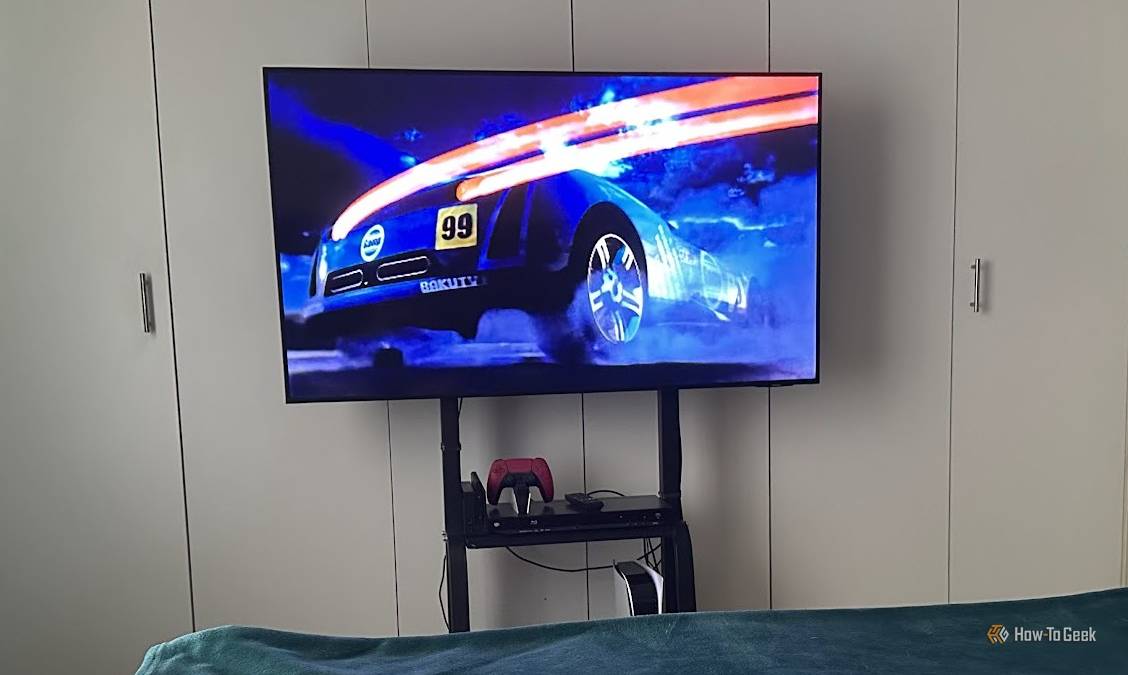
Published Oct 1, 2026, 8:45 AM EDT Sydney Butler is a technology writer with over 20 years of experience as a freelance PC technician and system builder and over a decade as a professional writer. He's worked for more than a decade in user education. On How-To Geek, he writes commerce content, guides, opinions, and specializes in editing hardware and cutting edge technology articles. Sydney started working as a freelance computer technician around the age of 13, before which he was in charge of running the computer center for his school. (He also ran LAN gaming tournaments when the teachers weren't looking!) His interests include VR, PC, Mac, gaming, 3D printing, consumer electronics, the web, and privacy. He holds a Master of Arts degree in Research Psychology with a minor in media and technology studies. His masters dissertation examined the potential for social media to spread misinformation. Outside of How-To Geek, he hosts the Online Tech Tips YouTube Channel, and writes for Online Tech Tips, Switching to Mac, and Helpdesk Geek. Sydney also writes for Expert Reviews UK. He also has bylines at 9to5Mac, 9to5Google, 9to5Toys, Tom's Hardware, MakeTechEasier, and Laptop Mag. I used a TV stand. That's the third option. You can see it in the picture above. It's not a mystery. But wait! There really is more to it than that. Because until I started using a dedicated TV stand, I really didn't think there was a third option other than using the TV's built-in feet or wall-mounting. A while ago, I wrote that I would "never wall-mount a TV again," and that simple statement seemed to resonate with many people. Literally, hundreds of thousands of people have read that piece, and there are strong feelings on both sides. Of course, as I noted then as well, I never said or thought that no one should wall-mount a TV, especially if you own the wall that's going to need studs found, holes drilled, and expensive electronics hung from it. Drilling is the last resort Every alteration is a negotiation for renters The big reason that I needed to find an alternative to wall-mounting is that, like most people in the world, I rent a home from someone else. That means mounting a TV to the wall requires the consent of a third party, not just me and the TV installer. However, where I really ran into a brick wall was when my wife asked if we could have a TV in the room. I'm not personally a fan of this idea, since I can always just watch a movie on my phone or tablet (and so could she), but the allure of watching a big-screen movie in bed on a rainy day was appealing. The problem was that no suitable walls existed in the room, and there was no permanent space a standing TV could take up. I toyed with the idea of having a 40-inch TV on one of those wall-attached extending arms, like you receive in hotels (or prisons), but the idea of convincing my landlord to install one was not appealing. Also, it wasn't going to give us the experience we wanted. PERLESMITH Universal TV Stand Type Tabletop Mount Material(s) Alloy Steel A simple yet versatie stand that should fit all but the largest TVs. Dimensions 37-78 inch TVs to 99lbs with Mount Brand PERLESMITH Colors Black This stand delivers And it costs less than you'd think Credit: Sydney Louw Butler / How-To Geek That's when I hit upon the idea of buying a rolling TV stand. In my previous corporate job, I used them all the time because I had to roll a TV from one meeting room to the next. It was cheaper than buying a TV for every venue when they weren't always needed. I expected that it would be expensive (the corporate ones certainly were), but if you're not fussed about wooden shelves or fancy chrome finishes, a basic stand will cost well under $100. Since I did not need it in the room 100% of the time, I actually started using my secondary TV way more. On the weekends, I'd wheel it out so I could play video games on it or watch a movie while my wife was racking up PlayStation trophies on the main TV. When no one was using it, it could be stowed in the spare room. Guests sleeping over could use it as well. It gives you most of the benefits of the other options Most of the best of both worlds, I guess you'd say. A stand lets you avoid the DIY aspect of mounting a TV, and it still offers better height and angle adjustability than having your TV stand on its own feet. This is also a good time to mention that you don't actually need to buy a floor stand. There are third-party stands designed to sit on top of the same plasma stand your TV would, while using its own feet. The difference being that these third-party stands let you adjust the height, swivel, and tilt of the TV and make cleaner cable management possible, depending on the specific model, of course. That's most of the practical benefit you get from a wall mount. You're just not getting the same amount of floor space saved. But, if you're going to have other devices plugged into your TV anyway, which means having a table or stand of some sort, then what are you actually gaining over a rolling or fixed stand? My first wall mount was for a TV that would only use its own smart apps and had nothing plugged into the HDMI ports. That was a good solution, because it really only took up some space on the wall. Unless you're also wall-mounting your Apple TV, gaming console, and soundbar, you're not gaining the true benefits of a wall mount. Drill if you know you're in for the long haul If you own the house you're living in, or at least you know you're going to be renting there for many years, wall-mounting is an option that's absolutely on the table. If you're going to get the height of the TV right (and never change its size) while also committing to never rearranging your furniture, then it's a solid solution with the most minimalist aesthetic. For everyone else, a third-party stand for your TV should be on your list of alternative solutions.
TV stands are the third option nobody talks about (and renters need to know)
Full Article
Original Source
Read the full article at Howtogeek →KhanList aggregates and links to publicly available news content. We do not host full articles from third-party sources. Always verify important information with original sources.