
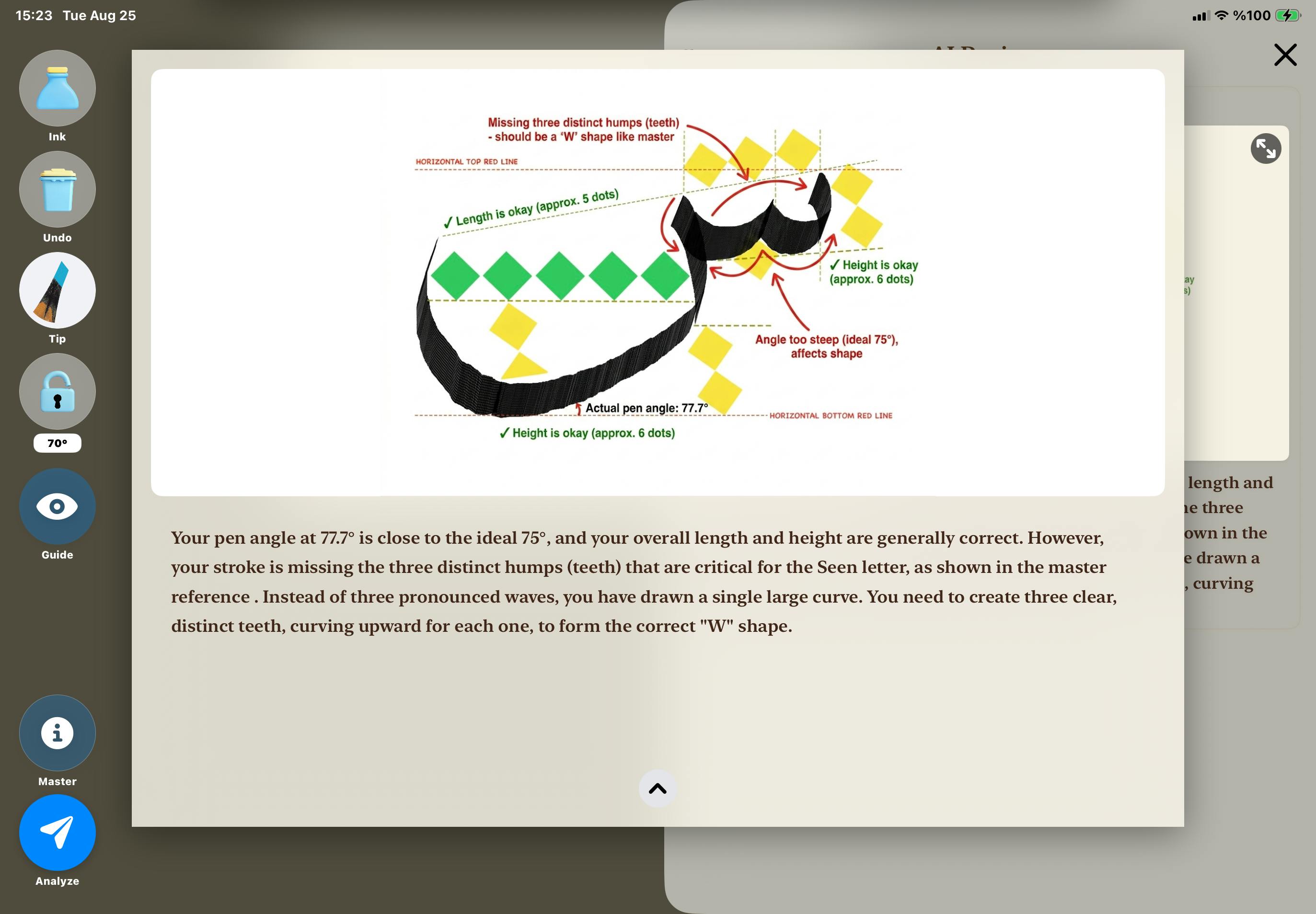
Building Qalaris forced me to simulate a flat-cut calligraphy nib with round hardware, teach a multimodal model to critique form instead of simply generate it, and redesign my AI credit system after local storage failed.A reed pen does not behave like a digital brush.Its flat-cut nib creates broad or thin marks depending on the direction of movement and the angle at which the writer holds it. Its ink supply is finite. A confident stroke can begin in deep black and weaken as the reservoir empties. The tool is not separate from the letter; its physical constraints help create the form.Apple Pencil, meanwhile, has a round tip.That mismatch became the central engineering problem behind Qalaris, the iPad app I built and shipped for RevenueCat Shipaton 2026. Qalaris combines an Apple Pencil-driven reed pen simulation, guided Arabic calligraphy lessons, multimodal AI review, and a credit system built with RevenueCat.The project began with a cultural goal. Arabic calligraphy is a living artistic tradition taught through close observation, repetition, proportion, and feedback from experienced practitioners. In 2021, UNESCO inscribed Arabic calligraphy: knowledge, skills and practices on the Representative List of the Intangible Cultural Heritage of Humanity: https://ich.unesco.org/en/RL/arabic-calligraphy-knowledge-skills-and-practices-01718I did not want to replace that tradition or the teachers who carry it. I wanted to build a bridge into it: a way for someone with an iPad and Apple Pencil to begin practicing the movement, geometry, and discipline of the art before expert instruction is available to them.That meant the app could not feel like a generic black line on a white canvas.The First Problem Was Not AIIt would have been easy to start with an API call: upload an image, ask a model what it sees, and call the result an AI teacher.But if the drawing tool itself did not resemble a reed pen, the analysis would be evaluating the wrong experience. The first challenge was therefore input and rendering, not AI.Apple Pencil exposes useful signals through UITouch, including azimuth, force, and altitude. Qalaris records those signals while drawing, but the shipped renderer primarily uses azimuth to determine nib orientation and force to influence width.The normal angle engine begins by calibrating against the way the user naturally holds the Pencil. It then maps a small azimuth change into the nib-angle range used for freehand rendering:delta = calibrationAzimuth - currentAzimuth progress = clamp(delta / inputRange, 0, 1) nibAngle = 68° + progress × (90° - 68°) That mapping is intentionally constrained. It gives users responsive rotation without allowing every tiny movement of a round Pencil to turn into a dramatic rotation of a flat digital nib.Each guided lesson can lock the nib to its exact configured target angle, including targets outside the 68–90 degree freehand range. The freehand engine itself is not smoothed; only releasing an override blends back to the live angle with a half-second smooth-step. This deliberate training control lets a learner focus on shape and proportion while holding a stable nib position.Rendering a Flat Nib One Segment at a TimeThe renderer runs from a CADisplayLink that requests up to 120 Hz on supported displays. Each update reads the active Pencil touch, calculates the rendered angle and width, and adds a small CAShapeLayer mesh between the previous and current points.In Normal (unsi) mode, that mesh is a four-corner polygon oriented by the calculated nib angle. It behaves like the footprint of a broad, flat nib.In Wild (washi) mode, the renderer creates a rounded capsule whose width responds more aggressively to force. This produces a different stroke character for thinner and more expressive marks. Demonstration of normal and wild pen tip modeI also wanted the pen to have a finite ink supply. The app reduces a normalized ink level according to the distance and width of each rendered segment. consumption = segmentDistance × renderedWidth × consumptionFactor As the remaining ink approaches zero, opacity begins to fall and the stroke width tapers. The user can refill from a virtual inkwell and continue practicing. Ink consumption is therefore not a decorative animation added after drawing; it is part of the same loop that produces every mesh segment.Ink DepletionThis architecture also made undo more complicated than removing one path. A single visible stroke can contain many small shape layers, so I group those layers by Pencil contact. A tap removes the most recent group, while a long press clears the entire canvas.I Built the Drawing Engine With Gemini Through Nearly 50 Video IterationsGemini did not merely analyze the finished drawing engine. It wrote and repeatedly revised the engine’s Swift code under my direction.The process was iterative:I ran that version on the iPad and recorded a new demo video.I sent the video back to Gemini, explained what was happening, and described how I wanted the nib, stroke, ink, or transition to behave instead.Gemini used that visual feedback to produce the next code revision.I tested the new version on the device, recorded it again, and repeated the cycle.Over the course of development, I produced nearly 50 videos. They now form a public development playlist on YouTube. Each video captured the current state of the engine, not a polished final demo. As the loop continued, the generated code moved closer to the interaction I had in mind.This was not model training or fine-tuning. It was iterative, multimodal software development:Generated code → Device test → Recorded evidence → Human direction → Revised codeStatic screenshots could show the final shape of a stroke, but video exposed timing, rotation, pressure response, and transitions between frames. Gemini generated the revisions; I defined the desired behavior, evaluated every result on real hardware, and decided which changes survived.The More Elegant Angle Engine That Felt WorseOne of the most useful parts of this project was an experiment I eventually removed.The original angle mapping could saturate at its upper bound. During measurement on an iPad Air with Apple Pencil, I saw a natural hand sweep of roughly 40–45 degrees, while the engine mapped a much smaller input window into a 68–90 degree output. In some test strokes, the result spent too much time pinned at 90 degrees.I replaced the hard mapping with a continuous hyperbolic tangent function:nibAngle = centerAngle + halfRange × tanh(gain × delta / halfRange) The goal was a 40–110 degree output with a linear-feeling center and soft asymptotic limits. I also tested a three-degree-per-frame rate limiter.On paper, the new engine was better. It eliminated measured saturation in my test and expanded the observed output to approximately 45–109 degrees. It satisfied the numerical requirements I had written before implementing it.It also felt worse to draw with.The problem was not only mapping. A real reed pen has a physical flat edge that the writer can feel. Apple Pencil is round and can rotate subtly in the hand during a stroke. Expanding the digital range made those ordinary grip movements much more visible. Lower sensitivity made the target angles unreachable; higher sensitivity made the nib unstable. Additional filtering reduced responsiveness and risked making recorded angle data disagree with what the user intended.So I reverted the experiment.The shipped version keeps the narrower freehand mapping and uses stable per-letter overrides where precision matters. That decision taught me something I want to remember: a mathematically cleaner input model is not automatically a better interaction model. When software is translating imperfect hardware into a physical metaphor, feel is part of correctness.Giving the AI Enough Context to Be UsefulOnce the drawing experience worked, I could build the analysis pipeline.Before an analysis starts, Qalaris performs local validation. An empty canvas is rejected without spending a credit. Guided lessons also evaluate whether enough drawing appears in the target region; an incomplete attempt can be cancelled or deliberately submitted. Drawing outside the letter area is rejected.Incomplete drawingThe app then captures only the guide area. It temporarily hides the traceable letter so the model cannot mistake the guide glyph for the user’s work, while retaining the measurement overlay used to reason about alignment and proportion.Along with the image, the app sends a compact summary of the rendered stroke data:Average rendered nib angleAverage pressureStroke durationRecorded point countThe backend is a Python Flask service deployed on Google Cloud Run. It normalizes the submitted image to the master-reference dimensions, loads the matching master image and letter-specific geometric metadata, and constructs the analysis prompt.The request to gemini-3-pro-image contains three ordered parts:The analysis instructions and structured measurementsThe master reference imageThe user’s drawingThat ordering matters. The master establishes the target; the second image is the work that should be examined and annotated.Instead of asking Gemini to generate a perfect letter from scratch, I ask it to act on the learner’s actual attempt: compare the geometry, explain the most important correction, and return a teacher-style annotated image. The app stores the result in a session feedback drawer so users can revisit both the text and the visual review. session feedback drawer Multimodal responses can contain text, images, or a combination of both. The backend handles this flexibly by parsing every response part, combining available feedback text, collecting generated images, and selecting the largest valid result. If Gemini does not return an image, the Cloud Run backend attempts to generate a fallback annotation with Pillow using the submitted drawing and analysis data. AI-annotated result Multimodal responses can contain text, images, or a combination of both. The backend handles this flexibly by parsing every response part, combining available feedback text, collecting generated images, and selecting the largest valid result. If Gemini does not return an image, the Cloud Run backend attempts to generate a fallback annotation with Pillow using the submitted drawing and analysis data.AI-annotated result Why AI Credits Became a RevenueCat ProblemEach image analysis has a real marginal API cost, so unlimited AI review was not a sustainable default. At the same time, I did not want payment to block the act of practicing calligraphy.The resulting model separates practice from analysis:Free Practice and four guided letters can be practiced without a subscription.AI review is separate and always consumes one CREDIT.A subscription unlocks all ten guided letters and grants a monthly allocation of AI credits.Consumable credit packs support additional analyses without requiring a subscription change.My first credit implementation stored balances locally. That was simple until I tested lifecycle events instead of only the purchase button. A reinstall could lose local state, while poorly coordinated restore logic could duplicate consumable grants. The payment transaction and the balance were living in different systems with no reliable shared source of truth.I replaced the local balance with RevenueCat Virtual Currency using a currency named CREDIT.The iOS app uses RevenueCat SDK 5.83.1 for offerings, purchases, entitlement state, and cached virtual-currency display. The backend holds the RevenueCat secret key and uses the v2 API as the authoritative balance source. Spending is also server-side: the client submits its RevenueCat App User ID, and the server—not the app—decides that one analysis costs exactly one credit.User taps Analyze ↓ Check connectivity and cached balance ↓ Validate the drawing locally ↓ Backend verifies and spends exactly 1 CREDIT ↓ Submit the screenshot and sensor summary for analysis ↓ Refresh the displayed balance This ordering matters. An empty canvas or a cancelled incomplete drawing never reaches the spend endpoint. The app also shows a persistent, gently breathing analysis indicator after spending succeeds, so the user is not left wondering whether a 15–30 second multimodal request is still running.In sandbox testing, I verified the cases that had broken the local approach: a ten-credit purchase produced a balance of ten; one analysis reduced it to nine; an empty submission spent nothing; reinstalling retained the server-side balance in the tested customer flow; and a subscription grant increased the balance without being duplicated by restore.The lesson was broader than payments: AI monetization is a distributed-state problem. Purchase events, recurring grants, consumables, cached UI, backend spending, retries, and restore behavior all interact. RevenueCat removed the need to invent the ledger, but I still had to decide which system was authoritative and exactly when value was consumed. AI Credit PaywallShipping a Focused First VersionShipaton (#shipaton) emphasizes releasing a real product, so I focused Qalaris v1.0 on delivering a complete and polished core experience.Arabic has 28 letters, and Qalaris launched with ten guided letters. Each letter requires much more than an additional row in a menu: a master reference, geometric metadata, a measurement guide, a trace overlay, stroke-order material, target angles, coverage rules, and letter-specific prompt logic.Rather than expanding the workbook before every lesson was ready, I concentrated on ten carefully implemented letters and the systems users encounter throughout the core experience: drawing, validation, AI analysis, RevenueCat credits, network-error handling, feedback history, and App Store readiness.Onboarding, progress tracking, the remaining letters, and a real-time Sensor Lab are part of the roadmap. Prioritizing the core experience allowed Qalaris to move through Cloud Run deployment, RevenueCat integration, App Review, and its first public App Store release during Shipaton.Each guided letter includes its own reference assets, geometry, stroke instructions, target angles, validation rules, and AI analysis logic. The guide system stroke by stroke demonstration Three Lessons I Am Taking ForwardTest the hand, not only the formula. The reverted angle engine improved the metrics but reduced the quality of the drawing experience. Physical interfaces expose weaknesses that a numerical test cannot.Treat AI context and monetization as architecture. The master-first image order, geometric metadata, and sensor summary make the model’s task specific. In the same way, a credit is purchased value shared across the App Store, RevenueCat, the device, and the backend—not an integer that belongs in UserDefaults.Build a bridge into the tradition. Qalaris does not replace master calligraphers or the human relationships through which this art is passed on. Its role is to help more people begin, practice deliberately, and arrive better prepared for deeper instruction.From a Round Tip to a Real ReleaseQalaris began with an awkward hardware question: how can a round Apple Pencil behave like a flat reed pen? Answering it required a rendering engine, deliberate constraints, an honest experiment, letter-specific content, multimodal orchestration, server-side credit accounting, and the willingness to focus version 1.0 on the experience that mattered most.The result is now live on the App Store. Users can practice with reed-pen-inspired physics, work through guided letterforms, and request visual AI review when they want another layer of feedback.The roadmap includes all 28 letters, additional calligraphic styles, progress tracking, and a real-time Sensor Lab with live angle and pressure visualization. Shipping turned those plans into the next chapter of a product people can already hold, draw with, and judge for themselves.Try Qalaris: Watch the demo:
Turning Apple Pencil Into a Reed Pen: How I Built and Shipped Qalaris
Full Article
Original Source
Read the full article at Hackernoon →KhanList aggregates and links to publicly available news content. We do not host full articles from third-party sources. Always verify important information with original sources.