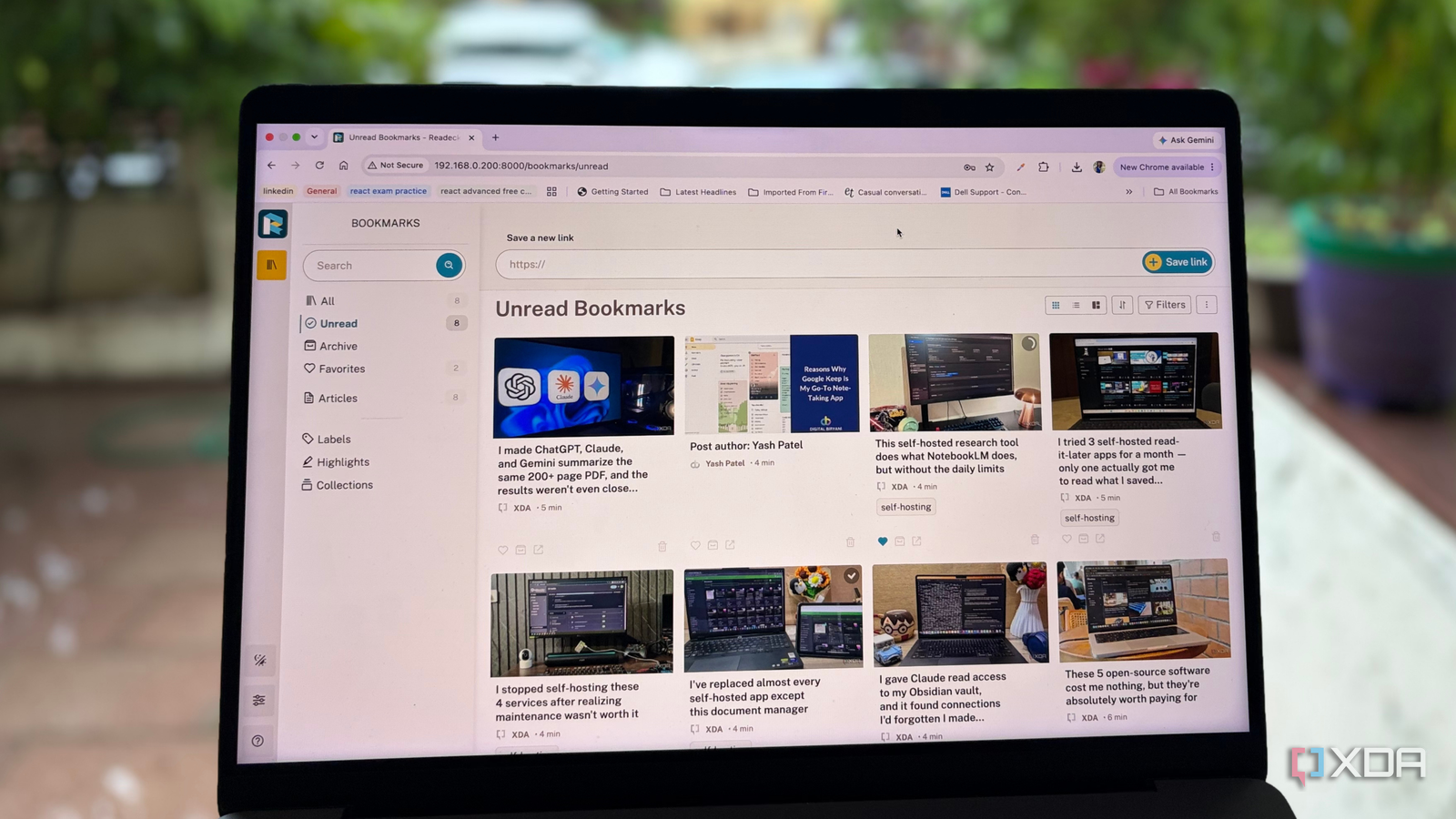
Published Jul 27, 2026, 7:30 AM EDT Beginning his professional journey in the tech industry in 2018, Yash spent over three years as a Software Engineer. After that, he shifted his focus to empowering readers through informative and engaging content on his tech blog – DiGiTAL BiRYANi. He has also published tech articles for MakeTechEasier. He loves to explore new tech gadgets and platforms. When he is not writing, you’ll find him exploring food. He is known as Digital Chef Yash among his readers because of his love for Technology and Food. Most of us come across interesting articles every day, but browser bookmarks aren't a great way to manage them. They quickly turn into a long list of forgotten links, and finding something later becomes frustrating. Read-it-later services solve part of the problem, but many rely on cloud storage, subscriptions, or limited free plans. Since I already have a productive self-hosted stack, I wanted a solution that would keep my reading library private and fully under my control. That's when I found Readeck. What started as another experiment with a self-hosted app completely changed how I save, organize, and actually read the articles I care about. What is Readeck? Self-hosted app gives me a personal reading library When I first came across Readeck, I assumed it was just another bookmarking app. After using it, I realized it's much closer to a personal reading library than a place to dump links I'll never open again. Instead of simply saving URLs, Readeck captures articles and presents them in a clean, distraction-free format that's actually enjoyable to read later. What made me try it in the first place was how easy it is to self-host. I already run several Docker containers on my Windows PC, so installing Readeck took only a few minutes. I created a simple Docker Compose file, started the container, and the web interface was ready without any complicated configuration. If you already have Docker running, it's one of the easiest self-hosted apps you'll deploy. Because it's self-hosted, all of my saved articles stay on my own server instead of someone else's cloud. I don't have to worry about subscription fees, vendor lock-in, or losing access if a service shuts down. It feels like owning my own private read-it-later service, and that's exactly what I wanted. The user interface makes reading experience super smooth Clean layout that keeps me focused on the article The first thing I noticed after opening Readeck wasn't a long list of features; it was how comfortable it felt to read. Every article opens in a clean, distraction-free view that removes the clutter I usually see on websites. There are no flashing ads, pop-ups, autoplay videos, or cookie banners competing for my attention. It's just the content, laid out in a way that's easy on the eyes. The reading experience feels consistent no matter where the article came from. Whether I'm saving a technical tutorial, a news story, or a long-form blog post, everything follows the same clean layout. That consistency makes it much easier to focus on the information instead of adjusting to a different website design every time. The typography and spacing are well-balanced, so I can comfortably read long articles without feeling overwhelmed. I often save documentation and in-depth guides that take 20 or 30 minutes to finish, and Readeck makes those sessions feel much less tiring than reading them on the original websites. It's one of those apps where the interface quietly gets out of the way. Instead of constantly reminding me that I'm using another tool, it lets me concentrate on what I actually opened it for: reading. Power-reader features Smart tools that make every saved article more useful Once I started using Readeck regularly, I realized it offers much more than a clean reading interface. It includes a collection of thoughtful features that make managing a growing reading library surprisingly easy. The browser extension is one of the first features I started using every day. Whenever I come across an interesting article, I can save it with a single click instead of copying links or creating another bookmark I'll probably forget about. It fits naturally into my browsing workflow, so saving something for later takes almost no effort. Tagging helps in organizing articles on Readeck. I organize articles into topics like self-hosting, Docker, AI, and Linux, so finding something later takes only a few seconds. Full-text search is equally useful. Instead of remembering which website published an article, I simply search for a keyword, and Readeck brings it up instantly. It has saved me countless hours while researching new blog ideas. My favorite feature, though, is offline reading. Readeck doesn't just save a bookmark; it saves the article itself. In many ways, it feels like turning every web page into an ebook that lives in my personal library. Whether I'm reading on a flight, dealing with unreliable internet, or revisiting an article months later, everything is still available. I never have to worry about broken links, websites disappearing, or articles being updated after I've saved them. The ability to highlight important passages and add notes while reading makes the research experience better. When I'm researching a topic, I can quickly mark key points and return to them later instead of rereading the entire article. None of these features feel overwhelming or complicated. They quietly improve the experience, making Readeck more than just a read-it-later app. It's become a research companion that helps me collect, organize, and revisit information whenever I need it. The app that finally made me read what I save Before Readeck, I saved far more articles than I have ever read. Now, I actually look forward to coming back to them because everything is organized, accessible, and pleasant to read. It has become one of those self-hosted apps that quietly fits into my daily routine without demanding any attention. Whether I'm collecting research for a blog, saving useful tutorials, or building a library of articles for later, Readeck handles it effortlessly. Readeck Readeck is a self-hosted read-it-later app that saves articles for offline reading, organizes them with tags and search, and creates a private reading library.
This self-hosted app completely changed how I save and read articles
Full Article
Original Source
Read the full article at Xda-developers →KhanList aggregates and links to publicly available news content. We do not host full articles from third-party sources. Always verify important information with original sources.