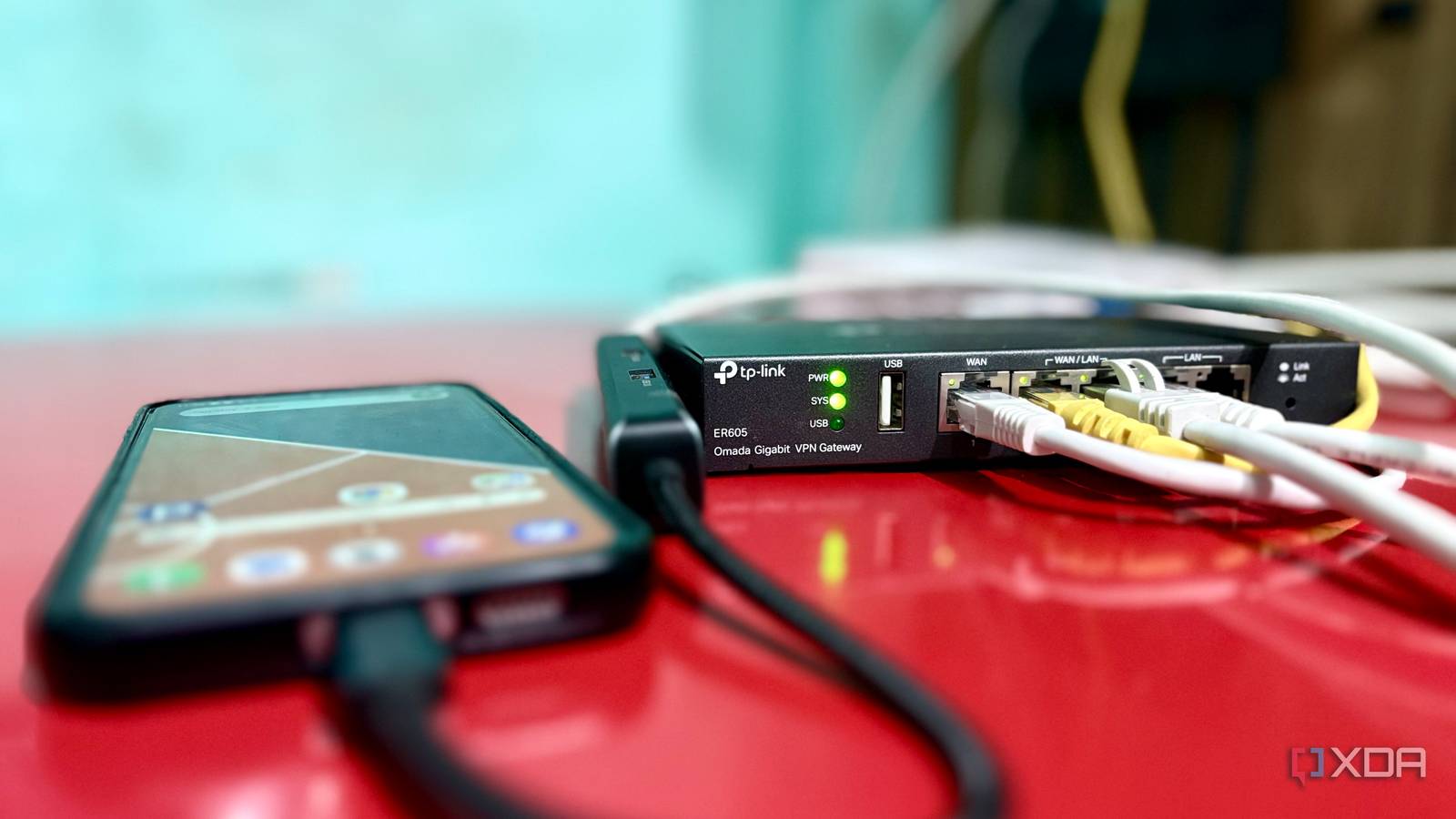
Published Aug 3, 2026, 4:00 PM EDT Shekhar Vaidya is a veteran technology journalist and computer science engineer. He is the founder of TechLatest, where he has spent years providing technical analysis on hardware and Windows ecosystems. Now a Computing Writer at XDA, Shekhar leverages his deep background in NAS, storage solutions, and PC internals to help readers master their tech. There is a widespread assumption that if you want a reliable home network and maximum homelab uptime, you get a secondary internet connection. I did the same. When my homelab grew, I got a secondary line and routed everything through my ER605's dual-WAN setup. The setup worked as expected: the secondary backup line took over when the primary had an outage. But then I noticed something else: I had another connection on my secondary Galaxy phone, sitting mostly idle. I was paying for a plan I barely used. That was when I decided tomake that idle plan earn its keep. The third WAN port nobody was using My backup line was redundant. My old phone made it official. My home network used to be simple, but as my requirements grew, it kept getting messier. Before I built my homelab, my home network was “just Wi-Fi.” I started my homelab with just one service — Jellyfin — and then kept adding more. I started self-hosting more and more of the services I used daily. Today, I self-host services from streaming and photo access to file storage and password management, like Jellyfin, Immich, Nextcloud, and Vaultwarden. That's only the public-facing half; infrastructure, networking, and monitoring tools like AdGuard Home, Unbound, Omada Controller, Portainer, Uptime Kuma, Beszel, Scrutiny, and ntfy round out the rest. My home internet was what kept these connected and working. The more services I added, the more responsibilities came along. And before long, I observed that to keep these services up, I needed a second ISP, so if one went down, the backup could take the load. I got the second line, along with the TP-Link ER605, a multi-WAN gateway to properly handle both. The ER605 handled the split between the two ISPs at a 7:1 ratio with smart failover. Honestly, the ER605 is one of the best networking hardware investments I made in a while. The home network worked. The ER605 split both ISPs; my switch handled distribution — nothing was wrong. But one day I was randomly going through my ISP bills. Two cellular connections, on my primary iPhone and second Galaxy, plus two lines for my home network — four bills in total. I noticed my second phone was almost idle all the time, with an almost unlimited plan, totally unused. It was used only when I was outside my home. Canceling it wasn't an option — I needed the calls and SMS for banking OTPs — but the 5G data underneath was going entirely to waste. I started thinking about what I could do with that unused data. I looked around a bit and discovered that the ER605 supported Android Ethernet tethering as a normal DHCP WAN on the third available port. That discovery became the turning point. I decided to see for myself whether my second Galaxy could handle the role of a real backup WAN. I forced a failure, and this is what happened I killed two internet lines on purpose. The setup was simple; I got a USB-C-to-Ethernet adapter with PD passthrough and a good Ethernet cable to connect my Galaxy to my ER605. I connected to the third WAN port on my ER605 and turned on Ethernet tethering on my Galaxy. But I needed a real situation to actually check whether it worked. So, I decided to force the issue by taking both wired connections and seeing if the gateway would actually fail over to WAN3. I want to make something clear from the beginning: I didn’t use automation apps, custom ROMs, or any special tweaks. I just connected the phone to the gateway via the Type-C adapter. The phone was powered only during the testing sessions, rather than left charging indefinitely. Before starting the test, I made a few changes on the ER605. I set WAN1 and WAN/LAN2 as primary, WAN/LAN3 (the phone) as backup, and the failover mode to trigger only when both primaries fail. That way, it's a last resort, not a load-shared line. And before the actual test, I did a ping test for WAN3, and it returned clean replies; that was my first good sign. Then I physically killed both ISPs by pulling out the cables. The first thing I did after the disconnection was open the Omada control panel and check the status. System Status confirmed it; both WAN1 and WAN/LAN2 flatlined to 0.0.0.0 across IP, gateway, and DNS. And WAN/LAN3, meanwhile, was the only one showing Link Up, with a valid IP and gateway. When that looked good, I did a real test on speedtest.net — 105 Mbps down, 8.9 up, 27ms ping. It was solid enough for browsing, streaming, SSH, and remote access, not just a bare-minimum trickle. Then I opened a few sites in an incognito tab — all loaded fine. By that point, I was convinced that my Galaxy could work as a backup line for my home network. The bigger limitation turned out not to be speed or stability, but something failover couldn't solve. The one thing that doesn't fail over The wall I expected wasn't the one I hit. I was already aware of the common issues with CGNAT because both my ISPs were behind it, and traditional port forwarding wasn’t for me. That's why I set up Pangolin on a VPS in the first place. I still tested the theory with the phone line, half-expecting cellular CGNAT to behave differently and break inbound access to my Pangolin-exposed services. On my iPhone with Wi-Fi off, no Tailscale or NetBird, just a pure public internet path, and it loaded without any issues. Pangolin's outbound-tunnel architecture was already the CGNAT workaround; it was never actually supposed to fail. Cellular CGNAT wasn't special. The CGNAT workaround worked, but with the new setup I was behind CGNAT again. Anything that relies on a direct inbound port forward or a fixed public IP would break. In my case, I didn’t have anything exposed that way; every public-facing service already routes through Pangolin. The limitation is more theoretical than practical for a setup shaped like mine. And then came the wall that did hold up: my backup ISP and cellular plan on Galaxy were on the same carrier. That meant it was a major issue, not because either connection is unreliable, but because they're both ultimately dependent on the same carrier. A primary outage still fails over cleanly to either backup. But a carrier-wide outage would take out the secondary ISP and the phone simultaneously. The one scenario this setup can't actually cover. But it was a trade-off I was willing to accept for now. But maybe in the longer run, I can ditch the secondary ISP and move permanently to my Galaxy. The Galaxy earned a place in my network; I just haven't decided if it's worth leaving on the charger full-time to make that permanent. My spare phone earned a permanent seat The Galaxy proved it could serve as a reliable backup WAN. It wasn't just an emergency hotspot. I still haven’t permanently replaced my secondary ISP with the Galaxy, not yet, and maybe not ever. But it's earned a permanent spot in the conversation. The test was never about tethering but about realizing hardware I already own can solve an infrastructure problem I'd normally throw money at.
This old Galaxy phone became my third WAN port, and it actually works
Full Article
Original Source
Read the full article at Xda-developers →KhanList aggregates and links to publicly available news content. We do not host full articles from third-party sources. Always verify important information with original sources.