
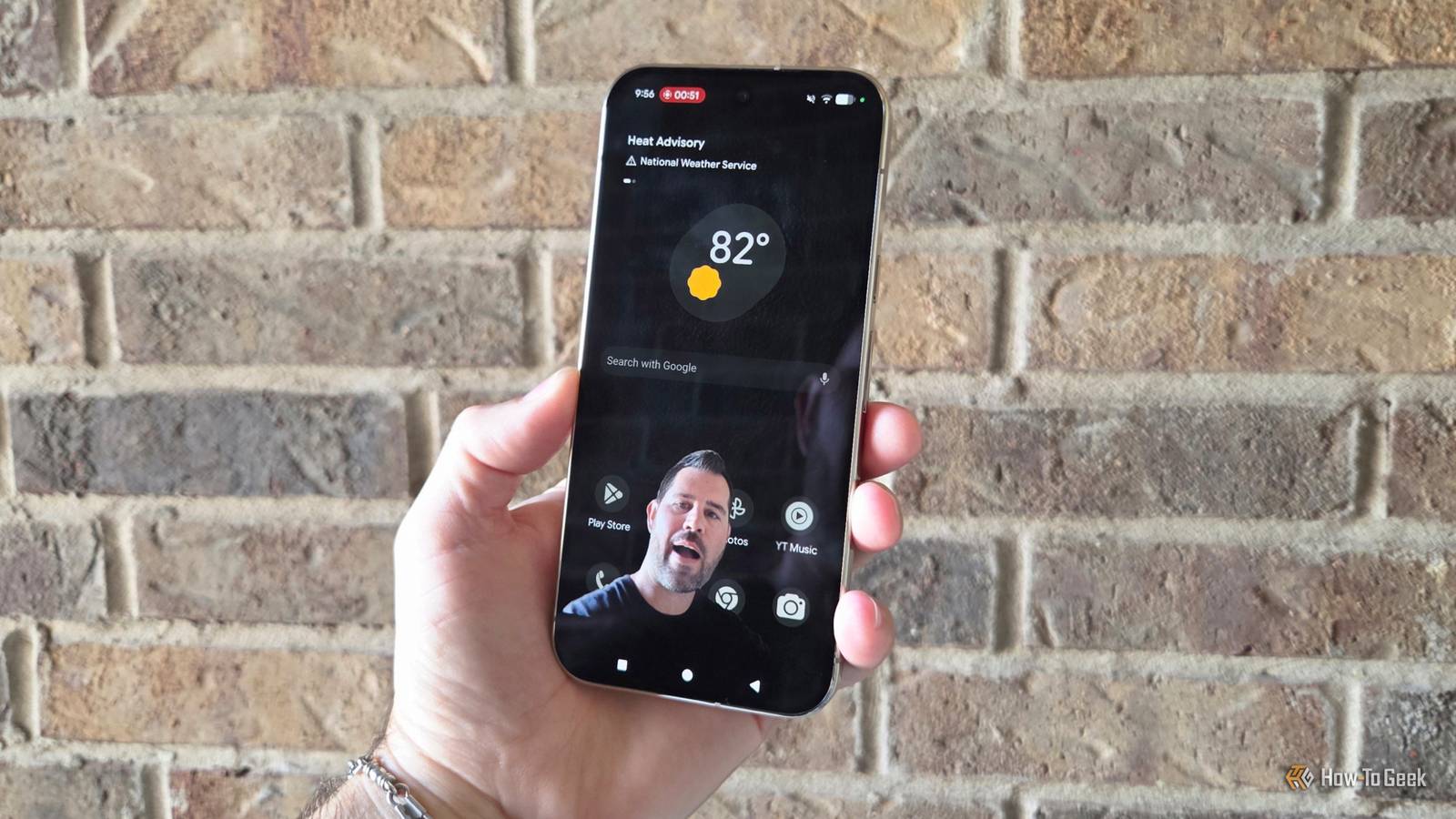
Published Aug 29, 2026, 9:00 AM EDT Cory Gunther is a senior author and Newsletter Editor at Valnet, covering cutting-edge tech, Android, and more for How-To Geek. He's covered Android, cars, and technology for over a decade. When he's not reviewing the latest gadget, you can find him off-roading in his Toyota truck, fixing said truck, or doing something outdoors with friends and family. He's covered CES, SEMA, and MWC and reviewed countless phones, TVs, speakers, EVs, e-bikes, and more. Before Valnet, Cory worked for GottaBeMobile. His writing has also appeared on SlashGear, InputMag, and AndroidCentral. He's written over 9,000 articles. Google Pixel phones are jam-packed with useful features, and sometimes it's hard to keep track of everything. A prime example is the new Pixel "Screen Reactions" feature in Android 17, the first green screen tool for reaction videos built directly into a phone. As many of you know, some of the most popular and viral clips on social media are reaction videos. You've all seen a content creator or TikTok user respond to a clip, but the process of making your own is a bit complicated. Reaction videos often require multiple apps, or are easier with a second device, but that's no longer the case with new Pixel phones running Android 17. If you're a content creator, TikToker, or want to make pro-quality reaction videos, here's what to know. Easily make reaction videos on your Google Pixel A green screen is built right into the screen recording tool Credit: Cory Gunther / How-To Geek Whether you're watching an exciting movie trailer, a football game, popular social media clips, or are jumping on the latest viral trend, the new Screen reactions feature on your Google Pixel makes it easy to capture your screen and record your reaction, live and with audio, all at the exact same time. One take, and you're all done. Just like with other phones, you can launch the screen recorder, but a Pixel lets you simultaneously record a selfie video on top. This feature basically gives you an instant green screen without requiring any other apps or devices. More importantly, the software uses AI to isolate your face and upper body, and can even blur out things around you. It's pretty neat. Here's how to make your own: Get the video that you want to play and react to ready, then Swipe down from the top of your Pixel screen to open all the Quick Settings toggles. Now tap the Screen Record button, the circle with four lines around it. If it's not in your quick settings panel, tap the edit pencil, then find and add the Screen record function. Once you tap on Screen Record and see the pop-up of options, turn on the Show selfie camera and Record microphone toggles. Next, you can adjust your camera bubble, add a background color, select audio preferences, and you're all set. Tap Start at the top, and it'll instantly record yourscreen and selfie camera for your reaction video. Now, all that is left to do is press play on that viral video, and it'll record your reaction in real time. It's a great way to capture real, genuine, and spontaneous reactions. When you're done, swipe down from the top of the screen again, then tap Stop in the screen recorder notification. It's that simple, and now you'll find an awesome reaction video in your Google Photos gallery that's perfect and ready to upload. You didn't have to record multiple takes to get the timing right, and you have your original reaction from the start. No launching CapCut or another app, no editing or merging two clips, no syncing audio, nothing. Your Pixel phone does everything for you. As I mentioned above, your reaction and green screen are completely customizable. You can tap, drag, and resize the video to the perfect size or location on your screen. There's even an option to change the background color, too. Just make sure you get it all set before you hit start. Crop out the beginning or end if you'd like, and you're all set. Don't forget to use the built-in Pixel editor to make any tweaks before you upload it to social media. According to Google, the new Screen Reactions and green screen features are available on Pixel 6 or newer devices running Android 17. Screen Reactions are just one of many new Pixel camera features As you can see, Pixel makes it easier than ever to create authentic yet engaging content. Once you update to Android 17, go ahead and make your own reaction video. It's easy, fast, and fun. In closing, if you have the new Pixel 11 Pro series, you'll find even more neat features similar to this. Google's latest phone has a new Magic Capture mode that we hope trickles down to older models, and under video settings, you'll find a slew of all-new "Creator Suite" tools. Some of those include a built-in teleprompter, audio visualizers, improved speech enhancement, and even camera grid lines with templates that match social media layouts and on-screen buttons. Google Pixel 11 Pro Brand Google SoC Google Tensor G6 The Google Pixel 11 Pro brings improved cameras, a faster Tensor G6 chip, and the HiLight notification LED to Android's official flagship phone.
This new Google Pixel feature turned my phone into a green screen studio
Full Article
Original Source
Read the full article at Howtogeek →KhanList aggregates and links to publicly available news content. We do not host full articles from third-party sources. Always verify important information with original sources.