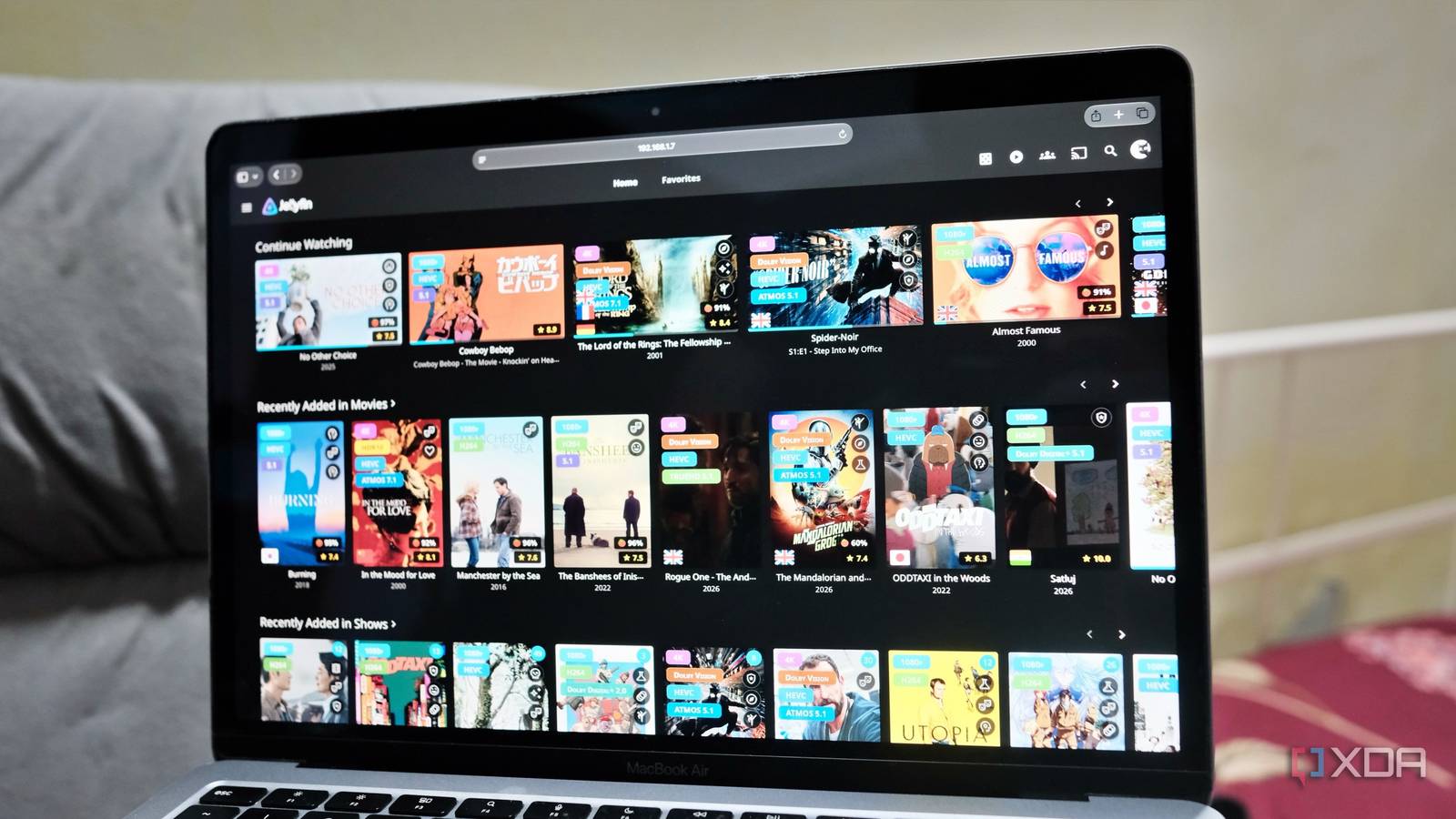
Published Aug 8, 2026, 8:30 AM EDT Samir Makwana is a technology journalist and editor from India since past 18 years and his work appears on MakeUseOf, HowToGeek, GSMArena, BGR, GuidingTech, The Inquisitr, TechInAsia, TechWiser, and others. He has written news, features, and gadget reviews for national technology media publications. His passion is to help people with their technology problems and gadget purchases. For that, he has worked for some of the biggest international technology publications, covering news, explainers, how-to guides, listicles, and product-buying guides. He has worked as an editor and managed teams since 2015. His expertise broadly covers computers, smartphones, game consoles, headphones, smart home products, browsers, and apps. Jellyfin is my go-to media server at home. It plays anything I throw at it without bothering me about a subscription pop-up. Nor do I get a ‘Still watching?’ nag. Even though I’ve decluttered my streaming subscriptions, I do miss those little elements from the interface. Some days it’s a plot summary, and other days it's the ratings that help decide which movie or show to watch. That said, some of the streaming apps I used for comparison aren’t much better. While I’ve used Netflix and Prime Video extensively, I’ve gotten tired of how their recommendations and interfaces behave. To tweak my Jellyfin server with some of those features, I installed Jellyfin-Enhanced plugin, expecting to get keyboard shortcuts and other tweaks. What I got was a plugin that peppered elements all over my Jellyfin server. The other two streaming apps often get those wrong. Poster art finally carries real information about content Quality, ratings, genre, and more at a glance Though I enjoyed the rows of poster thumbnails of my self-hosted media libraries, they only gave me a clue about a movie or a show. Even my family members often point out how little a poster tells them, and more than once they’ve dropped a show a few minutes in because it wasn’t what they expected. That’s why I wanted to install the Jellyfin-Enhanced plugin to help everyone know a bit more about the content. One of the first things I noticed was the Quality Tags, which flagged the content with 4K, HDR, Dolby Vision, and Atmos. I don’t have to open a title’s metadata to view the file name to figure out whether I want to watch it on my TV or stream it on a tablet. Ratings Tags pull scores from Rotten Tomatoes and TMDB straight onto the poster, and the same numbers appear on the player. The country flags on the posters indicate the available audio tracks. Genre Tags appear as themed icons on the poster to make them easy to distinguish, and each poster can have up to three tags. Netflix doesn’t show any of those details on the posters while scrolling through the main interface. Ratings and Language options are absent too. By default, Prime Video requires only a couple of taps to check the supported audio tracks and subtitle languages. Continue Watching finally works the way it should Predictable rows instead of guesswork It’s annoying how most streaming apps randomly move the Continue Watching row. Netflix applies some internal logic to move rows around, and I never figured out why. Prime Video sends me on a wild-goose chase. It removes the show from the row entirely, even the freshly aired one, and I have to find it myself. I end up using the app’s search to discover that a new episode has aired. Jellyfin-Enhanced adds a simple option to remove any title from the Continue Watching and Next Up rows. That doesn’t affect the content's playback position or even the watched state. Enabling the media calendar tells me when the next episode lands instead of tracking it individually. Reviews and recommendations close the discovery gap Ratings and TMDB reviews on titles help The biggest selling point of streaming apps is the typical ‘you may also like’ feature, reminiscent of Facebook’s ‘People you may know’ section. We all know how far off from the target that usually is. But Jellyfin-Enhanced takes care of that with the user reviews from the Jellyfin server users and TMDB Reviews for every title in my library. That means every user on my Jellyfin server can write and submit their review for a movie or a show, and it’s visible only to the entire household. Instead of applying any algorithmic tropes, I get to use Seerr to collect requests directly from my family members. This helps populate the Recommended and Similar sections in Seerr, enabling users to discover other shows and movies. The pause screen finally looks like that of Netflix Real info overlay instead of a frozen frame By default, Jellyfin freezes a frame when I pause a movie. It doesn’t even show the title. With Jellyfin-Enhanced, I get more details directly in the player. When I pause, I see the movie or show's original title, along with a short description, release year, rating, and duration. In a way, it does the same job as Netflix’s pause screen, which tells me at a glance whether the pause was intentional or the stream froze. That put an end to my mom asking every other day if the stream was broken when she accidentally hit pause. The little things collectively transform a Jellyfin server On their own, none of these features are the reason to install a plugin. When I stack them together, they turn a Jellyfin from a bare-bones media server into something that behaves like a proper streaming app. Most importantly, I don’t have to pay a dime for any of those features. Installing and removing the plugin is pretty straightforward. Configuring it will take a lot of time, and it took me nearly an hour. I kept discovering new options at every attempt. And I particularly liked the Active Stream Widget that shows who’s streaming what, on which device, on my Jellyfin server. Yet, I’d recommend restarting the Jellyfin server and refreshing the browser cache after you start tinkering with the features. True to its name, Jellyfin-Enhanced is certainly more than a cosmetic facelift for a media server. Jellyfin iOS compatible Yes Android compatible Yes Desktop compatible Yes
This Jellyfin plugin makes my bare-bones media server feel like Netflix
Full Article
Original Source
Read the full article at Xda-developers →KhanList aggregates and links to publicly available news content. We do not host full articles from third-party sources. Always verify important information with original sources.