
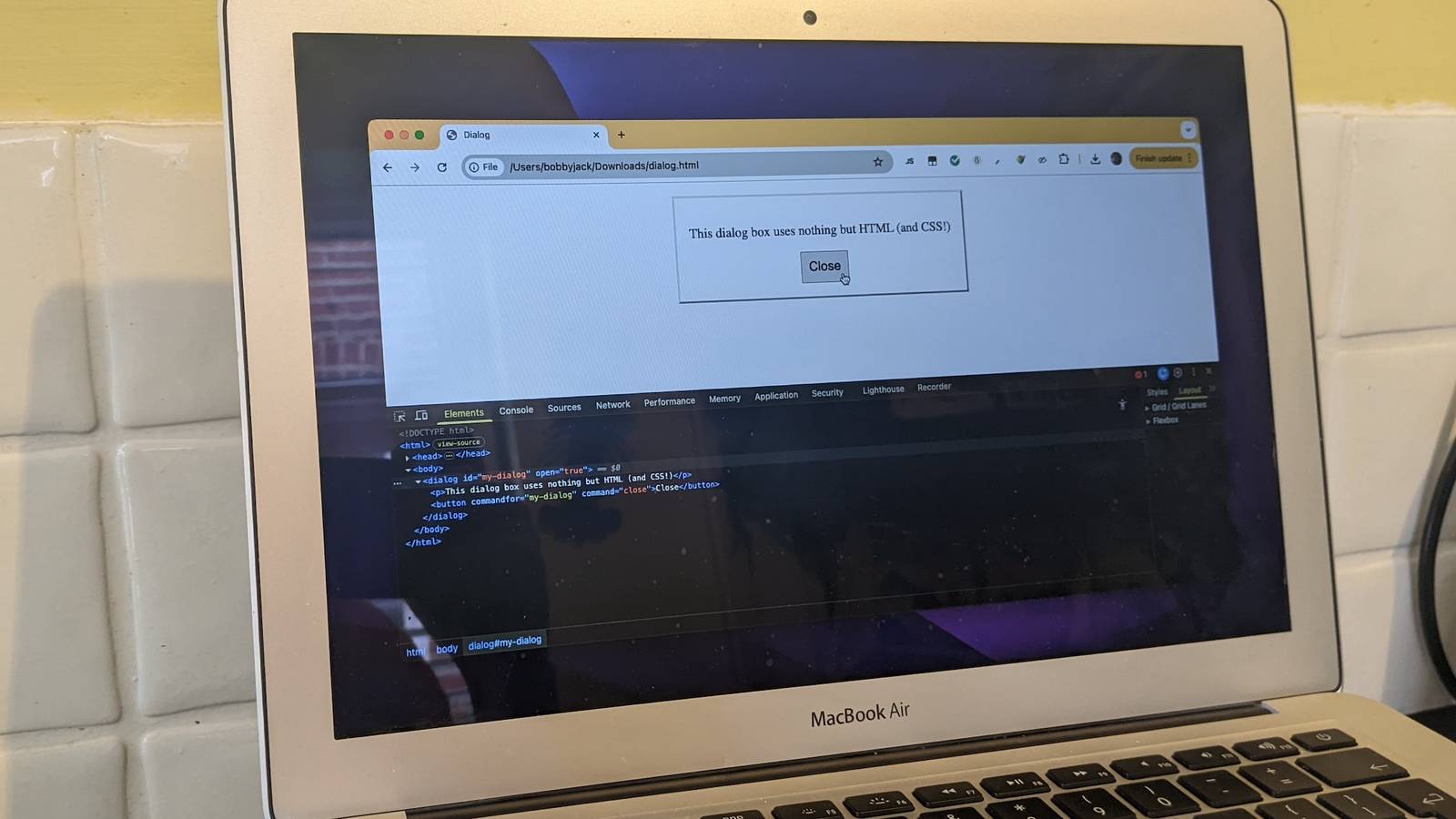
Published Aug 27, 2026, 9:30 AM EDT A technology enthusiast, Bobby studied Computer Science at the University of Southampton before working in a number of roles across industries, from the private sector to the charitable one, at multinationals and startups. He’s helped maintain backend Java servers, designed databases and front-end interfaces, and created a bespoke content management system. Bobby also enjoys video gaming, and has written for several outlets, including a stint as Editor-in-Chief at Switch Player Magazine and contributions to online magazine, SUPERJUMP. Bobby uses a Mac for day-to-day work and an Android phone for distractions. Although you can create a huge range of web page designs using just HTML and CSS, when it comes to interactivity, you’ll need to start writing JavaScript—right? Well, not necessarily. For a start, HTML has a number of interactive components built in, and there are more of these than you might realize. With a simple library, though, you can extend the power of HTML without writing a line of JavaScript yourself. Start with a solid base Many powerful elements are built into modern browsers When HTML was first proposed, the original language consisted of just 18 tags. These included some obvious choices, like title for the name of the overall document, p for paragraphs, and ul for unordered lists. But the only elements that really did anything remotely interactive were the a tag for hypertext links and isindex, a now-obsolete element that created an input box designed for in-page search. As HTML matured over the years, more and more functionality was added to the standard. Support for forms was added, along with many components that receive user input, like text boxes and radio buttons. HTML5 introduced even more interactivity, with more support for common use cases that had previously been handled by each site using its own custom scripting. This means there’s no longer a need to resort to JavaScript in many scenarios. For example, if you’re doing your own client-side validation, you’re probably doing it wrong. Here’s a better way: This produces a text input that will automatically validate, so there’s no need to do so yourself: If you’re building a public web app with a backend component, you should still make sure to validate any input sent on the server side. HTML5 also introduced new elements that act as replacements for common components. For example, the dialog element represents a modal or non-modal dialog box to display an alert, a subwindow, or similar: Hello, world. With the open attribute, the modal will display by default, while the closedby attribute with an "any" value lets you hide the modal by clicking outside it or pressing Escape. These elements support the Invoker Commands API, a way of using declarative markup to provide functionality. So you instruct a button to open a dialog using the declarative "command" and "commandfor" attributes: Hello, world! Show With other elements like details, progress, and input type="color", you can avoid having to code a whole set of common functionality since it’s already built into the browser. Layer on more interactivity with htmx A JavaScript library that enables more declarative functionality without writing any JavaScript Although you can do a lot without JavaScript, you’re still fairly limited by what HTML offers and browsers support. But there is a simple way to do a bit more, not by writing your own JavaScript, but by using code that has already been written. Enter htmx. The htmx library describes itself as "high power tools for HTML." As a drop-in library that you can add to any web page, it extends behavior through the use of custom attributes, primarily targeting AJAX interactions. Here’s a simple example: Click Me This markup introduces a new attribute, hx-get (all htmx attributes begin with the "hx-" prefix). This attribute tells the library to fetch a URL, extract its content, and inject it into the current page—all with a single attribute! In fact, there are some defaults in play too; here’s an equivalent with them spelled out: Click Me In other words, when this button is clicked, the htmx library will fetch the page at hello.html, then inject the contents of its body inside the button. You can use this approach to fetch content from remote services too. Here’s an example that fetches the latest headline from npr.org: Load latest This markup uses hx-target to inject the response HTML in a different element and hx-select to extract just a part of the content that’s returned. This example also uses an intermediate proxy to bypass CORS restrictions, purely for demo purposes. Htmx has support for many more interactions, including—but not limited to—the following: hx-trigger, which can target mouse events and respond when they are received. hx-push-url, which works with the browser’s history API to update the URL without refreshing the page. hx-confirm, which displays a confirmation dialog before an interaction completes. hx-headers, which you can use to manipulate the HTTP headers. And there are many more. Using these in conjunction with carefully crafted response HTML, you can build more complex components. For example, you can create an infinite scroll effect that continually loads content using hx-trigger with the "revealed" value, making sure that the injected HTML also includes htmx attributes. Start as simply as you can; add complexity only when you need it Many websites, and even some simple web apps, can be achieved using static pages and HTML & CSS alone. Even if your web app needs a backend, you can replace a lot of front-end JavaScript coding with declarative markup using built-in features of HTML5 or a convenient library like htmx.
This is the easiest way to build interactive websites without JavaScript
Full Article
Original Source
Read the full article at Howtogeek →KhanList aggregates and links to publicly available news content. We do not host full articles from third-party sources. Always verify important information with original sources.