
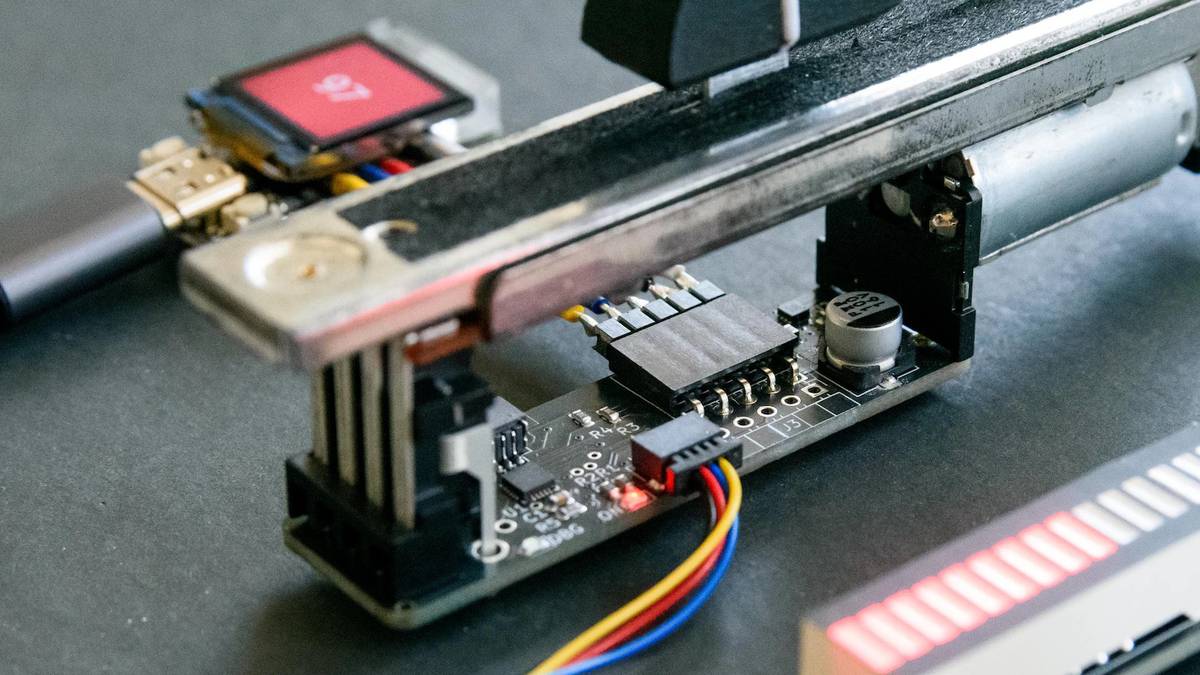
Published Sep 18, 2026, 12:30 PM EDT Tim has been covering technology for almost 20 years, in that time spanning a broad range of topics from security to product reviews. He is especially focused on the Apple ecosystem, productivity, and consumer advice. Over the years Tim has written thousands of articles, reviews, and round-ups in addition to producing video content and original photography. A graduate of journalism, he found his footing as a freelancer with a laptop and loves how he is able to work from practically anywhere. Now a Senior Editor for iPhone, Mac, and Smart Home at How-To Geek, Tim still loves to write. He can also be found crafting round-ups and productivity posts for the Zapier blog. Earlier in his career Tim spent nearly a decade as a writer and eventually Apple section editor for MakeUseOf. Tim currently lives in Brisbane, Australia. Outside of work he loves to hike and work out, play video games, and spend quality time with his wonderful partner and two cats Inka and Roger. There’s something satisfying about physical controls, whether that’s a clicky button, chunky dial, or smooth fader. It feels like motorized faders are having a moment in the ESP32 hobbyist community, so today we’re going to look at how you can put them to use. What are motorized faders? Add a touch of class to your smart home projects Credit: Behringer Have you ever seen footage of a fancy mixing desk in a recording studio where the faders move on their own as parameters change? These are motorized faders, and though they’ve typically only been found in professional settings, they’re finally making their way into hobby projects and the smart home. You can now buy a set of five Behringer MF60T motorized faders for less than $40 (though other fancier options are also available). They’re quiet, smooth, and most importantly, can be adapted for use in ESP32-powered projects. Arguably the best place to put motorized faders is in your smart home, which is what the projects below focus on. Lighting is perhaps the best thing you can control using motorized faders in your home, but volume control, blinds and window coverings, fan speed, and HVAC control are other areas you might want to explore. The presence of a motor allows them to physically move into place as whatever they’re linked to changes, which is what makes them so interesting. You can, for example, adjust the brightness of your lights by sliding the fader to a set position. When you pick a different scene using a voice assistant or mobile device, the faders will update to reflect the new value. This might feel a bit over-the-top, but isn’t that all part of the fun? FaderBuddy for ESPHome A modular control board for your projects FaderBuddy is a modular control board from developer Scott Bezek that allows you to interact with Behringer’s reasonably-priced MF60T motorized sliders within ESPHome. It’s a piece of hardware that sits between the fader and an ESP32 controller running ESPHome, making it possible to control all sorts of smart home variables with a slide. The beauty of this is that ESPHome has been designed to be easy to program using human-readable YAML markup. The FaderBuddy GitHub page is full of resources to help you out, including example YAML, wiring instructions, and diagrams that you can follow. Since FaderBuddy is a control board, you’ll either need to buy a pre-assembled PCB or order your own using the schematics posted on the GitHub page. Once you’re up and running, you can make use of smooth linear fading, configurable detents to switch between preset modes or values, and a “return to center” mode. How you put it to use is entirely up to you, though you can always join the official Discord to ask questions and get ideas. Assuming you can connect your target device to ESPHome, you should be able to communicate with it. This console might become a product of its own FaderBuddy isn’t the only game in town I’d be remiss if I failed to mention Sacrebleu Studio’s Home Assistant lighting control console, since this is what initially led me down the motorized fader rabbit hole. This ESP32-powered chunk of walnut and aluminum doesn’t use FaderBuddy on account of the author’s choice of motorized faders from a company called Alps Alpine. The faders are paired with a rotary encoder and an AMOLED display. The rotary cycles between different rooms in a house, while the faders allow the user to modify lighting values. Switching to a room sees the faders jump seamlessly into position, with several buttons on the left of the console to toggle between different presets. This is all plugged into Home Assistant, hence the project author Alex’s forum writeup. The project itself is a labor of love, but given the amount of interest shown by both the Home Assistant community and smart home enthusiasts on Reddit, the Sacrebleu Studio website has been updated to include an email registration form for anyone who might be interested in buying (or maybe building) one. Even if it remains a personal folly, the idea here is sound. You could get very close using FaderBuddy, some ESP32s, and ESPHome. The idea of using a few rotary encoders and a menu system linked to a display (or even just a few LEDs to indicate which room you’re controlling) is a sound one. Looking for more ways to use an ESP32 to spruce the place up? Check out some projects that make everyday routines feel a little more magical.
This ESP32 project lets you use fancy motorized faders in your smart home (Sep 18 - 20)
Full Article
Original Source
Read the full article at Howtogeek →KhanList aggregates and links to publicly available news content. We do not host full articles from third-party sources. Always verify important information with original sources.