
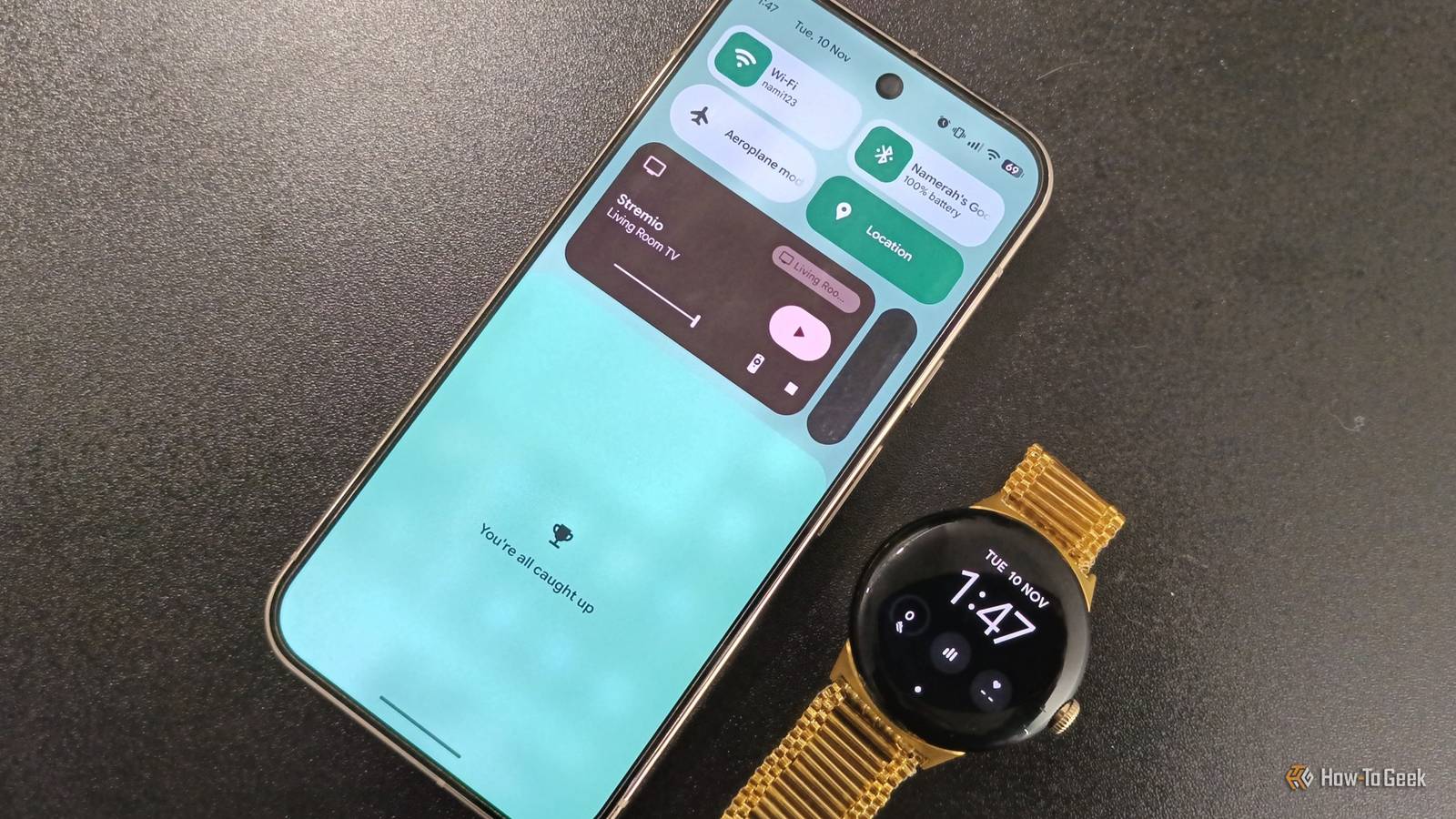
Published Nov 13, 2026, 4:30 PM EST Steve has been editing and writing content for almost two decades, including product reviews, tech news, how-to guides, and even lifestyle and health topics. He’s served as chief editor for publications like Tech Junkie and Alphr, and has written and edited content for many other tech-related sites. His expertise in Windows, Android, iOS, Mac, and Linux simplifies the gadget and computer world for others, enabling them to shop, connect, learn, tweak, and optimize devices and software to suit their needs. When he’s not writing or editing content, he enjoys repairing and optimizing devices (and game consoles), watching movies, golfing, and spending time with the family. Google Pixel, like many other brands, focuses on customization, personalization, and uniqueness. Each company wants to stand out in its own way, hoping to grab new customers with the latest and greatest features. Motorola is known for custom gestures, plus Quick Capture and Flip for DND (all within Moto Actions). It’s also known for unique display configurations like Peek Display, Attentive Display, and Night Display (all within Moto Display). Samsung delivers DeX mode (when connected to a monitor), floating windows, stackable widgets, and an alphabetical app drawer option. Pixel has a few exclusive tweaks, but it stays closer to the Android base, though Google has taken features to the next level and keeps improving them. It also receives new Android updates and features first (non-exclusive ones) before they’re released to other branded phones and carriers. To discover more features and changes in Android 17, hit play below. One prime example of new UI enhancements is the trophy in your notification shade after upgrading to Android 17, and that trophy contains a shortcut waiting to be discovered. If you don’t have the notification trophy yet, you will very soon Ensure you have Android 17 and notification history turned on The first sign of the trophy notification icon was revealed in Android 17 Beta 4 (not QPR1 or QPR2) in April 2026 as part of the Android Beta Program. The official Android 17 release appeared in June 2026 and included that same feature. The notification update was specifically for Pixel devices. That’s when Google replaced “No notifications” with “You’re all caught up.” If you haven’t received the UI update, check whether your phone is running Android 17. Go to Settings -> About phone -> System -> Android version to verify it. Also, make sure notification history is turned on. If you’re not running Android 17, you can manually update your phone by going to Settings -> System -> System update or About phone -> System updates. After it checks, select Download and install if it appears. You can also update your Pixel by sideloading an OTA or letting Google update it automatically. Pixel’s latest Android 17 release has some inspiration from Pixel Watch The secret trophy shortcut and other notification features become one Google has started focusing on making its Pixel phones and watches blend into one cohesive ecosystem. That doesn’t mean watches and phones can have everything in common, but some features or UI tweaks can work on both devices to create a sense of unity. Android Live Updates is one example of a design that started on Android and was carried over to Pixel Watch to display live updates like scores, deliveries, appointments, and more. It’s unpleasant to be bombarded by random notifications that make it hard to find important ones, especially when you need to check them regularly or remember a scheduled time slot, because they are status-based notifications. Now, Live Update app notifications will stand out so you don’t miss them and can respond as needed. The “All caught up” message with a trophy icon in your notification shade is inspired by the Pixel Watch UI, which has the same notification text and trophy. Adding a little whimsical, playful flair from the Pixel Watch UI to Pixel phones helps maintain a sense of cohesiveness. The Pixel trophy icon found in the notification shade is actually a shortcut A quicker way to access your notification history As mentioned, Google Pixel phones stick more to the Android base with a focus on simplicity and cleanliness, but that doesn’t mean they don’t enhance features and UI design. One example is the UI notification update inspired by the Pixel Watch, as mentioned earlier. When you’ve cleared all notifications, your Pixel phone now displays Wear OS’s message in your notification shade, stating, “You’re all caught up,” rather than the standard “No notifications” message. The trophy icon above it is actually a quick link, but that often goes unnoticed. To access the trophy shortcut, simply tap it, and it will go to your notification history. It’s a clever UI addition that makes recovery easier. To see all new features and updates in Android 17 side by side with Android 16, click the play button below. Google Pixel focuses more on stock Android, but it boosts the experience with new features You may wonder why the notification trophy shortcut matters, but it was meant to help you recover a notification quickly and easily when you accidentally close it. We’ve all had those mishaps, but it has always been a pain to navigate to the history list, assuming you had the feature turned on. Now you have a quick link to access it again. Live Updates is another prime example of an enhanced Android feature, giving you important notifications for timely messages, such as Calendar, sports scores, health tracking, deliveries, and more. These two features are currently exclusive to Pixel Watch and Pixel phones, but the UI changes may roll out to other Android phones in the near future. For now, it’s just an exclusive, and just two examples of how Google is trying to create a unified ecosystem across devices.
The trophy icon in your Pixel's notification shade is hiding a shortcut
Full Article
Original Source
Read the full article at Howtogeek →KhanList aggregates and links to publicly available news content. We do not host full articles from third-party sources. Always verify important information with original sources.