
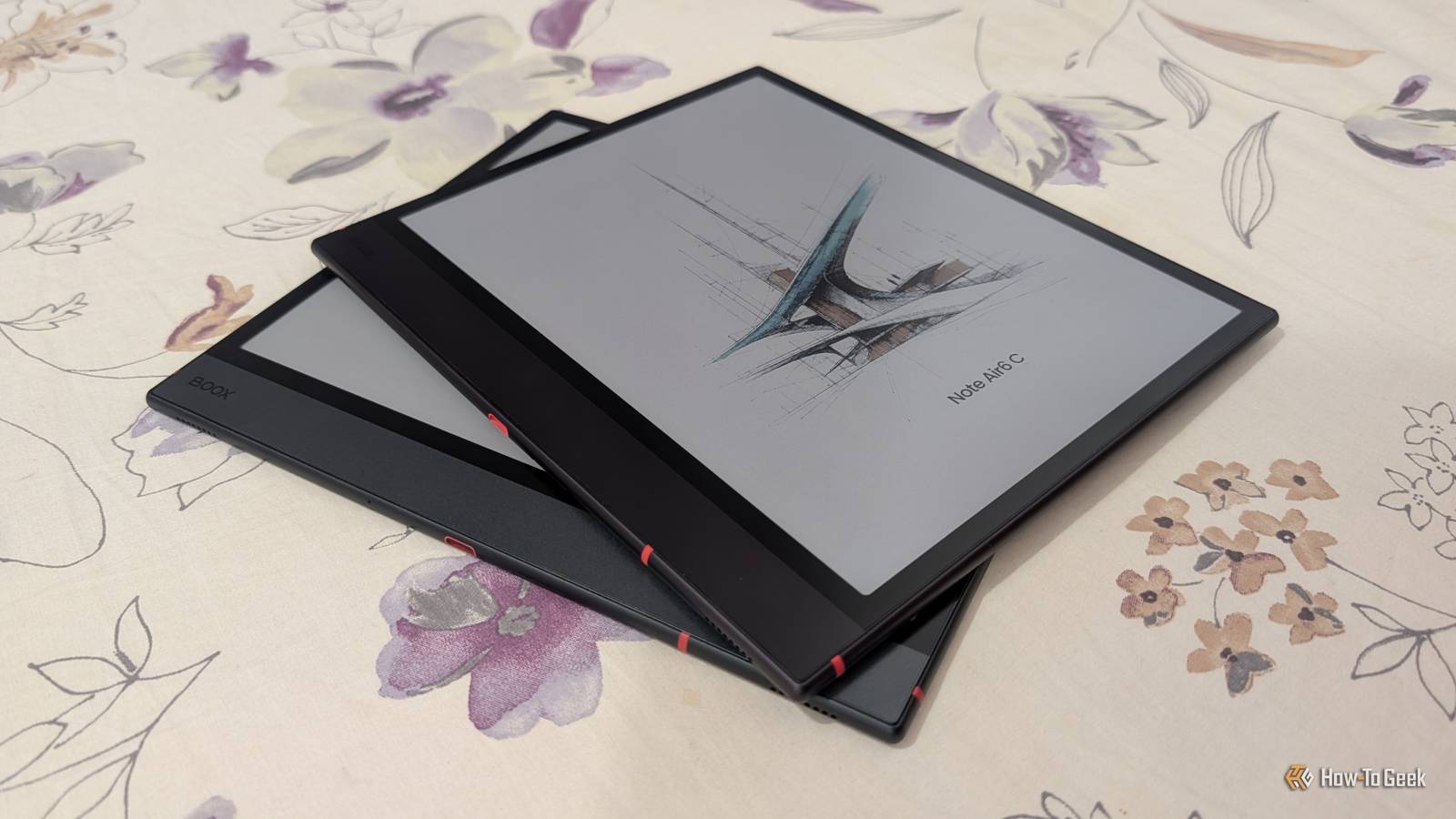
Published Nov 16, 2026, 6:30 PM EST Namerah Saud Fatmi has been writing about smartphones, accessories, e-readers, and apps for nearly a decade. She occasionally branches out into sects like gaming, software, hardware, smart home, and wearables. Before How-To Geek, she was a senior editor at Android Central, and has had bylines at other respectable publications such as Windows Central, iMore, XDA Developers, Neowin, and Good e-Reader. When she isn't writing or testing yet another weird and wonderful new gadget, she spends her free time snuggling with her grumpy feline life partner. Her hobbies include casual gaming, traveling, attempting to pet anything classified as an animal, unnecessarily complicated craft projects, and hunting for the next great bowl of noodles. Sign in to your How-To Geek account Onyx Boox Note Air6 C is the latest Android-powered eReader from Onyx Boox. The brand always knocks it out of the park with its spunky E Ink tablets, offering native OCR, fantastic reading and writing apps, and unrestricted access to the Google Play Store in slim, trim metal bodies. Boox always keeps good on its software promise, delivering timely updates in the three-year timespan of guaranteed software support. The 10.3-inch Note Air6 C follows in the footsteps of the Note Air5 C, which came out a year ago. The brand also released a couple of smaller models alongside the Note Air6 C. Among all the releases, I find the Boox Picco to be the most unique pick of the lot, as it breaks the status quo and offers a unique experience. I'm afraid I can't say the same for the Note Air C series from Boox because the last three generations have been nearly identical. Going into this review, I was really hoping that Boox made noteworthy changes with the Note Air6 C. Onyx Boox Note Air6 C More of the same 7.5/10 Brand Onyx Boox Screen E Ink Kaleido 3 Screen Size 10.3 inches Enjoy the best of ePaper with the 10.3-inch Onyx Boox Note Air6 C. Powered by a 4nm octa-core processor, it runs Android 16 and gives you unbridled access to the Google Play Store. Reading and writing is a premium experience on this eye-friendly, stylus bearing tablet. Resolution 1860x2480 Storage 64GB, expandable up to 2TB via microSD Connectivity Wi-Fi, Bluetooth 6 Front Light Yes OS Android 16 Battery 3,700mAh CPU Qualcomm 6690 + BSR GPU RAM 6GB Document Formats PDF, CAJ, DJVU, CBR, CBZ, EPUB, EPUB3, AZW3, MOBI, TXT, DOC, DOCX, FB2, CHM, RTF, HTML, ZIP, PRC, PPT and PPTX, plus PNG, JPG, BMP, TIFF, WAV and MP3 Ports USB-C Weight 440g Pros & Cons Android 16 with 3 years of updates Unrestricted access to Play Store The best native apps and features of any E Ink tablet Upgraded 4nm octa-core processor Top-notch hardware with expandable storage Features like BOOXDrop and BOOXDrop Screen Mirroring are unrivalled Almost exactly the same as previous-gen iteration Retains flawed stylus design Cases are insanely expensive Minor glitches present Super slow 15W charging Price and availability Onyx Boox launched the Onyx Boox Note Air6 C on September 16, 2026. The Note Air6 C is priced at $579.99 and comes with a Boox Pen3 stylus in the box. Accessories such as the magnetic folio case and the keyboard case are sold separately, with the basic case going for $50.99 and the keyboard case selling for $109.99. In contrast, the previous iteration is still up for grabs and costs $529.99 for almost the same specs, though the accessories cost the same. Specifications 7.5/10 Brand Onyx Boox Screen E Ink Kaleido 3 Screen Size 10.3 inches Resolution 1860x2480 Storage 64GB, expandable up to 2TB via microSD Connectivity Wi-Fi, Bluetooth 6 Front Light Yes OS Android 16 Battery 3,700mAh CPU Qualcomm 6690 + BSR GPU RAM 6GB Document Formats PDF, CAJ, DJVU, CBR, CBZ, EPUB, EPUB3, AZW3, MOBI, TXT, DOC, DOCX, FB2, CHM, RTF, HTML, ZIP, PRC, PPT and PPTX, plus PNG, JPG, BMP, TIFF, WAV and MP3 Ports USB-C Weight 440g New name, same look Did this even warrant a new release? The Onyx Boox Note Air6 C has the hallmarks of a great Android eReader. The sleek chassis is exceedingly thin, measuring just 5.8mm thick, and the body weighs a mere 440g. In comparison, the Samsung Galaxy Tab S11 Ultra weighs 692g and measures 5.1mm thick. The power button has a fingerprint sensor incorporated within it and is situated on top. The right side has volume buttons and is magnetic, so the Boox Pen3 stylus can be docked. Boox reinforced the magnetic strength of the stylus docking side, as the stylus used to fall off quite easily on the Note Air5 C. Apart from the slight difference in color, the two Note Air series tablets are virtually indiscernible from one another. I wish Boox had changed the stylus, because I hate the Boox Pen3 with a passion. The writing experience is lovely, and you get that scratchy feel when etching on the ePaper screen. My beef with the stylus is its poorly designed nib storage compartment on the back with a magnetic cap. The nibs always fall out, and at this point I have lost all my spare nibs from the previous Pen3. Older styli worked perfectly fine, but Boox decided to fix what wasn't broken. A perfectly good stylus has been replaced by an annoying one. The 10.3-inch E Ink Kaleido 3 display with front lights is the main attraction. The large, color screen is perfect for graphic novels and comics. Users can adjust brightness, color temperature, other color settings, and screen refresh modes on the fly. Boox paired this display with solid hardware specs like Bluetooth 6, Wi-Fi, stereo speakers, a mic, a 4nm Qualcomm 6690 processor, a BSR GPU, 6GB RAM, 64GB onboard memory, a microSD port that supports up to 2TB of expansion, a 3,700mAh battery, and a USB-C port with 15W wired charging. The Note Air6 C retains the magnetic pogo pins from the Note Air5 C that connect the Boox keyboard case wirelessly. Because of this, you can use the Note Air5 C keyboard case with the newer model. With light use, the battery lasts for weeks. With heavier use, you can still get several days of use out of a full charge. It charges at a snail's pace, supporting only 15W wired charging via USB-C. Ghosting is noticeably better than in past generations, and the tablet lets you force-refresh the screen at any time to clear lingering ink particles. Another fantastic feature is USB-C OTG support, which lets you connect a USB-C flash drive or supported device. The new 4nm octa-core processor is a smidge faster than the one from the last Note Air C tablet, but it's hardly noticeable unless you actively push the device to its limits. I genuinely don't think there are sufficient hardware changes to warrant a new release. I don't see why Onyx Boox didn't wait a little longer between releases. The E Ink Corp just unveiled E Ink Spectra 6 9-Color, the latest color E Ink display tech that features better vibrancy thanks to a nine-color base. We've been seeing the same hardware since the Note Air3 C was released in 2023. Three years on, Onyx Boox had the opportunity to give a huge display upgrade to the series, but decided to fumble hard instead. The software keeps me coming back Boox sticks it in the face of Kindle and Kobo Any Onyx Boox tablet runs the same OS, so you get a consistent experience across models. The Boox Note Air6 C runs BOOX Firmware V4.3 based on Android 16 out of the box. You get all the base elements of Android, from the notification panel and status bar to gesture navigation and extensive settings. The Google Play Store lets you download any app you could want, from the Kindle Store and Audible to Google Chrome and Spotify. What sets Boox apart is its excellent suite of native apps and tools. I love the Boox Notes App for note-taking, rough sketching, and general writing. The native OCR converts handwritten text really well, and you can even write into any text input field on the entire tablet. Calendar Memo lets you take notes, write down memos, create reminders, and add events. You sync third-party calendars and apps with it too, such as Google Calendar, Microsoft To Do, and CaLDAV. The built-in reading app, NeoReader, syncs your progress online, offers an exhaustive set of options and settings, and supports a very wide range of file formats. The Note Air6 C supports PDF, CAJ, DJVU, CBR, CBZ, EPUB, EPUB3, AZW3, MOBI, TXT, DOC, DOCX, FB2, CHM, RTF, HTML, ZIP, PRC, PPT and PPTX, plus PNG, JPG, BMP, TIFF, WAV and MP3. There is no dedicated data-copying feature between old and new Boox tablets, like Samsung Smart Switch or Google's native Android-to-Android data-copying tool. But thanks to OTG support, I managed to connect my old Note Air5 C to the Note Air6 C and copied my eBooks and files over. Apps still have to be installed manually. There were also some minor glitches on the tablet, though they were noticeably fewer than what I faced on the Note Air5 C at launch. This is a given with any new smartphone or tablet, however. What's important is that Boox always addresses issues and releases firmware updates and patches quite frequently. I am anticipating an over-the-air update to iron them out. Should you buy the Onyx Boox Note Air6 C? You should buy the Onyx Boox Note Air6 C if: You don't own an Android eReader already You want at least three years of guaranteed software updates You need a reliable E Ink tablet for reading and writing You want the best software experience on an eReader You should not buy the Onyx Boox Note Air6 C if: You own the Note Air 5C or 4C You want the best value for money My verdict regarding the Note Air6 C is two-fold and depends on the context. On the one hand, it is a sleek piece of hardware that performs well, is jam-packed with features, and has reliable software updates. It is a stunning, well-made tablet overall. But on the other hand, it does not add anything worth your attention over the last-gen Note Air5 C. Even though the processor has been upgraded, the difference in real-life performance between the two tablets is entirely negligible. If you are new to the world of Android eReaders, I say go for the latest and greatest, just so you're guaranteed to get software updates for another three years from now. There's a $50 price difference between the two, which is worth an extra year of OS updates. However, if you're thinking about upgrading your existing Onyx Boox Note Air5 C to the newest model, don't do it. Your old Boox is still supported for two more years. Wait for the brand to add significant changes to the Note Air C series; you'll actually get a proper upgrade. The key takeaway is that Onyx Boox makes excellent Android eReaders, but the brand needs to do a major refresh of the Note Air C lineup instead of re-releasing the same product for the fourth time. You can't go wrong with a Boox tablet, but choosing the newest model isn't necessary. Onyx Boox Note Air6 C Brand Onyx Boox Screen E Ink Kaleido 3 Resolution 1860x2480 Storage 64GB, expandable up to 2TB via microSD Connectivity Wi-Fi, Bluetooth 6 Front Light Yes It doesn't add much to the previous-gen Note Air 5C, but the Onyx Boox Note Air 6C is the latest Android eReader from the brand. Equipped with handy tools like a stylus and a stunning E Ink screen, this is easily one of the most premium eReaders out there.
The new Onyx Boox Note Air6 C is just the last-gen Note Air5 C masquerading as a new release
Full Article
Original Source
Read the full article at Howtogeek →KhanList aggregates and links to publicly available news content. We do not host full articles from third-party sources. Always verify important information with original sources.