
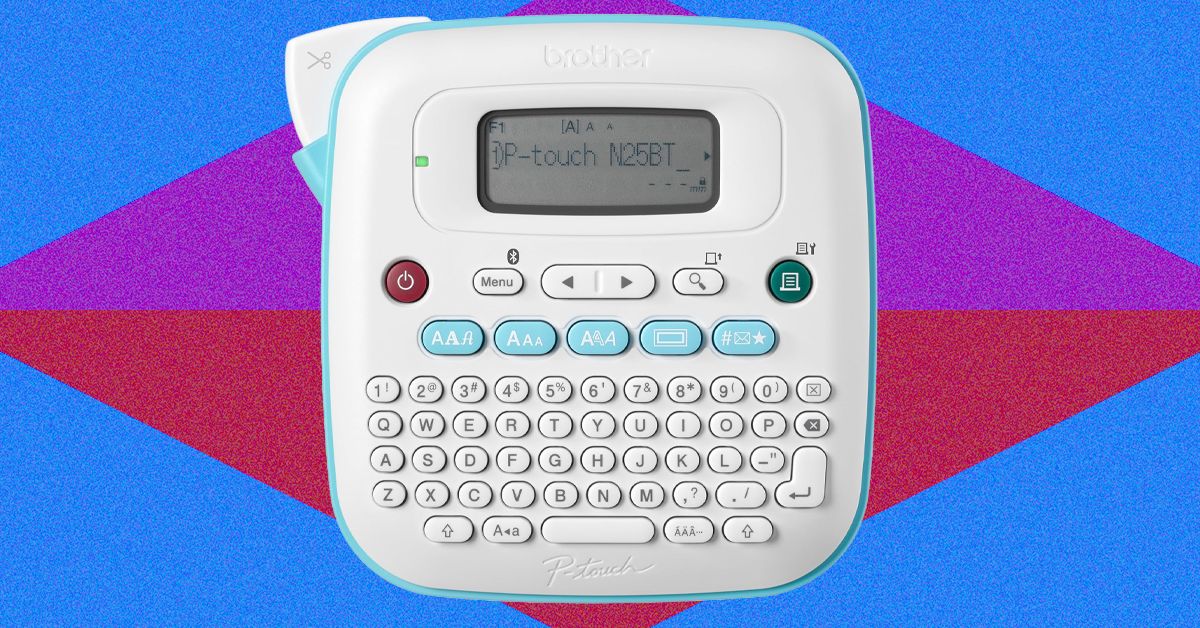
There’s something oddly satisfying about a perfectly labeled spice rack or a pantry with bins that specify exactly what they contain—even if it’s plain as day that the “pasta” bin contains boxes of dried penne. Taking a label maker to the most clutter-laden corners of my home helps me feel organized. And frankly, feeling organized externally often helps me feel organized internally, too.With that in mind, I researched, selected, and tested some of the top home label makers to see how intuitive different devices were to use and how well their labels stuck to my kids’ dresser drawers, toy bins, water bottles, and lunchboxes. Read on for my thoughts about the best machines for various needs. Just beware that household organizing with a label printer can get addicting and lead to joy-inducing clean spaces.Want more recommendations for upleveling your life at home? Check out our guides to the best Cordless Vacuums, Office Chairs, and Coffee Makers.Also TestedWhat Are the Different Kinds of Label Makers?Are Bluetooth or Traditional Label Makers Better?Can You Use Label Maker Labels on Clothing?How I Tested These Label MakersLove WIRED? Add us as a preferred source on Google to see more of us.Best OverallPhotograph: Alexis BergerPhotograph: Alexis BergerPhotograph: Alexis BergerThere’s not a whole bunch more the average person could want in a handheld label maker other than what the PT-n25bt offers, particularly at such an approachable price. With this device, even a label-making newbie should have no issue making a custom tag in less than a minute. After clicking the tape cartridge into place, simply close the back of the machine, power it on, and type directly onto the standard QWERTY keyboard. Press print, and then use the on-device cutting mechanism to get a clean, straight edge every time. If you’re not in a huge rush, you can putter around with three font options, seven font styles (think: bold, underline, italic), 15 text frames, and hundreds of symbols. The LCD screen lets you preview any edits you make to your label, minimizing unintended surprises you get when it, say, spits out a thick border design you really hate.For even more design flexibility, you can opt for the Brother Design&Print 2 companion app that’s available on iOS and Android devices. It connects via Bluetooth and provides dozens of templates geared toward specific purposes, like gift tags, file folders, or food containers. You can also design your own custom label on the app without using a template. If you go this route, you’ll have way more font, frame, and design options at your disposal than if you design directly on the app.The labels themselves offer a level of customization. Because the tape cartridges are available in 17 colors, you can choose to make your labels look all your own, particularly if you opt for a less-common color, like black print on green tape. The labels also hold up to the conditions. Brother markets its durability-minded laminated BTag label tapes—specifically for its P-touch line of label makers—as being water-, temperature-, and fade-resistant, along with microwave-, dishwasher-, and freezer-resistant. In my few weeks of testing, these claims held up.For all of its wins, there are a few drawbacks of the PT-n25bt: It runs on a whopping six AAA batteries that aren’t included in the box. You can also power it with an AC adapter, but you have to buy that separately for $26. You’re also limited to labels that are 12 millimeters wide (roughly half an inch), so you’ll need to stack labels if you’re looking for a bigger visual.SpecsType of inkThermal transferPower source:6 AAA batteries or AC adapter, neither includedDimensions:5.9" x 5.9" x 2.8"App compatibility:Brother Design&Print 2Tape-width range and cost:12 mm width, available in 17 colors; 13.1-foot tape cartridges for $7Warranty:1 year limitedBest UpgradePhotograph: Alexis BergerPhotograph: Alexis BergerPhotograph: Alexis BergerBrotherP-touch Cube Plus (PT-P710bt)If what you value in a label maker is a result that looks polished, professional, and decidedly not homemade, the P-touch Cube Plus is calling your name. It allows for great versatility in its labels, printing on tape as narrow as 6 mm and as wide as 24 mm, meaning you can use it to organize the small jars on your spice rack and large boxes in your storage unit.The Cube Plus also supports a huge selection of designs, with hundreds of fonts, borders, and graphics, available via your choice of three design apps and platforms accessible via Bluetooth connection: Brother Design&Print 2 (also compatible with the Brother PT-n25bt), iPrint&Label, and P-touch Editor software that you can use with a desktop, the latter of which I did not test. Like the Brother Design&Print 2 app, discussed above, the iPrint&Label is seamless to use. Its templates are less ornate, but on this upscale device, I found this simple quality to be nice, eliminating the time-suck of customization flourishes but still producing a professional-quality label. You do have to use one of these apps, though, as there’s no on-device keyboard. Once you select “print,” the connection is quick—just a couple of seconds—and the Cube Plus self-cuts your new label for you.At nearly three times the price of the Brother PT-n25bt, the Cube Plus’ upscale features do come at a cost, though—and the bills don’t stop once you buy the machine. The Cube Plus works with Brother’s TZe laminated label tape; replacement cartridges start at $15 for black print on clear tape and are pricier for specialty colors, like $24 for black print on glitter yellow tape. But the labels feel as premium as they claim to be, with text printed between seven layers of lamination. In my testing, the tape held up to heat, sunlight, microwaving, dishwashing, and general wear and tear.Price aside, there is something joy-inducing about making a jazzed-up label—my 4-year-old, for one, was thrilled about his shimmery gold new lunchbox label. Also, I was intrigued to learn that Brother sells a TZe fabric label tape that’s compatible with the Cube Plus. Though I didn’t test it, fabric tape is something I haven’t seen as an option on other home label makers, and parents in particular will find the ability to label clothes super-useful, even though this version still requires the extra step of ironing it on.SpecsType of inkThermal transferPower source:USBDimensions:5" x 2.6" x 5"App compatibility:Brother Design&Print 2, iPrint&Label, or P-touch Editor software from a PCTape-width range and cost:6 mm, 9 mm, 12 mm, 18 mm, and 24 mm widths, available in dozens of color options, starting at $15 for 26.2-ft tape cartridgesWarranty:1 year limited
The Best Label Makers (2026): Brother, Niimbot, Dymo
Full Article
Original Source
Read the full article at Wired →KhanList aggregates and links to publicly available news content. We do not host full articles from third-party sources. Always verify important information with original sources.