
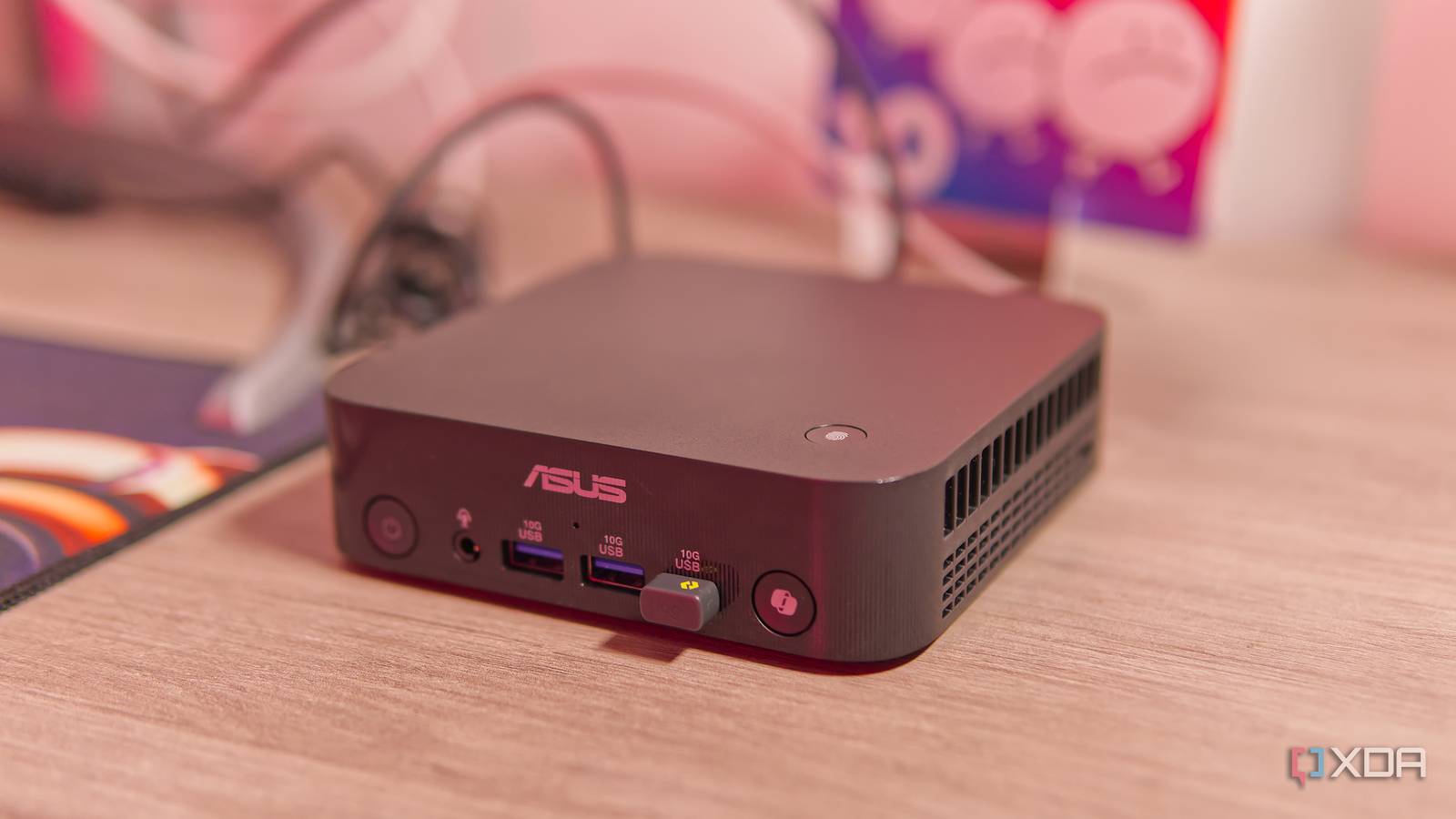
Published Nov 1, 2026, 1:30 PM EST João has been covering the tech world for over 7 years, with a heavy focus on laptops and the Windows ecosystem. I also love all things tech and videogames, especially Nintendo, which he's always happy to talk about. Prior to joining XDA in 2021, he worked at Neowin: https://www.neowin.net/news/poster/jo%C3%A3o-carrasqueira/ Sign in to your XDA account I love mini PCs. And ever since trying the M4 Mac Mini, there's been no doubt in my mind that it's the best one out there. But it's been two years since that model came out, and Asus has a new model, the ExpertCenter PN55, so I was obviously curious to see where the rest of the market is now. The ExpertCenter PN55 is a solid mini PC in many ways. It's extra compact, easily upgradable, it has a fingerprint reader, and it features the latest hardware from AMD. I can use it for all my usual workflows without too much of a problem. But it says something that I still find myself longing for my two-year-old Mac Mini. About this review: Asus sent me the ExpertCenter PN55 for the purposes of this review. The had no input into the contents of the review, nor did it get an early preview of it. Asus ExpertCenter PN55 Tiny, but packed with ports and upgrade options 7/10 CPU Up to AMD Ryzen AI 9 HX 470 Graphics Up to AMD Radeon graphics 860M (integrated) Memory Up to 64GB DDR5 (upgradeable) The Asus ExpertCenter PN55 is a compact mini PC with AMD Ryzen AI 400 series processors, delivering smooth-day-day performance for common tasks, in addition to supporting local AI workloads. However, it struggles with more resource-intensive tasks. Pros & Cons Upgradeable up to 96GB of RAM and 2TB of storage Sollid CPU performance Tons of ports for such a small chassis Fans can get loud GPU performance could be better AI capabilities are not impressive Pricing and specifications Asus announced the ExpertCenter PN55 at this year's Computex in early June, and it's still rolling out to the market. Right now, the only configuration I can find online has an AMD Ryzen AI 7 450 chip, 32GB of RAM, and a 1TB SSD, and it costs $1,350. That's not too different from the configuration I got for review, which has a similar setup, except it includes 64GB of RAM out of the box. Pricing for this model, when it becomes available, is still unknown. Specifications CPU Up to AMD Ryzen AI 9 HX 470 Graphics Up to AMD Radeon graphics 860M (integrated) Memory Up to 64GB DDR5 (upgradeable) Storage Up to 1TB PCIe 4.0 SSD (upgradeable) Motherboard Custom Ports Front: 1x USB Type-C (10Gbps), 2x USB Type-A (10Gbps), 1x 3.5mm combo audio jack; Rear: 1x USB4 40Gbps, 1x USB Type-A (10Gbps), 1x USB 2.0 Type-A (480Mbps), 2x DisplayPort 1.4, 1x HDMI 2.1 (FRL8), 2x 2.5Gb Ethernet, proprietary barrel charger Display n/a Operating System Windows 11 (barebone option available) Case Custom Dimension 130x130x34mm (5.12x5.12x1.34 inches) Weight 1.37 pounds (620 grams) Networking Wi-Fi 7, Bluetooth 5.2, 2x 2.5GB Ethernet CPU Cooling Fan cooling (custom) PSU External 120W PSU Fans 1 Cables Power adapter included RAID No Speakers 1W mono speaker Camera No Price Starting at $1,349 It's very compact Yet it packs plenty of ports I love seeing mini PCs be as "mini" as possible, and the Asus ExpertCenter PN55 is one of my favorites in this regard. It's a good bit shorter (in height) than the Mac Mini, and just about any mini PC I've tried with the exception of the Khadas Mind. It is wider, but only by a very small margin, so it's easy to fit anywhere. Of course, it also has VESA mounting options to help keep setups even cleaner. Despite its tiny size, though, Asus crammed plenty of ports in here. On the front, I get three USB 3.2 Gen 2 ports, two using Type-A and one using Type-C, along with a combo audio jack. The back is where most of the goodness is, with two DisplayPort outputs, one HDMI port, USB4, two more USB Type-A ports (one limited to USB 2.0 speeds), and two whole Ethernet ports, both supporting 2.5Gbps speeds. That's a lot of connectivity for such a tiny chassis. As time goes on, I find myself lamenting the shortage of USB-C ports in many Windows mini PCs, though. It's at the point now where some of my peripherals need adapters to use USB Type-A instead, and it just feels like the transition to USB-C is overdue. I also find it odd that we get so many display outputs and not more USB ports in general, but it's not like they're in short supply overall. I just juggle a lot of peripherals at any given time. Also worthy of note is the lack of any card readers, though it's obviously something not everyone needs. Despite its tiny size, though, Asus crammed plenty of ports in here On the plus side, it's also worth mentioning the inclusion of a fingerprint reader for easier login with Windows Hello, though unfortunately, it's not supported by Linux just yet. There's also a Copilot button, which can be remapped to a range of other tasks that may make it useful in some cases. You can upgrade it easily, too No tools required Despite its compact size, the ExpertCenter PN55 also sticks by the usual philosophy of upgradeability. Of course, you won't be swapping the processor on this integrated mainboard, but the RAM and storage can both be upgraded, with two SO-DIMM slots and two M.2 2280 slots available to expand your memory and storage as needed. The Wi-Fi card is also an M.2 2230 card that can be replaced if you need to. Getting into the PN55 is made pretty easy thanks to the completely tool-less design. A simple latch on the computer's underside lets you pop open the case, exposing the RAM and storage components so you can swap them out yourself. It's nothing mind-blowing, but it's always nice to see mini PCs stick by their upgradeable nature, and it's one area where Apple is easily beaten. It can handle most common office workloads Performance is solid across the board With a modern AMD Ryzen 7 and 64GB of RAM, you'd probably expect the ExpertCenter PN55 to perform pretty well, and for the most part, that's exactly what it does. I stayed on Windows for about a week of my review period before switching to Linux, and in both cases, the PC handled day-to-day tasks gracefully and without any issues. Browsing the web with multiple windows and tabs, often while being on a Discord call, all worked great. Before I go any further, here's a quick rundown of the scores from the usual benchmarks: Asus ExperCenter PN55 (Ryzen AI 7 450) Lenovo Yoga Mini (Intel Core Ultra X7 358H) Mac Mini (Apple M4) PCMark 10 7,948 9,728 --- 3DMark Steel Nomad (Light/Regular) 2,685 / 577 --- 4,072 / --- Cinebench 2026 (single thread/single core/multi thread) 483 / 655 / 3,932 --- 651 / --- / 3,876 Geekebench 7 (single/multi-core/OpenCL) 2,603 / 15,076 / 24,670 --- 3,274 / 14,404 / 34,931 The scores are mostly fine, and this chip does come out ahead of Apple's M4 when it comes to CPU power, but it's the GPU that falters. Both the 3DMark Steel Nomad test and Geekbench's OpenCL GPU compute test show that Apple's integrated GPU is far ahead here, and it really shows in applications like Affinity. When I first started working on the ExpertCenter PN55, I quickly realized that making adjustments to a RAW photo, developing said photo, or exporting an image was all noticeably slower. Moving sliders that used to show me real-time changes now seemed to jump in steps, so I had to be more cautious to get the right values. Exporting a 24MP JPEG file, which previously never even showed a progress bar because it was nearly instant now made me wait a few seconds. I briefly tried some light gaming, and both Elden Ring and the Grip 2 demo ran perfectly fine on this machine, though you naturally wouldn't want this to be a gaming-focused PC. Still, if these two games run without ay tweaking, you can probably get a lot of other titles to run. Asus Also advertises it as an AI-enabled PC, and with 64GB of RAM, you should be able to fit some fairly large models on it, but you shouldn't expect anything mind-blowing. I tried testing this project on GitHub, but even scaling down to a Q4 quantization variant of the default instructions resulted in a model too big for the RAM to hold, so I wasn't able to produce meaningful results. I always end up wanting to go back to the Mac Mini The Asus ExpertCenter PN55 isn't unusable by any means, but I'm consistently surprised by how much slower this PC feels when it's newer, has four times more RAM, and costs at least twice as much as the Mac Mini did two years ago. Granted, with today's prices, that difference is much smaller, but the current Mac Mini is also even more powerful with its M6 chip. All the while, I never hear the fan in my Mac Mini unless I'm editing or rendering video, and even then, it's very quiet. This PC spins up its fan often, and while it's not outrageously loud, it's still louder than I've ever heard Apple's mini PC be. And it's still slower. Perhaps it's the nature of x86 processors and it's impossible to compete with Arm in this regard, but I always end up wanting to go back to the Mac Mini. Should you buy the Asus ExpertCenter PN55? As much as I personally prefer the Mac Mini's hardware to the Asus ExpertCenter PN55, I know that the people interested in one aren't necessarily interested in the other. Mini PCs like this one have a clear enterprise focus, with things like VESA mounting support, upgradeable hardware, lots of ports, and, of course, Windows 11. Those are things the Mac Mini simply doesn't offer. If you're looking for a capable mini PC running Windows and you value the aspects I just mentioned, the Asus ExpertCenter PN55 is one of the better mini PCs I've tested. It handles day-to-day tasks, it's adorably compact, and it still manages to cram niceties like a fingerprint reader on top of everything else. You could do a lot worse than this. Asus ExpertCenter PN55 CPU Up to AMD Ryzen AI 9 HX 470 Graphics Up to AMD Radeon graphics 860M (integrated) Memory Up to 64GB DDR5 (upgradeable) Storage Up to 1TB PCIe 4.0 SSD (upgradeable) Motherboard Custom Ports Front: 1x USB Type-C (10Gbps), 2x USB Type-A (10Gbps), 1x 3.5mm combo audio jack; Rear: 1x USB4 40Gbps, 1x USB Type-A (10Gbps), 1x USB 2.0 Type-A (480Mbps), 2x DisplayPort 1.4, 1x HDMI 2.1 (FRL8), 2x 2.5Gb Ethernet, proprietary barrel charger The Asus ExpertCenter PN55 is tiny, but it packs plenty of ports and solid performance — particularly on the CPU side — with support for plenty of RAM so you can use it in AI workloads. The upgradeable design also makes it more future-ready.
The Asus ExpertCenter PN55 is compact, upgradable, and packed with ports, but it still can't replace my Mac Mini
Full Article
Original Source
Read the full article at Xda-developers →KhanList aggregates and links to publicly available news content. We do not host full articles from third-party sources. Always verify important information with original sources.