
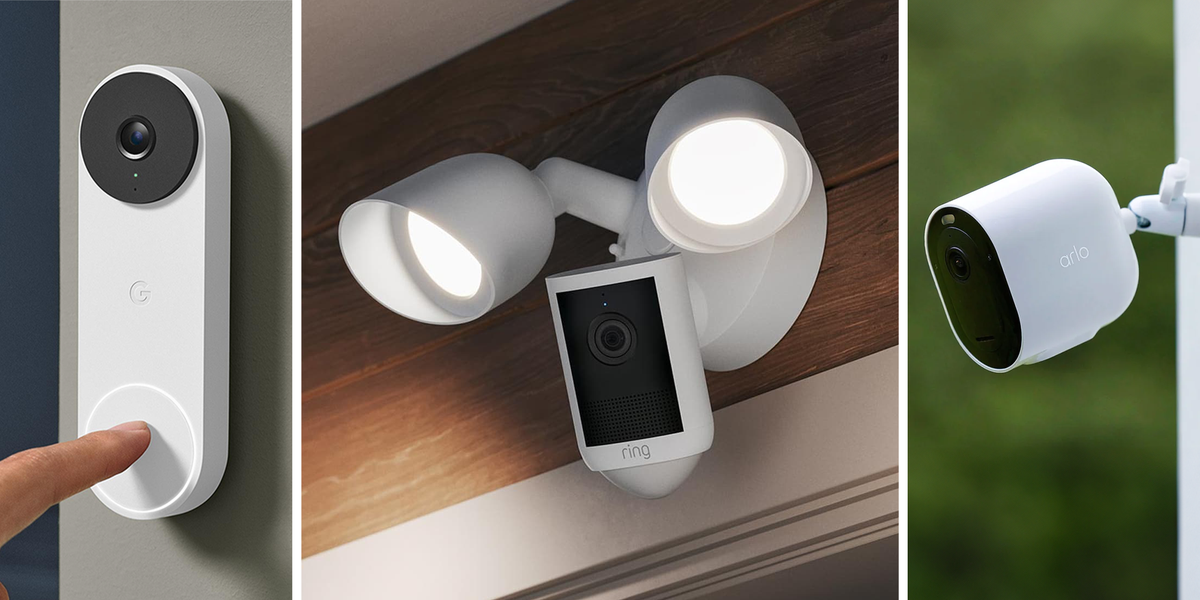
ProsWeather resistantWireless$3 a month for unlimited cloud storage is reasonableBattery lasts 3-4 weeksConsNo local storage so you need to pay for the cloudWhen I'm setting up an outdoor security camera, there are only three things I care about: Durability, battery life, and storage. Everything else—like smart recognition, video quality, and notifications—doesn’t matter as much. Give me 1080p resolution, an app that crashes all the time, and no advanced AI, and honestly, I really won’t mind. Thankfully, this camera is a bit better than that with an app that, for the record, does not crash all the time.Arlo's Pro wireless camera is great in all three areas. First, it's properly weather resistant. It can handle storms, heat, and cold without any dips in performance. Second, without an Arlo Smart subscription ($3 a month for unlimited video storage) you can store one-week's worth of video on the cloud, which gives you more than enough time to download videos of particular events of interest. I wish there was some free local storage (even a couple gigs is enough to cycle recent footage), but at least the fee is reasonable.It’s solid on the battery front too, with rechargeable batteries that only need to be swapped out about once every month. If you want to pay $199, you can get the version of the camera with an extra large battery, just note it is a bit bulkier.Pros2.5K is a major resolution upgrade from the v3Can use a microSD for local storageIncredible valueConsChunky designNeeds to be plugged inBudget options don't get better than the Wyze cam. It plays nice with Google Assistant and Alexa, and the newest version boasts improved image quality and better night vision. This 2.5K resolution camera technically has a higher resolution than the Arlo Pro, which is nearly three times the price. What you’re paying for there is a wireless connection. This camera is entirely wired, needing to be plugged in to operate. As a result, the Wyze cam continues to be an excellent option for indoor security, but not one I’d recommend for outdoor usage.You can pay Wyze for cloud storage, but it’s not the only option this camera gives. I love that Wyze allows users to bring their own MicroSD cards and use them for local storage. Chances are you have one somewhere, and these days ones with massive amounts of storage come relatively cheap. That truly makes this the budget smart camera option for indoor security.Advertisement - Continue Reading BelowProsLooks nice2K video recordingAlso comes in a battery powered versionConsFree storage is laughably limited and cloud storage is expensiveBetter face detection also locked behind If you want a nice-looking high-performance video doorbell, the new Nest is pretty much the full package. It always sends a crisp pitch right to your phone, and the camera itself has a wide enough field of view that you never feel like you’re missing something just out of frame. And if wired isn’t your speed, you can also grab a battery-powered version.While I always appreciate a free cloud storage option, Google’s is pathetic. I can’t rightfully say it’s bad on purpose, but after a week of only being able to save 10 second clips you’ll be begging to give your $10 a month for Google Home Premium. This also unlocks advanced AI face detection features that make the base experience feel that much worse.ProsCan replace a peepholeSetup is remarkably easyComes with a spare battery so you always have one chargedConsExpect frequent battery swappingNo free storage optionFor apartments, townhomes, or anyone who already has a peephole, this is the perfect doorbell camera. Just pop out your current peephole and slide this one in. It’s really simple as that, no bullshit.The only issue, as with any wireless camera, is battery life. Since this one is guaranteed to get a lot of traffic in front of it, battery changes are going to be pretty frequent, about every three weeks. That said, it's not a huge deal. The camera comes with two rechargeable battery packs, so you just have to make sure the spare is always charged and ready to go. At some point in the three week period, you’re bound to find the time.The unfortunate downside of going with Ring is the subscription fee. There’s no free cloud storage so you’re going to be writing (another) annual check to Amazon if you want to use this one.Advertisement - Continue Reading BelowProsBright, reactive floodlightsWide-angle 2K video captureComes in black or whiteConsOnce again, no free storageIf you need a camera and floodlight combo, you have tons of options from every brand that makes these things. Any worthwhile one is going to be wired, that’s just how it is. Most of those aren’t bad, but Ring’s is especially good. It’s a wide-angle 2K video, with a 6X zoom, more than enough to get important details when you need them. The lights themselves are bright and sensitive (although not overly sensitive because that’s straight up annoying). The rest of it works as you’d expect, with all the controls and custom features the Ring app offers at your disposal.The storage is both the best and worst thing about this camera. While I’ve complained about the lack of free storage on Ring devices already in this article, your $5 a month does go a long way. For some people that will be better than having to deal with local storage solutions. Still, I wish Ring offered the option.ProsEasy to mount, move, and adjustHigh video quality Local and cloud storage optionsSo you want something you can move around whenever—maybe from the nursery to the backyard and back three times a week? For you, Eufy makes an adaptable window camera that mounts to your window using suction. Once you have it secured, you can use the knob to easily adjust the rotation. And, when it’s time to move it all you do is remove the Velcro mount and place it on the desired window on the other side of the house.For something like a floodlight camera, I don’t find the wired setup to be a huge imposition for many people. With something like this window camera, being tethered via USB cord limits where you can place it. Depending on your home, this may or may not end up being an issue you need to account for.Advertisement - Continue Reading BelowWhat Do We Look for in Home Security Cameras?Really, it boils down to a few things. Most importantly, in my mind, are durability, power, and video storage, but things like video quality, smart home compatibility, and motion detection also play a role.Durability - How weather resistant is the camera? Here, all the cameras shown are IP65 or higher, meaning they're just about waterproof. I wouldn't go for any less.Power - I'd always recommend going wired here. Wireless, especially for high-up security cameras, can be a bit of a pain to keep charged. Though, a lot of people prefer the ease of setup for wireless.Video storage - Want unlimited cloud storage? It'll cost you. However, most cameras have some amount of complimentary storage. I wouldn't recommend anything under a week's worth of digital storage. And even then, I'd prefer a local option, as it's cheaper and easier to deal with.Video quality - 1080p on a doorbell is fine. 2K on a security camera gets the job done. 2.5k or 3K video is where you want to be. 4k video is nice to have, but honestly it’s a bit overkill.Motion detection - Most cameras are just OK at this. Brands claim their cameras are smart and can tell the difference between you and the UPS guy, but often that's a lie. At this price point, you just want something that can tell the difference between human and car. After that, it just needs to reliably detect motion and capture it.
The 6 Best Smart Cameras for Building Out Your Home Security
Full Article
Original Source
Read the full article at Esquire →KhanList aggregates and links to publicly available news content. We do not host full articles from third-party sources. Always verify important information with original sources.