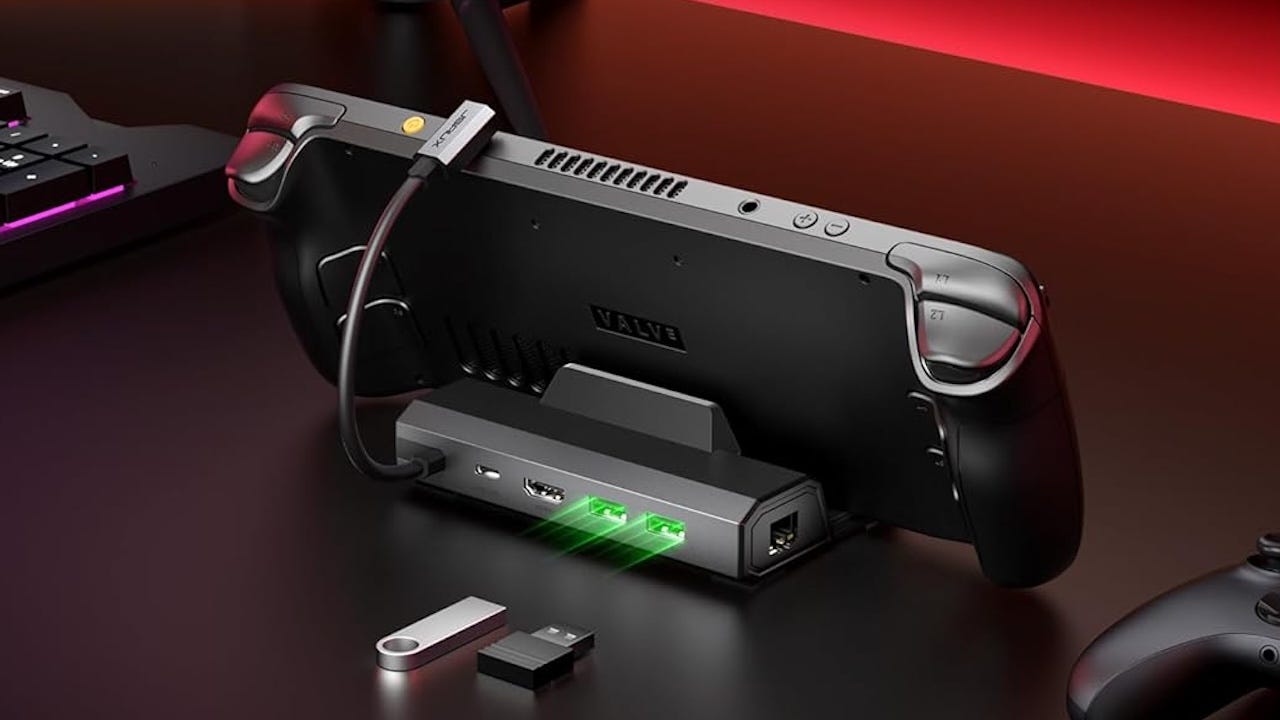
It's good enough, and you can't beat the price.I love my Steam Deck. I use it daily, enjoying everything from bite-sized indies and retro gems (thanks, EmuDeck!) to AAA games on its easy-to-use interface. The Steam Deck has been my primary gaming device since it launched, so when Valve announced the Steam Machine – a similar but more powerful device that plays games on a big TV screen – I was ready to pull a Futurama meme and wave cash in Gabe's face. But like pretty much everyone, including Valve, I was disappointed by the Steam Machine’s high price once Valve finally revealed it. JSAUX 5-in-1 Docking Station for Steam Deck/ROG Ally X/Legion GoThanks to RAMageddon, Steam Machines start at over $1,000. I have bills to pay and mouths to feed, so I can’t justify dropping that much cash on a new way to play games I can already play just fine on the Deck. Thankfully, it turns out I didn’t have to. I bought the JSAUX Docking Station for Steam Deck, currently on sale at Amazon for $26.99, and I’ve been enjoying all those same games on the big screen without having to take out a second mortgage on the house.The name JSAUX might look one of those no-name “brands” that litter Amazon’s search results, but it’s actually a respected maker of electronic accessories. The dock works like a charm. It’s a tiny thing, much smaller than a Switch or Switch 2 dock. It’s basically a little plastic wedge that’s just big enough to hold your Steam Deck upright (or ROG Ally or Legion Go – it works with most handheld gaming PCs). It has a little cable to plug into the power port on your Deck to charge it. And it has various ports on the back: HDMI, USB-C, and two USB-A. That’s it. It’s a simple thing.But when you connect it to power and your TV, it makes your TV the display for your Steam Deck. Just like a Steam Machine, it lets you play the majority of your Steam games on your TV.Now, it's not a perfect solution. The Deck isn’t as powerful as a Steam Machine, so you’ll have to play most games in 1080p, and they might look a little fuzzy on a 4K display. And you’ll need an external controller since you’ll be on your couch and your Deck, with its built-in controls, is docked. You don't need the pricy, sold-out Steam Controller; I use this 8BitDo one, but you can use an Xbox, PS5, or Switch controller as well. Spending a few bucks on a dock and a maybe an extra controller is a heck of a lot cheaper than cleaning out your savings account for a Steam Machine – and the results aren’t that different. Now I can play the majority of my Steam library on my TV, and that's pretty great.Chris Reed is a commerce editor and deals expert for IGN. He also runs IGN's board game and LEGO coverage. You can follow him on Bluesky.In This Article
Steam Machine Too Expensive? Get Your Deck a Dock
Full Article
Original Source
Read the full article at Ign →KhanList aggregates and links to publicly available news content. We do not host full articles from third-party sources. Always verify important information with original sources.