
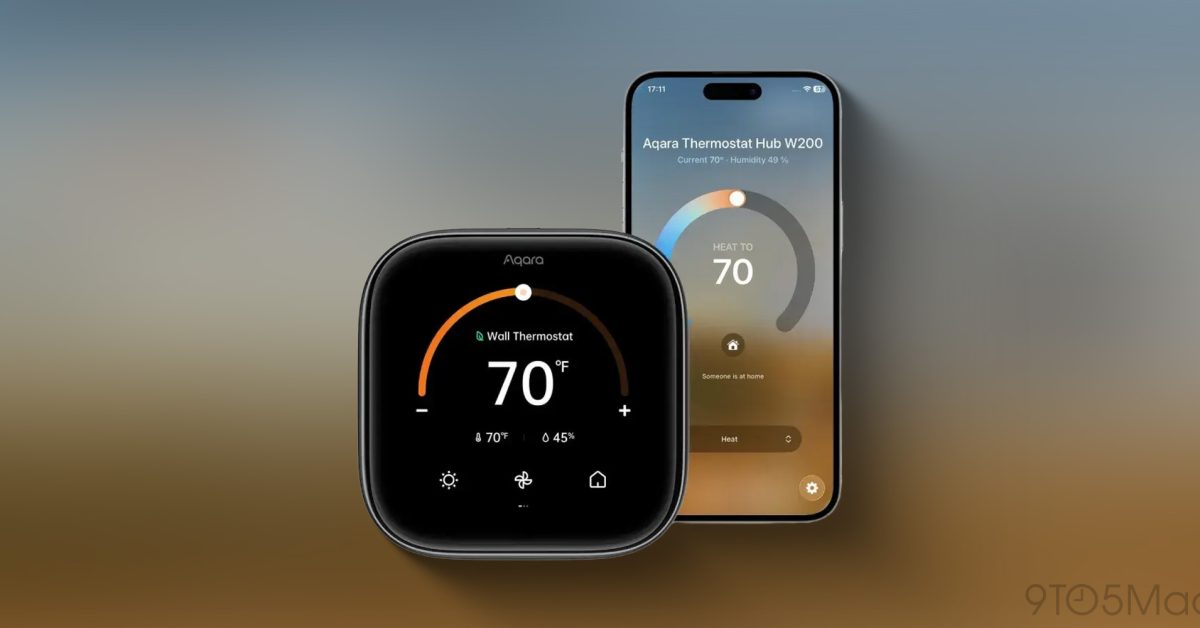
Earlier this year, my wife and I bought our first house. Along with all the other exciting things, it’s also let me spend a lot of time testing new smart home gear. One of the most important and useful smart home accessories is a smart thermostat. Six months ago, I installed the Aqara Smart Thermostat W200, and it’s been a fantastic addition to our smart home setup … especially because it supports Apple’s Adaptive Temperature feature. Here’s how it works. Buy the Aqara W200 Smart Thermostat $120 (Reg. $160) Installation and design Installing the Aqara W200 was relatively straightforward. I’d previously installed various Ecobee thermostats. The trickiest part this time was learning the intricacies of the new house itself, which the Aqara app did a good job of guiding me through. I used the Aqara app for the installation and setup, like choosing an interface design for the thermostat’s display itself. But after that, I closed the app and haven’t opened it since. Everything now is managed through the Apple Home app, and I appreciate that the Aqara app lets me do this without any pushback. It doesn’t try to pull me back into it to sell me a subscription or show me ads. This matters because the Aqara app is nothing to write home about. It has a lot of settings, but I don’t think it’s particularly elegant or user-friendly. You can choose from a small collection of different screensavers. The thermostat’s interface is similar to the app in that it’s very utilitarian, which isn’t necessarily a bad thing for quick manual temperature adjustments. The Aqara W200 also has a mmWave radar sensor that detects your presence. When you walk up to it, that sensor detects your approach and the screensaver automatically goes away to reveal the controls. It’s also exposed to HomeKit and can trigger automations. Unfortunately, this isn’t particularly useful for me because of the thermostat’s awkward location. The Aqara W200’s build quality is good enough. It’s primarily made of plastic, unlike higher-end smart thermostats that feature metal housing, so it doesn’t look super premium on your wall. It has a responsive 4-inch touchscreen. It has a small footprint overall, so you’ll likely need the included back trim plate if your previous thermostat required a larger opening in the wall. Apple Adaptive Temperature The standout feature of the Aqara W200, though, is its support for Apple’s Adaptive Temperature feature, which debuted as part of iOS 26. As of right now, the Aqara W200 is the only thermostat with Adaptive Temperature support available, though two more are coming next year as part of Apple’s new Home Collection suite. Adaptive Temperature is Apple’s feature that will automatically adjust your thermostat’s temperature based on your preferences. It uses your location and the location of other home members to determine when to adjust the thermostat. Once you enable Adaptive Temperature, you set your ideal temperature range for the following states: At Home: Adjust when someone is at home or predicted to arrive soon. At Home – Night Away: Adjust when everyone leaves home for the day or an extended period of time. Extended Away My wife and I set our preferred temperature ranges for each scenario. I particularly appreciate the ability to set a different range for night, since we like it noticeably colder overnight than during the day. After that setup process, Adaptive Temperature has worked in the background without any involvement from us. It passively uses all the information on our iPhones to make its decision. “Your iPhone uses on-device intelligence to predict when you’re on your way home to bring it to the correct temperature by the time you get there, and adjusts the thermostat to save energy when you are far away from home,” Apple explains. Adaptive Temperature uses your iPhone and other home members’ devices to determine when to adjust the temperature. “Home can learn daily routines to predict when you’re likely to arrive and adjust the temperature for you,” Apple says. This includes things like your calendar events. I can count on one hand the number of times we’ve had to manually adjust the thermostat since installing the W200, and most of those times were because we had guests with different preferences than ours. Wrap up Honestly, I thought I wrote this post months ago, but I guess it slipped my mind. I actually think there’s a pretty simple explanation for that, though. I installed the W200, enabled Adaptive Temperature in the Apple Home app, and haven’t thought about it since. I think that’s a great endorsement of the Aqara W200 as a product. When I build a smart home, I want accessories that I can install, benefit from the “smarts” of, and never have to think about. That’s why I’ve also come to appreciate Lutron, which I’ve installed throughout my entire house. The Aqara W200 falls into that same bucket. Between the Smart Thermostat W200 and UWB Smart Lock U400 (full review), Aqara powers two key pillars of my smart home, and I’ve been incredibly impressed with both. The Aqara Smart Thermostat W200 is also very reasonably priced. It retails for $159.99, but is currently on sale for $119.99. Buy the Aqara W200 Smart Thermostat $120 (Reg. $160) Buy the Aqara U400 Smart Lock with UWB $200 (Reg. $270) Here are a few other smart home products that I’ve installed since we bought our house: Airversa QliQ AC1 HomeKit Button Lutron Aurora Dimmer Switch YoLink Water Sensors + Alarm Meross Smart Plugs Do you use a HomeKit thermostat in your house? If so, which one? What are your favorite smart home accessories? Let us know down in the comments. My favorite Black Friday deals | AirPods Pro 3 $149 (Reg. $249) Apple Studio Display $1,399 (Reg. $1,599) MacBook Pro with PROLED XDR Display up to $300 off Apple Watch Series 12 from $299 (Reg. $399) M5 MacBook Air 16GB/512GB Up to $400 off Get a free Amazon gift card when you buy Apple Gift Cards Follow Chance: Threads, X, and Instagram FTC: We use income earning auto affiliate links. More.
Review: Aqara W200 supports Adaptive Temperature in HomeKit at a great price
Full Article
Original Source
Read the full article at 9to5mac →KhanList aggregates and links to publicly available news content. We do not host full articles from third-party sources. Always verify important information with original sources.