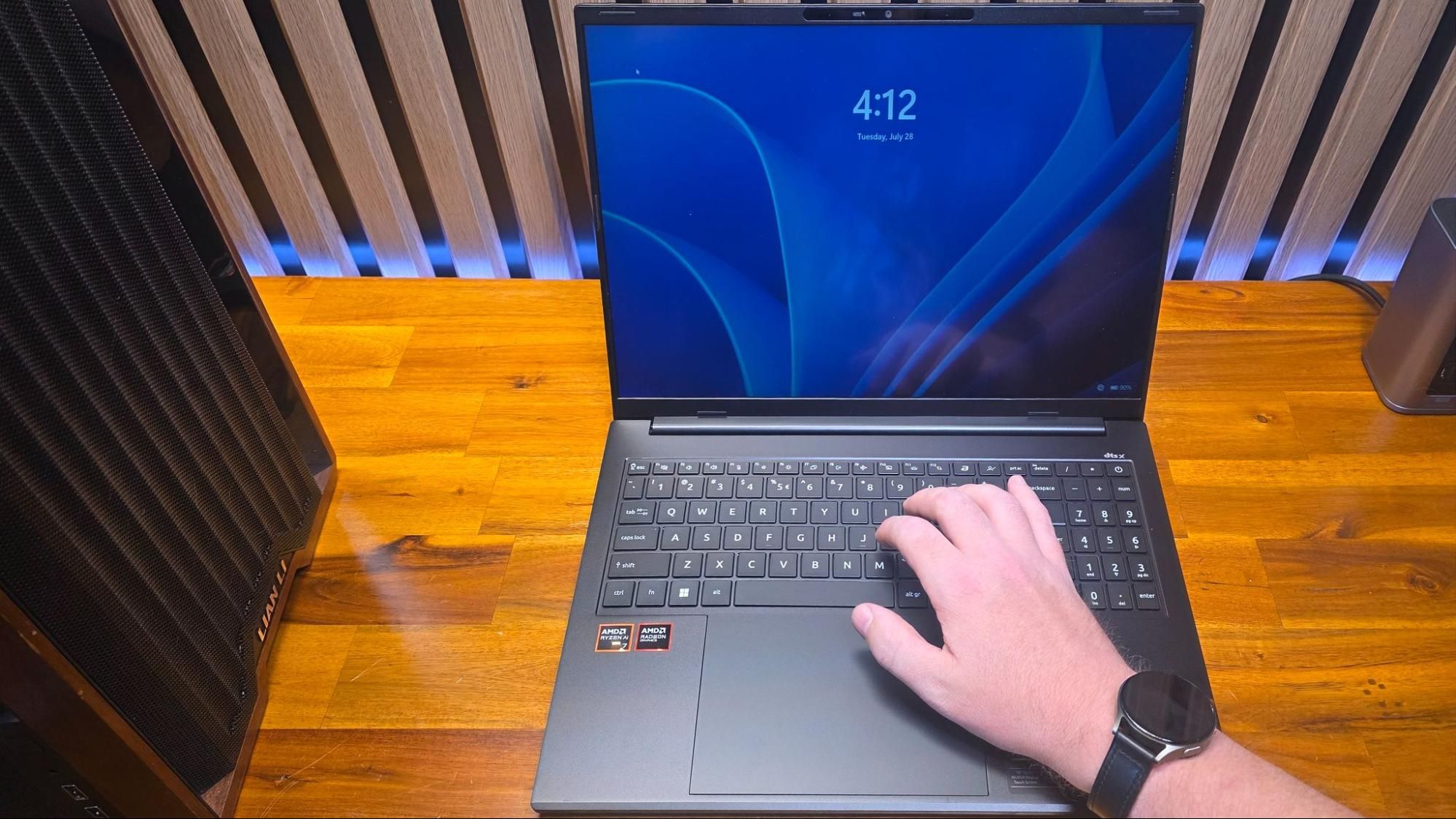
(Image credit: Tom's Hardware) I’ve used thousands of laptops over the years, between testing and trade shows, so it isn’t often that an issue pops up that I haven’t encountered before. But that’s exactly what happened recently while working with Acer’s Swift Go 16 AI (review coming soon). This unassuming mid-range portable packs AMD’s Gorgon Point silicon, alongside a large IPS screen and a roomy 7-inch touchpad – nothing groundbreaking, but a solid, svelte system with a metal shell and an affordable price (at least when it’s on sale).But pretty quickly, when I started setting it up and photographing it, I noticed that the screen would often go black, briefly, when I tried typing, and I would then get kicked out to the Windows lock screen. Since I was using a local account with no password to type in, this was only a minor annoyance at first. But it kept happening – not every time I tried to use the laptop, but often enough that I pretty quickly decided that the review unit must be faulty. Eventually, I reached out to Acer to explain and show them the problem.Company engineers thought it might be a software conflict, and suggested I reset the system, which I did, to no avail. The screen was still flashing black and kicking me out to the lock screen. In fact, after some experimenting, I could sometimes make the issue occur when I was barely even touching the touchpad. I discussed it with colleagues, sent them the same video I had sent to Acer, and became convinced it was some kind of strange electrical fault with the touchpad. I eventually got a second review unit of the laptop, but by that time I was onto other priorities, so it sat for a week or so, until I decided to at least bring the original “faulty” laptop back to the office so I could box it up and return it to Acer.Before I boxed it up to send back to Acer for their evaluation, though, I decided to show another colleague, Tom’s Guide’s lab tester Arif Bacchus, in our New York office. He watched me demonstrate the problem for about ten seconds before casually suggesting, “I think it might be your watch.”This hadn’t even occurred to me, but as soon as he said it, everything started to fall into place in my mind. I had been wearing my Galaxy Watch 7 this and every time I had the issue, because I wear my watch pretty much whenever it isn’t charging. And my watch band (which Amazon tells me I’ve had since May of last year) has a magnetic clasp on the bottom, which sits a few inches behind my right wrist when I’m wearing it. And as I moved my wrist across the lower-right edge of the laptop, the screen went black for a second, and I was once again kicked back to the Windows lock screen.The touchpad was never the issue, and the laptop isn’t faulty – although it does have a lid sensor that is triggered by a magnet embedded in the upper-right bezel, which can also be triggered by most other magnets if they get close to the bottom-right of the deck. I was able to duplicate the issue with a fridge magnet, a magnetic Qi 2 accessory, and a borrowed Apple Watch, which also had a band with a magnetic clasp. Using a piece of magnetic field paper, it’s easy to see the magnets embedded in the Swift Go 16 AI’s bezel. The corresponding sensors in the laptop’s deck tell the system when it’s closed. A magnet attached to your wrist can easily fool the sensor and kick you to the lock screen. (Image credit: Tom's Hardware)While perhaps not the greatest of design choices, this is, to be clear, an issue that probably won’t affect a large portion of people. To run into the problem I had with this laptop specifically, you’d need to have a magnetic watch band and either be left-handed or the odd right-hander like me who also likes wearing their watch on their right wrist.Get Tom's Hardware's best news and in-depth reviews, straight to your inbox.I wasn’t able to replicate this issue on any of the four other laptops (Dell, Apple, Lenovo, and Framework models) around my desk area. And the issue must be quite rare as, again, I have been wearing this watch band every day for 14 months or so, at CES in Las Vegas and two Computexes in Taiwan, where I put my fingers on dozens of laptops, and have never encountered screens that dim or turn off as my hands land on the keyboard deck.There are definitely other documented instances of this happening, though. Once I knew what to look for, it was easy to find a few (but not particularly a lot) of discussions about this and related issues, on Reddit, Apple, Dell, and Acer forums, and a Medium article about Chromebooks confusing Apple watches. Some older mentions also note that magnetic bracelets can cause the same issue (somewhat obviously).Clearly, this isn’t a new problem, but it isn’t well known. It was confusing enough that I was convinced the laptop was faulty and asked for a replacement. If I owned this Acer, it probably would have led me to return it and deal with an RMA process, only to eventually get another laptop that, even more frustratingly, would have the same issue. And yes, the replacement Swift Go 16 AI that Acer sent was also fooled by my watch band.So what do you do if you have a laptop with a lid sensor that is triggered by your watch band? Your options should be pretty obvious.You could get a new, non-magnetic band. I do love the convenience and easy removal of my current band, but this is probably the simplest solution.You could learn to love wearing your watch on your opposite arm. For most people, this might be tough, but I do switch up watch arms now and then when my right wrist gets irritated by the fact that I track nearly every waking and sleeping moment of my life with my smartwatch. And if you aren’t using your PC during most of your waking hours like me, switching your watch to your other arm or taking it off just while working or gaming might be easy enough.Also, if you just bought a laptop that is triggered by your favorite watch band, and you don’t want to give that up, you could return the laptop for something else.The good news is that it’s unlikely any other random model you choose will have the same problem. Perhaps this magnetic sensor issue is more common on Chromebooks (which I tend to avoid), but none of the dozens of other laptop models I’ve put my wrists on since May of 2025 have been triggered by my watch strap. So if you’re unlucky enough to be struck by the curious watch strap laptop curse once, it probably won’t happen with the next laptop you choose. Still, it’s always good to check out a laptop in a store, if you can, for this and several other reasons. After a rough start with the Mattel Aquarius as a child, Matt built his first PC in the late 1990s and ventured into mild PC modding in the early 2000s. He’s spent the last 15 years covering emerging technology for Smithsonian, Popular Science, and Consumer Reports, while testing components and PCs for Computer Shopper, PCMag and Digital Trends.
PSA: Your watch band may be messing with your laptop – magnetic clasps can cause lid sensors to lock your PC
Full Article
Original Source
Read the full article at Tomshardware →KhanList aggregates and links to publicly available news content. We do not host full articles from third-party sources. Always verify important information with original sources.