
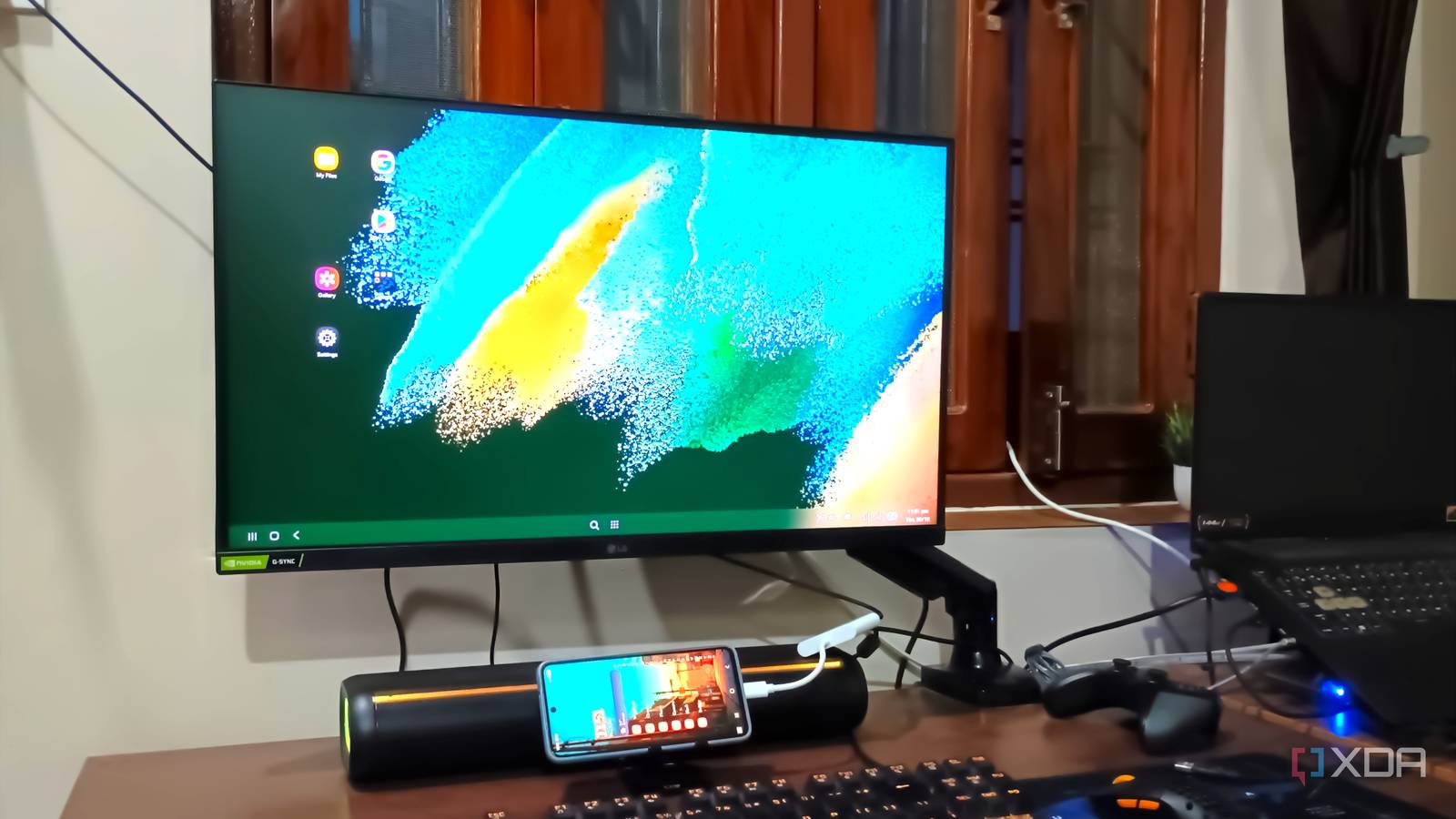
Published Oct 9, 2026, 9:00 AM EDT Abhishek is an author at XDA who covers computing. He has loved computers since he got the Lenovo G570 in 2012. Abhishek holds a master's degree in computer applications and began his writing career in 2018. He loves writing how-to articles, listicles, and informational posts on popular operating systems and web services. He closely follows the Windows Insider program and tests new Insider builds to discover upcoming experimental features and upgrades. His past work includes long-term collaborations with reputed publications like Tom's Hardware, and Windows Latest. When not writing anything, he is busy watching new episodes of One Piece or searching for something binge-worthy. Your current smartphone loses its charm after you upgrade to a new one. It used to be the main highlight of my day. Now it sits inside a drawer, barely receiving any attention from me. Slowly, it became coated with dust, out of battery, and an overlooked item in my home. I have a few such phones, and unless you are a very cautious person, you'll never use two phones at once. But phones can serve a purpose beyond making calls. Samsung has a DeX feature that lets you use your phone as a desktop PC. While it's a niche feature found in only a few models, my old Galaxy S21 FE supports it. So, rather than converting it into a server as I did with my mom's old phone, I decided to use it as a desktop. Old smartphones can work as a server But DeX mode is equally compelling I recently converted my mum's old phone to work as a home server for lightweight self-hosted tools. It runs OmniTools, BentoPDF, and a couple of other things inside Termux and has a broken screen. My Samsung Galaxy S21 FE is in much better condition, and its screen works phenomenally. But instead of turning it into a home server like other old phones, I decided to use it as a desktop. I'm fortunate that Samsung offers DeX for my phone variant and that it is very simple to set up. Samsung DeX works in wired and wireless mode, but for a smoother experience, you'll want to use a wired connection. It works with TVs and monitors and is plug-and-play in wired mode. But you'll need some accessories first. The first crucial thing you'll need is a USB-C to HDMI adapter. My monitor uses HDMI, and even my TV only has HDMI ports. The adapter will enable DeX mode and route the display signal to the monitor. My USB-C to HDMI adapter is pretty basic and has a full-size USB-C port apart from HDMI. I'll connect the phone charging cable to the USB Type-C port, so my phone stays charged. The other USB-A port will allow connections between the keyboard and mouse. If you use wired ones, you'll need an additional USB hub for connecting two devices at once. It's quite a mess, but you can tidy things up with a Bluetooth USB keyboard-and-mouse gadget. DeX mode has improved over time Not a lackluster implementation When you think of device-exclusive features, they sound more like a gimmick than something truly useful. But Samsung invested so many years in DeX, and the result is visible when you use it. If I say my Galaxy phone is now a desktop PC, it should have features that rival popular desktop operating systems. The interface boots up with a standard layout with a few app icons and folders on the desktop and a taskbar at the bottom. It tries to place the app finder and list at the center strategically, notifications and quick settings on the right, and physical action buttons on the left. For my use case, there are a few apps I use frequently. Google Docs is one of them, and it works nicely in full-screen mode. Nothing is cramped or misaligned, and I occasionally draft posts on it when my niece uses my main setup to play NFS. Similarly, Chrome is a great experience in DeX mode and almost feels like a desktop browser. Browsing websites is nice because you can view the full design. The only thing I miss is extensions, but Samsung Browser solves that. So, I dabble between the two. A standard desktop can run apps and browsers, and my Galaxy phone can do both with ease. I can also stack two apps side-by-side, which gives a sense of multitasking on a big screen. I also visit Gmail often to check PR requests and other things, and it opens a reply box next to the inbox when I want to type a response. Popular apps try to use the available screen space in DeX mode intelligently. Pushing the phone to its limits If you have old media files (personal videos, recordings, and downloads), the DeX mode is a great way to watch them on a bigger screen. Wired mode avoids audio delay and playback hiccups, but I miss the on-screen controls during playback. Other use cases include apps like Termius to control multiple home servers when your main PC is busy. There’s even a way to play PC games in the DeX mode using GameNative. However, you’ll have to be extremely picky with titles and compromise with resolution for stability. I don’t use it for gaming, but everything else works as you would expect from a real desktop. It’s smart enough to show my calendar and current or upcoming meetings, and that’s a nice touch for a phone trying to impersonate a desktop. My Galaxy phone heats up during normal usage, but it didn’t show any concerning signs in DeX mode. You cannot expect all apps to behave nicely, and you will notice that some of them don’t look great in full-screen mode. My phone’s a desktop now Samsung DeX mode works surprisingly smoothly for a smartphone-to-desktop implementation. I thought it would just zoom in on apps or force them into landscape mode on a monitor. But it actually feels like a basic desktop you get with lightweight Linux distros. It supports multi-window arrangement, automatically starts when you plug in the HDMI cable, and doesn’t lag in wired mode. The setup tends to look a bit cluttered, but you can hide everything behind the monitor and use a Bluetooth keyboard and mouse. You can also use it as a basic PC for older people and kids. Samsung Galaxy S26 SoC Snapdragon 8 Elite Gen 5 Display 6.3-inch Dynamic AMOLED 2x The latest flagship series phone with new AI features and improved camera.
My old Samsung Galaxy phone is now a desktop PC thanks to DeX, and I use it every day
Full Article
Original Source
Read the full article at Xda-developers →KhanList aggregates and links to publicly available news content. We do not host full articles from third-party sources. Always verify important information with original sources.