
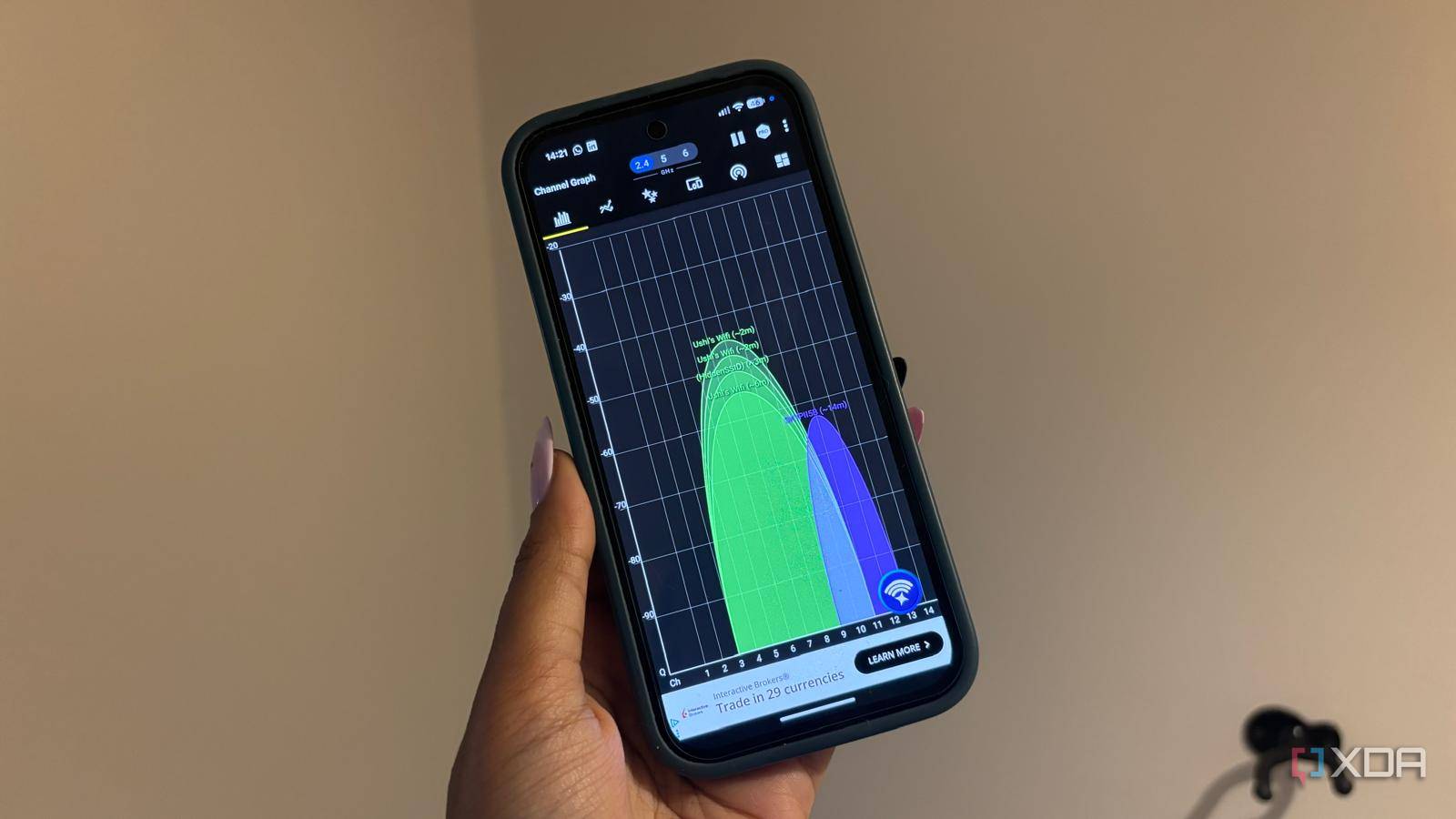
Published Nov 7, 2026, 2:30 PM EST Jasmine is Software and PC Hardware Author at XDA with years of tech reporting experience ranging from AI chatbots right down to gaming hardware, she's covered just about everything. Whether it's breaking news about the latest AMD NPUs or creating video tutorials on social media platforms, Jasmine has contributed to the world of AI and tech in a variety of ways including interviewing the CEO of Razer, AMD's Director of Product Marketing and the VP of Lenovo. Passionate about gaming and PC technology, she has built countless computers, keyboards and other peripherals - knowing them inside and out. Gigabit broadband connections and modern 5 GHz Wi-Fi access points can actually fail to deliver advertised speeds, as they exhibit random throughput drops and erratic latency despite strong physical signal indicators. Out-of-the-box router configurations can default to a narrow set of non-DFS channels in the lower 5GHz band, typically channels 36 to 48 or 149 to 165, leading to extreme radio frequency saturation in dense residential environments. Users often assume speed degradation stems from ISP throttling, faulty hardware, or even inadequate router coverage, leading to unnecessary mesh node purchases or redundant hardware upgrades. Manually auditing local RF congestion and relocating 5GHz Wi-Fi broadcasts to underutilized DFS or higher UNII-band channels can reduce co-channel interference and restore real-world throughput without you having to go out and invest in new hardware. Co-channel interference could be destroying your network Adjusting your channel width can make a difference The 5GHz spectrum is split across multiple UNII bands (Unlicensed National Information Infrastructure), but channels can vary by country. Within the US, UNII Band 1 contains channels 36, 40, 44, and 48, which are typically non-DFS. UNII Band 2A includes DFS channels 52 to 64 (DFS-required). UNII Band 2B covers channels 72 to 92, which most regulators generally restrict and do not allocate for Wi-Fi. UNII Band 2C then covers channels 100 to 144. UNII Band 3 has channels 149, 153, 157, 161, and 165. You can experience co-channel interference. Unlike adjacent-channel interference, which manifests as raw signal noise, co-channel interference forces neighboring access points on the same channelto share transmission airtime. Since Wi-Fi relies on Carrier Sense Multiple Access with Collision Avoidance (CSMA/CA), this means when a neighboring router transmits on the same channel as yours, your router must defer its own transmission, causing queue delays and severe latency spikes. You're essentially waiting for your neighbor's Wi-Fi to transmit packets before yours. Channel width can also play a part in this, as wide 80MHz and 160 MHz channel configurations can consume massive swaths of contiguous spectrum. In apartment complexes or dense suburbs, an 80MHz block centered on channel 42 overlaps with four distinct 20MHz channels, drastically increasing the likelihood of airtime contention. DFS channels might save your network But they come with their own limitations By taking advantage of DFS channels, you can actually unlock a whole uncongested spectrum, but what actually are DFS channels? Standing for Dynamic Frequency Selection channels, these channels typically sit between standard consumer spectrum blocks. Most of the time, they are reserved for radar systems such as military radar and weather forecasting infrastructure. DFS channels require access points to monitor for radar signals and vacate affected frequencies when radar is detected. Under US regulations, devices must cease transmissions on the affected channel within 10 seconds, with strict limits on traffic during that transition. Once radar has been detected, the channel cannot be reused for at least 30 minutes. Depending on the router, this can temporarily disconnect clients while the access point moves to another channel. Since most off-the-shelf consumer routers stay within UNII-Band 1 or UNII-Band 3 due to client compatibility, it means that these DFS channels are typically much quieter in non-airport areas or if you're far enough away from radar. In general, these channels aren't guaranteed to be empty but they're likely to be significantly less crowded. There are some limitations to swapping over to these channels. When you first switch a router to a DFS channel, it requires a mandatory 60-second Channel Availability Check before broadcasting begins. This Channel Availability Check can be up to 10 minutes on some specific weather radar frequencies. This can delay router reboots. It may be worth checking how your router's operating system handles CAC events to ensure your network fails over cleanly to a fallback channel without permanently dropping your local WLAN infrastructure. Another downside can be legacy client DFS limitations. Certain legacy or budget IoT devices, including older streaming sticks and regional client devices, may lack regulatory support for UNII-2 DFS channels, making the 5 GHz network invisible to those clients. Audit your RF environment A Wi-Fi analyzer can give you a lot of answers Before switching over, the best first course of action is to audit your local radio frequency environment. You can perform a site survey rather than relying on trial and error. A range of software tools, such as Wi-Fi Analyzer, can map local BSSIDs, signal strengths (such as RSSI), and active channel widths across neighboring networks. This will help you determine whether the latency and stuttering you're experiencing are caused by co-channel interference. Within the Wi-Fi analyzer report, you can select the optimal channel target. You can identify clear channel blocks with minimal overlapping BSSIDs. If radar interference is non-existent in your area, then shifting to a clean 80MHz block in the DFS space can provide you with full bandwidth without any co-channel contention. Of course, as mentioned earlier, it's worth keeping in mind the location of your home. If you're placed near a weather radar or an airport, then this will not be an option for you, as you will face a lot more interference. You also want to make sure that you're balancing channel width and stability. In environments where high radio frequency density covers all bands, stepping down from an unstable 160MHz or 80MHz channel width to a clean, fixed 40MHz channel width can reduce that noise floor exposure, drop retries, and deliver a far more consistent low-latency link. You might not need to invest in new hardware A simple setting change can make a major difference High-end networking gear cannot outperform basic physics. Operating your 5GHz radio on saturated factory-default channels forces your hardware to waste valuable airtime waiting on neighboring networks. Stop blaming your ISP or buying redundant mesh extenders before you complete an audit. Run a free RF environment scan. Move your 5GHz radio to an uncrowded DFS or upper UNII-band channel, and you might experience a significantly faster network.
Moving my router off its default 5GHz channel fixed my slow Wi-Fi
Full Article
Original Source
Read the full article at Xda-developers →KhanList aggregates and links to publicly available news content. We do not host full articles from third-party sources. Always verify important information with original sources.