
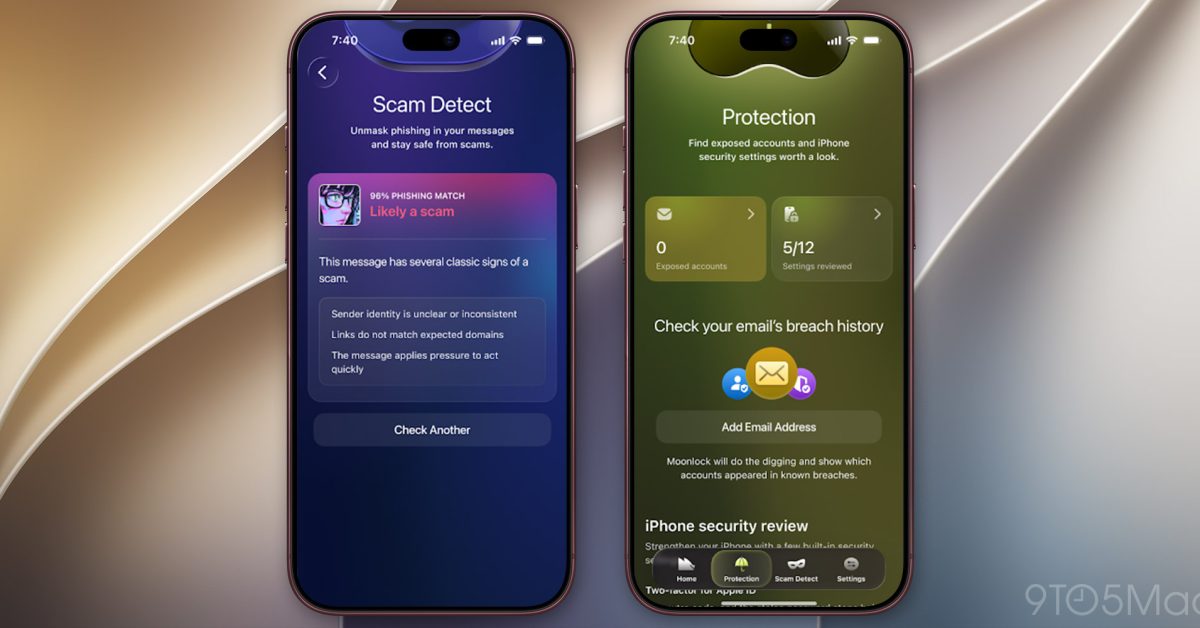
After launching Moonlock for Mac last year, MacPaw is bringing its scam-detection app to iPhone today. Here are the details. Moonlock now available for iPhone When MacPaw launched Moonlock on the Mac, the company described its new app as something that “complements Apple’s built-in security tools, protects from Mac-specific malware, and helps you understand cybersecurity better.” In practice, the Mac app includes real-time protection against potential threats. Users can also manually scan their Mac for malware, including suspicious files hidden in system folders and email attachments. Beyond that, Moonlock includes a VPN to encrypt internet traffic, a network inspector that shows where apps are sending data and lets users block connections to specific countries, and an AI-powered scam detector that analyzes messages pasted into the app for signs of phishing. It also helps users review and adjust macOS security settings. Today, MacPaw is launching Moonlock for iPhone, a move the company says “helps people recognize potential scams, understand their iPhone’s security and take practical steps to improve it.” Unlike the Mac version, Moonlock for iPhone doesn’t scan for malware, as iOS prevents third-party apps from accessing other apps and their files. Instead, it focuses on identifying potential scams, checking for exposed personal information, and helping users improve their iPhone’s security. On the iPhone, Moonlock lets users quickly check suspicious texts, screenshots, and QR codes for phishing, in addition to checking whether their email addresses have appeared in known data breaches. As MacPaw explains it, Moonlock’s Scam Detect “helps people check suspicious messages they encounter throughout the day. Whether it’s a text message, a screenshot shared by a friend, or a QR code, users can paste, scan or share content directly with Moonlock and receive an assessment explaining why something may be suspicious.” Here’s Oleg Stukalenko, Head of Product Management at Moonlock by MacPaw, on today’s launch: “When we launched Moonlock, our goal was to make cybersecurity something anyone could understand and use. But so much of what people do today, from banking to everyday conversations, happens on their phones. Bringing Moonlock to iPhone felt like the natural next step. We want to help people spot a scam before they tap, see where their security stands, and know exactly what to do next.” MacPaw adds that Moonlock for iPhone also includes the following features: Safe SMS: Automatically filters suspected scam texts out of the inbox when enabled, with a record of what was caught and why. Security Score: Provides a score from 0 to 100 reflecting the iPhone’s security setup, along with one recommended action at a time to help users improve it. Email Breach History: Tells users if their email has turned up in a known data breach, which service leaked it, when and what was exposed, then walks them through securing each affected account. Device and Network Checks: Helps users review Wi-Fi safety, passcode protection, iOS updates and signs of jailbreaking. A checklist of recommended one-time fixes provides step-by-step instructions and an estimate of how long each change takes. MacPaw’s Moonlock for iPhone is free to download, with subscriptions available for $9.99 per month or $49.99 per year. Check out Moonlock for iPhone on the App Store Worth checking out on Amazon Apple HomeView Apple TV 4K Apple Watch Series 12 AirPods Pro 3 AirTag (4 Pack) FTC: We use income earning auto affiliate links. More.
MacPaw’s Moonlock comes to iPhone, helping users detect potential scams
Full Article
Original Source
Read the full article at 9to5mac →KhanList aggregates and links to publicly available news content. We do not host full articles from third-party sources. Always verify important information with original sources.