
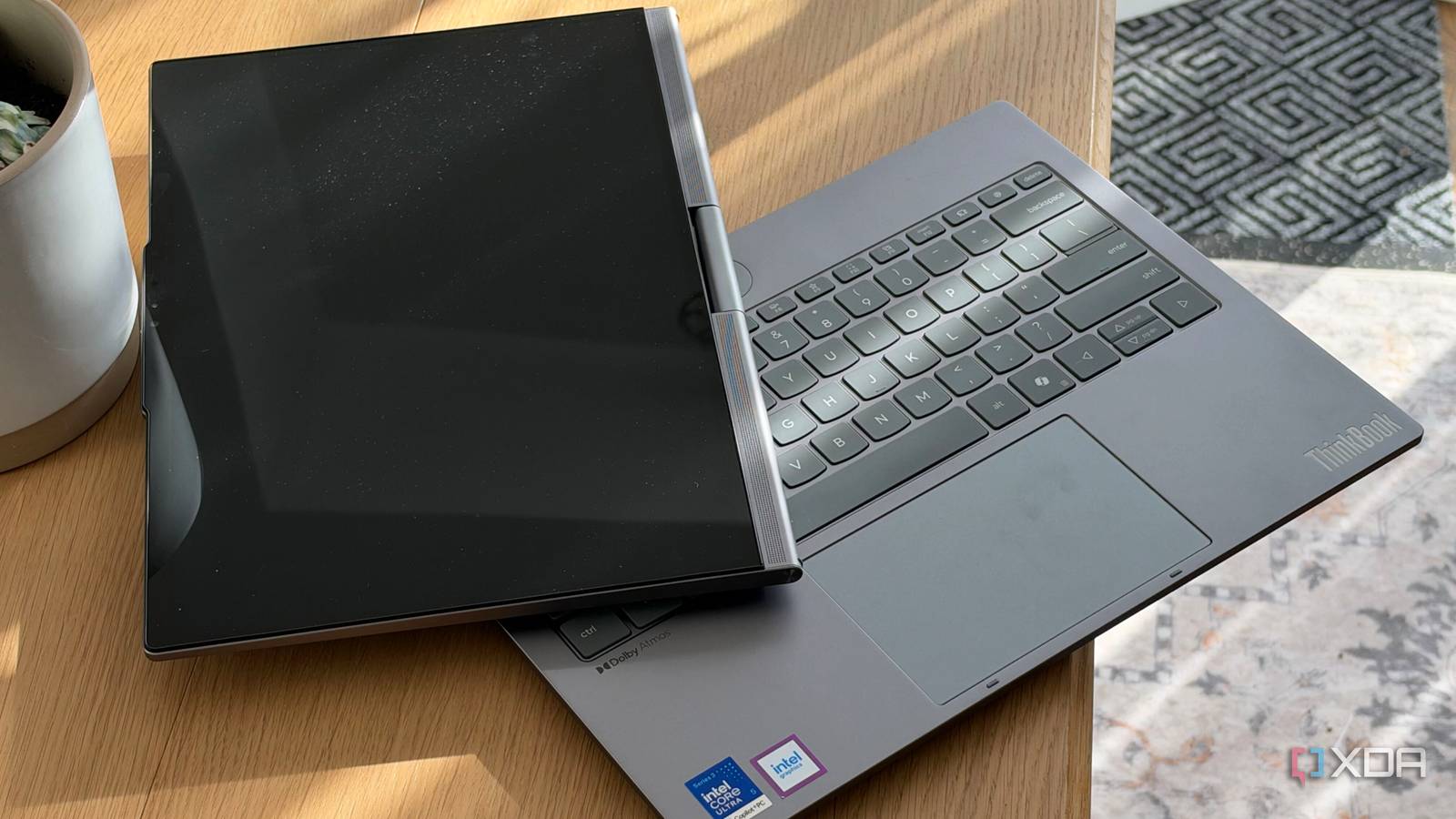
Published Nov 19, 2026, 1:31 PM EST I don't know who it's for, but I love that it exists Lenovo is no stranger to neat concept laptops, and they're often one of the more interesting laptop manufacturers to visit at a trade show. You never quite know what you're going to see—a rollable display, solid-state air cooling in place of fans, a fully modular laptop—many of these concepts don't make it to production because of cost, or complexity of manufacturing. But sometimes they do. The ThinkBook Plus Gen 7 Auto Twist is one laptop that did. The ThinkBook line is no stranger to experimentation, and a swiveling display isn't anything new for this line of Lenovo laptops, but making it motor-driven absolutely is. It's a rather unassuming silver laptop that can open on its own, turn its display to follow you around a room, and respond to voice commands. I'm not really sure who the Auto Twist is for, but the fact that it exists outside a trade show floor is impressive. About this article: Lenovo loaned XDA a ThinkBook Plus Gen 7 Auto Twist unit for the purposes of review. The company did not have any input into this article, nor did it see its contents before publishing. ThinkBook Plus Gen 7 Auto Twist 7.5/10 CPU Intel Core Ultra 5 325 GPU Integrated RAM Soldered 32GB LPDDR5x-7467 Form factor Motor Driven Dual-axis display Pros & Cons Gorgeous motor-driven display with tracking features Great battery life Good port selection Flagship price for mid-range specs Thicker and heavier than other laptops in its class Pricing and availability of the Lenovo ThinkBook Plus Gen 7 Auto Twist The ThinkBook Plus G7 Auto Twist was first unveiled at IFA 2024 as a concept before it resurfaced at CES in 2026 under its current name. The configuration I was sent is priced at $1,900 on Lenovo's website and features an Intel Core Ultra 5 325 processor with integrated graphics, 32GB of soldered LPDDR5x-7467, and a 512 GB PCIe Gen4 SSD. The review guide Lenovo supplied me with says that the Auto Twist can be configured with up to an Intel Core Ultra X7 358H processor, but at the time of writing it doesn't seem like that is a configuration option available on Lenovo.com. ThinkBook Plus Gen 7 Auto Twist CPU Intel Core Ultra 5 325 GPU Integrated RAM Soldered 32GB LPDDR5x-7467 Form factor Motor Driven Dual-axis display Display type OLED (Glossy) Display (Size, Resolution) 14" 2.8K (2880x1800) Storage 512GB SSD M.2 2242 PCIe 4.0x4 NVMe Battery Integrated Li-Polymer 75Wh battery Charge speed Rapid Charge Pro (charge up to 50% in 30 min) Ports 1x USB-A (USB 10Gbps), 1x USB-A (USB 10Gbps), 2x ThunderboltTM 4, with USB PD 15-100W and DisplayPortTM 2.1, 1x HDMI® 2.1, up to 8K/60Hz, 1x Headphone / microphone combo jack (3.5mm) Operating System Windows 11 Pro Webcam UHD 10.0MP with large sensor + IR discrete, with E-shutter, MIPI, fixed focus Wi-Fi connectivity Wi-Fi 7, 802.11be 2x2 Wi-Fi Bluetooth Bluetooth 5.4 Dimensions 313 x 233 x 15.85-23.9 mm (12.32 x 9.17 x 0.62-0.94 inches) Weight Starting at 1.4kg (3.09 lbs) Speakers Stereo speakers, 2W x4 Colors Luna Grey Pen compatibility Yes NPU Up to 47 TOPS, Copilot+ PC An unassuming laptop on the surface The Auto Twist looks and functions normally upon first glance Before we discuss the elephant in the room, it's worth covering this thing as a laptop first and foremost. It's a pretty conventional ThinkBook clamshell with a single center hinge cylinder, which has been seen before on previous twisting models. The main feature that stood out to me immediately was the thickness: this laptop is far from thin for a business laptop. It comes in at just under an inch at the thickest point of the chassis, which isn't bulge-in-the-backpack thick, but it's noticeable when you're maneuvering it around. It's also heavy, coming in at over 3 pounds, which does make it noticeable to carry around in your bag. Opening the lid reveals a standard keyboard and touchpad, and doing so manually makes this noticeable whirring sound as you work against the motor in the hinge, which isn't unpleasant, but it caught me off guard the first time I heard it. The keyboard itself has the same travel as some of my favorites from Lenovo, like the X1 Carbon I recently reviewed, but it feels slightly worse. I can't describe exactly why, because the travel on paper is an identical 1.5mm, but I don't enjoy the feeling of bottoming out on these keys. As someone who owns a myriad of keyboard switches and multiple testers, I'm definitely pickier than most here, so it's likely you'll have no problem. The mechanical touchpad is a good size and works exactly how you'd expect it to. Port selection is a strength of this laptop. Lenovo haven't let the extra thickness that is presumably required for the motor and hinge assembly go to waste: two Thunderbolt 4 ports, two USB-A ports, and a full-size HDMI is always nice to see. The only real knock against this layout is that both the Thunderbolt ports are on the left side, so charging is only possible from one side of the device. The power button also acts as a fingerprint reader, and while it's a little awkward to reach with your index finger, I've found registering an extra fingerprint for my middle finger worked a lot better, especially with one particular motorized hinge feature. The Auto Twist mechanism A gorgeous OLED display with a motorized hinge Finally, the headline feature of this laptop: the motorized hinge. As far as concept laptops go, this is one that seemed the most achievable in a mass-produced product, and Lenovo did a great job with it, all things considered. First, the good: the motorized hinge can be configured to open up automatically when the power button is pushed or the laptop is unlocked via the fingerprint reader, and it can also close automatically when put to sleep or hibernation. This is a feature I was actually using, and it definitely got a few looks at the coffee shop. The tracking features work as advertised, too. The facial tracking reliably keeps you in frame during video calls, and you can register which users you actually want to track, which is more useful if you want it to ignore random people behind you. You can also configure it to respond to voice commands, though I found it to be sort of hit-and-miss. You're supposed to be able to give it commands like "Hi Tiko, close lid," but I found that to be a lot more work than just going over and closing the lid. The voice tracking was a lot more functional, allowing the display to turn to where sound was coming from. Now, the bad: besides the extra thickness and motor noise that comes with a mechanism like this, it's also just a bit unwieldy to carry around. I recently took it to a car dealership to do a bit of work while getting my car serviced, and I could feel the lid shift around while carrying it. I could get used to that, but it feels very odd at first. There's also the caveat of durability. Any sort of motorized component on a device like this is another point of failure. Lenovo has undoubtedly done a ton of engineering work to be confident enough to release it in a product to the public, but if it were to break outside of warranty, you'd be stuck with a really expensive mid-range laptop that's lacking its headline feature. Performance In a vacuum, I'd like a bit more for my dollar The Intel Core Ultra 5 325 within the Auto Twist isn't going to blow your socks off, but it's good enough for light productivity. It scored 566 and 106 in multi-core and single-core Cinebench tests respectively, and came in at a respectable 2435 and 10444 in Geekbench 6, which beats the ThinkPad T14 Gen 7 I reviewed with the same chip inside. These scores aren't anything to write home about, but one thing that did surprise me was how quiet it was. Even under benchmark load, the noise signature of the fans weren't terribly noticeable over the whirring of my workstation's PC case fans. The only time I ever heard it really kick on was during fast charging. Lenovo supplies a 100W charger in the box with the Auto Twist, and even though the battery life is great on this machine, it charges from empty to full just about as fast as any laptop I've used. For nearly $2,000, I do wish the performance was a bit better. The Core Ultra 5 is fine, but if you need something with more oomph, I would forgo the motorized hinge for a more conventional laptop with better specs. For almost the same price, Lenovo's own Yoga Slim 7i really impressed me with its level of performance and battery life for its size, which comes in at nearly half of both the thickness and weight of the ThinkBook. A great execution of a concept laptop The ThinkBook Plus G7 Auto Twist is impressive, but not for the usual reasons a laptop would be You should buy the ThinkBook Plus G7 Auto Twist if: You take a lot of meetings from your laptop You want a unique laptop You should NOT buy the ThinkBook Plus G7 Auto Twist if: You want the best performance for your dollar You want a thin and light business laptop The ThinkBook G7 Auto Twist is proof that Lenovo is capable of turning neat trade show demos into a mass-produced product. I'm glad it exists, and while the automated hinge mechanism itself is impressive, if you don't love that feature, there are much better laptops out there for you, a lot of which Lenovo has in their own lineup. ThinkBook Plus Gen 7 Auto Twist 7.5/10 CPU Intel Core Ultra 5 325 Display (Size, Resolution) 14" 2.8K (2880x1800) Form factor Motor Driven Dual-axis display Operating System Windows 11 Pro Pros & Cons Gorgeous motor-driven display with tracking features Great battery life Good port selection Flagship price for mid-range specs Thicker and heavier than other laptops in its class
Lenovo’s motorized ThinkBook started as a trade show concept, and it actually works
Full Article
Original Source
Read the full article at Xda-developers →KhanList aggregates and links to publicly available news content. We do not host full articles from third-party sources. Always verify important information with original sources.