
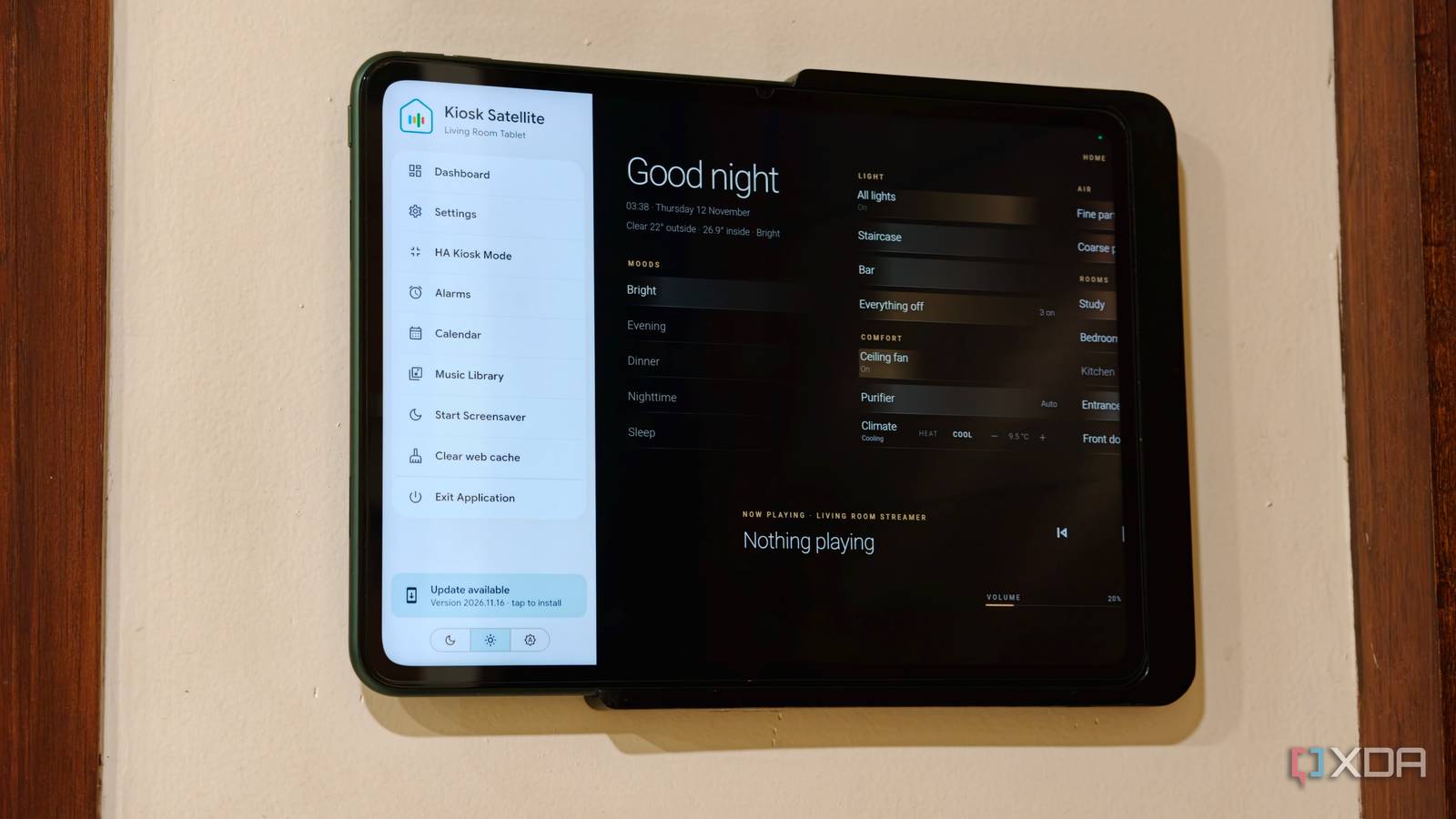
Published Nov 12, 2026, 2:30 PM EST Dhruv Bhutani has been writing about consumer technology since 2008, offering deep insights into the personal technology landscape through features and opinion pieces. He writes for XDA-Developers, where he focuses on topics like productivity, networking, self-hosting, and more. Over the years, his work has also appeared in leading publications such as Android Police, Android Authority, CNET, PCMag, and more. Outside of his professional work, Dhruv is an avid fan of horror media spanning films and literature, enjoys fitness activities, collects vinyl records, and plays the guitar. I use Home Assistant to manage my entire smart home and have deployed wall-mounted tablets across my home for quick access to essential controls. For years, I've used Fully Kiosk Browser as a way to wrestle Home Assistant into a dashboard-friendly format. However, anyone who has used Fully Kiosk would know that the app comes with its fair share of issues. Between per-device licensing, flaky motion detection, and no support for community add-ons, Fully Kiosk either works for you or it doesn't. I'm always on the lookout for new apps trying to solve that gap, and for a while, I've been hearing about a new Android app called Kiosk Satellite. This Android app is designed specifically for Home Assistant, and it handles everything from displaying dashboards to keeping the device locked into a dedicated interface. But most importantly, instead of pulling together multiple tools to build a comprehensive setup, Kiosk Satellite is designed as a one-stop shop. Plus, it brings some of its own interesting tweaks to the mix. Here's everything you need to know. Kiosk Satellite automatically finds all your Home Assistant dashboards Switch between dashboards or automatically rotate views Credit: The first and perhaps most important thing that immediately converted me to Kiosk Satellite is that it doesn't need you to tweak your own Home Assistant setup. Unlike Fully Kiosk, which is just a browser with fancy bolt-ons, Kiosk Satellite connects to Home Assistant via an access token, which lets it see exactly what dashboards you've already set up on your instance. Once connected, Kiosk Satellite takes care of displaying the interface. During setup, you can pick the dashboard you want to use as the default view, and the app automatically discovers the dashboards and individual views available. Unlike Fully Kiosk, you don't need to enter long dashboard URLs. This comes in handy because there's a good chance that, like me, you've probably spent a lot of time building dashboards for different rooms and use cases. I've got a dashboard dedicated to room-based lighting controls and another for security cameras. Kiosk makes them all accessible through a single interface by showing you a dashboard picker alongside their Home Assistant icons. This same dashboard picker is available throughout the app, which makes setting screensavers or automatic dashboard rotation very easy. That last bit is particularly interesting and rather unique. I've set Kiosk Satellite to return to my home page after a set duration of time. I run into this issue often enough wherein I'll switch to my study or security tab and forget to switch back. Using dashboard rotation to cycle through dashboards, or return to the home page, is an excellent quality-of-life addition. Kiosk Satellite does much more than just display a Home Assistant dashboard ESPHome integration, Bluetooth proxy support, and SendSpin integrations If that's all that Kiosk Satellite did, I'd be pretty happy with it. It's already a big step up over Fully Kiosk. However, there are plenty of additional features built in. For starters, there's a selection of built-in screensavers. With Fully Kiosk, I'd pointed it to a website displaying the time. If the internet went down, the screensaver would time out. Not very aesthetic. Kiosk Satellite lets you display a clock, weather information, photographs, or even albums from an Immich server. There's a lot of flexibility here, and it lets your Home Assistant dashboard double up as a photo frame while idling. The motion detection options are a big step-up over my previous setup as well. Kiosk Satellite can use the tablet's front-facing camera to detect movement and wake the display when someone approaches. Fully Kiosk supported that too, but precision was very hit or miss. Kiosk Satellite also adds face detection to the mix and wakes the screen when someone looks directly at it. It's not quite Face ID, but it works surprisingly well. Where it gets even more interesting is that the features aren't just limited to controlling the display. Kiosk Satellite has a built-in ESPHome connection that exposes your device's sensors and controls to Home Assistant. This means I can use the tablet's motion detection as a trigger for automations like triggering specific lights. The app also turns your device into a Bluetooth proxy, which lets it relay nearby Bluetooth devices to Home Assistant. Add to that the ability to turn your tablet or smartphone running Kiosk Satellite into a SendSpin client, and you're looking at a system that's remarkably capable of building a smart home around. While I haven't used the Bluetooth proxy feature just yet, I've dabbled with beaming ambient music playlists across through Music Assistant to my wall tablet, and it works beautifully well. Finally, if you're running a fleet of Home Assistant tablets, Kiosk Satellite makes it a breeze to set them all up using remote administration. You can access the tablet's configuration through a laptop browser and use it to change settings, run backups or even view a live screenshot. Nifty. All in all, we're just scratching the surface with the features supported by Kiosk Satellite. Between community mods support that unlock abilities like native-like controls for Ubiquiti doorbells, deep compatibility for music players, and Home Assistant voice satellite support, there's plenty to discover here, and if you can think of a use case, the software probably supports it. Kiosk Satellite earns an easy recommendation if you're building a wall-mounted dashboard As a paying customer of Fully Kiosk Browser, I'm surprised how quickly I made the jump to Kiosk Satellite. Compared to Fully Kiosk, which always seemed like a piece of software that happened to make Home Assistant work on a tablet, Kiosk Satellite is clearly built from the ground up for Home Assistant. It understands how dashboards, views, and integrations work. However, more than that, it lets you capitalize on all the capabilities of not just Home Assistant, but also the tablet you're viewing it on by exposing it as another data point in Home Assistant. If you have an unused Android tablet or want to build a dedicated Home Assistant wall panel, Kiosk Satellite earns an easy recommendation from me to build around. Kiosk Satellite Kiosk Satellite is an open-source Android app designed specifically to turn your tablet into a Home Assistant kiosk complete with robust customisation and deep integration with Music Assistant and ESPHome.
Kiosk Satellite turned my Home Assistant tablets into a one-stop smart home dashboard
Full Article
Original Source
Read the full article at Xda-developers →KhanList aggregates and links to publicly available news content. We do not host full articles from third-party sources. Always verify important information with original sources.