
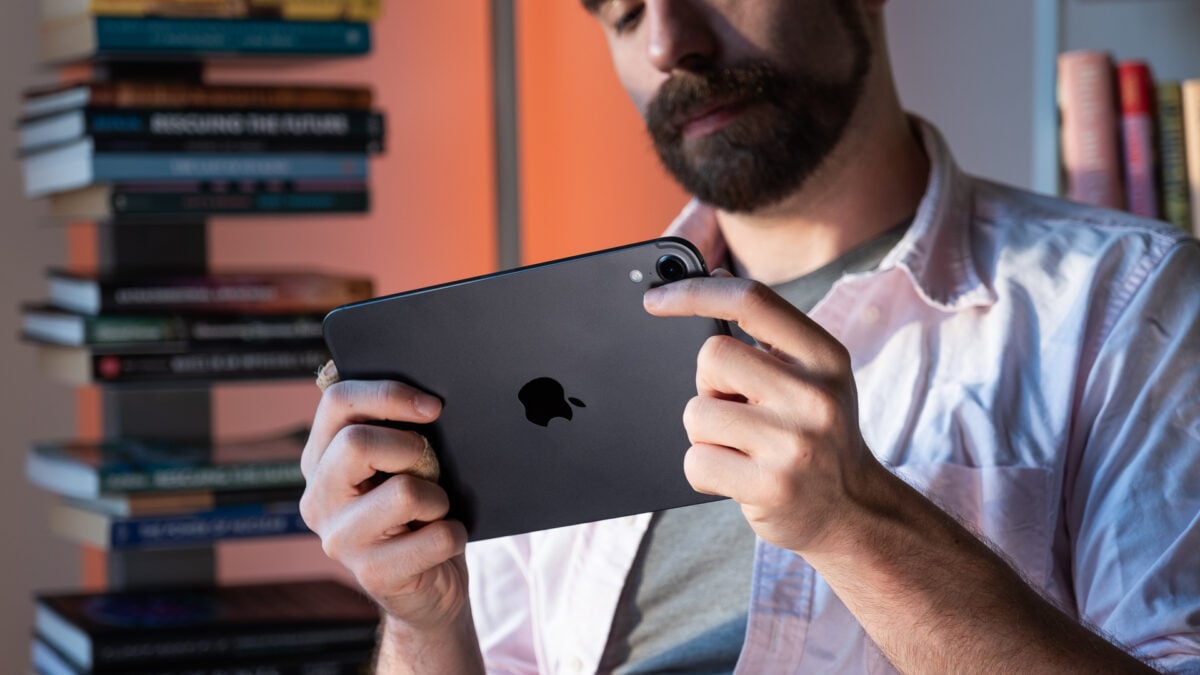
After spending a paltry few minutes with the new iPad mini and its first OLED display last week, I could tell I would enjoy this version of Apple’s new tiny tablet. What I didn’t expect to find was that the new iPad mini is now somehow nearly as capable as the larger iPads. If you’re used to working on a small display, or you’re lucky enough to have tiny hands, you don’t actually miss much by opting for the smallest tablet in Apple’s tablet bandolier. Achieving that status is especially important this time around, because the eighth-generation iPad mini costs $699 (for the model with only 128GB of storage), which is $100 more than the A17 Pro iPad mini and only $50 less than a base M4 iPad Air. It literally needs to meet a certain bar, and thankfully—for the most part—it meets and even beats my expectations. A20 Pro iPad mini OLED With a prettier screen and surprising performance, the iPad mini may be the best tablet for most users, so long as you don't need high refresh rates. Pretty and bright OLED display Performance matches up to higher-end tablets Super slim and light Acoustic Display hits the right notes Improved Apple Pencil magnets Lack of ProMotion of 120Hz options Performance issues with Smart Folio "Nano texture" isn't necessary iPadOS 27 isn't perfect for smaller screens Combining that surprise performance with a pretty OLED display seems like it should create the best version of an iPad. It’s never that simple. The 8.5-inch display gets bright, but it lacks the 120Hz variable “ProMotion” refresh rate you expect from a tablet that costs close to $700 with only 128GB of storage. It’s also constrained by its thin frame. It’s more than capable of completing most creative tasks, though that doesn’t mean it’s best for every single activity you can dream up—unless you’re keen on developing a strained back, bleary eyes, and cramped hands. But at the end of the day, the miniature iPads have always been my preferred tablet. They don’t pretend to be full-blown laptop alternatives. They’re just a creative companion to your main workhorse, be it a MacBook or something else. This time around, Apple has fine-tuned its device with some smart, innovative additions that go beyond the pretty, surprisingly bright OLED display. There’s enough here for the latest small-scale iPad to make a case for itself as a productivity machine. For some people, it may even be overkill. So many smart design choices It’s only slightly thicker than the iPad Pro, one of the skinniest tablets around. © Adriano Contreras / Gizmodo This is Apple’s thinnest iPad mini; it’s been shoved out the door at a mere 5.4mm (only 0.1mm thicker than the latest 11-inch iPad Pro). And yes, before you ask, thinness actually matters. For one, the new iPad mini weighs 0.56 pounds (0.58 pounds with cellular connectivity), lighter than the A17 Pro iPad mini’s 0.65 pounds. This also means it takes up even less space in your backpack, and with an attached case like Apple’s Smart Folio, it takes up so little room I don’t ever feel overloaded when sticking it in my bag on the go. Speaking of which, this gadget is built for mobility. There are no speaker or exhaust grille; the sound instead blares through the screen, a technology Apple calls its “Acoustic Display.” The audio feels full despite this device’s size. Essentially, instead of speaker holes, the display houses a dual pair of speakers and a woofer positioned near its left and right sides when you’re holding the device in landscape orientation. It’s nice, by the way, to be able to hold this iPad mini however you want to without worrying about covering up the speakers. This is smart design, considering that you’ll likely be using this tablet while sitting on the couch or in bed, and you probably don’t want to crab claw your tablet. To give you an idea how small 8.5 inches is, compare it to the size of a typical 11-inch iPad Air. © Adriano Contreras / Gizmodo The sound that comes through the screen will rattle your hands, especially if you’re watching content with Hans Zimmer Inception-level bass. I didn’t find that rumble too distracting in my hours watching content, whether it be Haikyuu! on Crunchyroll or The Great British Baking Show on Netflix. After a minute or so, you simply get used to the vibrations. Apple also reduced the screen bezels compared to the seventh-gen iPad mini. Normally, you would use those bezels to keep your fingers out of the way of your screen. But with the speaker holes gone, such bezels aren’t as necessary anyway: you can now hold it mostly by its sides without issue. The lack of any speaker or exhaust grille is what helped Apple claim an IP67 durability and water resistance rating, which means it’s dustproof and will survive in up to 3 feet of water for about 30 minutes. In other words, I have little compunction about taking this iPad mini into the steamy bathroom while I shower. © Adriano Contreras / Gizmodo © Adriano Contreras / Gizmodo As for drawing and the like, Apple is still letting you use an Apple Pencil USB-C and Apple Pencil Pro on the latest iPad mini. Unfortunately, you can’t use your older Apple Pencil on any of the latest iPad Air, iPad Pro, or iPad mini models. Speaking of the pen, its magnetic attachment point is stronger on this iPad than it was on the previous edition. I had the device in my bag during long train commutes to and from work, and the pen never dislodged and disappeared into the bottom of my backpack, as often happened with the previous iPad mini. The new OLED screen isn’t premium in every way I’m not the biggest fan of the matte filter. © Adriano Contreras / Gizmodo Apple is further confusing its display lexicon with this latest generation of both iPads and MacBooks. The iPad mini includes Apple’s “Super Retina XDR” display. This is not the same thing as the other OLED iPad, the M5 iPad Pro’s “Ultra Retina XDR.” It certainly doesn’t hold a candle to the reference-level OLED of the MacBook Pro with PROLED XDR Display. For one, the mini isn’t using any tandem organic light-emitting diode technology, which typically boosts the brightness of these displays while enhancing the longevity of the individual organic light-emitting diode layer. That’s not to say this tablet isn’t bright. Apple promises its latest iPad can reach a typical brightness of about 600 nits when playing SDR content. It can then boost its luminance to 1,000 nits for HDR content. The iPad Pro, for context, is rated for up to 1,000 nits of full-screen brightness, with HDR highlights reaching up to 1,600 nits. Instagram on the iPad mini may not scale super well, with menu text occasionally bleeding into the feed. © Adriano Contreras / Gizmodo It’s bright enough for what you’ll likely need, though it can also get very dim, bottoming out at 1 nit. That makes it useful for reading in bed with the lights out—though, full disclosure, I mostly leveraged it for late-night YouTube sessions, which the OLED certainly improved. Apple shipped my iPad mini to Gizmodo for review with the optional $100 “Nano-texture glass” (which is only available on the 256GB and 512GB storage variants). This is essentially a matte display filter designed to diffuse the worst reflections that can appear when you’re working under bright lights or sunlight. It adds a paperlike quality to the screen that may feel nice under your finger, but overall, I would still prefer the tablet without it. It dulled some of OLED’s best qualities, particularly its deep colors and contrast. An iPhone Duo only lets you put four items on the dock. The iPad mini allows up to 15 app or folder icons. © Adriano Contreras / Gizmodo There’s one issue you’ll probably see naysayers harping on social media about: the 60Hz maximum refresh rate. Apple does not say whether the screen is using LPTO, or low-temperature polycrystalline oxide, the layer of circuitry behind the OLED pixels that controls them. However, this screen is likely made of low-temperature polycrystalline silicon, which means it’s limited to fixed refresh-rate states. If Apple wanted to, it could lock the screen at 120Hz, but that would just waste battery life. The 120Hz is not something most consumers will actually notice or use; it’s more of a badge that Android fans like to lord over iPhone users. Apple, perhaps in response, brought 120Hz ProMotion, its adaptive refresh rate technology, to its base iPhones with the iPhone 17. Can you game on the iPad mini? Yes, and to a degree that’s surprisingly close to the performance of a larger M4 iPad Air. It’s just not the peak experience you could get if on a better screen. You’re telling me this is an iPhone chip?! No, I don’t recommend using the touchscreen controls to play games like ‘Resident Evil 4.’ But it is playable on this screen with the A20 Pro chip. © Adriano Contreras / Gizmodo The A20 Pro—first seen in the iPhone 18 Pro and iPhone Duo—comes in two variants: a “binned” 5-core CPU/7-core GPU and a high-end version with a 6-core CPU. You’ll only get the maxed-out option if you spend at least $1,000 on 512GB of storage. I cannot say how well the lower-end models perform in comparison. However, since you still receive the same GPU no matter what, you can at least count on these latest tiny tablets to offer some impressive graphics performance, enough to make other tablets, both in and outside of Apple’s own ecosystem, sweat. Benchmarks never tell the full story of a device’s capabilities. And still, as I jotted down the A20 Pro iPad mini’s performance numbers, I did detect an impressive pattern. This chip first appeared on the iPhone 18 Pro and iPhone Duo, and now that it’s on a slightly larger screen, it’s actually holding its own against some of Apple’s recent M-series Mac- and iPad-centric silicon. Shapr3D feels silky smooth on iPad mini. © Adriano Contreras / Gizmodo For instance, on Geekbench 7 CPU tests, which benchmark the processor’s capabilities, the iPad mini lags the M4 in the latest iPad Air by only 15% in multi-threaded performance. In single-core settings, which determine how well the iPad performs on straightforward tasks like loading web pages, the iPad mini is actually faster than the M-series silicon inside the larger 11-inch tablet. The CPU is generally capable of managing multiple apps at once, but the GPU was where things truly got surprising. The iPad mini beat the M4 iPad Air in Geekbench 7’s Metal GPU benchmark by around 15%. Similarly, on real-time 3D graphics tests inside 3DMark Steel Nomad Lite, the iPad Air trailed its smaller counterpart by nearly 25%. When you compare ray-tracing performance via 3DMark Solar Bay Extreme, the two tablets are nearly on par. Trying to edit video on such a small display isn’t ideal. This iPad is, however, an incredibly portable tablet. © Adriano Contreras / Gizmodo Comparing this iPad mini to a similarly sized Android tablet feels like pitting a heavyweight champ against Punchout’s Glass Joe. So I compared the iPad mini to a similarly sized 9-inch RedMagic Astra 2 tablet. That’s a gaming tablet built around Qualcomm’s 2025 flagship Snapdragon 8 Elite Gen 5, and it also packs a liquid-cooling system to lower system temperatures during peak performance. It still scored 40% lower than the iPad mini on Geekbench 7’s multicore benchmark. GPU-wise, the RedMagic Astra 2 is more competitive and more consistent overall (which it should be, considering that it’s a gaming-first tablet). While the iPad mini performs 37% better on 3DMark Solar Bay Extreme, the Astra 2 wins in Wild Life Extreme by nearly 36%. That may have less to do with the Qualcomm chip than it does with heat dissipation and sustained GPU performance. Let’s just admit you’re rarely going to use that rear 12-megapixel camera. © Adriano Contreras / Gizmodo It’s hard to move heat out of a device this slim, but the mini does seem to struggle even more if you cover its back. I got lower performance scores when I ran the tests with the Smart Folio on than when I ran them with it off. We reached out to Apple for clarification on this, and we’ll update this post if we learn more. Still, benchmarks aside, playing Call of Duty: Mobile or PUBG: Mobile feels smoother on the Astra 2 than on the iPad mini, not only because of the improved cooling but also because of the 120Hz refresh rate. That being said, I also played Resident Evil 4 on this small iPad and didn’t feel like I was cheaping out with the mobile-first processor, so Apple has that going for it. Overall, the performance you can get from Apple’s latest A-series chip is—simply put—impressive. In an app like Octane X, which relies on the GPU, I can render the Screws scene nearly as fast on the iPad mini as on the iPad Air. That means that the Air vs. Mini iPad selection, for many people, will be a simple question of whether you’re willing to spend $50 extra for a larger (but uglier) screen. Is this the epitome of iPad design? Swiping down from the top of the screen will let you text Siri at a moment’s notice. It can occasionally prove handy as a quick math tool or an alternative to the ever-enshittified Google Search. © Adriano Contreras / Gizmodo To answer the above question, no. A small screen constrains what you can do with your tablet. Case in point: I wrote half of this review on my trusty MacBook and the other half on the iPad mini. This was already ill-advised, since the iPad mini is the only Apple tablet that doesn’t offer a Magic Keyboard option. It works with Bluetooth keyboards, of course, so I settled for the Logitech Keys-2-Go 2. This setup was serviceable, but it’s not something I would use outside of situations where I absolutely had to (such as in a tiny airplane seat, perhaps—I’ll probably haul it on my upcoming trip to Iceland). Apple’s Smart Folio would be much better if it allowed for vertical orientation. And if I wanted to do any sort of multitasking, I’d be looking for a larger screen. Since iPadOS 26 introduced a better multi-window experience on iPads, the 11-inch and 13-inch tablets have become much closer to full laptop replacements (though not quite close enough that I’d recommend them over a clamshell for most people). The iPad mini’s 8.5-inch screen can accommodate at most two windows side by side. Even then, some apps don’t feel quite as tuned to the mini’s aspect ratio as they are for other iPads. For instance, Instagram’s menus sometimes clip into the feed column. Even Apple’s iPadOS 27.2 doesn’t seem to be designed for this screen size. If I click the top of each window to close it, or hit the Move & Resize button, I sometimes end up triggering Siri’s Spotlight instead. If you’re hoping to be productive, go for a larger iPad. iPadOS will also let you scribble out your text in a text field. How accurate it is depends on the legibility of your chicken scratch. © Adriano Contreras / Gizmodo Creative apps are a different story. Canva just launched its Affinity suite for free on iPadOS (though you’ll need a subscription for any of those special AI tools), and that particular UI is well-scaled for this screen size, and Canva has nailed usability without sacrificing functionality. Other apps, including Apple’s own Creator Studio tools like Final Cut Pro and Pixelmator Pro, are similarly easy to use despite the squashed display size. And as I mentioned before, the A20 Pro chip inside this tablet is plenty for these tasks, whether you’re 3D modeling or rendering video. The iPad mini can export 4K footage when necessary, and it doesn’t even do it that much slower than an M4 iPad Air. That doesn’t mean you shouldn’t prepare to spend time hunched over the small screen, squinting as you pick out the fine lines of your 3D objects in Shapr3D. The (small) space reserved for the $699 iPad Reading on the iPad mini is as nice as ever, thanks to its high brightness. © Adriano Contreras / Gizmodo I’m often conscious of an 8.5-inch-sized hole in my life. There are times when I just want a screen that’s smaller than my laptop but larger than my phone. That’s why I have such an appreciation for the iPad mini, especially now that its base functionality has taken such a leap over the 2024 model. Several other upgrades are worth noting. Apple included its N1 connectivity chip, giving the iPad mini access to Wi-Fi 7 and Bluetooth 6. 5G is also available via Apple’s C2 Wi-Fi and cellular modem. The upgraded chip is also doing double duty for battery life. The A20 Pro uses a new 2nm process, which is notably more efficient than the larger processors like the A17 Pro in the previous iPad mini. That’s important because the new iPad uses a slightly smaller 18.9Wh battery (the older version sported a 19.3Wh cell), and I still managed to get a full day of browsing and video streaming out of my review unit. The 8.5-inch display may be just enough for your artistic endeavors. I imagine others will want more space. © Adriano Contreras / Gizmodo At the same time, Apple hasn’t really improved any of these cameras, although they now occupy the landscape side of the iPad rather than the shorter portrait end. The front-facing 12-megapixel Center Stage camera is good enough for a video or FaceTime call. You won’t find many uses for the 12-megapixel wide rear camera lens unless you’re a grandma who still can’t figure out how to use anything but a tablet camera for some reason, but it is there. Even though it’s not using a MacBook-level M-series chip, the A20 Pro processor is a performance marvel despite its size—at least in the version with six CPU cores and a powerful 7-core GPU. This probably says something about the limitations of the M4 iPad Air, which, despite its name, is now thicker than an iPad mini and heavier than an iPad Pro. In any case, I desperately want to see a new version of the MacBook Neo running this silicon, because that could be untouchable. Multitasking on iPadOS 27 with the iPad mini is more difficult thanks to the smaller display—but it’s still totally doable. © Adriano Contreras / Gizmodo All these small additions don’t actually change when, where, and how you use an iPad mini. They make it a better version of the same tablet it’s always been. At its $699 price point, the iPad mini has to feel as capable as Apple’s higher-end slates, and I’ll admit I’m surprised by just how close it comes. All of that is to say: if I had to choose a single iPad from Apple’s line, I’d go for this tiny one every time.
iPad mini OLED Review: Apple’s Smallest Tablet Is Also Its Best
Full Article
Original Source
Read the full article at Gizmodo →KhanList aggregates and links to publicly available news content. We do not host full articles from third-party sources. Always verify important information with original sources.