
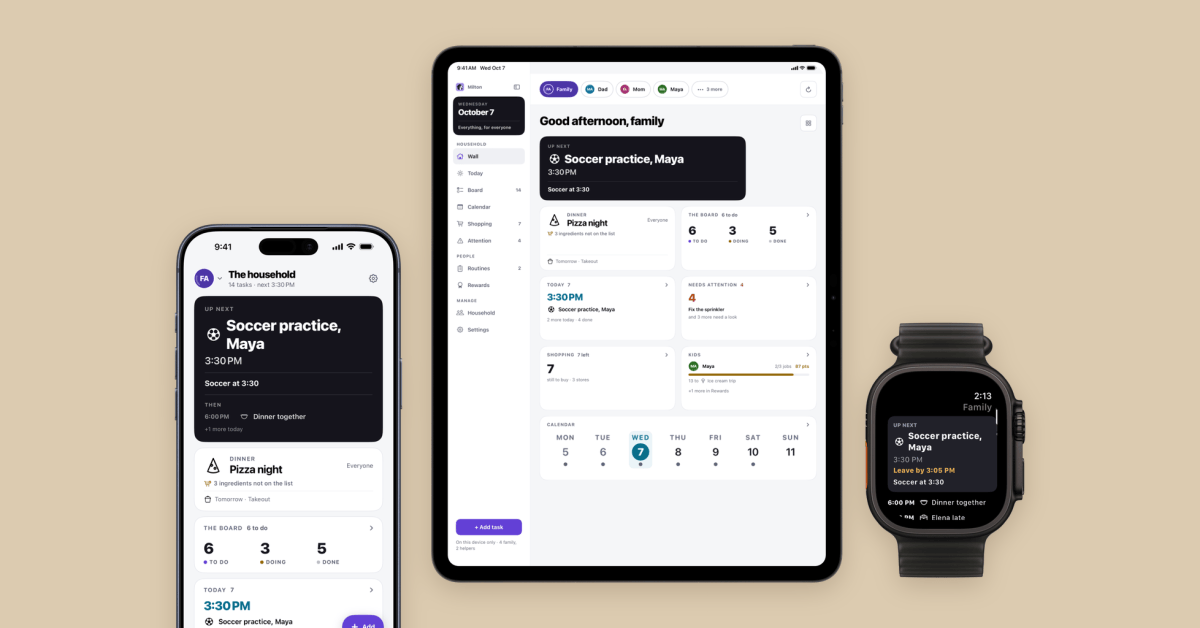
Welcome to Indie App Spotlight. This is a weekly 9to5Mac series where we showcase the latest apps in the indie app world. If you’re a developer and would like your app featured, get in contact. Apple finally released its new HomeView this week, a smart display that serves at the center of your home. What if you don’t want to buy a new product though? Milton is an app for older iPads running iPadOS 17 and later that can serve a similar purpose. Highlights Milton offers a customizable dashboard that allows you to put your most important tiles front and center. It can show your calendar, chores, shopping lists, weather, the clock, a photo frame, a to do list, and so much more. Everything you include will show on the family iPad, but it can also sync to iPhones if you want to check something remotely. There’s one neat feature that’ll be fun for families: a points system. If your kids complete chores, they can be awarded points and as a parent you can set goals for what kids can earn with enough points. This system can be used to encourage kids to complete chores or follow routines. Parents can also sign off on the chores to ensure kids aren’t just tapping the complete button. It also serves as a nice recipe guide. If you take photos of cookbooks, Milton can parse through what you captured and provide a step by step guide for cooking. If you don’t have certain ingredients, it can quickly be added to your shoping list. This only scratches the surface of what Milton can do. You can read their website for the rest. The story Here’s why Josh, the developer, decided to build Milton: I’m a software engineer, and my partner is an oncology pharmacist. She wanted one place that kept our household organised: the calendar, the chores, the shopping, what’s for dinner. Skylight is expensive, and the iPad apps that do this charge a subscription every year. We wanted something that fit our lives, connected us as the Apple family we already are, and didn’t cost families a fortune. Like most families, we had an old iPad lying around. We put it in a case with a magnet, stuck it to the fridge, and that became Milton. Download the app Milton provides a very generous free offering on the App Store. The core organizer features are all available out of the box, but if you want to add more people to the app, sync across devices, or share the app with other family members (for their personal devices), you’ll need to purchase Milton Individual for $4.99 (one time purchase) or Milton Family for $14.99. Milton Family automatically shares with your iCloud family sharing group. Some of my favorite Apple accessory recommendations: AirPods Pro 3 (2x ANC vs AirPods Pro 2!) Anker MagGo 25W 10K Battery Bank with Kickstand Belkin MagSafe 3-in-1 Charging Stand for iPhone MOFT MagSafe Kickstand Wallet for iPhone Anker Prime 3-in-1 25W Compact MagSafe Charger Follow Michael: X/Twitter, Bluesky, Instagram FTC: We use income earning auto affiliate links. More.
Indie App Spotlight: ‘Milton’ lets you turn your old iPad into a home dashboard
Full Article
Original Source
Read the full article at 9to5mac →KhanList aggregates and links to publicly available news content. We do not host full articles from third-party sources. Always verify important information with original sources.