
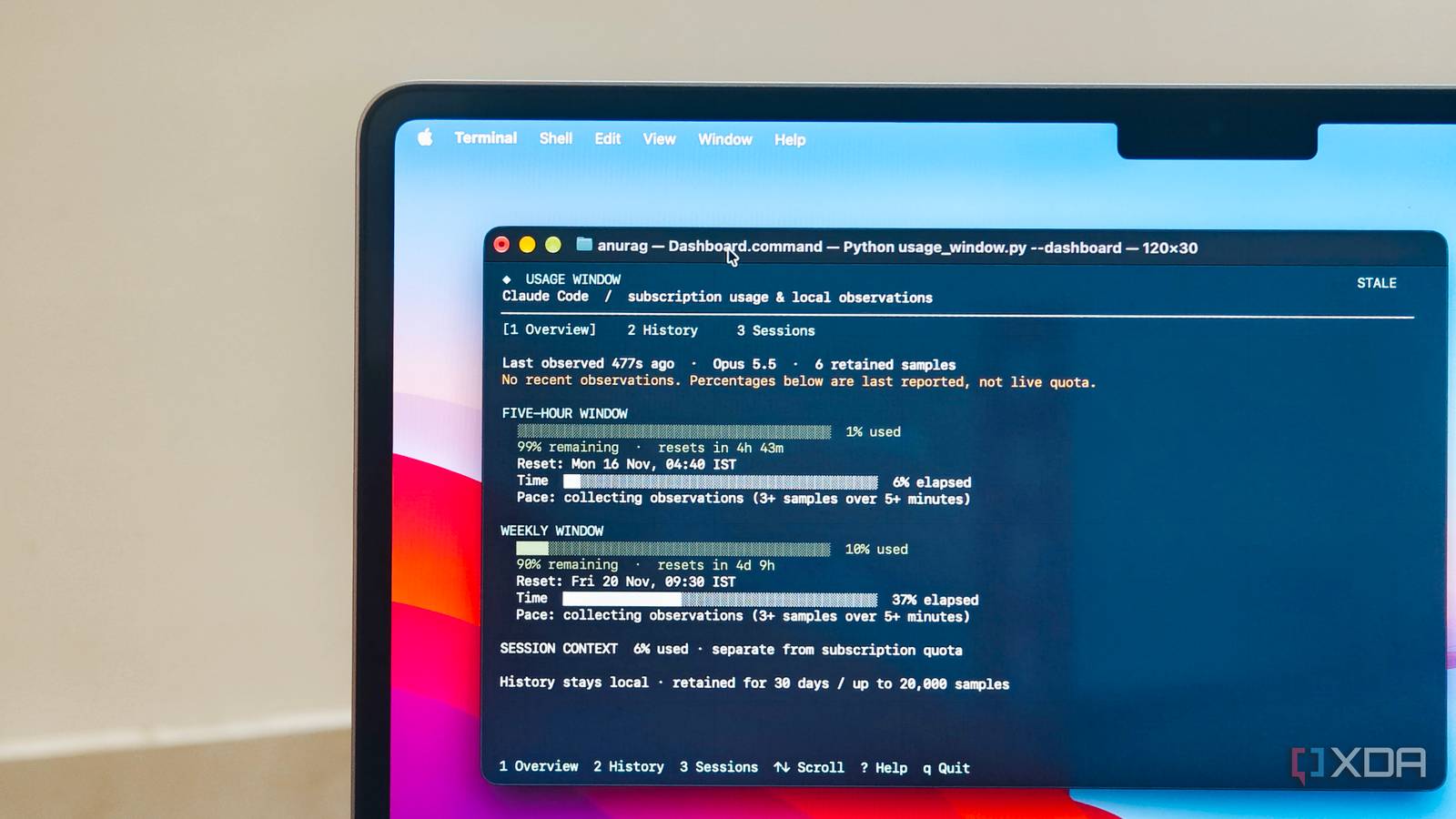
Published Nov 17, 2026, 8:01 AM EST Anurag is an experienced journalist and author who’s been covering tech for the past 5 years, with a focus on Windows, Android, and Apple. He’s written for sites like Android Police, Neowin, Dexerto, and MakeTechEasier. Anurag’s always pumped about tech and loves getting his hands on the latest gadgets. When he's not procrastinating, you’ll probably find him catching the newest movies in theaters or scrolling through Twitter from his bed. Claude Code is great, but you know what's not? The usage restrictions. There have been times when I've been working on a new feature, only to exhaust my allowance before I could finish. Claude Code does have a built-in /usage command that shows how much of your allowance you've consumed, but I wanted something that would keep track of it continuously and, more importantly, tell me how much longer I could keep working at my current pace. So I built a small tool that sits alongside Claude Code, tracks my five-hour and weekly usage limits, and estimates when I'm likely to hit them. Claude Code's usage limits kept interrupting my projects Knowing what's left changes everything One thing I've learned from using Claude Code is it's difficult to predict how much of your allowance a particular task will consume. Sometimes, I can get an entire feature built with a handful of prompts. Other times, something as simple as fixing a bug turns into a lengthy debugging session, with Claude repeatedly reading files, running commands, and making changes. Both consume my usage allowance, but at very different rates. Claude Code has a five-hour usage window as well as a weekly limit, and I've found that keeping track of both is important when working on larger projects. You might have plenty of allowance remaining in your current five-hour window but be approaching your weekly cap. And because usage isn't consumed at a consistent rate, knowing that you've used 60% of your allowance doesn't necessarily tell you how much more work you can get done. The built-in /usage command is useful for checking where you stand, but I don't want to interrupt my workflow every few prompts to check it. More importantly, it doesn't tell me whether my recent activity is likely to exhaust the remaining allowance in the next 20 minutes or whether I can comfortably continue working for another hour. I built my own usage dashboard for Claude Code Everything I need in one place I built a small Python tool called Usage Window that connects to Claude Code through its existing status-line interface. It doesn't require an API key or any additional Python packages, and the entire thing runs locally. I just had to run python3 usage_window.py --install, which configures Claude Code to pass its usage information to the script. The tool then records these observations in a local SQLite database. Once installed, I can open the dashboard in a separate terminal pane alongside Claude Code. The main screen displays two gauges for my five-hour and weekly usage allowances, showing how much I've consumed, how much remains, and when each window resets. It also shows my current context usage and a timeline of the active usage windows. My favorite feature is the estimated time to limit. The tool looks at how quickly I've been consuming my allowance over recent observations and calculates roughly how much longer I can continue at that pace. It needs enough recent data to make a prediction, so it won't always show an estimate. There are two other views worth mentioning. The history feature lets me see how my usage has changed over the past hour, 24 hours, or seven days, complete with graphs and individual observations. Sessions shows the last recorded activity, model, and context usage for each Claude Code session. I've also added a /usage-window slash command that gives me a quick snapshot without opening the dashboard. And since the tool uses data Claude Code already provides, it doesn't need to make any network requests or collect my conversations. The dashboard updates as new observations arrive and flags readings that are more than five minutes old, so I know when the information is stale. There's a lot more you can customize in Claude Code The defaults are just a starting point Since installing Usage Window, I've been able to manage my Claude Code sessions much better. If I'm approaching my usage limit, I can wrap up whatever I'm working on instead of starting something complicated. I also have a better idea of how much allowance I typically consume during longer coding sessions, thanks to the historical data the tool collects. However, building this tool also got me interested in what else I could change about Claude Code. I've previously experimented with hooks to make the agent more reliable. For example, I added a Stop hook that makes Claude review a list of mistakes it has made previously before finishing a task. Claude Code now also supports mods, which take customization considerably further. Mods can change the way Claude Code behaves and even modify its interface. You could build one that displays additional project information in the terminal, prevents certain commands from executing, or changes how Claude handles specific tool calls. Anthropic has already started using mods for some of Claude Code's built-in functionality, including its /diff interface. You can install community-built mods through the plugin system or ask Claude Code to create one for a particular requirement. I think this is one of the more interesting aspects of Claude Code. You don't necessarily have to wait for Anthropic to introduce a feature you've been wanting. With a little experimentation, you can build it yourself and make Claude Code work the way you want. There's plenty more to experiment with I've only scratched the surface of what can be customized in Claude Code, and I already have a few more ideas I want to try. If you use Claude Code regularly, I'd recommend exploring its hooks, plugins, and mods. You might find that some of the features you've been missing are surprisingly easy to build yourself.
I wrote my own Claude Code mod to show my usage window, and I stopped getting cut off mid-task
Full Article
Original Source
Read the full article at Xda-developers →KhanList aggregates and links to publicly available news content. We do not host full articles from third-party sources. Always verify important information with original sources.