
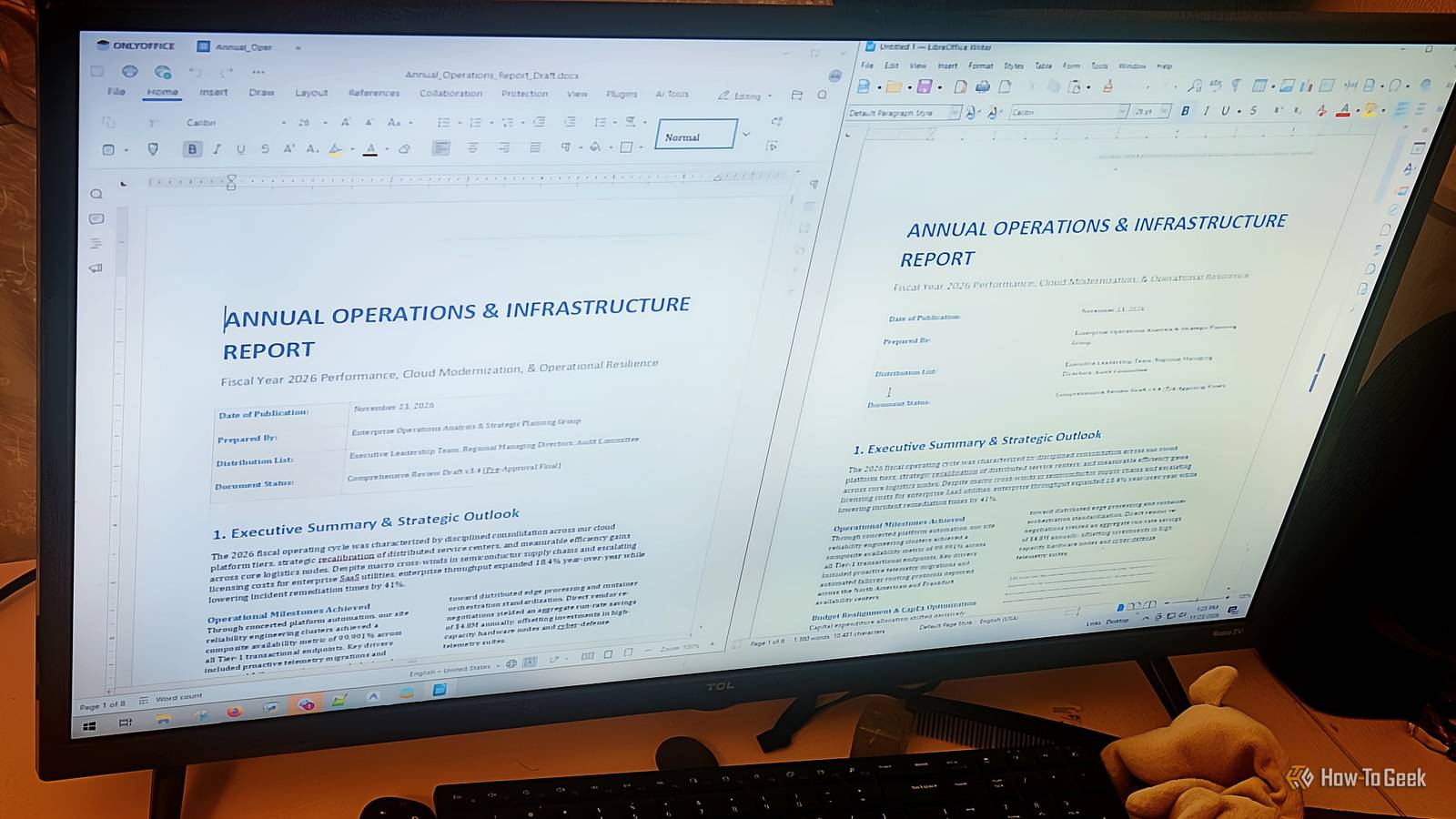
Published Nov 24, 2026, 10:30 AM EST Aggy is a veteran writer and editor in the technology and gaming space. Having served as a Managing Editor for high-traffic digital publications, alongside being an editor and consultant for over a dozen sites. Aggy's published work spans a wide and respected array of tech and gaming outlets, including WePC, Screen Rant, How-To Geek, Android Police, PC Invasion, and Try Hard Guides. Beyond editorial work, Aggy's direct experience in the tech sphere extends to app development. Aggy has published two games under Tales and is always eager to learn and do more. He also likes working on computers and researching in his spare time. He knows about Windows, Linux, Audio, Video, and much more. Office software has a way of becoming something you pay for without ever deciding to. The subscription renews, and you end up with more files in that same software, making it harder to leave. I got tired of putting it off, so I spent a month living in two free alternatives. Both OnlyOffice and LibreOffice promise to replace Microsoft Office, and both do it in different ways. I wanted to know which one holds up with real work and real deadlines. I really thought that the answer would be simple, but now I think differently about what a replacement even needs to do. These two suites were built in very different ways LibreOffice and OnlyOffice handle your files differently LibreOffice has a long backstory that I was surprised to read about. Sun Microsystems acquired StarOffice and later released its source code as OpenOffice.org. After Oracle acquired Sun, community members started The Document Foundation and forked OpenOffice.org to create LibreOffice. From there, the team spent years updating the code and adjusting the program until it looked a lot like Microsoft Office. OnlyOffice started in 2009 as TeamLab. The team eventually rebuilt the editing engine around browser-based canvas rendering, rebranded as OnlyOffice in 2014, and put the core server software out under an open license. It began as a web product and only added desktop apps later, using that same web engine inside the app. LibreOffice is built around the Open Document Format as its native standard. When you open a Word or Excel file, LibreOffice translates it into its own internal format, works on it there, then translates it back when you save. While a lot of people like this, I've dealt with plenty of issues thanks to that translation step. I've noticed that things go wrong with complex files, especially ones with tables and long blocks of text. OnlyOffice uses Microsoft's Office Open XML formats as its native formats. So it can basically edit DOCX, XLSX, and PPTX files without converting them first. Other formats can be converted to OOXML for editing. That's pretty great for OpenOffice with Microsoft files, because I don't have to worry much about corrupting or random text getting deleted when I save. LibreOffice was better for my daily work OnlyOffice has a few advantages of its own After using both for a full month on real work, LibreOffice stood out as the one I liked better. I especially liked how well it handled spreadsheets and long documents. I was worried about the file conversion because I used LibreOffice when I was younger, and that's when I had the most problems. This time, I never saw it break when opening or saving Microsoft files, even though LibreOffice still imports them into its own document model and exports them when I save. I was really surprised to see Calc handle complex recalculations, multi-condition filters, array formulas, and even the random sorting formulas AI gave me. OnlyOffice felt noticeably slower on the same files and used more memory. I didn't like that at all because I wanted my documents to feel smooth. Writer was also better, but not as much as Calc was. I was able to make multi-page reports with nested tables, footnotes, multi-column layouts, and margin notes, and everything stayed intact. LibreOffice gives you a lot of control over compatibility settings for spacing and font handling. I can't prove it, but I think all those settings are why it plays nicer with Word files. LibreOffice runs locally, which is a big reason I like it over Word. I don't like needing an internet connection to run software that used to not need the internet at all. I don't want background servers or web stuff running when I just need to type a document. Still, it wasn't a clean sweep. OnlyOffice was better in a few areas that mattered more to me than they might to other people. Its interface looks so much like Microsoft Office that it was easier to work in. I liked seeing the same ribbon layout across desktop and browser versions. LibreOffice seems to have moved away from copying Microsoft's look and stuck with a more traditional menu setup, and while it does have an optional ribbon mode, turning it on takes some digging through settings. For someone switching from Office who wants things to look familiar right away, OnlyOffice is the easier switch. OnlyOffice is better for working together Neither suite can completely replace Microsoft Office Where OnlyOffice really wins is real-time collaboration in its online editors. One thing that makes me love Google Docs is how well people can collaborate. I don't like how it works on Microsoft Word, but I think OnlyOffice actually does it better than Microsoft. It supports live co-editing in the browser, and you can either watch changes show up as they happen or lock a section until you're done with it. It also works well with platforms like Nextcloud. LibreOffice doesn't have this built in, and that makes sense because it's built to work offline. But it still feels like something every office program should have by now. Unfortunately, neither suite is a complete replacement for Microsoft Office in my opinion. Both have issues with complex macros, which is where Microsoft still wins. LibreOffice can run basic VBA but stumbles on anything advanced. OnlyOffice doesn't run VBA at all, so any macro-based workflows would need to be rewritten from scratch. There are other little features missing in both suites, so neither one feels like the clear best. Pick the one you like Neither suite will replace Microsoft Office for everyone, and if your work depends on advanced macros, you can't use either reliably. Both are free, so all it costs you is a few hours with your own files. Open the documents that give you the most trouble, and you'll know quickly whether either one fits. LibreOffice OS Windows, macOS, Linux, Android Individual pricing Free What's included? LibreOffice Writer, Calc, Impress, Draw, Base, Math LibreOffice is a free Microsoft Office alternative, letting you use similar applications without having to pay a fee.
I used OnlyOffice and LibreOffice for a month, and one is the better Microsoft Office replacement
Full Article
Original Source
Read the full article at Howtogeek →KhanList aggregates and links to publicly available news content. We do not host full articles from third-party sources. Always verify important information with original sources.