
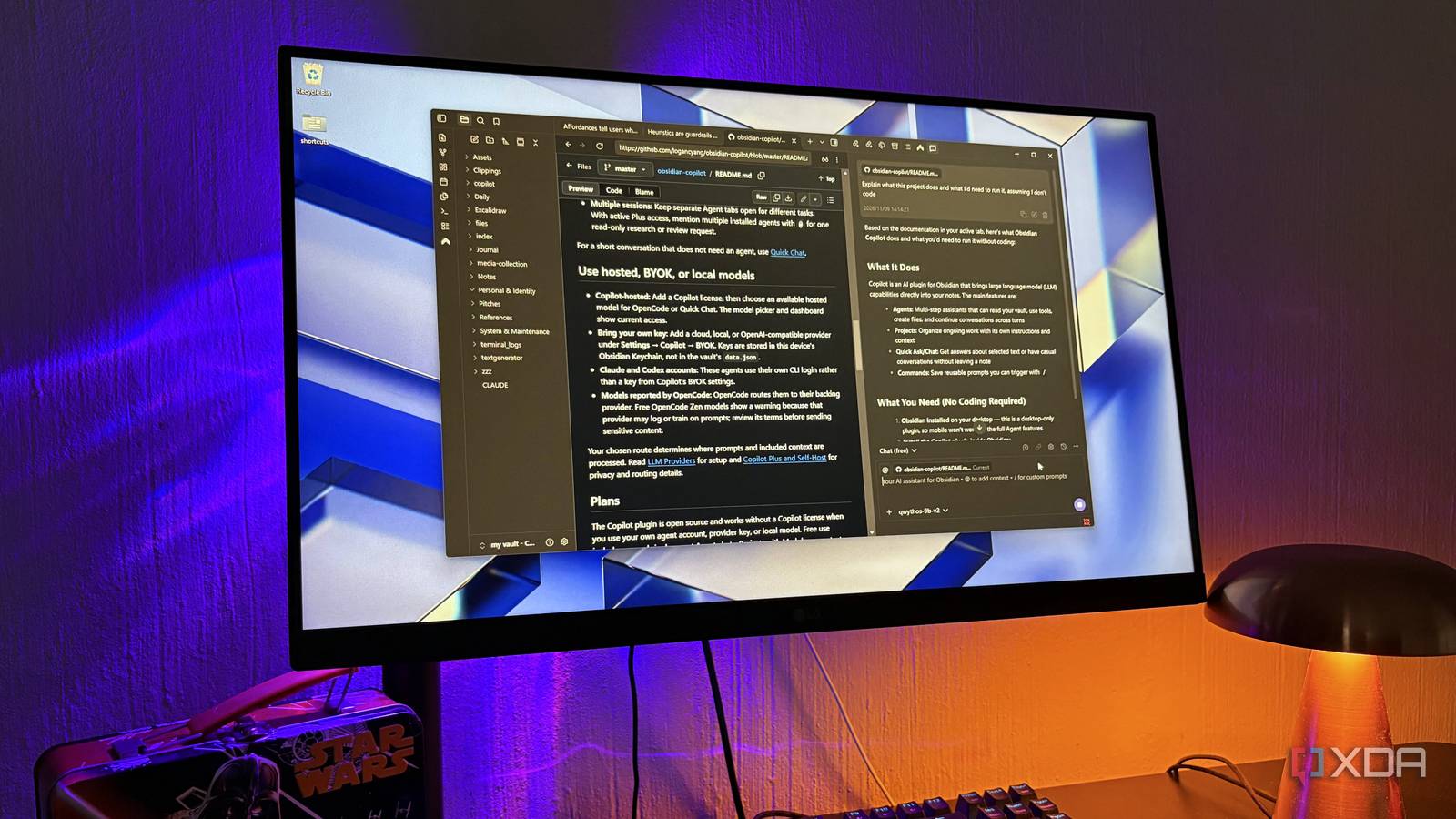
Published Nov 9, 2026, 4:00 PM EST Nolen began their writing career in 2019, with three years dedicated to editing the Creative section at MakeUseOf. Their expertise lies at the crossroads of technology and creativity, covering areas like photography, video editing, and graphic design. Outside of work, you'll often find Nolen diving into a good book, writing their own stories, or playing video games. Gemini has been living in Chrome's side panel since Google's big update back in January, and it's since rolled out to most of the world outside Europe. You can have it open beside whatever tab you have open and ask about the page without having to copy anything back and forth to a chatbot app. Google has been adding Personal Intelligence on top of that, which lets Chrome remember context from past conversations and tailor its answers to you. The catch with browser assistants like this is that the page you're reading gets sent off to someone else's servers every time you ask about it, and with memory switched on, a running picture of your research ends up there too. This is where a local LLM comes in for private work, and with a web MCP you're already halfway there. However, Obsidian is where all my notes and docs are, plus, it already has a full browser built-in. This workflow is a little DIY because it's not an AI browser as much as it is AI bolted onto a browser feature - but it works seamlessly. Obsidian already has a browser built-in One of the most underrated Obsidian core plugins Obsidian has a built-in browser as a core plugin, called Web Viewer, and it's been there since Obsidian 1.8 came out in early 2025. I've known about it, but overlooked it for most of the time I've been an Obsidian user. I already have Chrome for work and Brave for personal use, and constantly test AI browsers, so this one just disappeared into the background for me, until recently. It's built on Electron, which already bundles Chromium, so Web Viewer is basically a Chromium webview (the same feature Canvas uses to embed web pages) loaded into a regular Obsidian tab. Once you've turned it on, you can easily access it from a fresh page or the command palette. A page can sit in a split beside the note you're writing, which I think is the biggest appeal of this feature. But you can also just use it like you would a regular browser, or perhaps pop it out into its own window if you have a second monitor. The glasses icon switches to a reader view that strips the page to plain text with Mozilla's Readability library (the same one behind Firefox's reader mode), and a save option turns the page into a note in your vault. Ad blocking is on by default too which is always appreciated. I recommend checking the Open external Links setting to what you prefer. It decides whether links in your notes open inside Obsidian or get sent to your normal browser. And you can set your search engine preference while you're at it. Copilot is the part that actually reads the page Local model or cloud API, the plugin doesn't really mind which Web viewer on its own just shows pages, so the AI has to come from somewhere, and that's going to be the Copilot plugin. It's a community plugin by Logan Yang (no relation to Microsoft's Copilot), which can attach whatever page is open in Web viewer to a chat the same way it attaches a note. It's a BYOK situation, so to add a model you just go to its settings, pick LM Studio or Ollama from the list, which will fill in the local server address for you, and add your model name. For local options, there's no API key needed, which is the route I went with, but cloud providers work too if you'd rather paste in an API key. And my models of choice here are Qwythos 9B and Qwen 3.5 9B, which are pretty much my staples for bringing into local tools. I've got them set to 30k context in LM Studio, which strikes a good balance on my 8GB card. The chat view you want is Quick Chat, which you open from the command palette and dock next to your Web Viewer tab. In its free Chat mode, whatever page you have open gets attached automatically, so there's nothing to copy over. It only answers from what's attached, though, so it won't search your vault unless you add a note yourself. What a vault-aware browser can actually do The page is only half of the context Day to day, it comes down to a page in one tab and the Copilot panel docked beside it. The page is basically just like any other note that I'd bring my local LLM into. Its entire text goes in with the prompt and also gets sent again when a new page loads, so I can browse around a site and keep asking questions without having to re-attach anything. Be mindful that this can quickly drain your context budget, so what I like to do is hit the little New Chat button at the bottom when the topic changes. The part Gemini can't match is what else goes into that chat. Typing @ pulls in other notes, whole folders, or other open web tabs, so a page can sit right next to my own notes on the same topic. For example, I can open a UX article and ask what it covers that my notes don't, or whether it contradicts something I wrote months ago. This goes beyond just getting basic summaries or explainers because now the answer partly depends on what's also in my vault. Two web tabs in the same chat turn it into a comparison tool for pricing pages or competing docs, and selecting a paragraph attaches only that bit, which helps with stuff like READMEs which sometimes go over my head. Copilot lets you save prompts you trigger with a slash, and a saved prompt can pull in a specific note. If you keep a specific note, a command can audit whatever page is open against it, so a live site gets judged by your own criteria. Those chats autosave as Markdown notes too, which is how they end up back in the vault. There are limits to this though. Copilot only reads the pages, it can't act on them. So you're not getting Gemini's auto browse here, where it clicks through sites on your behalf (that's a paid Google AI Pro and Ultra feature anyway). Long pages are the other thing. A small local model can only hold so much in context, and even when it can handle it, speed also becomes a factor - Qwythos 9B often took its sweet time to reply on moderate-length web pages. My research tabs found a new home I still use Gemini in Chrome because that's the browser where a lot of my real work lives. But a lot of my research tabs have drifted to Obsidian now, which wasn't even entirely the plan when I switched Web Viewer on. I think the reason is pretty boring. A chat that lands as a note next to the notes it was about is a pretty cool function to have in my vault, plus the whole pipeline is private so long as I keep the AI layer local. Obsidian OS Windows, macOS, Linux, iOS, iPadOS, Android Individual pricing Free normally; $4/month for Obsidian Sync
I turned Obsidian into an AI browser, and it does what Gemini in Chrome does without my research leaving my vault
Full Article
Original Source
Read the full article at Xda-developers →KhanList aggregates and links to publicly available news content. We do not host full articles from third-party sources. Always verify important information with original sources.