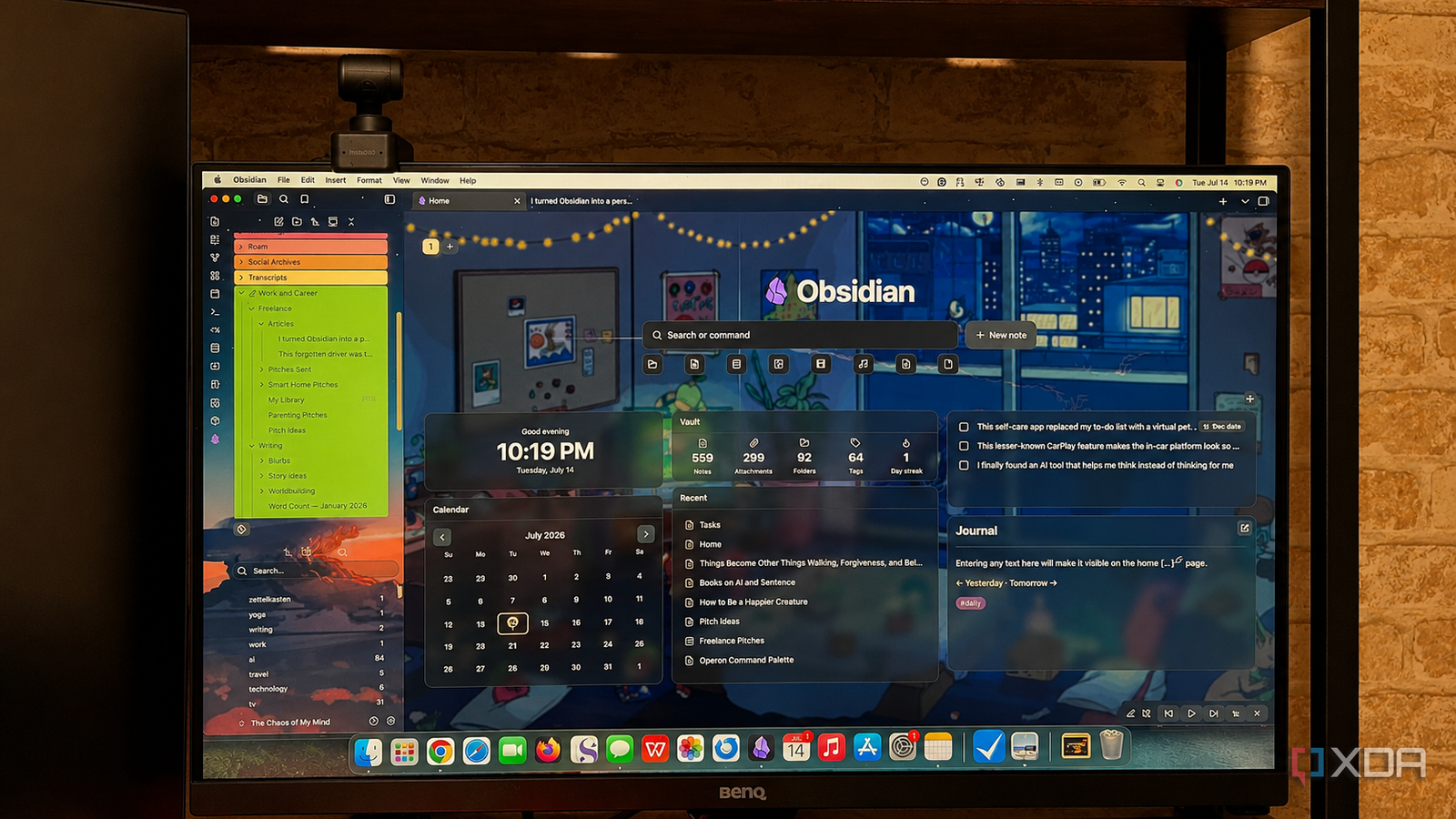
Published Jul 19, 2026, 5:30 PM EDT Patrick is a seasoned writer with more than a decade of experience, specializing in any and all things tech. His work has been featured on platforms like CNET, Yahoo, Xfinity, and many other outlets. When not typing away, he can be found with his nose in a book. Obsidian is the first app I open each morning at the start of my work day. Not Word, not Notes, not even my email client. When I first discovered Obsidian, I didn't know much about it; it was just an app for taking notes, and I was toying with it because I was curious. I had no idea then that it would become my central command center for my workflow, with everything — to-do lists, stray ideas, daily logs, and more — all going into it. Now, thanks to Obsidian's versatility, I hardly even open other apps. That's not to say I never use them; some file types just don't work as well in Obsidian, even with an army of plugins fueling my vault, so I'll use something like LibreOffice to edit Word documents, PDFs, and spreadsheets, but the actual writing? That's done in Obsidian. So is managing my to-do list and calendar. Here's how I do it. I start with a centralized, functional dashboard It opens when Obsidian does, and my day goes from there I've built a homepage that serves as a jumping-off point for my workday. It shows me the time, the date (and I can click on the calendar to see if I have any meetings or events that day), my recently accessed files, an overview of my vault, my to-do list, and lets me open my daily note. Sure, it has a custom background and has been tweaked to suit the overall theme of my vault, but it's both aesthetic and functional. I used the Hearth plugin for this, but it's entirely possible to create the same setup with other homepage-oriented plugins, or even just CSS. There's no right or wrong way to do it, and the style of homepage/dashboard that works for me might look entirely different for someone else. I have multiple vaults, and each one has a different dashboard depending on its purpose. My tasks and my notes live in the same place Obsidian has replaced numerous other apps My work can be broken into either writing, researching, or editing. I spend a lot of time in the research phase, either looking for new and interesting software to try out or putting it through the wringer to ensure I know all there is to know about it before I start writing about it. Then there's the writing phase, which is self-explanatory (although I do, at times, break those tasks into multiple, smaller tasks — usually different drafts). And finally, there's the editing phase. After an article is written, I go back and give it a pass to check not only for grammatical issues but also for informational accuracy. I can draft and edit a story without ever leaving Obsidian, and when I'm done with those tasks, I can mark them as completed and move on to what's next. Before Obsidian, I would have written the article in a word processor like MS Word, opened a to-do list app like Todoist to mark it as complete, and then copied and pasted the story into whatever CMS I'm using. While that last part remains a routine part of the workflow — although I could, in theory, log in to the CMS from the Obsidian web view — I've eliminated multiple apps by working inside Obsidian. I don't miss word processors either. There are multiple editing toolbars that make writing in Obsidian feel as good as, if not better than, writing in Microsoft Word. I can access external info without leaving my vault Plugins are your friend Obsidian can do a lot, but there's a fair amount it can't do. That said, I can also access external information without the need to leave Obsidian. The Obsidian Web Viewer is a core plugin that lets me surf the web from inside my vault, and it even has an adblocker built in. And with other plugins, I can display RSS feeds inside notes that update in real time, keeping me apprised of anything I need to know. The Obsidian Web Clipper lets me save entire web pages straight to my vault, and I can even embed YouTube videos to be referenced later. With the right workflow, there's hardly ever a need to leave Obsidian. Some jobs are better handled with dedicated apps Here's the thing: Obsidian isn't meant to replace every app. While its plugins can grant a lot of the same functionality, they aren't a total replacement, and often lack the polish a dedicated app might have. There are some tasks I wouldn't even dream of attempting inside Obsidian, like editing a photo. A program like Photoshop or GIMP will do the job infinitely better than an Obsidian plugin, no matter how complicated it is. The same goes for spreadsheets. While there are ways to work with them inside Obsidian, it's typically more of a pain than it's worth. I'd rather just open up Excel and get the job done rather than fight with quirks introduced by a plugin. I love staying in one app as much as possible, but sometimes it's just easier to open a secondary app to get the job done more quickly. Obsidian functions like a command center for my workday Due to the nature of my work, there's a lot I can do without ever leaving Obsidian, but that isn't the same for every field. For example, programmers could write code in Obsidian — and many do — but it isn't always the best choice. I appreciate how a dedicated homepage streamlines my workflow, and many other types of work can benefit from something similar, but it's not always the right call for everyone. Obsidian OS Windows, macOS, Linux, iOS, iPadOS, Android Individual pricing Free normally; $4/month for Obsidian Sync Obsidian is a feature-rich note-taking app that's available on different platforms and offers a neat and clean interface. It's also free-to-use for individuals.
I turned Obsidian into a personal command center, and now I barely open separate apps
Full Article
📰 Original Source
Read full article at Xda-developers →KhanList aggregates and links to publicly available news content. We do not host full articles from third-party sources. Always verify important information with original sources.