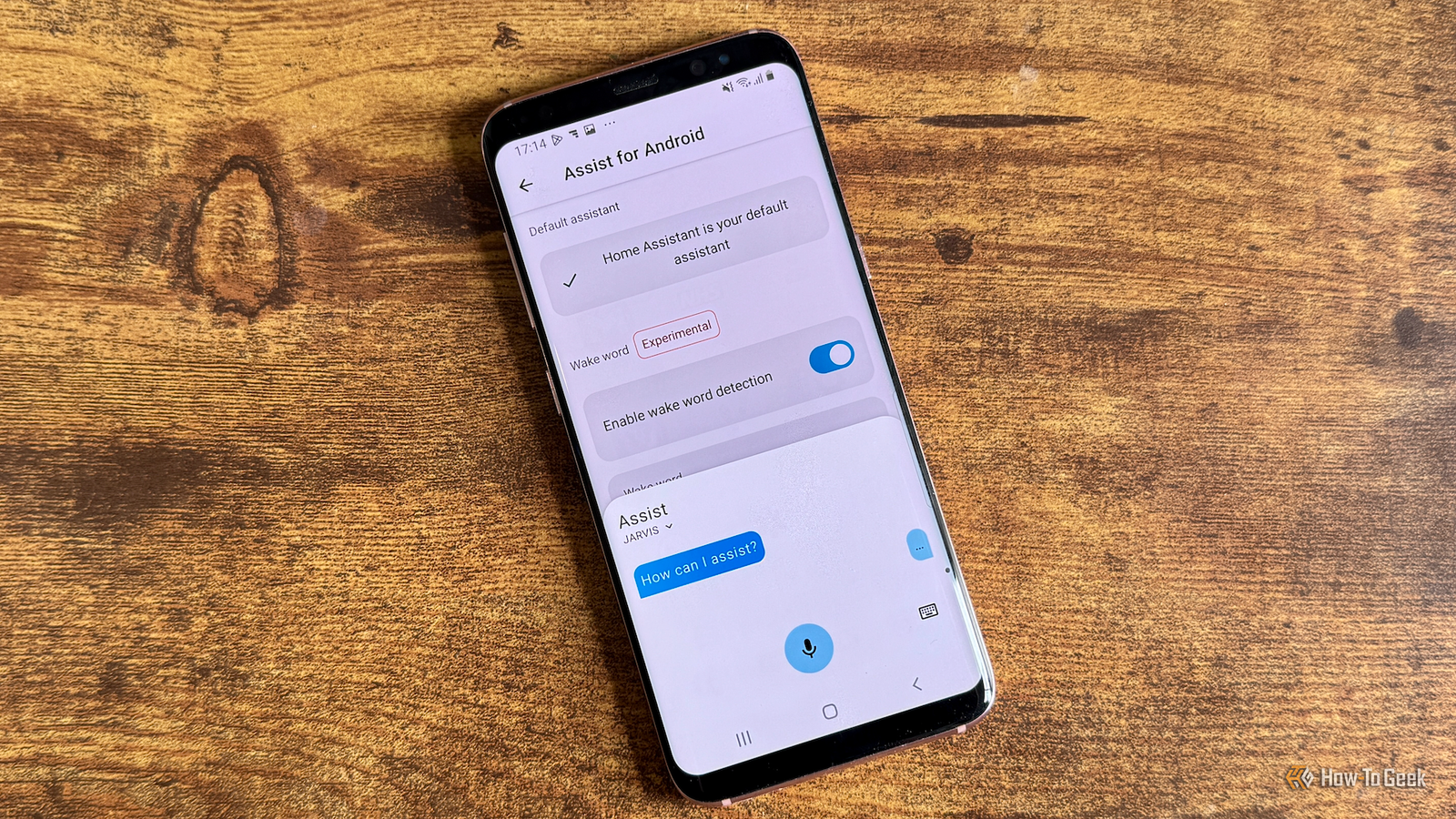
Published Aug 5, 2026, 12:00 PM EDT Adam has a degree in Engineering and has a life-long interest in technology. He has been writing for over a decade for various print and online publications, with a focus on consumer tech. He joined How-To Geek in 2024 while working at Pocket-lint. As well as being a long-term fan of Apple products, he also has a strong interest in smart home tech, running a Home Assistant server at home to automate all his smart home devices. He believes that the ideal smart home should work with minimal interaction from the user, with automations running as if by magic rather than requiring you to push buttons on a control panel. You can find more of his work on Muck Rack. Being able to control your smart home with your voice can be very useful in the right circumstances. If you're a Home Assistant user, you can buy ready-made smart speakers or build your own. However, if you have an Android phone, there's also another option. Turning an Android phone into a voice assistant has never been easier The feature is now part of the Home Assistant Companion app Credit: Adam Davidson / How-To Geek Home Assistant is a rare beast in these modern times. Unlike most apps and services, which continue to get worse and worse over time, Home Assistant just keeps on getting better. Almost every month a new update drops, and these updates often add new features or integrations. One such update happened in March 2026. The 2026.3 version of Home Assistant added new features such as the ability to send a robot vacuum to specific areas of your home, improvements to energy dashboards, and a new "continue on error" option for actions in automations. An experimental feature was also added that allows you to turn an Android phone into a voice satellite. Alongside the update, the Home Assistant Companion app for Android gained support for on-device wake word detection. Your phone can actively listen for one of three wake words, and if the wake word is detected, you can then give spoken commands to Home Assistant directly through your phone. Home Assistant Voice Preview Edition Dimensions 84x84x21 mm Weight 96 g Home Assistant Voice Preview Edition is a privacy-first smart speaker built as an alternative to the likes of Amazon Alexa and Google Nest Mini. It adds voice assistant capabilities, including local-only processing, to a Home Assistant-powered smart home. Integrations Home Assistant Connectivity 2.4 GHz Wi-Fi, Bluetooth 5.0 Colors White Setting it up is simple to do Toggle a few settings and your phone will start listening Since the feature is baked into the Home Assistant Companion app, setting it up is quick and easy. You'll need to install the Home Assistant Companion app on your Android phone, set up Assist in Home Assistant with an appropriate voice pipeline, and expose the devices that you want to control to Assist. For the best performance, it's good practice to only expose the devices you want to control so that Assist doesn't need to search through hundreds of entities to find the one you mean. Open the Home Assistant Companion app and go to Settings > Companion app. Scroll down and select Assist for Android. Tap Set as default to make Home Assistant the default assistant for your phone. Once you've done so, toggle Enable wake word detection on. Select the wake word you want to use and tap Test wake word to try it out. While you're in the Companion app settings, you'll see the Assist window appear. Once you leave that screen, the Assist window won't pop up when the wake word is detected. You just speak your commands like you would to any other smart speaker. It can work even when the phone is locked. Since you have to make Home Assistant the default voice assistant for your phone in order to use Assist for Android, you can also launch Assist by holding the Home button or using your phone's equivalent shortcut. This will bring up an Assist window, and you can speak or type your commands as usual. A phone is not a smart speaker Don't expect it to work as well as Alexa Credit: Adam Davidson / How-To Geek Being able to use your phone as a voice satellite is useful, but it's not a perfect replacement for a proper smart speaker. Devices such as Amazon Echo smart speakers have arrays of multiple microphones to capture sound from different directions, and beamforming technology that can focus on the direction of your voice. Your Android phone is designed primarily for close-range use. That means that while Alexa can hear you give a command from the other side of a noisy room, your smartphone is going to find that a lot harder. The wake word detection on my Samsung Galaxy S8 works well if I'm reasonably close to the phone. If I'm on the other side of the room, it struggles to recognize the wake word, even if there's no other noise. Another annoying issue is that currently, there's no indication as to whether the wake word has been recognized or not. With popular smart speakers, you get a visual or audible indication when the speaker recognizes the wake word. Using an Android phone, nothing lights up, and there's no audible tone. The only way to know if the wake word has been recognized is to issue a command and wait to see if you get a response. Because the phone is always listening for the wake word, it also has a negative impact on battery life. You can leave your phone connected to power, although you may want to use a battery-charging limit or an automation to reduce the amount of time it spends fully charged. It's genuinely useful in the right circumstances For specific uses, you can give old tech a new life Credit: Adam Davidson / How-To Geek While an Android phone doesn't make the perfect voice satellite, it can be very useful in the right circumstances. I keep the phone by my bed in the evenings, and it's perfect for turning off the bedroom lights with a voice command. Since the phone is right next to me, the wake word detection usually works on the first try. The beauty is that I didn't need to buy a dedicated smart speaker or any other tech. I took an old phone that was lying in my drawer and put it to use as a voice satellite. It works far better than I expected. Android beats iOS This is one example of where an Android phone has a clear advantage over an iPhone. The iOS version of the Home Assistant Companion app does not support using an iPhone as an always-on voice satellite. If you've got an old iPhone, you'll have to find something else to do with it.
I turned an old Android phone into a Home Assistant voice satellite—no speaker needed
Full Article
Original Source
Read the full article at Howtogeek →KhanList aggregates and links to publicly available news content. We do not host full articles from third-party sources. Always verify important information with original sources.