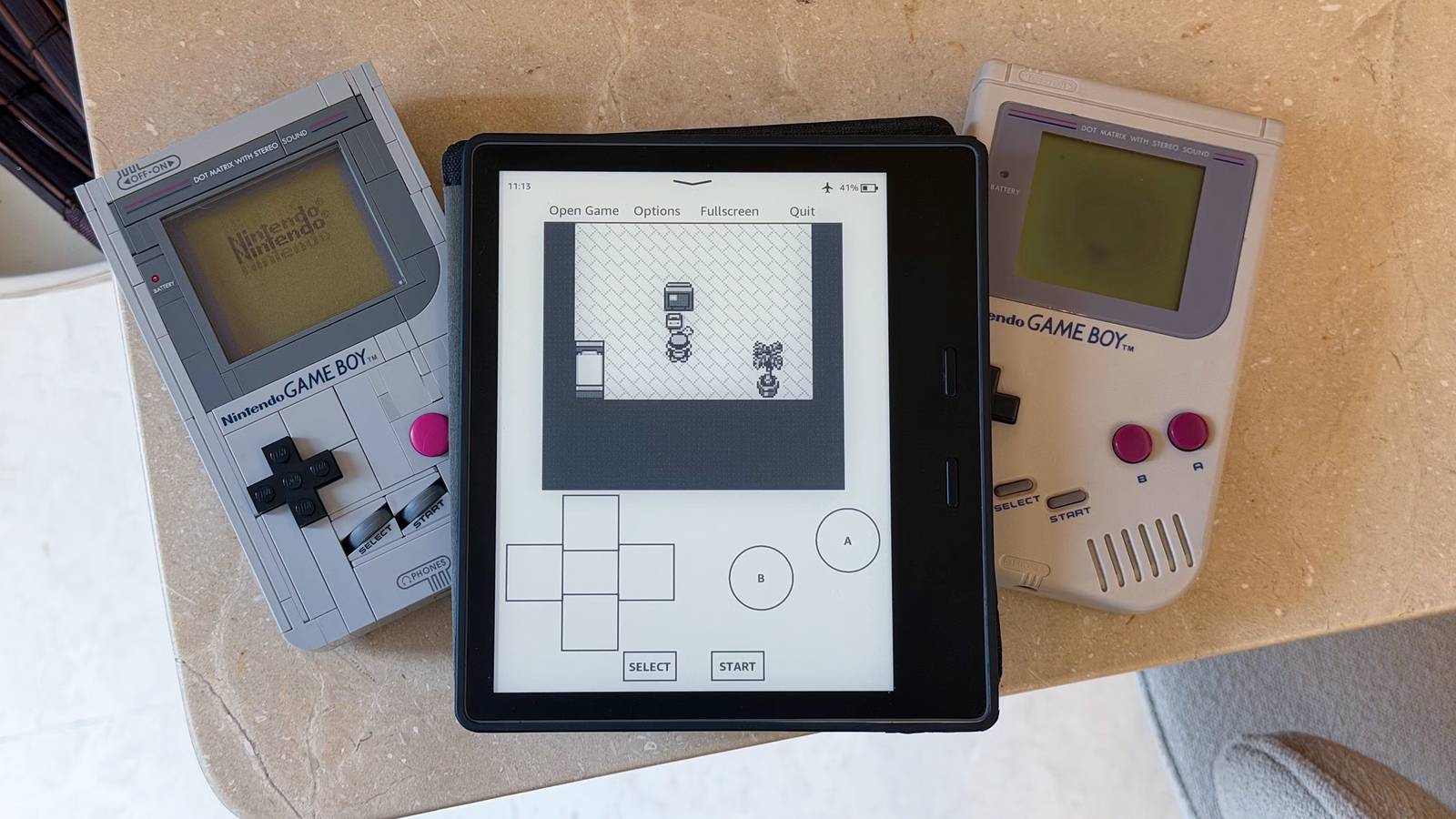
Published Aug 8, 2026, 3:00 PM EDT Dhruv Bhutani has been writing about consumer technology since 2008, offering deep insights into the personal technology landscape through features and opinion pieces. He writes for XDA-Developers, where he focuses on topics like productivity, networking, self-hosting, and more. Over the years, his work has also appeared in leading publications such as Android Police, Android Authority, CNET, PCMag, and more. Outside of his professional work, Dhruv is an avid fan of horror media spanning films and literature, enjoys fitness activities, collects vinyl records, and plays the guitar. My Kindle goes everywhere with me. As an avid reader, it's a constant companion. I'd hacked my Kindle to break out of Amazon's shackles long ago. So, recently, I decided to explore what else my Kindle could do. On a lark, I installed Gambatte-K2, an emulator that lets the humble Kindle run Game Boy, Game Boy Color, and Game Boy Advance games. It might sound like an odd combination for a device that basically lacks any physical controls, but a few weeks later, boy was I wrong. The fact of the matter is that my Kindle is already in my bag, ready to go. Its battery lasts for weeks and if it can give me the ability to kill a few minutes with a fun RTS or turn-by-turn adventure game, I'm all in on it. A hacked Kindle playing Game Boy games isn't going to replace a handheld for anyone, but you'll be surprised by how much use you get out of it. It's perfect for short breaks Titles like Pokémon and Advance Wars feel right at home on the e-ink display Outside the hour that I set aside for reading every night, my downtime is usually in chunks. Five or ten minutes here and there is the best I can hope for. Usually, while I'm brewing a cup of coffee or waiting for lunch to heat up. In a bid to cut down on my screen time, I've started picking up my Kindle instead. But as I mentioned earlier, some days you just don't feel like reading, or you're in the middle of a juicy bit that you know is going to take away an hour. So, all too often I pop open a Game Boy game instead. Because it runs on an e-ink screen, you'll quickly realize the emulator isn't meant to play fast-paced action games. Nor do I use it that way. The e-ink display favors slower-paced titles like the ever-popular Pokémon series. That said, you can also dabble in puzzle games or turn-based RPGs. In fact, Advance Wars is a personal favorite of mine, and it works rather well on the Kindle's e-ink screen. Having spent hundreds of hours on the game back in the day, the throwback nostalgia is real. The point is that the slower refresh is not an impediment for games like these. Unless you're a masochist, you're not going to be speed-running any games on the Kindle. If all you're looking for is a few minutes of downtime, it works. Gambatte isn't a hack job either. It includes the most popular features, including save states, so you can conveniently pause your game mid-session without having to get to the next in-game save point. Just save, close the cover of your Kindle, and pick it up again whenever you have a minute or two. It's completely changed how I revisit these old classics. I like handhelds, but it's one more thing to carry, which I don't really care about. On the Kindle, I can revisit these old classics without having to keep tabs on one more gadget. It works surprisingly well on the Kindle The emulator is easy on the eyes and the long battery life make it a solid choice for slower titles In case you're curious, reading still remains the primary use case of my Kindle. Adding the Game Boy emulator to the mix means that I'm using it more than before, if anything. Despite the limitations of an e-ink screen, Gambatte is well suited to the hardware. Since the Game Boy was not particularly input-heavy, the touchscreen controls for the D-pad and basic inputs work out just fine. You'll also find brightness and contrast adjustments that can make some games look a bit sharper and crisper. Similarly, you can adjust the frame rate to a degree. I haven't needed to on my Kindle Oasis, but if you're running a particularly old Kindle, you can play around with these settings to smooth out the experience. Personally, I'd avoid playing Game Boy Advance games on the Kindle. With the more detailed sprites, the Kindle's slow screen refresh rate can often make them hard to view. The experience is better suited for older, simpler Game Boy and Game Boy Color titles. All that said, the easy-on-the-eyes Kindle display, coupled with long battery life, makes it a great target for reliving old but still great titles. More specifically, the Game Boy is the perfect console for this, as a significant portion of the library was designed around quick sessions and simpler mechanics. Plus, if you've got a Kindle lying around, the project is a great way to put your old hardware to use. Give your old Kindle a second life It goes without saying that an emulator on a hacked Kindle isn't going to give you the same experience as a dedicated console. Instead, it lets you add a secondary source of entertainment to a device you carry around with you anyway. I carry my Kindle everywhere, and Gambatte lets me get a few minutes of Pokémon and Advance Wars on the go without having to lug around a handheld. And it does this while being easy on the eyes and offering weeks-long battery life. Gambatte-K2
I transformed my Kindle into an e-ink Game Boy, and now I can't put it down
Full Article
Original Source
Read the full article at Xda-developers →KhanList aggregates and links to publicly available news content. We do not host full articles from third-party sources. Always verify important information with original sources.