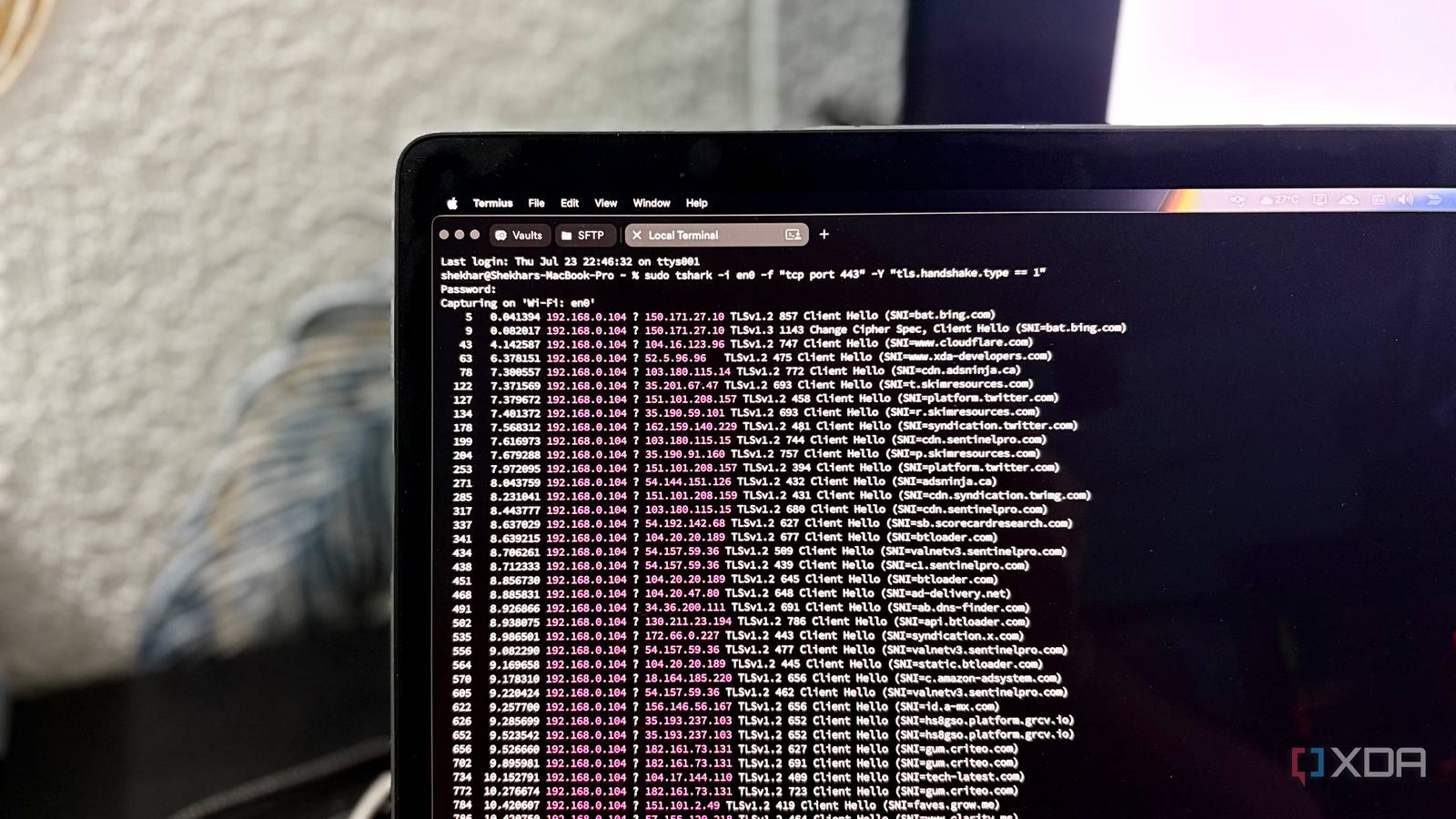
Published Jul 25, 2026, 4:00 PM EDT Shekhar Vaidya is a veteran technology journalist and computer science engineer. He is the founder of TechLatest, where he has spent years providing technical analysis on hardware and Windows ecosystems. Now a Computing Writer at XDA, Shekhar leverages his deep background in NAS, storage solutions, and PC internals to help readers master their tech. I settled on AdGuard Home and encrypted DNS-over-HTTPS for my home network, thinking it was the final wall keeping my online activity from anyone watching. I even verified the queries were traveling encrypted rather than just trusting the settings panel. But that was only true during the DNS lookup. Out of curiosity, I wanted to see what happened after the DNS lookup. That's when I realized encrypted DNS solves a different problem than I thought. Encrypted DNS wasn't lying It just solved a different problem My DNS journey has been a bit of a roller coaster. I started with Pi-hole just to block ads network-wide. Then I moved to Pi-hole + dnscrypt-proxy for encrypted DNS-over-HTTPS. Then I moved to AdGuard Home (AGH) to simplify the stack. After that, I temporarily switched to Technitium for better features and specifically for native recursive resolution. But Technitium was asking too much from me, so I switched back to AGH but with Unbound to handle recursive resolution. And finally, now I am using AGH, sometimes with Unbound and mostly Quad9 DoH. Let’s talk a little bit about DNS. Traditional DNS queries travel in plaintext, exposing my network metadata. Once the query is outside my network, my ISP or anyone on the path can see every hostname I looked up. DoH or DNS-over-HTTPS is essentially designed to solve that problem. For example, with my current AGH + Quad9 DoH setup, once AGH forwards a query upstream, it's already inside an encrypted HTTPS connection to Quad9. I implemented DoH and verified it on my setup, accepting it as a bulletproof way to keep my ISP from knowing what I’ve been up to. My initial assumption was that when no DNS requests were visible, my ISP probably couldn't tell which websites I visited either. At that point, I assumed I’d removed the biggest source of browsing metadata. The data probably stayed within my own network and the DoH provider I trusted. My curiosity didn't stop there, though. I’d already figured out that once the IP address was identified, the browser started the HTTPS connection. And I thought that was the right point to start looking, and so I began observing TLS handshakes instead. The one field nobody encrypts Your browser still announces who it's calling Okay, AGH passed the queries in an encrypted HTTPS connection, Quad9 resolved it, and DNSSEC made sure they weren't tampered with along the way. And finally, the browser had the destination IP address. What happened next? I was curious to know what the browser actually sent when it started the HTTPS connection. After a few searches on how I could see what happened next, I learned that Wireshark was the best tool to get a visual answer to my question. I immediately installed Wireshark on my Mac using Homebrew (brew install wireshark). And I ran the tshark command specifically for "tcp port 443" and "tls.handshake.type == 1". The result was something I didn’t expect. I saw familiar names: reddit.com, google.com, and xda-developers.com, since I'd visited these while running the capture. Then I saw a flood of domains I'd never typed: adblockplus.org, cdn-apple.com, grcv.io, sentinelpro.com, and many more I'd seen for the first time. My first thought: why were these even visible? I was using DoH; these should have been hidden. That was when my expectations started falling apart. sudo tshark -i en0 -f "tcp port 443" -Y "tls.handshake.type == 1" While I was looking at the packet captures, I noticed a term that I'd never dug into — SNI. After a quick Google search, here is what I understood. HTTPS encrypts the content, but even before the full encryption begins, the browser sends the TLS Client Hello. The TLS Client Hello is the first message that the browser sends to the server to initiate the connection. And that message contains the Server Name Indication (SNI). Why does the server even need SNI? Because on the World Wide Web, many websites share the same IP address — shared hosting, shared proxy, sister sites — so SNI is used to distinguish them. So, even if the DNS was encrypted end-to-end, the resolved hostname would still appear during the TLS handshake. And anyone like my ISP could easily see the destination domain by observing the connection. They couldn’t read the actual content of the webpage I was requesting, but they could read the destination address. After all this discovery, I realized something ironic: it wasn't even new to me. My own Pangolin setup uses the same protocol. Traefik reverse proxy uses SNI to decide which self-hosted service should receive an incoming connection. It's just that I never really thought about what it actually meant from the other side. And finally came the realization: what was the use of the whole DNS encryption effort, when my browser still announced where I was visiting? My tinkerer mind instantly asked: if SNI was the leak, could it be encrypted too? ECH closes the gap (mostly) Not everyone got the memo “Can SNI be encrypted?” This question led to a simple Google search, then a few blogs and numerous tech forums. The answer was yes. Encrypted Client Hello (ECH), previously Encrypted SNI, was designed to encrypt the SNI part of the Client Hello. Every blog post and thread made sure that ECH only encrypts the part of the TLS handshake containing the real server name, not the whole Client Hello message. On paper, it sounded like the missing piece. Then I started with the ‘how’ part. If it was the solution, what should I do to implement it? It was a two-part job — the server I was trying to request should have this protocol enabled, and the client I was using, i.e., the browser, should support ECH. The client part was easy, since most browsers already supported the protocol, whether it was Safari, Firefox, or Chrome (Chromium too). The server part, though, wasn't something I could control directly. It was dependent on the server configuration. After some quick digging, I found out the adoption was still thin, and Cloudflare was, at the time, the only major provider using it at any real scale. Cloudflare was the dominant, largest-footprint CDN supporting ECH. Other major CDNs haven't caught up in any meaningful way yet. And from what I was reading, Cloudflare forced it automatically on every plan, with no opt-out for site owners. Many of my sites were already on Cloudflare, even a few with free plans, so it was the right moment to test my theory. I started by running a simple kdig command to check whether my domain had ECH enabled. The output exposed the ECH key. Then the actual real-world test began. I simultaneously ran the tshark command with "tcp port 443" and "tls.handshake.type == 1" and opened my website on Chrome. The captured packet proved the theory; instead of my actual hostname, the Client Hello showed cloudflare-ech.com while the destination IP stayed the same. kdig +short TYPE65 Then I tried testing another domain; it didn’t advertise ECH. This sent me down another digging session, and from what I found, I'm fairly confident that on paid plans, ECH is an optional toggle rather than being enabled by default. I couldn’t verify the toggle visually since that domain was under a paid Cloudflare tier managed by my host. In the end, the browser support is largely there now, but that's only one half of the equation. DNS provider, CDN/web server, and the website itself all have to support ECH. Until all of that lines up, encrypted DNS alone won't fully hide your online activity. Encrypted, but not invisible — yet My DNS stack wasn't broken. My understanding of what encrypted DNS actually protected was. Encrypted DNS was doing exactly what it was supposed to do — removing plaintext DNS queries from the equation. It was never meant to provide complete browsing privacy. It turned out ECH was the missing piece to complete the loop, but that depended on whether the server on the other end had it turned on. The takeaway isn’t that encrypted DNS is pointless — I still keep it on, but I just no longer mistake it for complete privacy. AdGuard Home AdGuard Home is a network-wide software for blocking ads and tracking.
I thought encrypted DNS protected my privacy, until I saw what my ISP could still see
Full Article
Original Source
Read the full article at Xda-developers →KhanList aggregates and links to publicly available news content. We do not host full articles from third-party sources. Always verify important information with original sources.