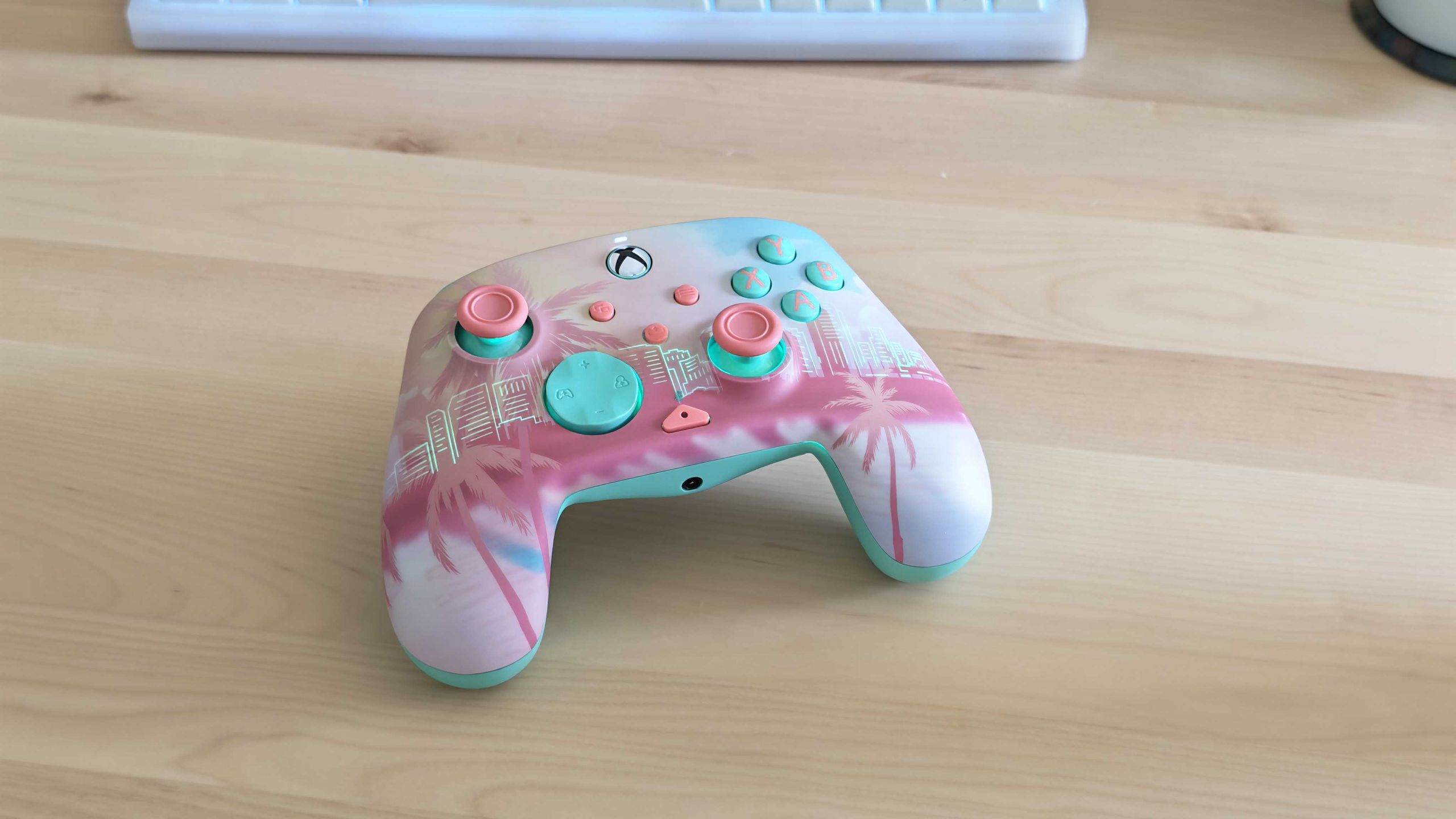
TechRadar Verdict The Turtle Beach Pacific Skyline Wireless Controller is a well-made Xbox and PC gamepad with a decent set of features, including remappable rear buttons and on-board audio controls. Its unique aesthetic is truly exceptional, however, and elevates it to a must-have accessory if you like the look. This will be my go-to pad for GTA 6. Pros +Beautiful, unique appearance +Tasteful RGB lighting +Smooth thumbsticks and triggers +No-nonsense feature set Cons -Materials don’t feel as good as first-party options -I wish the dongle was also pink Why you can trust TechRadar We spend hours testing every product or service we review, so you can be sure you're buying the best. Find out more about how we test. Jump To: One-minute review Price and availability Specs Design and features Performance Also consider... How I tested Turtle Beach Pacific Skyline Wireless Controller: One-minute reviewThe Turtle Beach Pacific Skyline is the best-looking Xbox controller that I’ve ever tested. The face plate, complete with its illustration of a San Diego skyline dripping with inviting tropical vibes, is gorgeous and pairs wonderfully with the contrasting baby blue buttons and bright pink thumbstick caps.The Pacific Skyline has a hidden trick up its sleeve as well — stunning RGB lighting that illuminates the city’s major buildings when the controller is turned on and can be customized with a variety of colours and presets without the need for any companion software. It’s genuinely a beautiful bit of hardware, and there’s nothing else quite like it on the market.I’m sure the look was also closely inspired by Grand Theft Auto 6 as it’s very reminiscent of the game’s bright promotional art, and I already know that this will be my go-to gamepad when I venture into the neon-soaked streets of Vice City on Xbox Series X.Latest Videos FromTechRadarThe aesthetics are great, but the controller also performs well overall — even if it’s not particularly feature-rich. The TMR thumbsticks are responsive and smooth, the rear buttons are easy to remap on the fly, and the built-in audio controls are genuinely useful and effective, giving you some compelling reasons to choose it over the stock Xbox Wireless Controller aside from just the look.Yes, there are some controllers with even more features available for around the same price, just look at the GameSir G7 Pro, but you simply won’t find anything that’s this visually appealing elsewhere. Image 1 of 3 (Image credit: Future) Turtle Beach Pacific Skyline Wireless Controller: Price and availabilityAvailable in the US and UKCosts $89.99 / £79.99 / around AU$150You’re paying a premium for the designThe Turtle Beach Pacific Skyline Wireless Controller is readily available in the US and UK via the Turtle Beach website, where it costs $89.99 / £79.99 (that’s roughly AU$150). This model does not seem to have made its way to Australia yet.It’s a solid price given the feature set, but you’re definitely paying a bit of a premium for the design, and alternatives like the GameSir G7 Pro deliver more features for the same cost.Get daily insight, inspiration and deals in your inboxSign up for breaking news, reviews, opinion, top tech deals, and more.Still, it’s worth it if you're considering the likes of the standard Xbox Wireless Controller but are willing to splash out for a nicer and more unique design.Turtle Beach Pacific Skyline Wireless Controller: Specs Swipe to scroll horizontally Price $89.99 / £79.99 / around AU$150 Weight 7.04oz / 200g Dimensions 6.22 x 4.09 x 2.36in / 158 x 104 x 60mm Compatibility PC, Xbox Series X, Xbox Series S, Xbox One Connection type Bluetooth, Wired (USB-C), 2.4Ghz wireless dongle Battery life ~20 hours Turtle Beach Pacific Skyline Wireless Controller: Design and featuresStunning tropical aestheticStandard Xbox controller form factorRear inputs and on-board controlsOut of the box, the first thing you’re going to notice about the Turtle Beach Pacific Skyline Wireless Controller is its beautiful design. Turtle Beach says that the pink and baby blue look was inspired by the ‘Xbox pastel project’ — which saw a selection of third-party gamepads with pastel aesthetics hit the market a few years ago.I think there’s another clear inspiration, though: GTA 6. Covered in palm trees, with views of a beach and a city skyline (in this case, San Diego, the home of Turtle Beach), it’s a perfect match for the highly anticipated upcoming open-world game.I imagine this pad is Turtle Beach’s way of getting in on the GTA 6 hype, but that’s certainly not a complaint as I think the result is stunning. The bright colors really pop, and the design is detailed enough to pore over without being too distracting. (Image credit: Future)There is also some brilliant RGB lighting when you turn on the pad, which lights up to reveal an otherwise hidden skyline. It looks truly brilliant and surprisingly tasteful, especially if you set it to a static illumination in a custom color.In terms of layout, the Turtle Beach Pacific Skyline Wireless Controller is very close to the standard Xbox gamepad.The overall shapes are extremely similar, though side by side you will notice that the Pacific Skyline has slightly softer corners and fatter grips. The Turtle Beach pad does have three extra buttons: a microphone mute button (which can also be pressed to access on-board functions) and two customizable rear paddles.If you look at the D-pad, you will notice a few small markings. Hold the microphone mute button and tap up or down to raise or lower the volume of your connected headphones, while left and right adjust game chat balance. The controls are intuitive and easy to remember, and genuinely quite useful as it means that you don’t have to fiddle around with system menus to adjust game volume if you’re playing with wired headphones connected via the controller's 3.5mm jack.The controller doesn't feature any removable batteries, and is instead charged via a USB Type-C cable. A generous roughly 10ft / 300cm one is included in the box along with a USB dongle. Sadly, neither the cable nor the dongle are pink or blue to match the controller — a missed opportunity to make them stand out against those of other pads. (Image credit: Future)Turtle Beach Pacific Skyline Wireless Controller: PerformanceDelivers well-rounded performanceBasic but functional softwareVery lightweightThe Turtle Beach Pacific Skyline Wireless Controller delivers basically everything you could want from a basic Xbox Wireless Controller alternative. The thumbsticks are smooth and responsive, the buttons are satisfying to press and well-sized, and additional features like the volume mixing and rear inputs work just as you would expect.It certainly doesn’t reinvent the wheel in any respect, but the performance is exactly what you would want and expect at this price. There are more versatile options out there, though I think this is reasonable when, realistically, you’re mainly buying this particular controller for its looks.The controller is compatible with two pieces of companion software: the Swarm II mobile app and the Turtle Beach - PDP Control Hub. Both offer similar options and are rather basic, mainly there for adjusting vibration strength, remapping buttons, and tweaking thumbstick dead zones.My only real complaint using the controller is that the materials simply don’t feel as premium as the Xbox Wireless Controller. I think a lot of that comes down to the weight: the Turtle Beach Pacific Skyline Wireless Controller is very light, making it comfortable in the hands but meaning it lacks that reassuring heftiness. The back of the grips is also completely smooth, and I found myself missing the more grippy texture of the original pad.The Pacific Skyline controller gains back the upper hand with its built-in battery. It lasts for about 20 hours per charge — roughly on par with Microsoft’s pad, all without the need to fiddle with pricey AAs every time you need to top it up. (Image credit: Future)Should I buy the Turtle Beach Pacific Skyline Wireless Controller?Buy it if…You love the aestheticThere’s simply no controller out there that looks like the Turtle Beach Pacific Skyline. It’s a must-have if you’re enamoured with its appearance like me.You want a no-nonsense Xbox gamepadThe Turtle Beach Pacific Skyline Wireless Controller has fewer features than some alternatives, making it very easy to use.Don’t buy it if…You want maximum valueThe stock Xbox Wireless Controller is cheaper than this model and could be a better choice if you’re on a budget. Performance is similar, and you only miss a few extra features.Also consider...Not keen on the Turtle Beach Pacific Skyline Wireless Controller? Here are two alternatives to weigh up. Swipe to scroll horizontally Row 0 - Cell 0 Turtle Beach Pacific Skyline Wireless Controller Xbox Wireless Controller GameSir G7 Pro Price $89.99 / £79.99 / around AU$150 $59.99 / £54.99 / AU$74.99 $79.99 / £89.99 (around AU$114) Weight 7.04oz / 200g 9.76oz / 275g 9.6oz / 272g Dimensions 6.22 x 4.09 x 2.36in / 158 x 104 x 60mm 6.02 x 4.01 x 2.40in / 153mm x 102mm x 61mm 6.9 x 6.8 x 3.7in / 177 x 173 x 94mm Compatibility PC, Xbox Series X, Xbox Series S, Xbox One Xbox Series X, Xbox Series S, Xbox One, PC, Android, iOS Xbox Series X|S, Xbox One, PC Connection type Bluetooth, Wired (USB-C), 2.4Ghz wireless dongle Wireless (Xbox, Bluetooth), Wired (USB-C) Wireless (2.4GHz, Bluetooth), Wired (USB-C) Battery life ~20 hours 20-40 hours Around 12 hours Xbox Wireless ControllerThe stock Xbox Wireless Controller is a decent alternative if you're after a cheaper Xbox or PC controller. You lose the remappable rear buttons and the lovely design, though.Read our full Xbox Wireless Controller reviewGameSir G7 ProThe GameSir G7 Pro shows that you can get even more features for the price of the Turtle Beach Pacific Skyline Wireless Controller. It offers a 1000Hz polling rate and dual-mode triggers Read our full GameSir G7 Pro reviewHow I tested the Turtle Beach Pacific Skyline Wireless ControllerTested for multiple weeksUsed as primary controller for Xbox and PCCompared to other gamepadsI tested the Turtle Beach Pacific Skyline Wireless Controller for more than two weeks, using it as my primary gamepad for both Xbox and PC play.During that time, I experienced a wide range of games with it, including driving titles such as Sonic Racing: CrossWorlds, Forza Horizon 3, and Forza Horizon 6, plus shooters like Gears of War Reloaded.Throughout my time with the controller, I compared it to my hands-on testing of other Xbox controllers, including the standard model and those by competitors like GameSir and PowerA.Read more about how we testFirst reviewed August 2026 Dash is an experienced tech journalist who specializes in video games, electronic entertainment products, and the wider industry that surrounds them. He currently serves as the Gaming Editor at TechRadar, leading our review, preview, feature, and news coverage of the latest and greatest releases.Before joining the team, he was Contributing Writer at PLAY (formerly Official PlayStation Magazine UK) and has written articles for many of the UK's other biggest gaming magazines including the likes of Edge, PC Gamer, and SFX.Now, when he's not getting his greasy little mitts on the newest hardware or gaming gadget, he can be found listening to J-pop or feverishly devouring the latest Nintendo Switch otome. You must confirm your public display name before commenting Please logout and then login again, you will then be prompted to enter your display name.
I tested Turtle Beach’s newest controller, and I can’t imagine using anything else for GTA 6 — it’s got an illuminated skyline and tropical vibes; what more could you want?
Full Article
Original Source
Read the full article at Techradar →KhanList aggregates and links to publicly available news content. We do not host full articles from third-party sources. Always verify important information with original sources.