
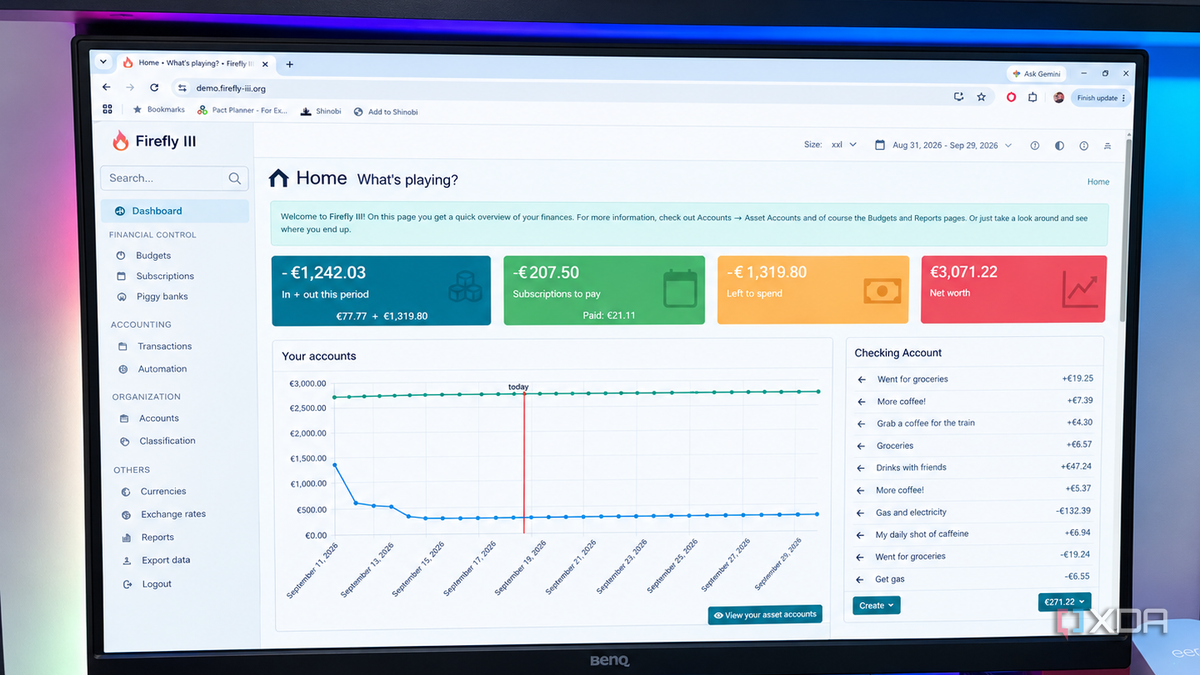
Published Sep 13, 2026, 2:00 PM EDT Patrick is a seasoned writer with more than a decade of experience, specializing in any and all things tech. His work has been featured on platforms like CNET, Yahoo, Xfinity, and many other outlets. When not typing away, he can be found with his nose in a book. Budgeting is probably my least favorite chore, even more than folding my laundry after it dries. It's one of those necessary tasks you have to do, but I know very few people actually feel anything close to enjoyment from it. Firefly III is an answer to that. While budgeting will never be as enjoyable as binging your favorite show, Firefly III removes much of the tedium from the task and spares users from some of the worst aspects (like manually importing bank statements). It's one of the few budgeting apps I've ever used that can actually talk to your bank. More importantly, it makes tracking a budget feel a lot less like a second job. Because Firefly III is self-hosted, it lets me track my spending without uploading documents to a third-party cloud server. Everything stays on my device, and that's the kind of security I want when dealing with anything related to banking. Firefly III automates the statement import process It spares me from remembering to download my statements each month I've tried a lot of budgeting software before. Firefly III's interface is among the best I've used, but more than that, it lets me connect my bank account and set up automations that pull statements from my bank at set intervals (daily or weekly) and import them. That requires a separate tool called the Data Importer that works alongside Firefly III, but setup is easy enough to do through Docker, Kubernetes, and a variety of other options. One caveat here: Data Importer uses third-party banking services like GoCardless or Salt Edge to connect to your bank. While these services have good reputations, they add another link in the chain, which increases the risk to your data. Budgeting only works if you keep up with it, and I have always struggled with tedious tasks. Firefly III streamlines the process of downloading my statement and importing it into a budgeting tool, something that I would often forget to do. There's a bit of initial setup, but the experience after was straightforward. The interface makes it easier to understand where my money goes Knowing my spending habits helps cut back on waste I thought I had a decent understanding of where I spent my money, but once I started budgeting, I found several expenses that I didn't realize were coming out of my account each month. By the time I canceled them and added up the amount, I realized I was wasting more than $100 each month on subscriptions I didn't use (one for a product I didn't even own). Firefly III is particularly useful because it makes it easy to see your spending represented in a variety of different ways. It lists each charge out, of course, but I found it easier to get a bird's-eye view of my budget through a pie chart. Firefly III can show multiple accounts at once, represented by graphs, itemized graphs, and more. If you're a visual, data-driven person, you'll appreciate the level of detail that goes into the reports. It keeps critical data under my control I had my banking information stolen once, and it was an absolute headache to sort through. Between closing fraudulent accounts opened in my name, monitoring credit reports, and all the other work that goes into not letting bad actors wreak havoc on your life, I don't want to go through it again. I've always been wary of online financial tools, but Firefly III's self-hosted nature puts me at ease. I have much more control over privacy and access than I would if using a service like Credit Karma. Firefly III isn't exactly plug-and-play It could be intimidating for newcomers While I mentioned earlier in the story that Firefly III is easy enough to install, I should have added a caveat: it's easy to use if you've self-hosted before. If not, there's a fair bit of setup involved, and it can be a lot to take in for beginners. Docker alone can be hard to wrap your head around if you aren't familiar. Self-hosting isn't black magic, but not everyone wants to learn how to maintain self-hosted tools (especially when ports get involved). But in spite of the initial technical hurdle, Firefly III is well worth the trade. Once it's up and running, the app more than pulls its weight with its automation tools and appealing interface. It's the first budgeting app that's worked As I said, I've tried budgeting apps over the years. I stuck with them for varying amounts of time, but none have "clicked" with me the way Firefly has. This tool makes it easy for both my wife and me to check our budget and have a better idea of where our hard-earned dough is going. Firefly III Firefly III is a free and open-source personal finance manager that can be self-hosted in Docker.
I switched to Firefly III, and it's made budgeting easier because it can import from my bank
Full Article
Original Source
Read the full article at Xda-developers →KhanList aggregates and links to publicly available news content. We do not host full articles from third-party sources. Always verify important information with original sources.