
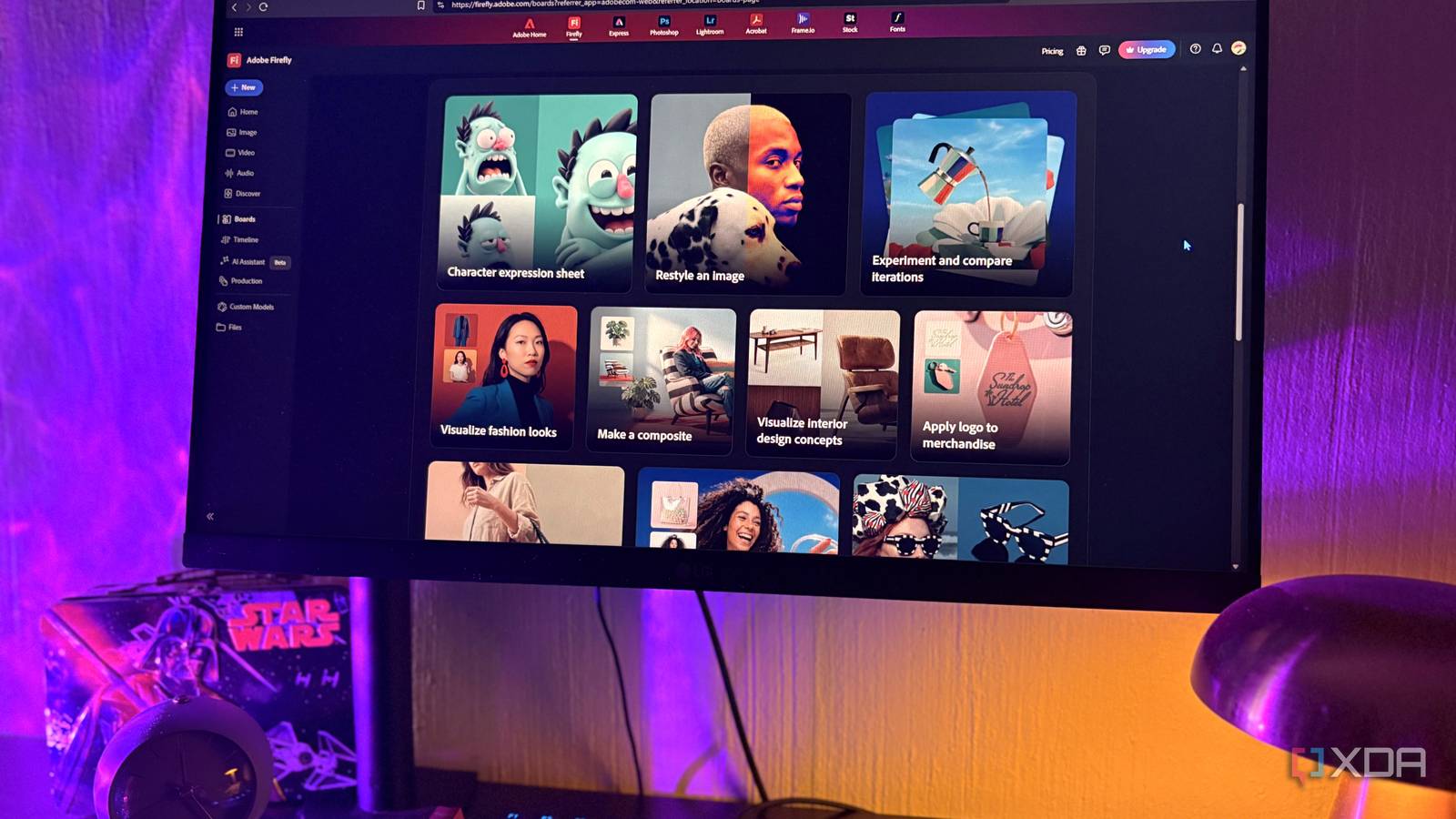
Published Sep 8, 2026, 10:30 AM EDT Nolen began their writing career in 2019, with three years dedicated to editing the Creative section at MakeUseOf. Their expertise lies at the crossroads of technology and creativity, covering areas like photography, video editing, and graphic design. Outside of work, you'll often find Nolen diving into a good book, writing their own stories, or playing video games. Every project has that scattered phase before it turns into something usable, so what often happens is you end up with a pile of references and a head full of half-ideas. There's a myriad of tools available to help you visually make sense of a project roadmap, the top ones being Figma, FigJam, Miro, Obsidian Canvas, and even Canva. But the thing is, they work best when you already have a clear idea of what direction to take the project in, not so much for the unclear, early, scattered parts. Bending them into an ideation space can make it feel like you're working with lackluster tools. They're not lackluster, they're just not the right tools for the first phase of a project. Then Adobe Firefly Boards showed up, and it slotted perfectly into that stage for me. Adobe built it for concepting, but underneath it's an infinite canvas that happens to generate things Adobe launched Firefly Boards back in June 2025, and it's sold as an AI moodboarding tool meant to explore early ideas before they turn into storyboards or pitch materials. It actually started as an internal project called Project Concept, which tells you what Adobe was really going for here: a place to get into the messy parts of a project before anything real starts taking shape. It's all one infinite canvas, with the generation bar along the bottom and your tools around the edges. Those different workspaces you'll spot on the home screen aren't different apps (like "apply logo to merchandise" and "make a composite"). They're Quick Guides, which are simply guided workflows that all open onto the same canvas. The generation side is actually a little surprising because you're not locked into Adobe's own models. You can reach for Firefly or partner ones like Google's Gemini and GPT Image, and Boards tends to get the newest ones before Photoshop does. Firefly Boards isn't a subscription of its own. It's free with any Adobe account, and you'd only pay through a Firefly plan or Creative Cloud for the premium models and higher limits. I'm using the free tier and it's genuinely usable, though the individual graphics that are AI-generated do come out watermarked. The AI credits are a bit murky, and I gave up trying to find a straight number because Adobe moved the free tier onto some undisclosed daily allowance that isn't written down anywhere, not even on their pricing page. So that's the catch here; you'll be hitting the credit cap unexpectedly. It's exactly this type of business model that made me leave Adobe in the first place; something that veers on tricking users into paying. But their products are still top of the line, so if there's a free version of it, you can bet I'm trying it out. It looks like a scrapbook but can also behave like an editor Once you've spent a couple of minutes on the canvas, the design tooling starts to show itself. You've got your shape, line, and text tools, plus an artboard tool, which reminds me a bit of Figma's Frame tool. And of course, anything you drop on the canvas gets a properties panel for things like position, scale, color, and so on. You can pull images in from your own files or straight from Adobe Stock without leaving the board. The generation bar at the bottom is where you prompt, and you can feed it a reference image or even eyedrop a style off something already on the canvas - some on-canvas elements will even give you style tags to choose from in a dropdown. This beats tools like Figma or Canva for the early ideation process because, take Canva for example, the AI is a thin trickle running a single model, and all the genuinely useful AI tools sit behind a paywall. Similar to Figma, you don't really get to experiment with generating ideas, its AI is better suited for established concepts. Whereas with Adobe Boards, you can pick between a long list of advanced models for free, which, for a hobbyist just playing around with ideas, is a big difference. It goes beyond text-to-visual generation though. Adobe Boards has a feature called Presets, which are entire generative workflows in one click. Restyle, for example, takes an image and repaints it in a new look, while Mashup fuses a few images into the same composition, and there are dozens more. I've never been a big fan of AI-generated images, but I find this useful as a visual thinker even if I don't end up using the actual generations, because it gives me a starting point. Using the same canvas as a thinking space It's the perfect space for brainstorming and diagramming It's the same canvas underneath, so when I'm not designing I just use it to think and plan. Given the stripped-down UI, it's quicker and easier to go from idea to concept than in dedicated diagramming tools. Miro has its own AI, sure, but it's pointed at the workshop side, generating diagrams and clustering sticky notes rather than making actual images. And Obsidian Canvas doesn't generate at all. I'll bring in my own reference images to get the ideas going, then generate a few off them. Those new images become references too, the pieces I lay out to map a project. Moreover, you can hyperlink on any element on the canvas, so if you're working with a bunch of reference materials and weblinks, add them straight to the shapes and images that represent them. It's also a shared collaborative space with live comments, presentation mode, shared assets, and all. So the collaboration Miro is known for is covered here too. A free Adobe tool that can replace multiple apps in one go Firefly Boards is not a Figma or Canva replacement for serious design by any means, but it's a much better option for the ideation stages of any project that involves visual elements. I was initially only going to cover it as a design tool, but soon realized how versatile it is and that it can actually take the place of apps like Miro and Obsidian Canvas too, especially with its collaborative features. Adobe is also one of the few here that's upfront about where its generated visuals come from. Firefly trains on licensed Adobe Stock and public domain work, not a scrape of the open web like many generators. It's not spotless, but plenty of tools won't even tell you what they trained on.
I stopped opening Figma, Obsidian Canvas, and Miro after finding this free Adobe tool nobody talks about
Full Article
Original Source
Read the full article at Xda-developers →KhanList aggregates and links to publicly available news content. We do not host full articles from third-party sources. Always verify important information with original sources.