
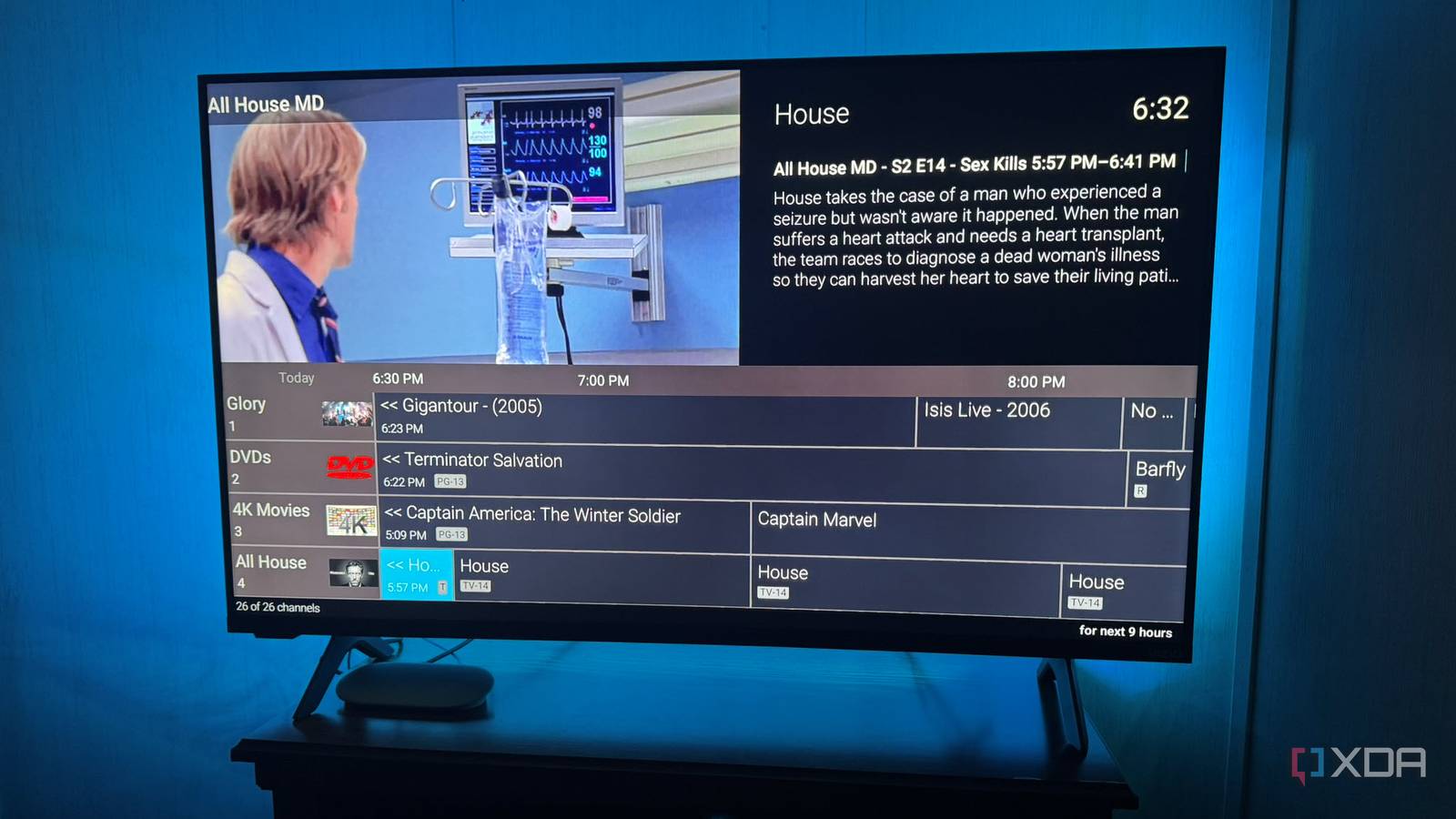
Published Nov 1, 2026, 11:30 AM EST Based in rural Minnesota, Brian Burgess worked in IT for 10 years before finding his passion for writing about consumer technology. Brian earned his degree in computer and network technology in 2000. He held various IT positions, including help desk support, router installations for IBM, database administration, and other associate network administration roles. He's been a personal technology journalist for 18 years and has written thousands of articles about Microsoft products and services, Android, iOS, streaming, and more. He has written for notable tech sites including XDA, InformationWeek, How-To Geek, Byte, groovyPost, and others. When he is away from the keyboard, you will hear him playing guitar, working outdoors, and watching Star Trek. I set up a cheap network tuner to stream live TV to Jellyfin for screens throughout my house. I even created a self-updating channel guide for it. I also took it up a notch by creating my own channels from my self-hosted media library and adding them to the guide. By creating my own media channels, I can build a guide that displays media from my Plex, Jellyfin, or Emby servers. The cool thing is that you're the TV station manager and can air whatever you want, on your schedule. It's fun for me to create channels, and fun for the viewers in my home. In fact, my channels have become the family's first choice for media, and Netflix is a distant second. There are a few ways to do it Want to be a TV station manager? No worries; there are different ways to do it. You can use Tunarr to program channels with time slots and more, ErsatzTV for a more detailed, broadcast-style setup, or Nostalgex to turn your media into a retro TV guide on Apple TV. Your choice depends on what works best for your setup. However, Plex Pass is required for ErsatzTV channels to appear in Plex's live TV guide, but not to add content from it. DisquezTV is also an option, but it doesn't work with Jellyfin. For more customized channel building, Tunarr or ErsatzTV are the best options. Since using them, I lean toward Tunarr because it's easier to use. I can create channel lineups and arrange them with scheduled time slots or shuffles. ErsatzTV takes more time to set up and uses a more modular approach to channels and media collections. They run similarly: install the software (or Docker image) and manage your TV station in a web-based UI. Both also require the host computer to stay on to view the channels you create from other devices. So, while an always-on computer isn't necessary, it improves the viewing experience, especially in a busy household. Nostalgex is a cool project and turns your self-hosted media into an old-school channel guide. But the process is automated. While settings let you enable more content channels, it's less like owning your own television station and building custom media channels. It creates the channels for you — similar to what QuasiTV does. It's also currently only available on Apple TV, with a Roku version in beta. It also has a web tuner, but it requires a secure remote server connection. Creating your own channels puts you in control Air the content you want Once I got acclimated to Tunarr and ErsatzTV, I started creating custom channels based on whatever I wanted to air. It's cool because I can create live channels based on whatever I want. I can have one with all kids' content, one for the MCU, one with only Game of Thrones or House of the Dragon, or a Star Trek-only channel. I can create channels based on genres like Action, Drama, Comedy, and Thrillers. Or I can create a "Best of" or "Favorites" channel that combines content and genres. I can assign any number to the channel, create custom names, and add my own icons whenever I want. The only limitation is my imagination and determination to keep making new channels; even if I use all my media, there is always a way to create interesting channels. For instance, I have one that includes movies, TV shows, and ripped CD tracks. I even made my own MTV-like channel from DVDs and Blu-ray discs I've collected from bands and artists over the years. Watching self-hosted channels more than Netflix My family likes the live TV guide experience Whatever project route you choose, once you create the channels and the guide shows on all screens, it becomes more popular than Netflix. I know my household members appreciate the old-school channel-guide browsing experience. The guide is similar to a streaming TV subscription, free OTA, or cable TV. I can also display my channels alongside free stations I add from my network tuner. But the difference is the content quality. There aren't hundreds of channels and nothing to watch. Instead, each channel offers something someone in my house wants to watch. It's perfect for a home with large self-hosted media libraries. Once my channels are live, family members can see what's on from any streaming device. Netflix is often a bottomless pit of mediocre movies and shows. Of course, the service has its gems, and some people in the house want to see them. However, a retro-style guide of content you own is more enticing for everyone in the household. For some, it's a nostalgic relic; for younger viewers, it is a brand-new experience. My kids turn it on before they open Netflix. For me, it's fun being the station manager. Creating self-hosted media channels is better than streaming I created my own TV channels that broadcast throughout the house, and my family watches the content more than Netflix or other streaming services. I can create new channels that air content at different times, so it keeps things fresh for everyone—especially easy with Tunarr. They enjoy the retro-style TV guides, so when they find something they like, they can tune in. Tunarr
I set up my own TV channels from my movie library, and my family watches more than they did on Netflix
Full Article
Original Source
Read the full article at Xda-developers →KhanList aggregates and links to publicly available news content. We do not host full articles from third-party sources. Always verify important information with original sources.