
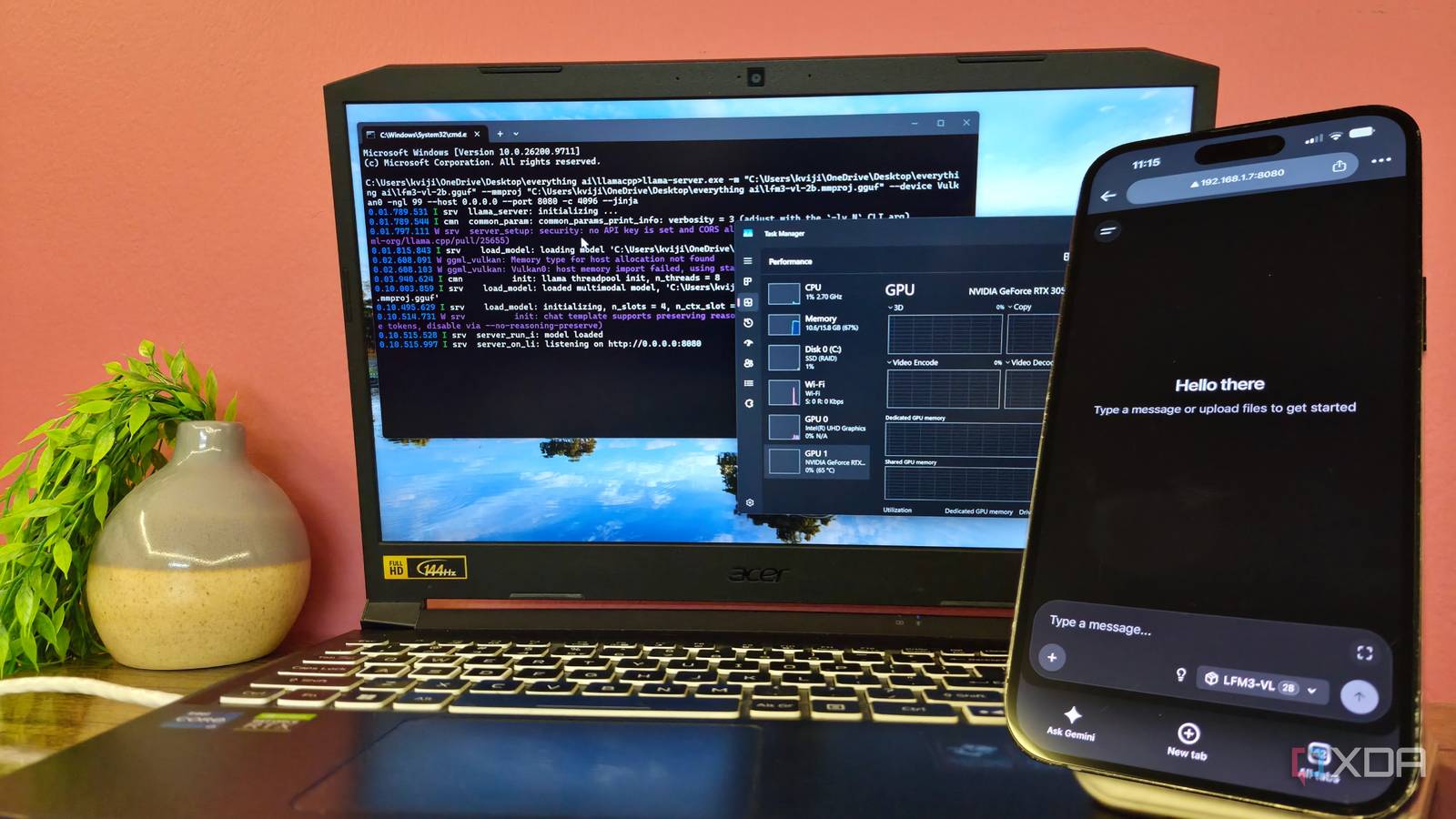
Published Nov 12, 2026, 7:30 AM EST Gaming has been Samarveer’s greatest passion, and the Literature graduate in him takes immense joy in dissecting games for their themes, messages, and impact. Samarveer holds a deep appreciation of gaming, and considers the platform to be the most immersive and impactful across all media. He can be found engaging with gaming communities online, always ready to debate the finer points of ray tracing or itching to write an 8-page collegiate thesis on any game that impacts him emotionally. There's no better retirement plan for an old laptop than an always-on home server that makes life easier for everyone on the local Wi-Fi network. Ever since I replaced my five-year-old Acer Nitro 5, I looked forward to repurposing it and giving it new duties. The Nitro has an RTX 3050 Ti (mobile), a Core i7-11800H, and 16GB of RAM — a combination that was once respectable enough. These days, however, I pick my battles carefully. With the RTX card inside handling plenty of GPU-heavy tasks, I needed every ounce of power the discrete GPU had. It made little sense to waste it on another background task. Then, I noticed my parents uploading pretty sensitive information and documents straight to Gemini and ChatGPT with reckless abandon. Since the Nitro was already doing server duty, I figured it could handle one more job. I set up a tiny local vision-language model, but kept it entirely on the laptop's Intel UHD integrated graphics baked into the CPU, leaving the RTX free for everything else. The local AI server had to stay off the GPU My RTX card has better things to do The RTX 3050 Ti in this old Nitro 5 isn't exactly sitting on a throne. Between Jellyfin transcoding streams for the house and Sunshine pushing the odd low-polygon game to the TV, the discrete card already has its hands full — and I want every ounce of it going to those jobs. That makes the integrated graphics the perfect candidate for running a tiny local AI model in the background. The more interesting problem was sitting on my parents' phones, though. They were routinely throwing bank statements, insurance documents, medical reports, bills and other paperwork, into Gemini or ChatGPT whenever they needed something explained. It's convenient, sure, but I wasn't comfortable with genuinely private documents being sent to someone else's servers. The idea, then, wasn't to build some grand ChatGPT replacement. All I needed was a 2B model running on integrated graphics that I could host on a private server as a household helper, answering questions about our documents without sending them anywhere. Once it's running as a local server, anything connected to the same network can talk to it, too, including everyone's phones and laptops. And the whole time, my original goal holds: the increasingly-ancient RTX 3050 Ti-M stays completely free to keep transcoding, streaming, and doing the heavier lifting a home server is actually for. Building the tiny local AI server The iGPU was finally pulling its weight Since llama.cpp is the easiest to run on a weak laptop, its lack of glamor is also why I like it. All it needs is to be pointed at a model, and somewhere to run it. My first priority was making sure that "somewhere" meant the Intel integrated graphics, and not the RTX 3050 Ti M. In order to use the Intel GPU explicitly, I used the Vulkan build of llama.cpp. With the device pinned to Vulkan0, my iGPU, the model's layers were pushed onto the integrated graphics, while running a simple nvidia-smi -l 1 command showed me that llama.cpp was absolutely not part of the utilization of the RTX card. That was the entire point, after all, since I needed the discrete GPU to stay out of the equation, what with its full plate of responsibilities. For the model, I happily used a model I'd been excited to use ever since I came across it — Liquid AI's LFM3-VL-2B. It is a small vision-language model, which matters here because I wanted something capable of looking at documents and images instead of just answering text prompts. For using LFM3-VL-2B, you need build 11960 of llama.cpp or newer. Once inference worked, I turned llama.cpp into a LAN server, which changed the project completely. Now I had an AI chatbot talking to my family members and a service that every device on my home network could reach. The laptop remained wired on LAN, which helped every other wireless device reach the model through a simple Chrome shortcut I set up on everyone's phone. The LFM3-VL-2B chatbot remained available for everyone to use throughout. The tiny model does have very real limits It's slow, it's useful, and absolutely not ChatGPT The main thing I've had to make everyone accept is that this local model running on an iGPU isn't going to impress them or replace ChatGPT or Gemini in terms of intelligence. Regardless, it must remain the go-to model for when anyone on the Wi-Fi network needs help with summarizing a medical report or bank statement, or pulling together broad points from something they don't want to read. Nuanced reasoning it won't do, so it's best to temper expectations. None of this is fast, since generation plods along at a steady six tokens per second. The real wait, however, was the reading. Handing this local model a two-page scanned rental agreement resulted in nearly four minutes before a single word came back. Real-world performance (2-page scanned agreement + question) Prompt / input tokens 7,098 Generated tokens 252 Prompt processing (prefill) 33.3 tok/s Time to first token (TTFT) ~213 s (3 min 33 s) Generation (decode) 6.11 tok/s Generation time ~41 s End-to-end (ask → full answer) ~254 s (4 min 14 s) LFM3-VL also doesn't really process PDFs, which means that everything has to be screenshotted and then uploaded to it, which does add an unnecessary step. However, when dealing with highly-sensitive information in confidential papers, the effort is well worth it, especially when such instances are few and far between. For everything else, there's always Gemini that's already familiar with the level of tech-savviness (or lack thereof) of the retirees. None of the speed constraints matter here, since it's primarily a background helper and not a chatbot. I can leave the laptop quietly working in the corner, access the model from phones and laptops around the house, and keep sensitive documents inside my own network. Sometimes, slow is good enough Truth be told, I don't think this setup makes sense for most people — there's no performance bragging rights here, and "benchmaxxing" won't get me too far, either. It's deliberately modest, and it does one unglamorous job that happens to be valuable for the household it's in. That's what makes this old laptop feel like a much more useful machine than it has any right to be in 2026. I just need it to sit there, quietly doing its thing, whenever someone in the house needs help making sense of a document. For once, the slow option is also the one I trust more. llama.cpp Llama.cpp is an open-source framework that runs large language models locally on your computer.
I run a small local model on my laptop's integrated graphics, so my dedicated GPU stays free for other work
Full Article
Original Source
Read the full article at Xda-developers →KhanList aggregates and links to publicly available news content. We do not host full articles from third-party sources. Always verify important information with original sources.