
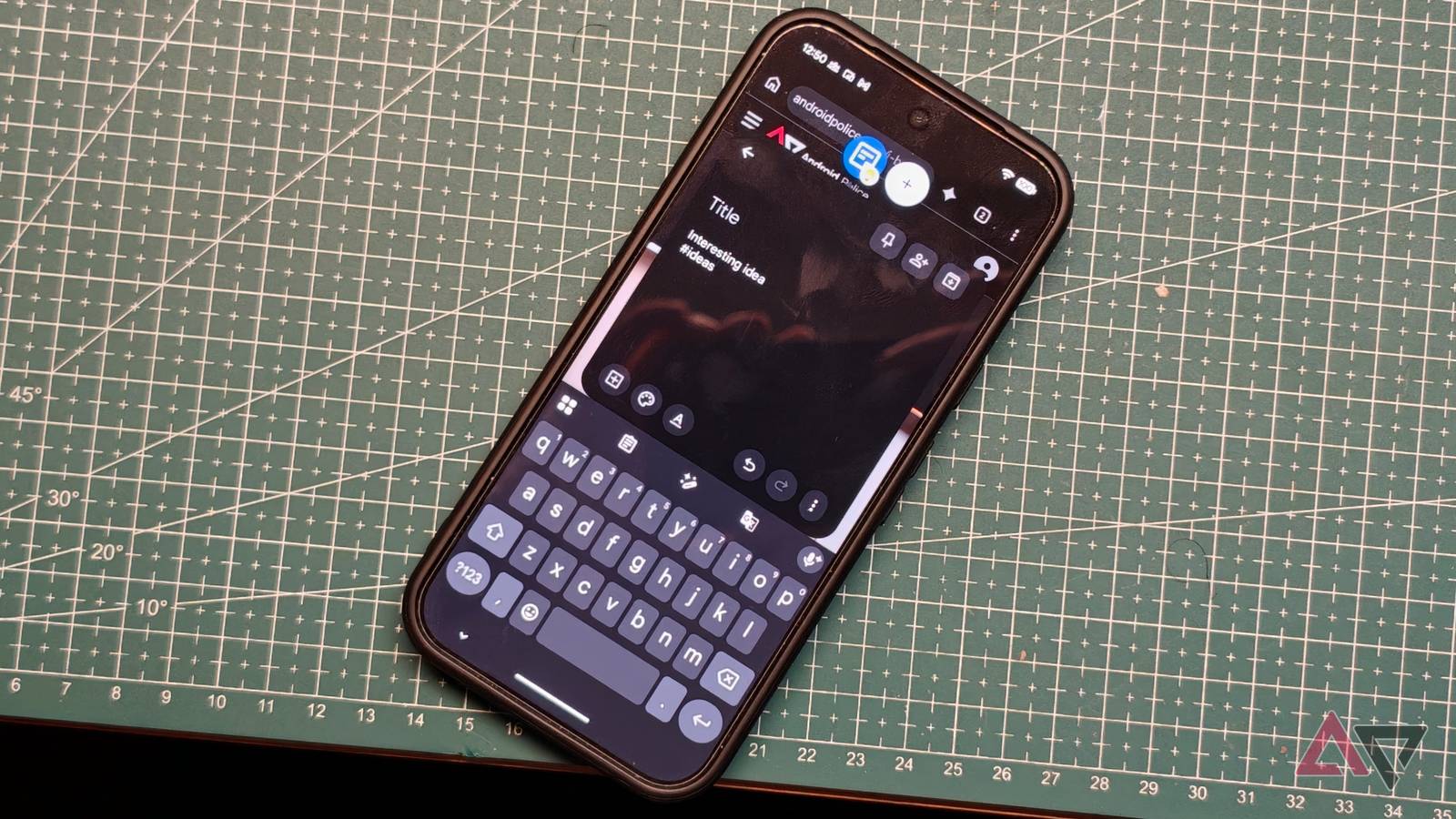
Published Nov 29, 2026, 9:06 AM EST Dhruv Bhutani has covered the Android ecosystem since 2010, with a focus on smartphones, connected devices, and home networking. His reporting is informed by hands-on experience reviewing hundreds of smartphones and testing a wide range of smart home and audio products over more than a decade. He has attended Mobile World Congress eight times since 2011 and IFA Berlin five times, alongside regular coverage of launch events and industry briefings from companies including Google, Xiaomi, Oppo, and Qualcomm. This on-ground access and long-term exposure to product cycles inform how he evaluates hardware, software direction, and ecosystem shifts. First-Hand Experience Reviewed and tested hundreds of smartphones since 2009 Tested smart home, audio, and connected devices across multiple categories Attended Mobile World Congress (8 times, first in 2011) Attended IFA Berlin (5 times) Covered industry events including Qualcomm Summit and launch events from Google, Xiaomi, Oppo, and Vivo Career History CNET — Freelance Editor May 2024 – Present XDA - Freelance October 2024 – Present Android Police — Freelance Editor July 2023 – Present Android Authority — Contributor November 2022 – Present Android Authority — Editor January 2019 – October 2022 FoneArena — Editor February 2010 – January 2018 PhoneReport.info — International Correspondent February 2010 – May 2011 Nokia Mobile Talk — Writer June 2009 – October 2009 As a tech journalist and productivity enthusiast, I've tried the entire range of productivity apps and suites available out there. Be it Obsidian, Notion, Todoist, and plenty of others, they're all great, but they all end up running into the same problem. I need the speed and simplicity of a paper notebook, just digital. All I really need is somewhere to jot down an idea or save a reminder without having to dive into an app or navigate a bunch of folders. Google's November 2026 Pixel Drop introduces a surprisingly useful solution to the problem. It's added a tiny Notes widget to my Google Pixel 11 Pro that opens a floating Google Keep interface with a single tap. Let's just say that it's become my everyday scratchpad and the only productivity tool that I really need on my smartphone. I love it. Google Keep finally feels like a digital scratchpad This Pixel widget makes note-taking feel effortless The problem with every productivity-focused app tends to be just how much work goes into administration. At least that's the term I like to assign to the act of opening the app, creating a new note, giving it relevant tags, folders, and additional details. Some people like that, and I used to as well. It might just take a few seconds, but life gets busy and those seconds add up. Anything that adds friction is now something that makes me put off writing it down. The result? Me committing all my tasks to memory and eventually forgetting one or more. That's not sustainable. Google's new Notes widget addresses this specifically mid-30s problem by making note-taking feel like a built-in workflow in Android. And the best part is that it is designed to be quick and dirty. Added to the Pixel 11 Pro as part of the November 2026 Pixel Drop, the widget occupies just a single 1x1 space on the home screen. Tap it and a floating bubble pops up onscreen, just like any other floating widget. Except this floating widget has a full-fledged notepad built in. It lets you create and access notes without having to launch the full Google Keep experience. The floating widget makes capturing quick pieces of information feel like a much more immediate action. A bit like opening a dog-eared page in a well-worn notebook. OK, perhaps I'm getting a bit too nostalgic for my journals there, but you catch my drift. A floating Google Keep notepad that works across all apps Capture ideas while browsing and multitasking I've got the widget on my home screen, which is the most obvious place for quick content capture. The floating interface opens a new note in Google Keep by default, which cuts out another step and is exactly what I want because my goal is to avoid organization. Of course, if you want to add labels to your note, you can just use inline actions to do the same. In fact, you're not missing out on any of the core features that you get when you create a new note in Google Keep. Just tap the overflow button and you'll see additional functions like assigning labels, creating a reminder, or sending the note to a contact. The entire experience is surprisingly full-featured as far as widgets go. Where I find the widget useful is during multitasking. You see, this bubble shortcut for notes isn't a traditional widget locked to your home screen. Instead, you can access it while using other apps or the browser as well. I've been using it to jot down interesting ideas for article pitches while browsing the internet. More often than not, I get my article ideas while browsing social media and catching up on news via my favorite RSS readers. The floating widget has been surprisingly handy. Just tap the floating button and it overlays whatever you're doing with a notepad. Jot down whatever you need to, hit back, and you return to the app you were using previously with the note safely saved. The same usefulness extends to everyday reminders. If I'm on a call, I can have the widget pop up and add in things like a grocery list or shopping to be done, or perhaps the time, date, and location for a meeting. Contrast that with the usual process of backing out of your current app, opening Google Keep or your productivity app of choice, creating a new note, and adding in this information. You can see why this is so much faster and why I prefer it over anything else I've used. This tiny widget transformed Google Keep into my favorite productivity app Unironically, Google Keep is one of the most effective productivity apps around. What it hides behind its somewhat simple interface is a remarkably robust system of tools, labels, and color codes that can run rings around many of the other better-known productivity tools. And it does this while being extremely fast. This new setup works well for precisely that reason. It is fast, it is capable, and it allows you to use your existing setup for whatever kind of information you want to store. Be it quick thoughts, grocery lists, or longer ideas that you are still fleshing out. This single floating widget has completely transformed my productivity game on my Pixel smartphone, and I see no reason to go back to any other app. Google Keep Publish date May 20, 2013 In-app purchases None ChromeOS support ✅ Yes App Publisher Google LLC Categories Productivity Google Keep is a great option for a note-taking app that works across operating systems. Keep features include cross-device synchronization, color coding, offline mode, and real-time collaboration.
I replaced my entire productivity system with a single widget on my Pixel 11 Pro
Full Article
Original Source
Read the full article at Androidpolice →KhanList aggregates and links to publicly available news content. We do not host full articles from third-party sources. Always verify important information with original sources.