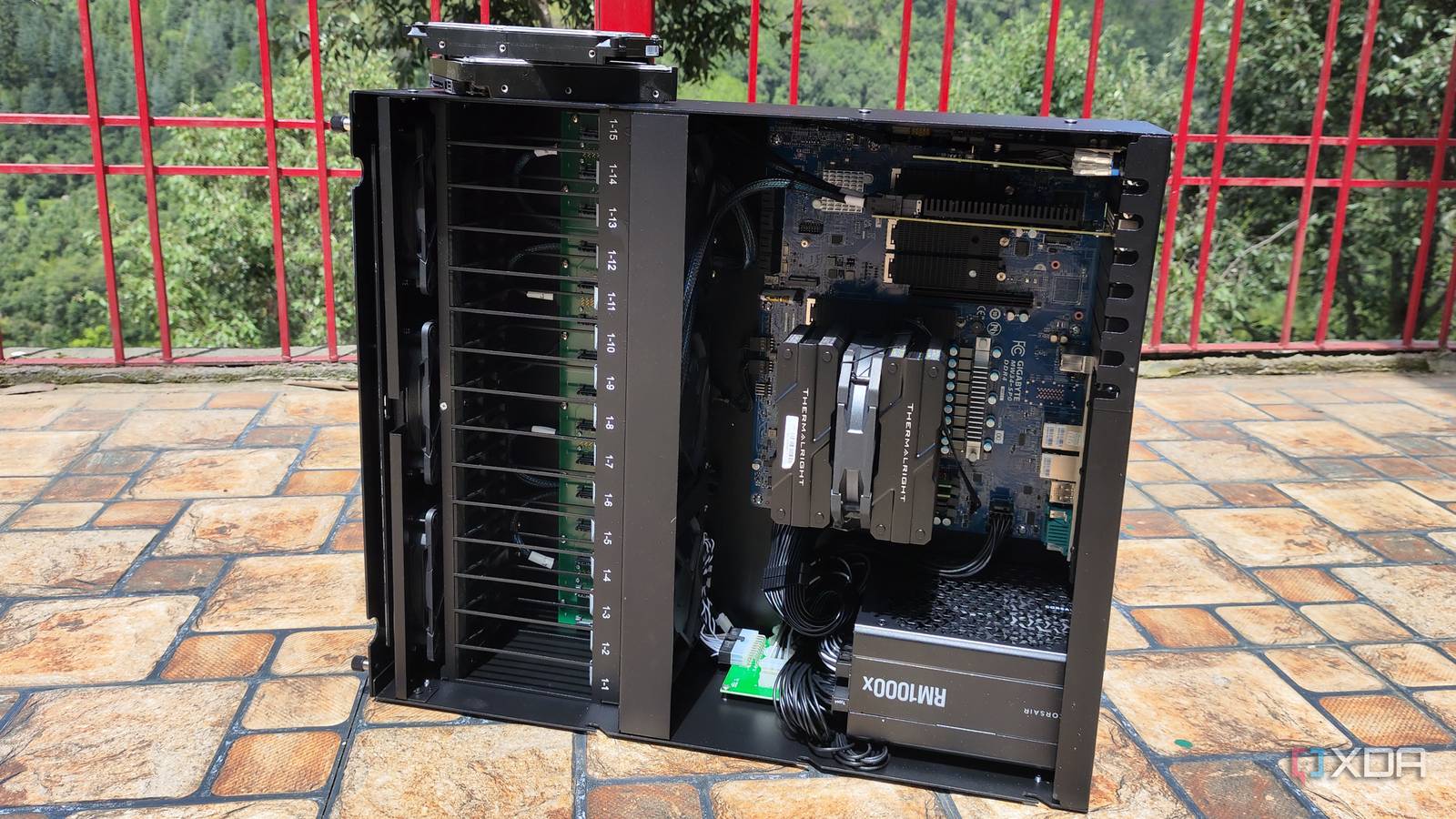
Published Jul 31, 2026, 9:00 AM EDT Ayush Pande is a PC hardware and gaming writer. When he's not working on a new article, you can find him with his head stuck inside a PC or tinkering with a server operating system. Besides computing, his interests include spending hours in long RPGs, yelling at his friends in co-op games, and practicing guitar. When you’re working on hardcore server projects, you’ll typically want to use a workstation with plenty of CPU cores and enough memory to house all your virtual guests. In fact, that’s pretty much the reason I’ve been rocking a dual-Xeon rig for almost three years, and it’s especially useful for running dozens of containers and virtual machines for my Proxmox experiments. Unfortunately, the biggest drawback of enterprise-grade hardware is its insane power draw. My aged system, for example, can easily pull 130W when it’s left idle, and that’s after I’ve taken several steps to cut down its energy-guzzling tendencies. Considering its sky-high electricity consumption, I had to install Proxmox on cheap mini-PCs just to run important virtual guests, while my Xeon workstation remains powered off for the most part. So, when 45HomeLab approached me about their X15 workstation, I’d presumed it’d be another energy siphoning warmachine. However, now that I’ve been using it for nearly a month, I must admit that it’s pretty power-efficient, even though it packs plenty of extra virtualization, security, and QoL-enhancing features under the hood. About this article: 45HomeLab sent me an X15 sample for my Proxmox experiments, but the company had no input on the article’s contents. Migrating my Proxmox virtual guests to the X15 was a cakewalk And it’s all thanks to Proxmox Datacenter Manager Since I wanted to test the X15’s virtualization prowess, I absolutely had to go with Proxmox. Sure, the workstation ships with a lifetime license of Unraid, but I consider Proxmox Virtual Environment the best platform for home lab experiments. Just so I don’t have to manually configure dozens of virtual guests on this node, I figured I could just migrate all the LXCs and VMs from my Xeon server to the X15. Proxmox Datacenter Manager is my favorite utility for remote migration, and since both my Xeon server and the X15 have 10G cards, the process was wrapped up in less than 2 hours. Speaking of the hardware specifications, my old workstation has two ancient Xeon E5-2650 v4 processors, which brings the grand total of my CPU resources to 24-cores and 48-threads, alongside 64GB of ECC-compatible DDR4 memory (yes, I bought it long before the RAM apocalypse was a thing). Before you mention it, I’m well aware it’s a dinosaur system. But here’s the thing: its vast core and thread count made it better than most 6/8/12-core consumer-tier processors for server tasks – to the point where it could handle practically everything I threw at it, including Windows 11 and Hackintosh virtual machines. Even though the X15 has about the same RAM as my Xeon E5-2650 v4, it packs a 20-core, 28-thread Intel i7-14700 processor. Since its core and thread count is lower than my current workstation, I was worried it might have trouble driving my virtual guests once I overprovision them. But since LXCs don’t hog too many CPU resources, I had zero trouble running my entire container stack of 35 services on my new Proxmox node. Heck, I also ran Windows 11, Debian (GUI-laden, by the way), CLI-based Arch, NixOS, and a couple of other Linux VMs on the workstation, and to my surprise, the CPU utilization was well under the 60% mark, even though I was fully expecting it to hit the red zone. The other neat aspect of this setup was the sheer responsiveness of my virtual guests... My VMs are a lot more responsive on the X15 My Windows dev environment, in particular, was buttery smooth One of my biggest caveats with my Xeon workstation (and other enterprise-grade rigs I’ve reviewed in the past) is that their single-core performance leaves a lot to be desired. Sure, my workstation can handle bulky VMs, but the latency is somewhat noticeable once I open too many apps and start looking into performance-hogging features like nested virtualization. For example, attempting to run Podman containers alongside WSL2 machines, multiple browser tabs, and a VS Code instance can cause noticeable slowdowns on my Xeon rig, even if I throw plenty of CPU and memory resources its way. The virtual guests running on my X15, however, delivered a responsive experience throughout my stress tests. Even after leaving every LXC and VM operational, I had no latency issues whatsoever – and that’s after I’d tweaked the fan curve and tinkered with the processor settings to reduce its power consumption as much as possible (and I’ll get to this section in a bit). The built-in iGPU and IOMMU provisions are great for NAS and media server experiments If you’ve ever tried to pass PCI cards to your virtual machines, you’ve probably enabled IOMMU to let Proxmox unbind a device from the host and hand it over to the guest OS. Well, the no-name motherboards typically used in server rigs (including my X99 mobo) tend to have finicky IOMMU provisions, and it’s something I only learned after bashing my head trying to grant my TrueNAS VM full control over the Xeon workstation’s SATA controller. Fortunately, this process was a cakewalk on the X15, as it features proper IOMMU capabilities. In fact, I even spun up a TrueNAS virtual machine with 16GB of memory and ran a couple of commands to pass the HBA card and, by extension, the two HDDs I’d slotted into the system. I also plan to toss an Intel Arc A750 GPU into the X15, but until then, the Intel UHD Graphics 770 are more than enough for the AI tasks required by Frigate and Jellyfin. But the real perk is the reduced idle wattage of this setup The X15 is significantly more efficient than my aged Xeon rig While the extra performance and QoL facilities are helpful for my server experiments, I’m surprised by the idle wattages on the X15. For reference, my Xeon workstation consumes about 170W when it’s left idle with just two SSDs, an Arc A750, and a 10GbE network card. Modifying the BIOS settings and switching the CPU scaling governor to powersave brings this number down to 135W, and if I were to remove the GPU, the dinosaur machine would sip 120W when it’s left idle, with occasional spikes to 135W. Unfortunately, this number is far too high for a home server, which is why I only power it on when I need to work on a project. And don’t even get me started on the actual energy numbers when I work on more demanding experiments utilizing dozens of CPU cores. Personally, I’d expected the X15 to hog at least as much power as my Xeon workstation, even though the former should technically have better efficiency. After all, between its HBA capable of supporting several drives, a bulky 2x 10GbE port, and six case fans that can screech like jet engines at high volumes, the X15 ships with plenty of extra components, and that’s before you include the three M.2 SSDs and two 3.5-inch hard drives I’ve connected to this machine. But without any modifications to the BIOS settings, the system idles at roughly 106W, which is pretty low compared to my Xeon node. With my CPU governor and fan profile tweaks, I managed to reduce its idle draw to 67–70W, and that’s with half my LXCs and a few VMs running. I’ve even seen it go as low as 56W when it's running two VMs and twelve LXCs in the idle state. In fact, if I were to bulk-start everything and set the CPU scaling governor to performance, the power consumption jumps to 170W, which is pretty decent for a server rig running almost 50 virtual guests (including Windows and GUI-heavy Linux VMs). And that’s before I start optimizing the active P- and E-cores on the X15! When I bought my Xeon workstation and other ex-enterprise hardware, I did so because they were available at dirt cheap prices. However, the situation is pretty different in this day and age, as the ECC memory kits that were fairly inexpensive a few years ago now cost hundreds of dollars. Then there's the sky-high idle power draw, which can result in them costing a lot more over the course of a few years. Modern rigs might not have the same prices as their used Xeon counterparts, even more so if you opt for high-end components. Heck, the X15 I've covered so far isn't very affordable, either. However, the extra performance, superior connectivity options, and energy-efficient nature make these systems worth the extra penny. 45HomeLab X15
I replaced my dual-Xeon Proxmox workstation with a modern server, and better efficiency wasn’t the only benefit
Full Article
Original Source
Read the full article at Xda-developers →KhanList aggregates and links to publicly available news content. We do not host full articles from third-party sources. Always verify important information with original sources.