
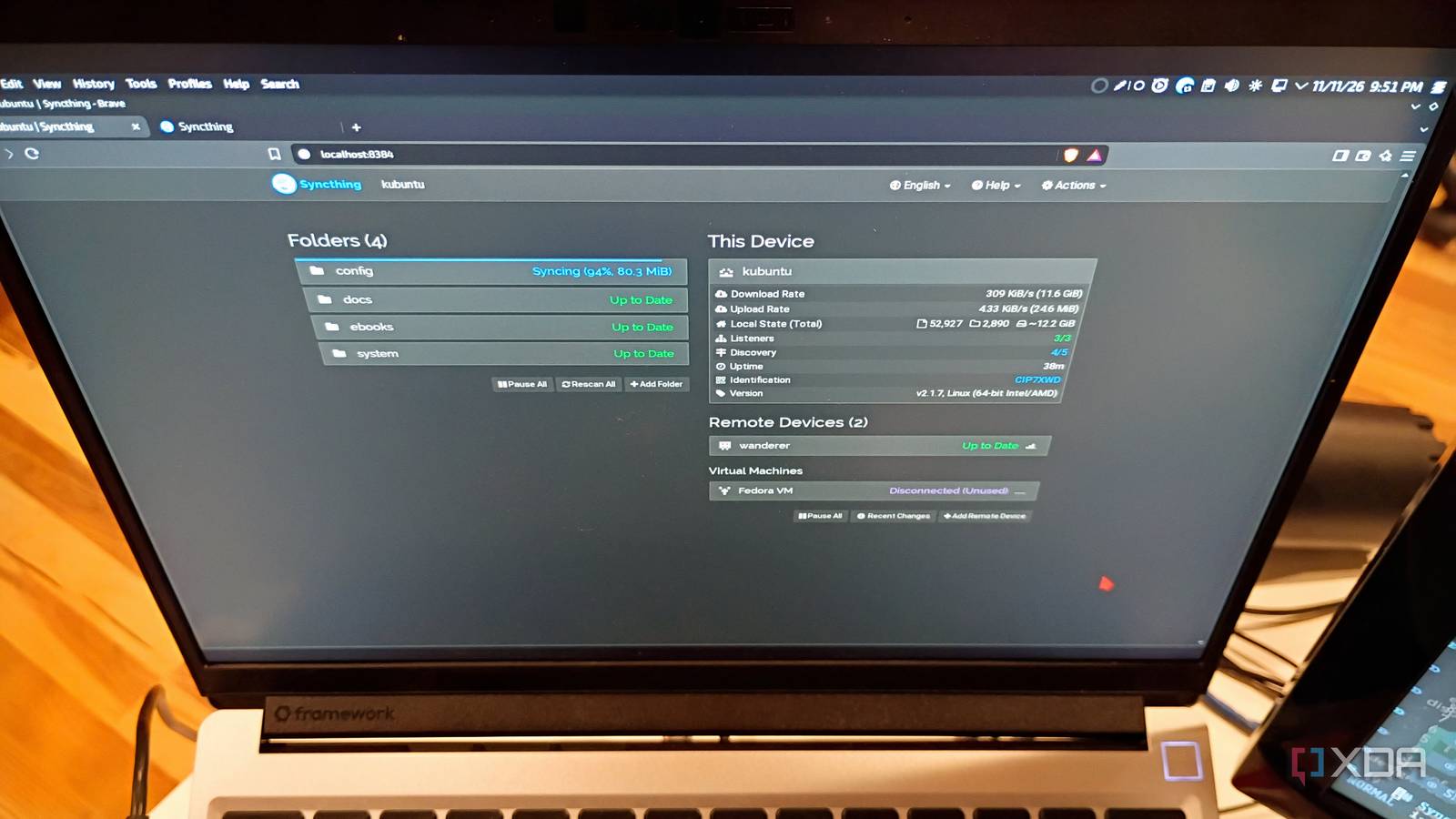
Published Nov 13, 2026, 10:00 AM EST Richard Sezov has worked in IT most of his life, and loves all things Linux, 3D printing, and retro computing. When Rich isn't working, you'll find him spending time with his wife and kids, playing with single board computers, packaging Linux software, 3D printing, reading science fiction, playing games, and hopefully not blowing anything up. Everything's getting more expensive these days, and it's smart to look for stuff you can drop from your budget. One of these things is cloud storage. Dropping a monthly subscription can help you realize both short-term and long-term savings, and cloud syncing is a good candidate to replace with an open-source alternative, especially one with no storage limits. And if you're already thinking of getting into the home-labbing hobby, this is a great starter project. Syncthing offers a peer-to-peer sync that works everywhere Syncing for the masses, not the classes Syncthing is a small client that runs in the background on your machine, whether that machine runs Linux, Windows, Mac, Android, or iOS. You interact with it via a web interface. Machines are connected through a Device ID generated by the client the first time it starts. Every device has a cryptographic keypair generated for it, which is how devices verify each other. Once two (or more) devices connect, they become a cluster and can share folders with each other. Devices can be next to each other on the same network, on opposite sides of the world, or anywhere in between. Syncthing does NAT traversal through uPnP or by HTTP relays. If you don't trust Syncthing's relays, you can set up your own relay and configure your clients to use it (though syncing through a relay is a last resort, as it's much slower than the default). And the sky's the limit on storage. Since you're not renting someone else's disks, you can sync and share as much data as your storage can hold. This is why advertising, graphics shops, and even movie studios use Syncthing: they can transfer large assets to and from clients for free. Installing Syncthing is easy: installers are available for Windows and Mac, and Syncthing is often in the repositories on various Linux distributions. For Android, there's Syncthing-fork (more on that later), and for iOS, there's Möbius Sync, a wrapper for Syncthing. Sharing a folder with somebody else If only it was this easy in the 90s Once you have Syncthing up and running, you can access its interface by going to http://localhost:8384. By default, there is no password, which is fine for your local workstation because the interface cannot be accessed from other machines. You can change this later (keep reading). The top-right box shows information about your machine, including its Device ID. Click the link next to Identification to display your Device ID. You can copy/paste it into an email or a text to share it with whomever you plan to send a folder. If somebody sends you their Device ID, you can add that device by clicking Add Remote Device and pasting the ID into the Device ID field. Sharing a folder is a similar process: click the Add Folder button and give your folder a label (a descriptive, human-readable name), an optional group (a human-readable way to group folders, such as family, work, or clients), and the path on your system where the folder resides. You can also modify the auto-generated Folder ID to be something human-readable, as long as that ID is unique within your Syncthing cluster. Use the Sharing tab to select other machines in the cluster where you want to send the folder. Once you save your share, Syncthing notifies the other machine that a folder has been shared and asks if the user wants to accept it. When accepting a folder, you get to decide where on your system it should be stored. This is where I got into trouble when I started out with Syncthing: I had shared folders scattered all over my system, and there were times I lost track of which folders were shared and which weren't. Here's how I fixed that: I moved all my Syncthing folders inside ~/Share. Now I don't have to guess which folders are shared and which aren't. Syncing your phone's pictures and videos Stop running out of cloud storage If you're constantly in danger of running out of cloud storage, you can choose to sync your phone's pictures and videos to your own devices rather than to the cloud. On Android, install Syncthing-fork and on iOS, install Möbius Sync. Syncthing-fork is so named because it was a fork of the original Syncthing app on Android that was abandoned. Syncthing-fork therefore became the Syncthing app on Android. Möbius Sync is a commercial wrapper of the Syncthing executable. Unfortunately, because iOS doesn't allow background processes, you have to launch Möbius Sync periodically to get your file updates. Syncing your pictures and videos to your own storage saves gigabytes of cloud storage, which puts money back in your pocket. When syncing to different operating systems (particularly phones), you must think about file names and file systems. I am old school: I don't stream. Instead, I sync my entire music collection to my phone. Ripped CDs and MP3s downloaded from Amazon Music don't always result in file names acceptable to phone OSes. Android can handle 01 - The Neal Morse Band - Not Afraid, Pt.2.ogg, but it cannot handle 01 - The Neal Morse Band - Not Afraid: Pt.2.ogg. That colon kills it every time. If the underlying OS can't store the file name, Syncthing can't sync it. Some of the reviews of Syncthing-fork describe people abandoning it because of trouble syncing certain files, and I guarantee that's the reason. If you run into problems, you may have to rename your files to be compatible with all the OSes you're sharing with. Creating a Syncthing server with a Raspberry Pi Even the smallest device can change the course of the future If you want a home lab starter project, this is it. You can set Syncthing up on a small device like a Raspberry Pi or Libre Computer, stick it on your home network, and let it sync in the background. Since the server is online all the time, you never have to worry that you missed out on some files because you weren't online at the same time as somebody else. If the shared folder is on your server, other people can sync with your server when your workstation is offline, and when you get online, you can get the files they already synced to your server whether they're online or not. Here's what I recommend for a Raspberry Pi or other single-board Syncthing server: Get an external USB disk to store your Syncthing shares. I have a 5TB spinning disk that contains my Syncthing shares. Get a powered USB hub. The least expensive storage right now is still a spinning disk, and you don't want to try running that from the Pi's power supply. Trust me; I tried, and it didn't go well. Store all the Syncthing shares on the external disk. If the Pi dies, you can still plug the disk into your computer's USB port and access the data. You'll access the Syncthing console from another machine, so you definitely want to set the GUI Listen Address to 0.0.0.0:8384, and make sure you set a GUI Authentication User and a GUI Authentication Password. You can find this in Actions -> Settings -> GUI. The one thing Syncthing cannot do Nobody's perfect Syncthing cannot share files with anybody outside your cluster. There's no way to create a URL to one file and send that URL to share a file with somebody, like you can with Dropbox and other cloud syncing programs. It's a peer-to-peer sync only. To share files, everyone must use the client and be part of the cluster. But since Syncthing runs pretty much everywhere, this isn't a huge limitation. And since Syncthing is open source, you can check out its documentation and overcome its limitations yourself! Syncthing is my family's main file-sharing system Shared drives are a thing of the past I used to keep my music in a shared folder on a server. Now, I just sync it to my phone, to a "jukebox" computer in my family room, and it lives on my laptop. When we were buying a house, my wife and I used Syncthing to share all the pictures, PDFs, Sweet Home 3D designs, and our own documents containing things like paint colors for each room. I don't even think about setting up Samba or NFS shares anymore. And I certainly don't pay for cloud storage. With Syncthing, I have the data locally, and it syncs across the Internet, wherever I am. Syncthing is a great product with a great name. I recommend it to people all the time. Sometimes I'll make the recommendation and then not see the person for a while. When I see them next, sometimes they remember we talked about it. Invariably, they ask me, "What was that sync thing you were telling me about?" I reply simply, "Yes. That's what it was."
I replaced my cloud sync services with one open source tool, and it works surprisingly well
Full Article
Original Source
Read the full article at Xda-developers →KhanList aggregates and links to publicly available news content. We do not host full articles from third-party sources. Always verify important information with original sources.