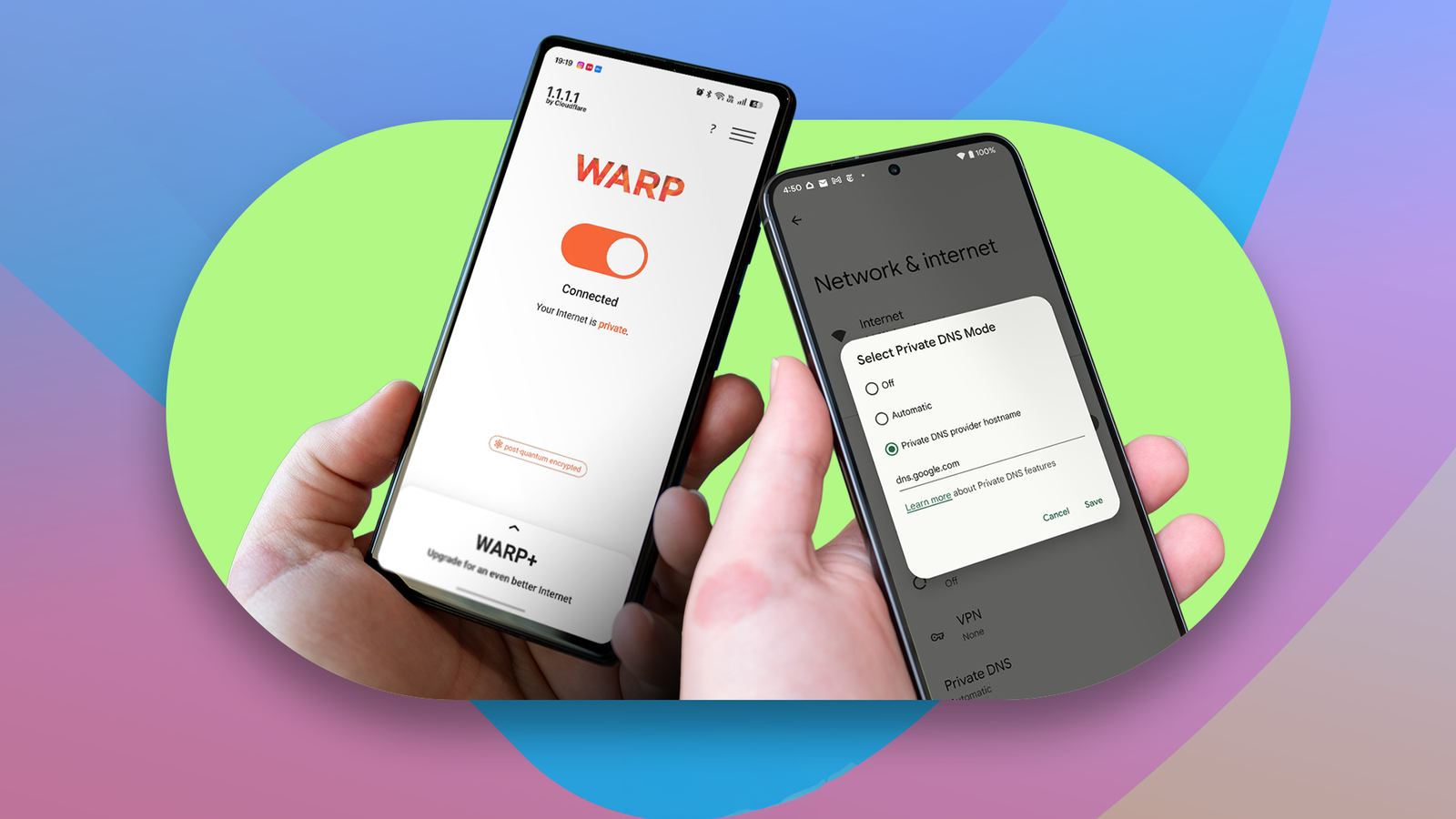
Published Aug 13, 2026, 4:00 PM EDT Dhruv Bhutani has covered the Android ecosystem since 2010, with a focus on smartphones, connected devices, and home networking. His reporting is informed by hands-on experience reviewing hundreds of smartphones and testing a wide range of smart home and audio products over more than a decade. He has attended Mobile World Congress eight times since 2011 and IFA Berlin five times, alongside regular coverage of launch events and industry briefings from companies including Google, Xiaomi, Oppo, and Qualcomm. This on-ground access and long-term exposure to product cycles inform how he evaluates hardware, software direction, and ecosystem shifts. First-Hand Experience Reviewed and tested hundreds of smartphones since 2009 Tested smart home, audio, and connected devices across multiple categories Attended Mobile World Congress (8 times, first in 2011) Attended IFA Berlin (5 times) Covered industry events including Qualcomm Summit and launch events from Google, Xiaomi, Oppo, and Vivo Career History CNET — Freelance Editor May 2024 – Present Android Police — Freelance Editor July 2023 – Present Android Authority — Contributor November 2022 – Present Android Authority — Editor January 2019 – October 2022 FoneArena — Editor February 2010 – January 2018 PhoneReport.info — International Correspondent February 2010 – May 2011 Nokia Mobile Talk — Writer June 2009 – October 2009 Most people don't change the DNS settings on their phone for no reason. If you're looking up this option, you're usually looking for a specific utility or reason. In my case, I didn't want every network deciding how my phone resolves websites and services. Plus, I wanted to get around certain geographical blocks. There are a few options available to an enthusiast when it comes to swapping DNS, but Cloudflare and Google's public DNS come on top. So, I decided to test them out head-to-head. I expected the biggest decision maker between them to be speed, but that difference is imperceptible. Instead, what I found more interesting was that Cloudflare lets me do more than Google DNS after the fact. Quiz 8 Questions · Test Your KnowledgeCloudflare, Google DNS, and internet privacy on AndroidTrivia challenge Think you know your DNS resolvers and privacy settings on Android? Put your knowledge to the test. DNSPrivacyNetworkingAndroidSecurity Begin What is the IP address of Cloudflare's primary public DNS resolver? A8.8.8.8B9.9.9.9C1.1.1.1D208.67.222.222 Correct! Cloudflare's primary DNS resolver is 1.1.1.1, launched in April 2018. It's widely praised for being one of the fastest and most privacy-focused public DNS services available. Not quite — the answer is 1.1.1.1. That's Cloudflare's primary resolver, launched on April 1, 2018 (no joke!). 8.8.8.8 belongs to Google, while 9.9.9.9 is Quad9 and 208.67.222.222 is OpenDNS. Continue What is the IP address of Google's primary public DNS resolver? A1.1.1.1B8.8.8.8C4.4.4.4D8.8.4.1 Correct! Google's primary DNS resolver is 8.8.8.8, with 8.8.4.4 as its secondary. Google Public DNS launched in 2009 and remains one of the most widely used DNS services in the world. Not quite — the answer is 8.8.8.8. Google Public DNS has used this memorable address since its launch in 2009. Its secondary resolver is 8.8.4.4. The 1.1.1.1 address belongs to Cloudflare. Continue Which Android version first introduced native support for Private DNS, allowing users to set a custom DNS-over-TLS provider system-wide? AAndroid 7.0 NougatBAndroid 8.0 OreoCAndroid 9 PieDAndroid 10 Correct! Android 9 Pie introduced the Private DNS feature in 2018, letting users specify a DNS-over-TLS provider across all network connections. This was a major step forward for mobile privacy. Not quite — it was Android 9 Pie. Google added the Private DNS setting in 2018, enabling DNS-over-TLS system-wide without needing a VPN or third-party app. You can still find it today under Settings > Network & internet > Private DNS. Continue What does DNS-over-HTTPS (DoH) primarily protect against compared to traditional DNS? AMalware infections from malicious websitesBEavesdropping and tampering of DNS queries by third partiesCIP address spoofing attacks on routersDSlower DNS resolution speeds on mobile networks Correct! DNS-over-HTTPS encrypts your DNS queries inside HTTPS traffic, preventing ISPs, network operators, or attackers from seeing or tampering with which domains you're looking up. It's a key privacy enhancement over plain DNS. Not quite — the primary protection DoH offers is against eavesdropping and tampering with your DNS queries. Traditional DNS sends lookups in plain text, meaning anyone on the network path can see or alter them. DoH wraps those queries in encrypted HTTPS to prevent this. Continue On a modern Android device, where would you navigate to set a system-wide Private DNS provider like 1.1.1.1? ASettings > Privacy > DNS configurationBSettings > Network & internet > Private DNSCSettings > Connections > Advanced > Secure DNSDSettings > Security > VPN & DNS Correct! On stock Android, Private DNS lives under Settings > Network & internet > Private DNS. You can enter a hostname like 1dot1dot1dot1.cloudflare-dns.com to use Cloudflare's DNS-over-TLS resolver system-wide. Not quite — on stock Android, the Private DNS option is found under Settings > Network & internet > Private DNS. Note that Samsung's One UI rearranges some menus, but the standard Android path is consistent across Pixel and many other devices. Continue Cloudflare offers a privacy-focused DNS variant at 1.1.1.2 that blocks access to what type of content? AAdvertisements and tracking scriptsBMalware and phishing sitesCAdult contentDPeer-to-peer file sharing services Correct! Cloudflare's 1.1.1.2 resolver is designed to block known malware and phishing domains, adding a layer of protection without needing extra software. Cloudflare also offers 1.1.1.3, which additionally blocks adult content. Not quite — 1.1.1.2 blocks malware and phishing sites. Cloudflare offers a tiered set of resolvers: 1.1.1.1 for speed and privacy, 1.1.1.2 for malware blocking, and 1.1.1.3 for both malware and adult content filtering. Continue What is the hostname used to configure Cloudflare's DNS-over-TLS resolver in Android's Private DNS setting? Adns.cloudflare.comBcloudflare-dns.comC1dot1dot1dot1.cloudflare-dns.comDsecure.1.1.1.1.cloudflare.net Correct! Because Android's Private DNS field requires a hostname rather than an IP address, Cloudflare provides 1dot1dot1dot1.cloudflare-dns.com as the DNS-over-TLS hostname. It's a clever workaround for a field that doesn't accept raw IPs. Not quite — the correct hostname is 1dot1dot1dot1.cloudflare-dns.com. Android's Private DNS field needs a resolvable hostname, not a raw IP like 1.1.1.1, so Cloudflare created this hostname specifically for use in that setting. Continue Which protocol does Android's built-in Private DNS feature use to encrypt DNS traffic? ADNS-over-HTTPS (DoH)BDNS-over-QUIC (DoQ)CDNS-over-TLS (DoT)DDNSCrypt Correct! Android's Private DNS feature uses DNS-over-TLS (DoT), which operates on port 853 and wraps DNS queries in a TLS-encrypted connection. This is different from DNS-over-HTTPS, which tunnels DNS inside regular HTTPS traffic on port 443. Not quite — Android's Private DNS uses DNS-over-TLS (DoT), not DNS-over-HTTPS. DoT runs on its own dedicated port (853), making it easy for network administrators to identify and potentially block, whereas DoH blends into regular web traffic on port 443. See My Score Challenge CompleteYour Score / 8 Thanks for playing! Try Again Private DNS gives me a consistent resolver across all networks DNS encryption adds protection without the overhead of running a VPN Credit: When it comes to swapping out the DNS, Android's Private DNS feature is the starting point for everyone. You can enter a provider hostname and have the phone use DNS over TLS instead of using the resolver provided by your network provider. This could be your wireless carrier or even your home broadband when you're connected over Wi-Fi. And getting started is very simple. Both Google and Cloudflare provide a URL that you enter into your private DNS setting. In the case of Google, this is dns.google.com, while Cloudflare uses 1.1.1.1. After you've applied the private DNS setting, it works across your Wi-Fi and cellular connections. That last part is important because you probably switch between data providers multiple times a day. When you leave home, you switch over to your wireless carrier, and maybe when you get to a coffee shop or office, you'll switch over to their Wi-Fi network. Setting a private DNS means that all DNS resolution happens through the same single resolver. So what does that mean? Using private DNS standardizes one part of your network connectivity. For example, if a website works on one connection and not on another, you can eliminate DNS as one of the issues. This problem arises more often than you'd imagine. Both Cloudflare and Google's DNS resolvers tend to be very fast, so you can expect slightly faster browsing all around. Elsewhere, there's encryption. It's not a VPN, and a private DNS can only protect DNS traffic, but both Google and Cloudflare support DNS over DLS and over HTTPS. A portion of your traffic remains fully encrypted, and that portion is the one that sends out queries to the internet. You don't really need a VPN for everyday browsing, but that's only the start. Cloudflare gives you more flexibility than Google DNS Google DNS is the set it and forget it option Testing both DNS resolvers, I quickly realized that speed is just the start. While both DNS resolvers are equally fast for all practical purposes, Google's public DNS is a great set-it-and-forget-it option, but not the one to pick if you want a bit more flexibility. That's where Cloudflare steps up. While Cloudflare's default 1.1.1.1 resolver gives you standard DNS resolution without additional content filtering, you have options. For example, Cloudflare offers a specific resolver designed for family use. One of these DNS resolvers can block domains associated with malware and phishing, making it a great choice for households that might not be up to speed with the best internet safety practices. Elsewhere, it offers a DNS resolver that can block adult content across your network. This is an excellent choice for households with young children, and it automatically blocks any unapproved content on all devices, including smartphones, tablets, and laptops. All it takes is changing one setting at the phone or router level, and it handles everything else. Using Cloudflare as your DNS resolver also gives you access to WARP. If you use Cloudflare's app, it lets you switch between DNS-only mode and Warp mode. In DNS-only mode, it works like Private DNS, where it encrypts your DNS queries. That's it. WARP goes further by tunneling your devices' entire traffic through Cloudflare's network. This gives you all the security and encryption benefits of using a VPN. Keeping in mind that this is not a traditional VPN, you cannot change your geolocation on the fly using WARP. The idea here is that if you want to secure your entire traffic over a network that you don't entirely trust, let's say public Wi-Fi, that's where WARP comes in. When comparing Google DNS and Cloudflare's Private DNS, this flexibility stands out. The numbers are more than fast enough that you won't notice a difference. However, Cloudflare gives you the option to filter content and encrypt the entirety of your traffic. That's something that Google DNS doesn't offer, but on the flip side, Google DNS gives you a little more simplicity. Cloudflare wins out for being more than a simple DNS resolver The choice between them depends on your goal. If you want the simplest way to get around your network provider's DNS restrictions, Google DNS is probably the way to go. If you're like me, and you like the ability to tweak your experience and definitely don't mind a free VPN-like service as an add-on, I would recommend going the Cloudflare route. It gives you all the speed with a side of security. Can't complain about that.
I pitted Cloudflare against Google DNS on Android, but speed wasn't the real surprise
Full Article
Original Source
Read the full article at Androidpolice →KhanList aggregates and links to publicly available news content. We do not host full articles from third-party sources. Always verify important information with original sources.